Dedicated Gateway MQTT Collection
Dedicated Gateway MQTT collection aggregates variables from multiple edge Gateways into one central Gateway. The central Gateway creates only one collection device. GatewayMqttCollectClient maintains one connection to a shared Broker, while GatewayMqttCollectServer exposes one MQTT listener. A stable RemoteKey isolates the catalog, real-time values, snapshots, online state, and remote writes of every edge Gateway.
General MqttCollectClient and MqttCollectServer devices map arbitrary Topics and JSON fields. Dedicated Gateway MQTT collection accepts only the current ThingsGateway fixed protocol. Do not copy general MQTT addresses, JSONPath expressions, or arbitrary publish settings into a dedicated collection device.
Choose a Mode
| Mode | Use When | Central Gateway | Edge Gateways |
|---|---|---|---|
GatewayMqttCollectClient | A shared Broker already exists, or every Gateway can only make outbound connections | Uses one persistent ClientId and subscribes to all configured sources | Multiple MqttClientProducer targets connect to the same Broker and publish under their own RemoteKey |
GatewayMqttCollectServer | The central Gateway can expose an inbound MQTT port | Listens on one port and binds each edge session to a ClientId, credentials, and optional certificate fingerprint | Multiple MqttClientProducer targets connect directly to the central Gateway |
Prepare the Deployment
- Assign every edge Gateway a stable
RemoteKeycontaining only ASCII letters, digits, hyphens, or underscores. - Use the same Topic root on the collector and all edge producers. The default is
ThingsGateway/Gateway. - Create an
MqttClientProduceron the Data Forwarding page of every edge Gateway, keep Retain disabled, and configure the variable, data-request, and RPC Topics as described below. - For remote writes, enable permissions on the edge producer, the central collector, and the target variable.
- Use TLS in production. In Server mode, configure unique credentials for every source. If certificate fingerprints are enabled, bind a different certificate to each source.
Complete Data Path
GatewayMqttCollectClient and GatewayMqttCollectServer run only on the central Gateway and perform inbound collection. MQTT upload from each edge Gateway continues to use the existing MqttClientProducer data-forwarding plugin. No second Gateway-specific producer plugin is required.
Collected variables on an edge Gateway
  → Data-forwarding group (selects scope and trigger mode)
  → MqttClientProducer (uploads values and handles snapshot/write requests)
  → Shared Broker or the central Gateway MQTT listener
  → GatewayMqttCollectClient / GatewayMqttCollectServer
  → Mirror variables on the central Gateway
Client and Server in the plugin names describe the MQTT role of the central collector, not the data direction. In Client mode, the central collector connects to a shared Broker. In Server mode, the central collector listens and each edge MqttClientProducer connects to it.
Configure MQTT Upload on Each Edge
Perform these steps on every edge Gateway:
- Sign in to GatewayRuntime Web and open Development Configuration → Data Forwarding.
- Create and enable a data-forwarding group, then add every variable to aggregate to the group scope. Variables outside that scope are not uploaded.
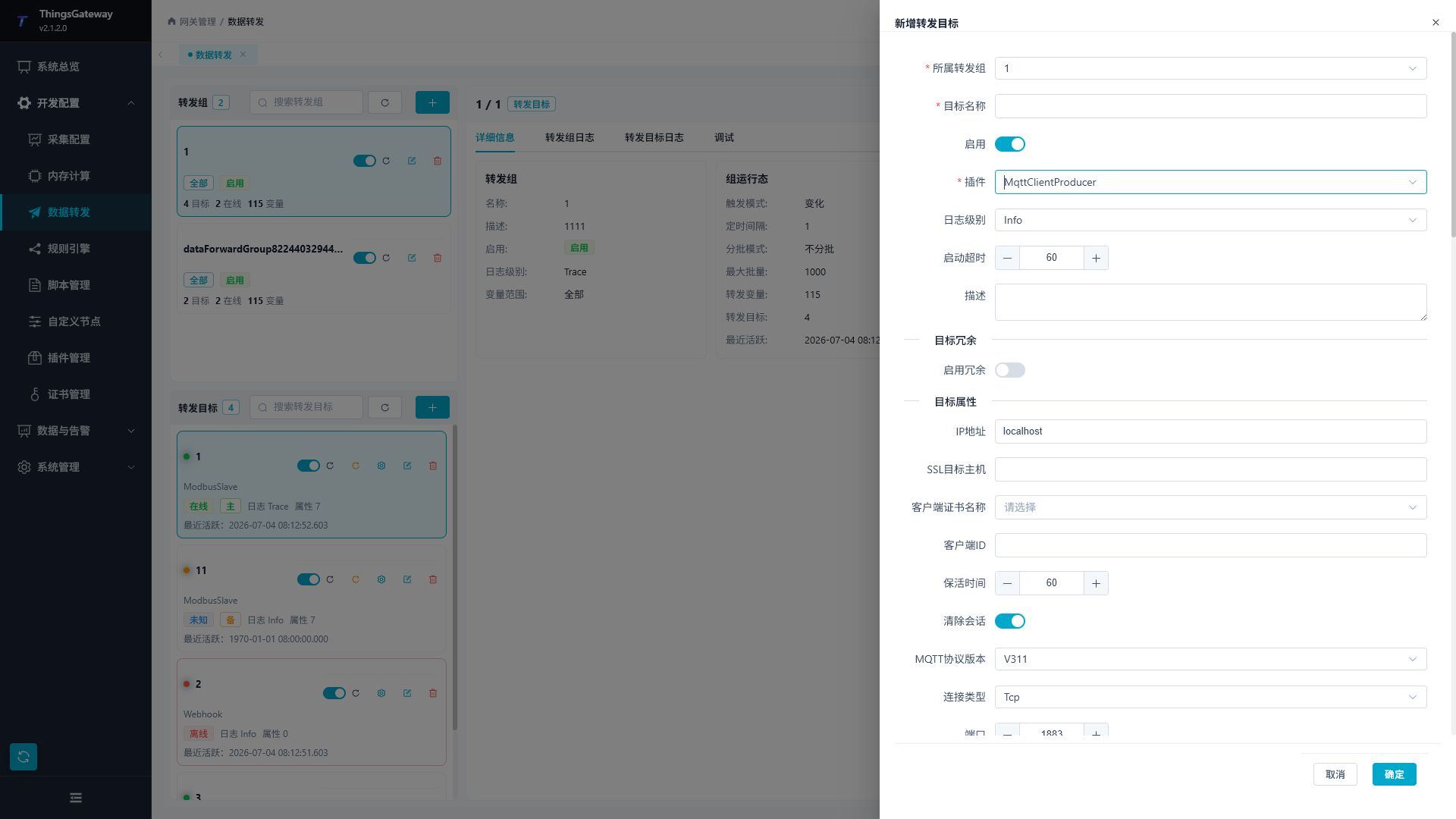
- Create a target in that group, select
MqttClientProducer, and enable the target. - Configure the endpoint for the selected mode, then configure the fixed Topics with this edge Gateway's
RemoteKey. - After saving, verify that the target is online and has no CacheDB backlog. Then request a snapshot and synchronize variables from the central collector debug page.
Endpoint Mapping
| Central Collection Mode | Edge MqttClientProducer Endpoint | Identity Configuration |
|---|---|---|
GatewayMqttCollectClient | Enter the shared Broker address and port. The central collector connects to the same Broker | Use a unique edge ClientId and the Broker account assigned to this edge. Broker ACLs should restrict the edge to its own {TopicRoot}/{RemoteKey}/# namespace |
GatewayMqttCollectServer | Enter the central Gateway address and the listener port configured by GatewayMqttCollectServer | ClientId must equal the source's AllowedClientId; username and password must also exactly match that source configuration |
Do not use MqttServerProducer on the edge. Client collection requires both sides to connect to one shared Broker, while Server collection requires an edge client to connect to the central listener. MqttClientProducer is the connection initiator in both topologies.
Fixed Topics and Payload Shape
If the collector Topic root is ThingsGateway/Gateway and this edge uses RemoteKey=edge-01, configure its MqttClientProducer as follows:
| Edge Property | Value or Requirement |
|---|---|
| Variable Topic Template | ThingsGateway/Gateway/edge-01/Variable |
| Data Request Topic | ThingsGateway/Gateway/edge-01/RpcQuest |
| RPC Write Topic | ThingsGateway/Gateway/edge-01/RpcWrite |
| Variable List Upload | Enabled |
| Variable Dictionary Upload | Disabled |
| Variable Entity Script / Upload Template | Empty; do not change the current fixed payload |
| JSON Ignore Null | Disabled |
| Retain Message | Disabled; dedicated collection rejects retained messages |
| Filter Offline Data | Disabled so a full snapshot includes offline variables and their metadata |
| QoS Level | Match the edge and the central source. With AtLeastOnce, duplicate delivery is allowed and handled idempotently by the collector |
| Upload Shard Size | Greater than 0, with each JSON batch kept below the collector's Inbound Payload Byte Limit |
RemoteKey is not a separate MqttClientProducer property. It is embedded in the three fixed Topics above. Every edge Gateway must use a different RemoteKey. Do not use ${...} placeholders in these Topics, and do not change the payload through an entity script or upload template. The dedicated Gateway MQTT collector does not consume the historical-read RPC Topic.
Create the Collection Device
Sign in to GatewayRuntime Web, open Development Configuration → Collection Configuration, click Device Management, and create a GatewayMqttCollectClient or GatewayMqttCollectServer device.
Common Properties
| Property | Description |
|---|---|
| Topic Root | Fixed root shared by the collector and every edge producer. |
| Allow Remote Write | Collector-wide gate for variable RPC writes. Collection remains available when this is disabled. |
| Snapshot Interval (seconds) | Periodic full-snapshot interval, from 10 to 3600. |
| Request Timeout (seconds) | Timeout for snapshots and RPC requests, from 1 to 600. |
| Offline Timeout (seconds) | Marks a source offline after no valid protocol message; it must be longer than the snapshot interval. |
| Remote Source Limit | Maximum source count for one collection device. |
| Snapshot Concurrency Limit | Maximum concurrent source snapshots or synchronization jobs. |
| Inbound Payload Byte Limit | Maximum size of one MQTT message. |
| Messages Per Second Limit | Aggregate rate limit before protocol parsing. |
| Inbound Handler Concurrency | Maximum concurrent JSON handlers. |
| JSON Depth Limit | Maximum nesting depth of fixed-protocol JSON. |
| Per-Source / Total Catalog Limit | Bounds the variable catalog of one source and of the complete device. |
| Pending RPC Limit | Maximum RPC batches waiting for a response. |
| Detailed Log | Records redacted protocol summaries. Enable for commissioning, then disable. |
Client Mode Properties
| Property | Description |
|---|---|
| Connection Type, IP Address, Port | Connection method and endpoint of the shared Broker. |
| WebSocket Path | Used only for WebSocket or WSS and must match the Broker. |
| Enable SSL, SSL Target Host | Enables TLS/WSS and verifies the hostname in the Broker certificate. |
| Client Certificate, CA | Client certificate for mutual TLS and the CA used to verify the Broker. |
| Allow Untrusted Certificates | Keep disabled in production. |
| SSL Protocols, Revocation Check | Configure according to the site security policy. |
| Client ID | Stable ClientId used by the central Collector. It must be unique on the Broker. |
| Username, Password | Broker account of the central Collector. |
| Keep Alive, Clean Session, MQTT Version | Session settings of the shared connection. |
| Connection Timeout | Time allowed to establish the shared connection, in milliseconds. |
| Remote Sources | Maintains RemoteKey, display name, enabled state, and QoS for every logical source. Edge credentials are not configured here. |
Server Mode Properties
| Property | Description |
|---|---|
| Connection Type, Port | MQTT listener type and port on the central Gateway. |
| WebSocket Path | Used only for WebSocket or WSS listeners. |
| Enable SSL, Server Certificate, CA | Enables TLS/WSS, supplies the server certificate, and verifies edge client certificates. |
| Allow Untrusted Certificates | Keep disabled in production. |
| SSL Protocols, Revocation Check | Configure according to the site security policy. |
| Remote Sources | Every source has a RemoteKey, display name, enabled state, QoS, unique AllowedClientId, username, and password. |
| ClientCertificateSha256 | Optional lowercase SHA-256 client-certificate fingerprint. If one enabled source uses fingerprint binding, all enabled sources must use it. |
The Server TCP listener supports a normal reconnect by an authorized edge using the same AllowedClientId. The new connection is validated against its ClientId, credentials, and optional certificate fingerprint before it closes the connection that still owns that ClientId and takes over the session. A collection-channel restart or network recovery therefore does not require manual removal of the old TCP client. This replacement applies only to the same configured source and does not allow two edge Gateways to share one ClientId. For WebSocket or WSS, close the old connection before reconnecting.
Configure Variables
The central variable address has one fixed form:
RemoteKey/RemoteVariableId
For example, edge-01/828746157506629. The RemoteKey must exist in the device's source list, and RemoteVariableId is the stable ID of the edge variable. Use the dedicated debug page to retrieve the remote catalog, then run Synchronize Current Source or Synchronize All Sources. Do not guess variable IDs manually.
Synchronization creates missing mirror variables and updates only data type, unit, and description. The central Gateway owns the local variable name, expressions, alarms, history settings, and write permissions. When an edge variable is deleted or leaves the forwarding scope, the local mirror is retained and marked as missing from the source.
Dedicated Debug Page
Open Development Configuration → Collection Configuration, select the dedicated Gateway MQTT device, click More Functions, and open Debug. This page shows shared transport, aggregate state, remote Gateways, remote variables, diagnostics, and variable synchronization. It does not expose arbitrary Topic or Payload publishing.
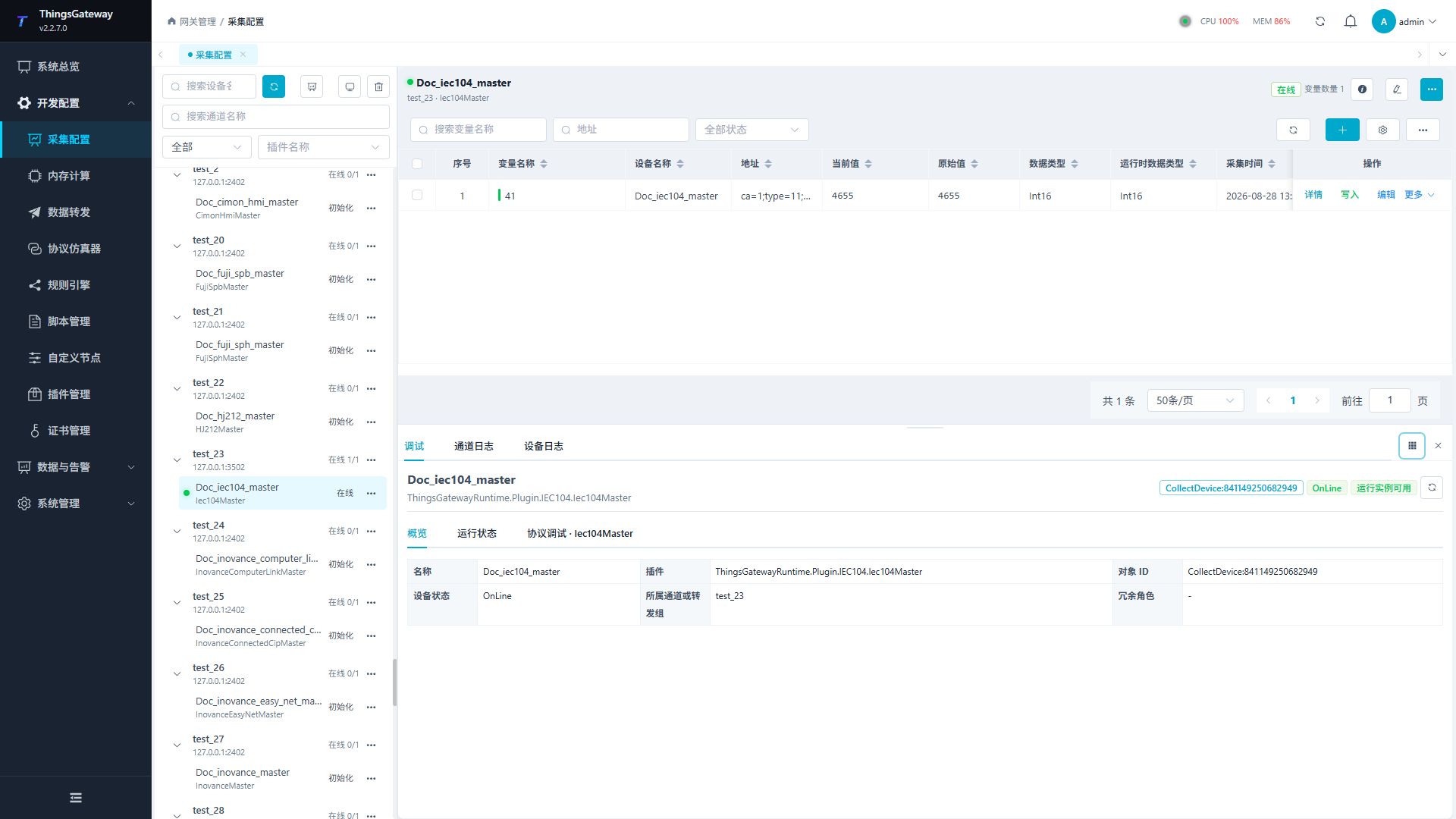
| Area | Purpose |
|---|---|
| Shared Transport | Confirms that Client mode is connected to the Broker or Server mode is listening. |
| Aggregate State | Online means every enabled source is online; Degraded means at least one source remains usable; Offline means the shared transport is unavailable or no source is usable. |
| Remote Gateways | Shows source state, identity binding, catalog size, recent message, recent snapshot, and error. |
| Remote Variables | Browses source catalogs, mappings, and online state. |
| Diagnostics | Shows redacted protocol rejection, throttling, snapshot, and RPC events. |
| Variable Synchronization | Synchronizes one or all sources and shows per-source results under an OperationId. |
The collection device is online only when the shared transport is available, at least one source is Online or Degraded, and at least one mirror variable is online. If the shared transport disconnects, the device becomes offline even while the previous source snapshot is still visible.
Troubleshooting
| Symptom | Action |
|---|---|
| Shared transport is not ready | In Client mode, check Broker address, credentials, ClientId, TLS, and Topic ACLs. In Server mode, check the listener, certificate, firewall, and port conflicts. |
| Source remains Offline | Verify the producer Topic root and RemoteKey. In Server mode, also verify the exact ClientId, username, and password. |
| TCP reconnect reports that the ClientId already exists | The current version automatically replaces the old TCP session for the same source. Confirm that both the central and edge Gateways were updated and restarted, then check that two edge Gateways are not using the same ClientId. Close the old connection first when using WebSocket or WSS. |
| Catalog exists but the device is offline | Check whether mirror variables are online and whether the edge still sends valid real-time values or snapshots. |
| Invalid variable address | Use only RemoteKey/RemoteVariableId; do not enter a general MQTT Topic or JSONPath. |
| Local name did not change after synchronization | This is expected. Local names, expressions, alarms, history, and write permissions are owned by the central Gateway. |
| Remote write is rejected | Check the collector's remote-write gate, edge producer RPC settings, variable write permissions, and user permissions. |
| One source affects other sources | Determine whether the shared Broker or listener failed. A source protocol error is isolated to its RemoteKey; a shared transport failure affects all sources. |
See also Collection Configuration, Plugin Manual Index, and Certificate Management.