SyncBridge Gateway Synchronization
SyncBridge lets one public Hub aggregate multiple edge Gateways through one mutual-TLS listener. Edge Gateways initiate outbound connections, so field networks do not need inbound ports. The Hub can request configuration synchronization from one or all Edges and continuously receives real-time variable values.
Runtime Roles
| Role | Purpose | Address Property |
|---|---|---|
HubServer | Listens in the public or central network and accepts multiple authorized Edges | Set ListenUri, for example 0.0.0.0:7777 |
EdgePublisher | Connects to one Hub and publishes the current forwarding-group mirror | Set RemoteUri and TransportTargetHost |
Every target requires a stable and unique LocalPeerId. The Hub and every Edge use separate certificates issued by the same private CA. VerifyToken is a second authentication secret after TLS and must not use a public default.
Prepare the Deployment
- In System Management → Certificate Management, import the private CA, Hub server certificate, and one independent client certificate for every Edge.
- Select the Hub listener port and expose only that port through the firewall.
- Assign stable IDs such as
public-hub,edge-01, andedge-02. - Define the forwarding-group variable scope on each Edge. SyncBridge mirrors only devices and variables inside that scope.
- Before enabling reverse writes from the Hub, confirm field-control permissions and the maintenance window.
Configure the Hub
Open Development Configuration → Data Forwarding, create a forwarding group and its variable scope, then add a SyncBridge target.
| Property | Recommended Setting |
|---|---|
| Role | Select HubServer. |
| LocalPeerId | Enter a stable Hub ID, such as public-hub. |
| ListenUri | Enter the listener endpoint, such as 0.0.0.0:7777. |
| VerifyToken | Use a random strong secret and deliver it securely to the Edges. |
| TransportCertificateName | Select the Hub server certificate. |
| TransportCaCertificateName | Select the private CA used to verify Edge client certificates. |
| HeartbeatIntervalMs | Default 5000; allowed range 1000 to 60000. |
| MaxConcurrentConfigurationSyncPeers | Maximum Edges synchronized concurrently by the Hub; default 4. |
| AllowRemoteRpc | Disabled by default. Enable only after variable and user write permissions are prepared. |
Configure Each Edge
Add a SyncBridge target to the forwarding group on each edge Gateway. Keep the group scope limited to variables that must be mirrored to the Hub.
| Property | Recommended Setting |
|---|---|
| Role | Select EdgePublisher. |
| LocalPeerId | Enter a unique stable ID for this Edge. |
| RemoteUri | Enter the reachable Hub endpoint, such as sync.example.com:7777. |
| VerifyToken | Must exactly match the Hub. |
| TransportCertificateName | Select this Edge's independent client certificate. |
| TransportCaCertificateName | Select the private CA used to verify the Hub. |
| TransportTargetHost | Enter the hostname in the Hub server certificate. |
| ConfigSyncMode | OnReconnect compares configuration on reconnect or Hub request; OnChangeAndReconnect also reacts to forwarding-scope changes. |
| RealtimeFlushIntervalMs | Real-time value coalescing window; default 20 ms. |
| MaxRealtimeBatchVariables | Maximum variables per real-time batch; default 2000. |
| MaxRealtimeBatchBytes | Maximum real-time payload; default 262144 bytes. |
| RealtimeAckTimeoutMs | Timeout for the Hub application acknowledgement; default 3000 ms. |
| MaxConfigChunkBytes | Maximum configuration chunk size; default 524288 bytes. |
Keep TransportSslProtocols at the secure system default unless site policy requires an explicit value. SSL 3.0, TLS 1.0, and TLS 1.1 are rejected. CheckCertificateRevocation is enabled by default, so the deployment environment must support certificate revocation checks.
Configuration and Real-Time Rules
- The Hub can request configuration from one Edge or all known Edges.
- Revision, checksum, staged chunks, and one atomic commit prevent partial configuration from being applied.
- Existing mirror variables update only data type, unit, and description. The Hub keeps local names, expressions, alarms, history, and write permissions.
- If an Edge deletes a variable or removes it from scope, the Hub keeps the local mirror and marks the source missing.
- Real-time values are validated by Epoch, Sequence, and configuration revision. The Hub acknowledges applied values, and late values cannot overwrite newer state.
- After reconnecting, configuration is verified first, then a complete current-value snapshot is restored before incremental updates resume.
Dedicated Debug Page
Open Development Configuration → Data Forwarding, select the SyncBridge group and target, then open Debug. The Hub view shows transport state, Peer count, per-Peer configuration revision, sequence, pending/inflight/inbound counts, latency, rejection counters, and recent receive time.
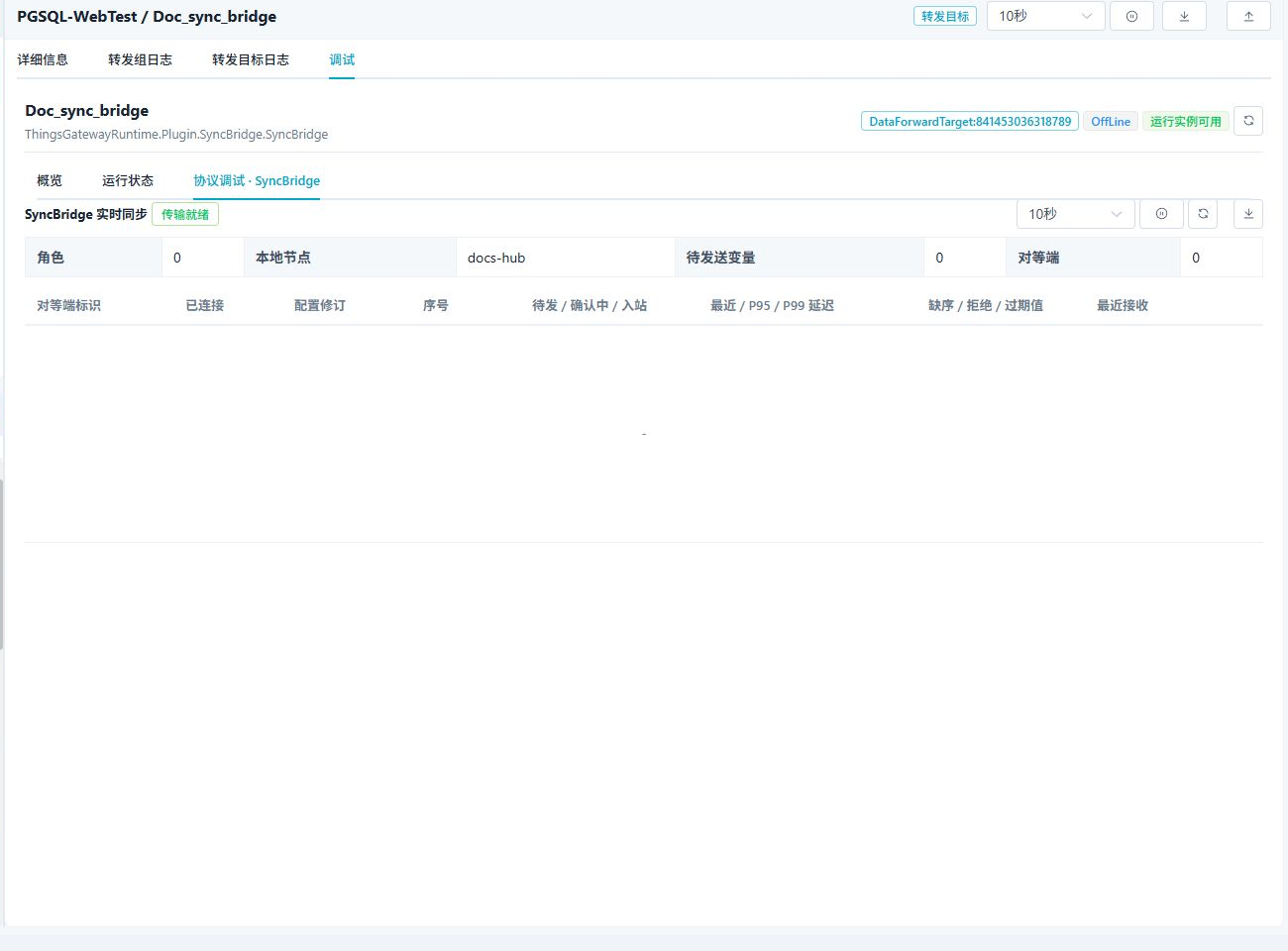
| Operation | Description |
|---|---|
| Synchronize All Edge Configurations | Requests every known Edge. Offline or failed Edges remain explicit, and partial success is not reported as complete success. |
| Synchronize One Peer | Updates only the selected Edge, which is useful for point-list changes or single-site maintenance. |
| Request Full Values | Requests the current complete value snapshot from an Edge. |
| Reconnect / Disconnect Peer | Maintains one session without restarting the complete Gateway. Confirm field impact before use. |
| Export Diagnostics | Exports redacted state, revisions, counters, and errors without tokens, private keys, or complete variable payloads. |
The Hub target is online when its listener is ready and at least one authenticated Peer is connected. A mirror device is online only when its corresponding Peer session, configuration, and mirror-variable state are ready. Authenticated heartbeats keep idle Edge sessions alive, so normal idle time is not treated as a disconnect.
Troubleshooting
| Symptom | Action |
|---|---|
| Hub transport is not ready | Check ListenUri, certificates, CA, firewall, and port conflicts. |
| Edge cannot connect | Check RemoteUri, TransportTargetHost, client certificate, CA, VerifyToken, and system time. |
| Peer ID conflict or authentication failure | Give every Edge a unique LocalPeerId and independent certificate. Do not clone another Edge identity. |
| Peer is connected but the mirror device is offline | Confirm configuration commit, mirror-variable online state, and the most recent full-value application. |
| Configuration result is Unchanged | Revision and checksum already match; no write is required. |
| Local name or alarm was not overwritten | This is expected because these fields are owned by the Hub. |
| Reverse write is rejected | Check AllowRemoteRpc, the variable RPC gate, write validation, and user permissions. |
| Latency is high | Inspect RTT and pending/inflight counts, reduce batch pressure, lower change rate, or improve the WAN path. A lower flush interval alone cannot guarantee WAN latency. |
See also Data Forwarding, Plugin Manual Index, and Certificate Management.