Data Forwarding
Data Forwarding sends collected variables, device states, alarms, and events to external systems. It can also write real-time data, historical data, or historical alarms to storage targets.
There are two objects to configure: the forwarding group decides what to send and when; the forwarding target decides where to send it.
Quick setup
- Open Development Configuration → Data Forwarding and create a forwarding group.
- Select Manual range, scheduled trigger, and a
1000ms interval, then save. - Reopen the saved group, add one existing point using the selector and its adjacent plus button, save, then create a target with the required plugin.
- Fill in the target connection properties. Maintain target variable properties only when a variable needs an external field or address.
- Enable the group and target, then confirm that the target is online without continuous errors.
- Open the target's Debug tab or check its logs and verify that the external system received a test record.
Quick terminology
| Term | Meaning |
|---|---|
| Forwarding group | A set of variables and trigger rules to send. |
| Forwarding target | A data destination such as MQTT, a database, a webhook, or a protocol server. |
| Group variable | A variable member of the group. In a manual range, it determines the actual members. |
| Target variable property | The external mapping of one variable for one target, such as a field name, address, or write permission. |
| Trigger mode | When data is sent: on change, on a schedule, or on either. |
| Online filtering | Sends only online variables. Offline variables are excluded when enabled. |
| Offline cache | Stores data locally while the external system is unavailable and sends it after recovery. |
| Target redundancy | A standby target that takes over when the primary target fails. |
| Debug | A target detail page used to verify publishing, subscription, client, or server status. |
Page entry
Menu path: Development Configuration → Data Forwarding.
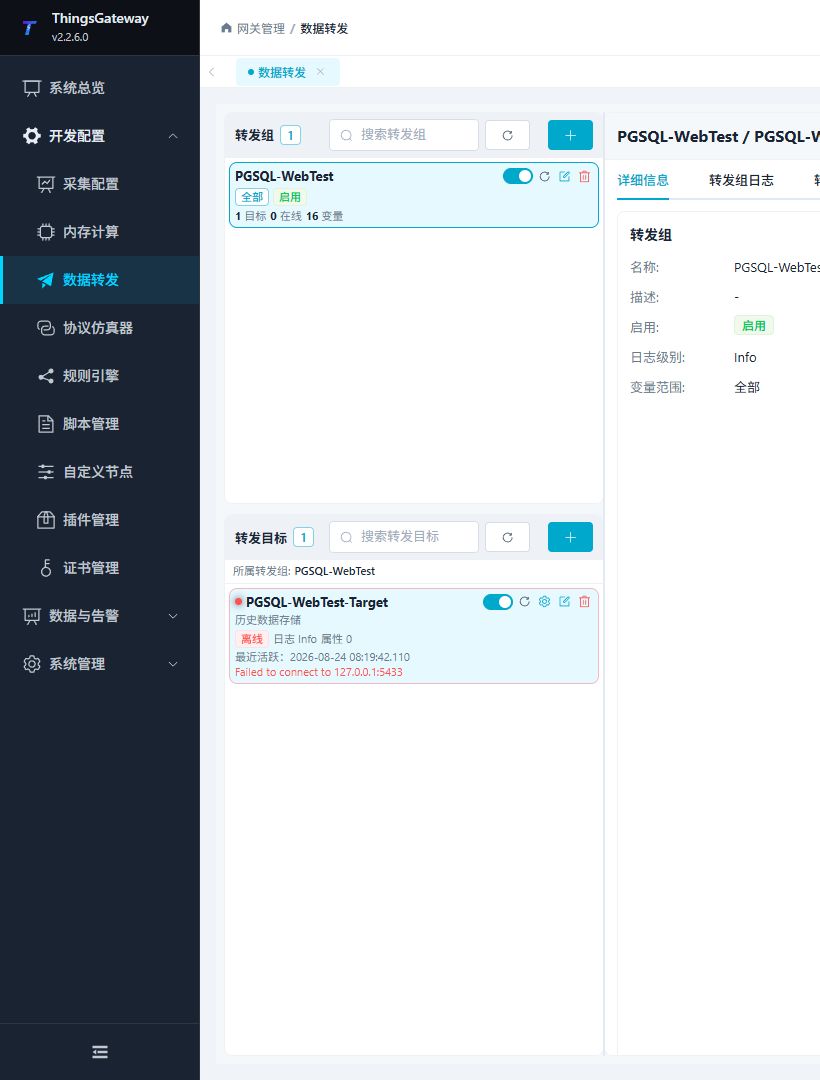
| Area | Purpose |
|---|---|
| Forwarding group list | Add, edit, delete, enable, disable, and restart groups. |
| Forwarding target list | Manage targets, target variable properties, and target runtime state for the selected group. |
| Detail area | View group logs, target logs, details, and the debug page. |
Configure groups and targets
Configure a forwarding group
Click Add in the forwarding group panel to open the group editor.
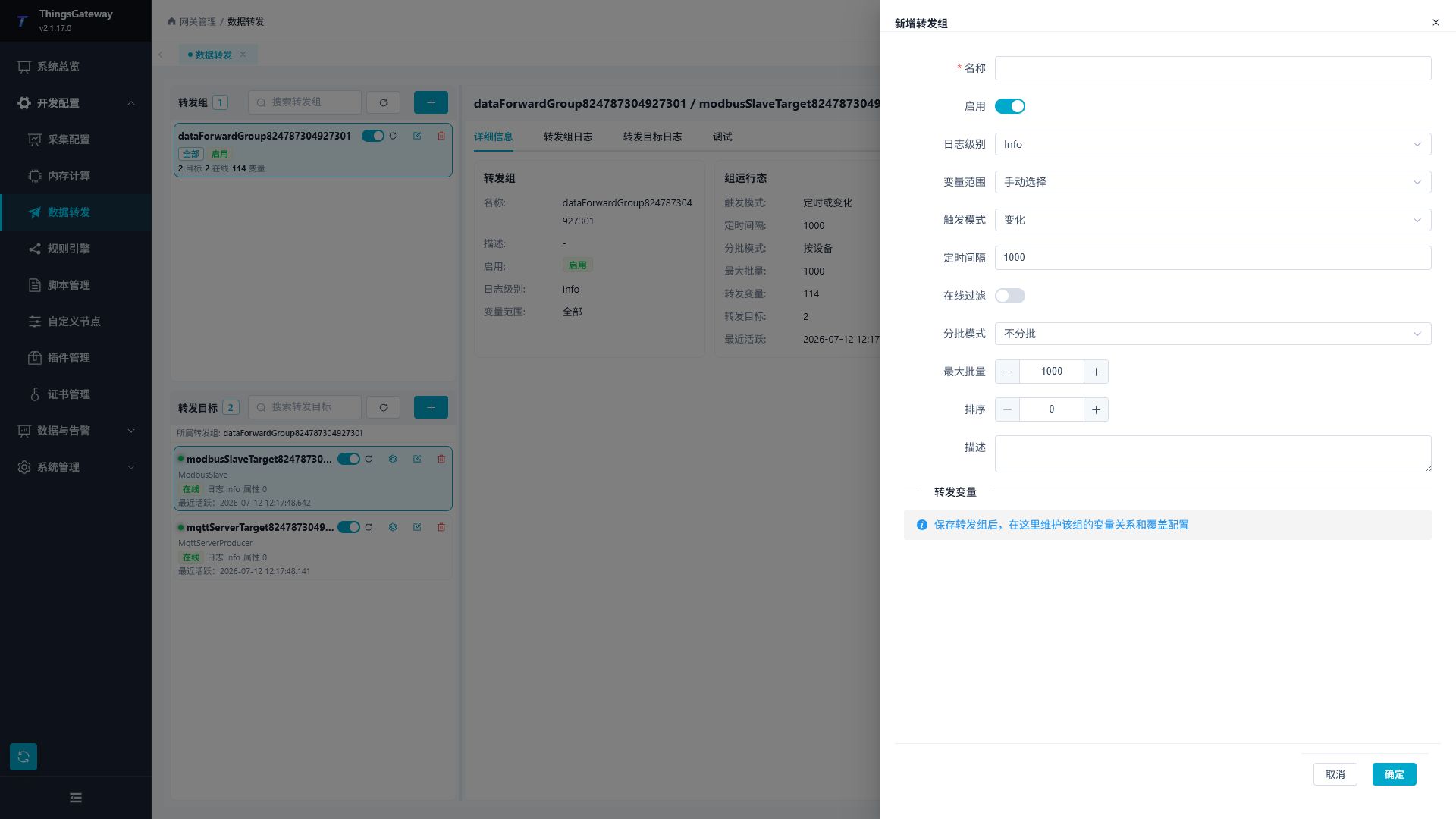
| Setting | Description |
|---|---|
| Name | Display name of the group. Include the business scope, for example Line-A_Realtime. |
| Sort order | Orders group navigation, with smaller numbers first. It does not set variable sampling or target send order. |
| Enable | Controls whether the group runs. A disabled group does not start its targets. |
| Log level | Group log detail. Temporarily use a higher level during commissioning, then restore Info. |
| Variable range | All variables, manual selection, collection devices, or collection groups. |
| Range settings | Names used by a collection-device or collection-group range. Separate multiple names with English commas. |
| Trigger mode | On change, scheduled, or scheduled/on change. |
| Schedule interval | Required when the trigger includes scheduling. Enter milliseconds or a Cron expression; routine cycles should use milliseconds such as 1000. |
| Online filtering | Sends only online variables when enabled. |
| Batch mode | No batching, one combined batch, by data group, by device, or by collection group. |
| Maximum batch size | Maximum variable records in one snapshot batch delivered by the group. Target slicing, Topics, and payload formatting still determine outbound messages. |
| Description | Records the group purpose, range, and maintenance notes. |
Select a variable range
| Range | Use it when |
|---|---|
| All variables | The whole installation must be uploaded. |
| Manual selection | Only key points or a pilot set should be sent. |
| Collection device | The target should follow one device or a device set. |
| Collection group | Variables are already organized by collection group. |
Select triggers and batches
| Requirement | Recommended setting |
|---|---|
| Send when the value changes | On change. |
| Send at a fixed interval | Scheduled, with an interval in milliseconds. |
| Send on change and periodically | Scheduled/on change. |
| Organize input batches by device | Batch by device, then verify the target's outbound messages. |
| Organize input batches by business group | Batch by data group or collection group. |
| Let the target handle a small payload | No batching. |
Batching defines the records delivered to a target. Topic routing, list/dictionary mode, templates, and upload slicing can split or merge them again. Two variables with different MQTT Topics can produce separate messages even in one device batch; a dictionary can merge repeated records under one key.
Maintain group variables
When the range is manual, the group variable list is the member list. For other ranges, it can override variable-level settings.
A new member starts with the current group trigger mode. Once saved, its Update value is an independent override; later changes to the group trigger mode do not replace existing member rows.
Add selected points
- Save a new group with Manual range before adding members.
- Reopen it and find Forwarding Variables.
- Search for the exact
Device.Variable, select it, and click the adjacent plus button. Selecting an option alone does not add a row. - Check the enabled row and its Update mode. Select scheduled or scheduled/on-change when an unchanged value must also be sent periodically. Add other points and save the group.
- Reopen to verify membership. Disabling or removing a row affects this group without deleting the collected variable.
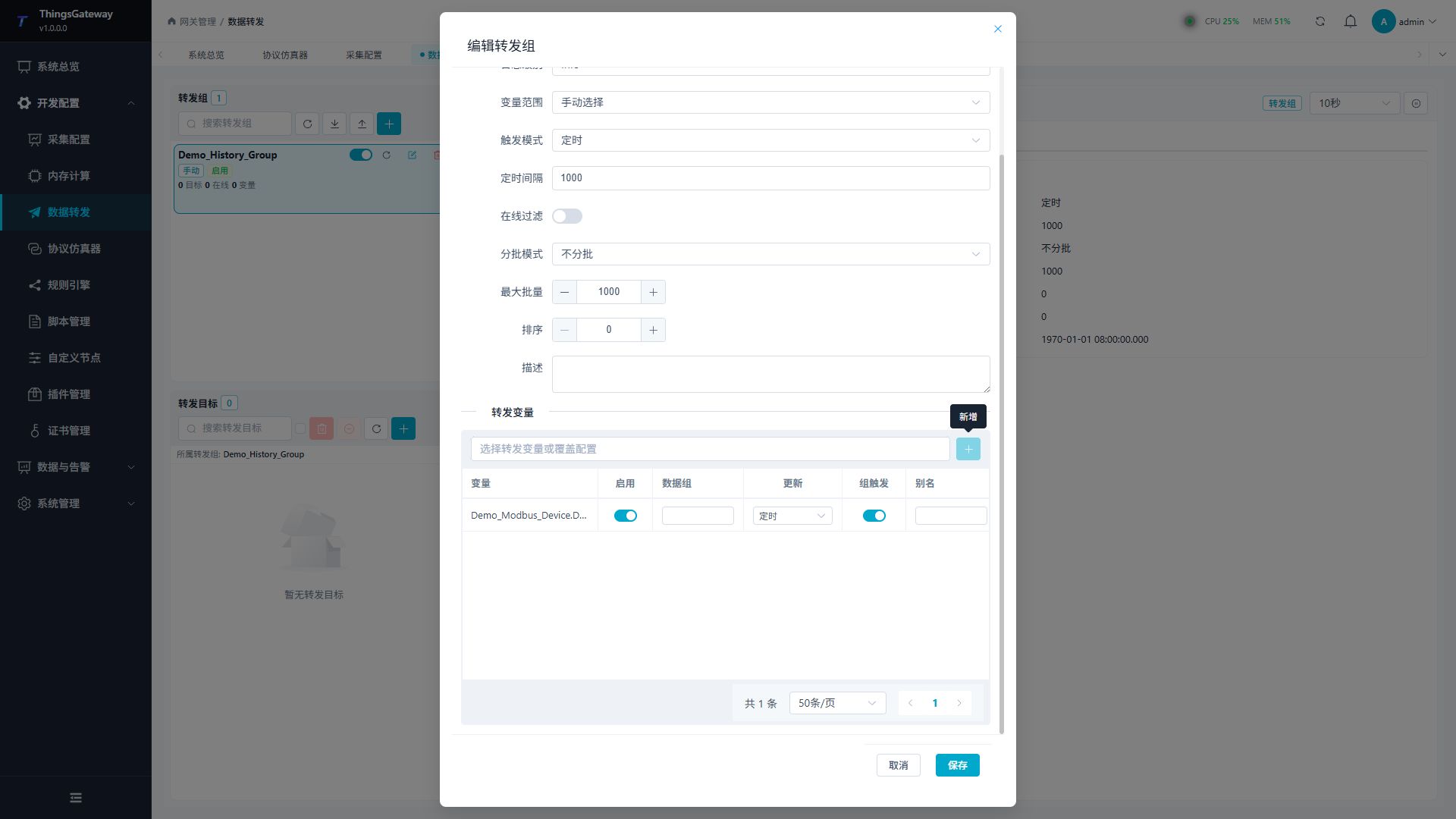
| Setting | Description |
|---|---|
| Variable | Variable to add or configure for this group. |
| Enable | Includes or excludes the variable from this group. |
| Data group | Group name used by by data group batching. |
| Update | Overrides the variable trigger mode for this group. |
| Group trigger | Allows a variable change to wake the whole group. |
| Alias | Additional mapping name consumed by supporting targets/scripts; it does not automatically rename the default MQTT entity's Name or its source variable. |
Turning off Group Trigger does not remove a member. It stops that member from waking the whole group; member updates and scheduled snapshots still follow the chosen strategy. Disabling the member excludes it from this group without stopping source collection. Compare received identities and sample times for each setting. See Upload Templates for list/dictionary structure and explicit alias shaping.
Test with two points: hold B steady and change A. Compare received records before and after enabling A's Group Trigger; B must already belong to the group. Check member-level Update overrides when a scheduled group does not include an expected point.
For batch verification, use two devices with two points each. Compare All, By Device, By Collection Group, and By Data Group, including maximum batch size 1. No batching delivers points individually; an empty data-group key is treated individually. Data group belongs to this forwarding group, while collection group comes from the source variable. Target upload slicing remains a separate limit.
Configure a forwarding target
Select a forwarding group, then click Add in the target panel.
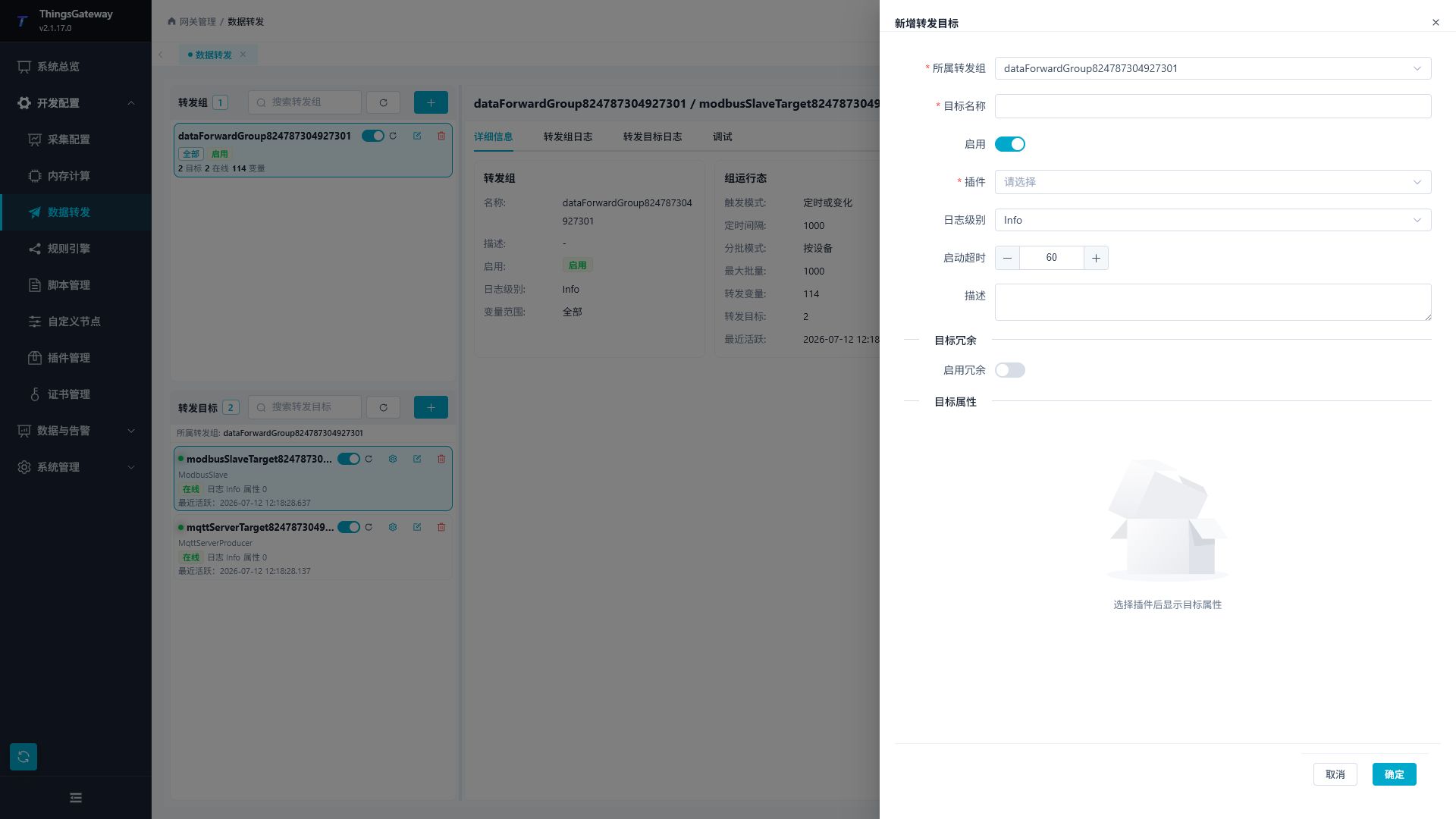
| Setting | Description |
|---|---|
| Forwarding group | The group that owns the target. The target consumes only that group's range. |
| Target name | Unique name within the group. It is used in logs, redundancy, and import/export. |
| Enable | Starts the target and makes its debug page available. |
| Allow method calls | Off by default. Allows all exposed direct methods on this target. Calls through a MQTT or UA entry to another instance check that other instance's switch. See Plugin Method Calls. |
| Plugin | Selects the data-forwarding plugin and exposes its target properties. |
| Log level | Target log detail. |
| Startup timeout | Time allowed for the target to connect or initialize, in seconds. |
| Description | Records the target purpose and maintenance notes. |
| Plugin target properties | Properties provided by the selected plugin. Use the matching page in the Plugin Manual Index for field details. |
Where to find plugin properties
This page covers the common target workflow. MQTT, Kafka, RabbitMQ, Webhook, Modbus, OPC UA, IEC104, IEC61850, database, and SyncBridge-specific properties, templates, debug tabs, and troubleshooting are documented in the matching data-forwarding plugin manual.
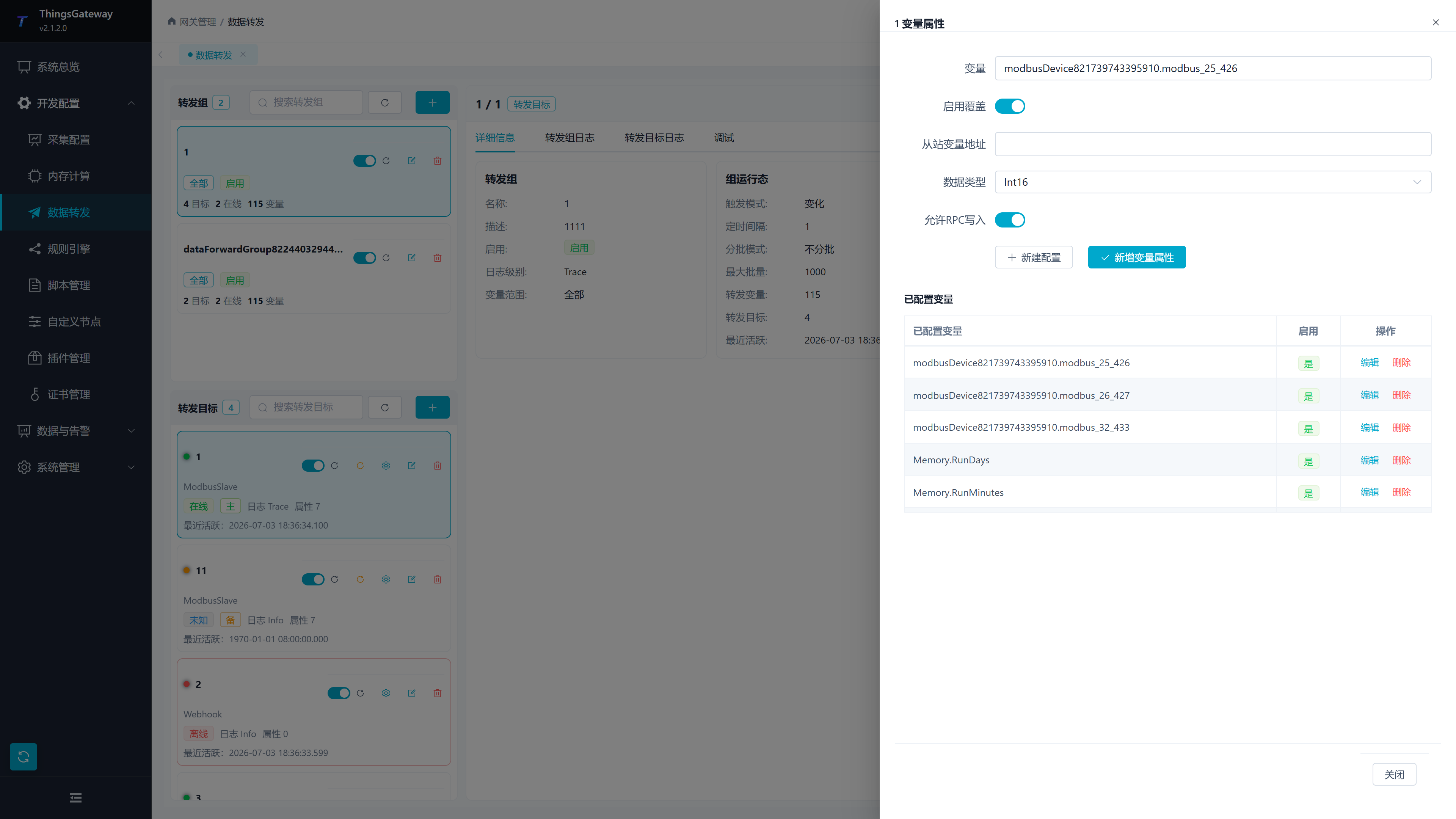
Target variable properties
Target variable properties define the external mapping of one variable for one target. They do not define the forwarding group's member range.
Typical uses include:
- External field names, aliases, and custom data fields.
- Modbus slave addresses, data types, and write permissions.
- Upload fields for MQTT, Kafka, RabbitMQ, and Webhook targets.
History sampling scope and triggering are configured in the forwarding group; target variable properties do not provide a second sampling configuration.
Select a valid target and variable before editing these properties. The variable must be inside the group's range for the mapping to take effect.
Run, debug and recover
Enable and verify
After saving, confirm in order:
- The forwarding group is enabled.
- The target is enabled and shows a running state.
- The target's variable range is not empty.
- Target logs contain no connection, authentication, or send errors.
- The external system receives one test record.
An online target does not prove that data has arrived. Check both the target log and the receiving system.
Debug and logs
Select a target and click Debug. The page varies by plugin and may provide publishing, subscription, client-list, server-status, or protocol operations.
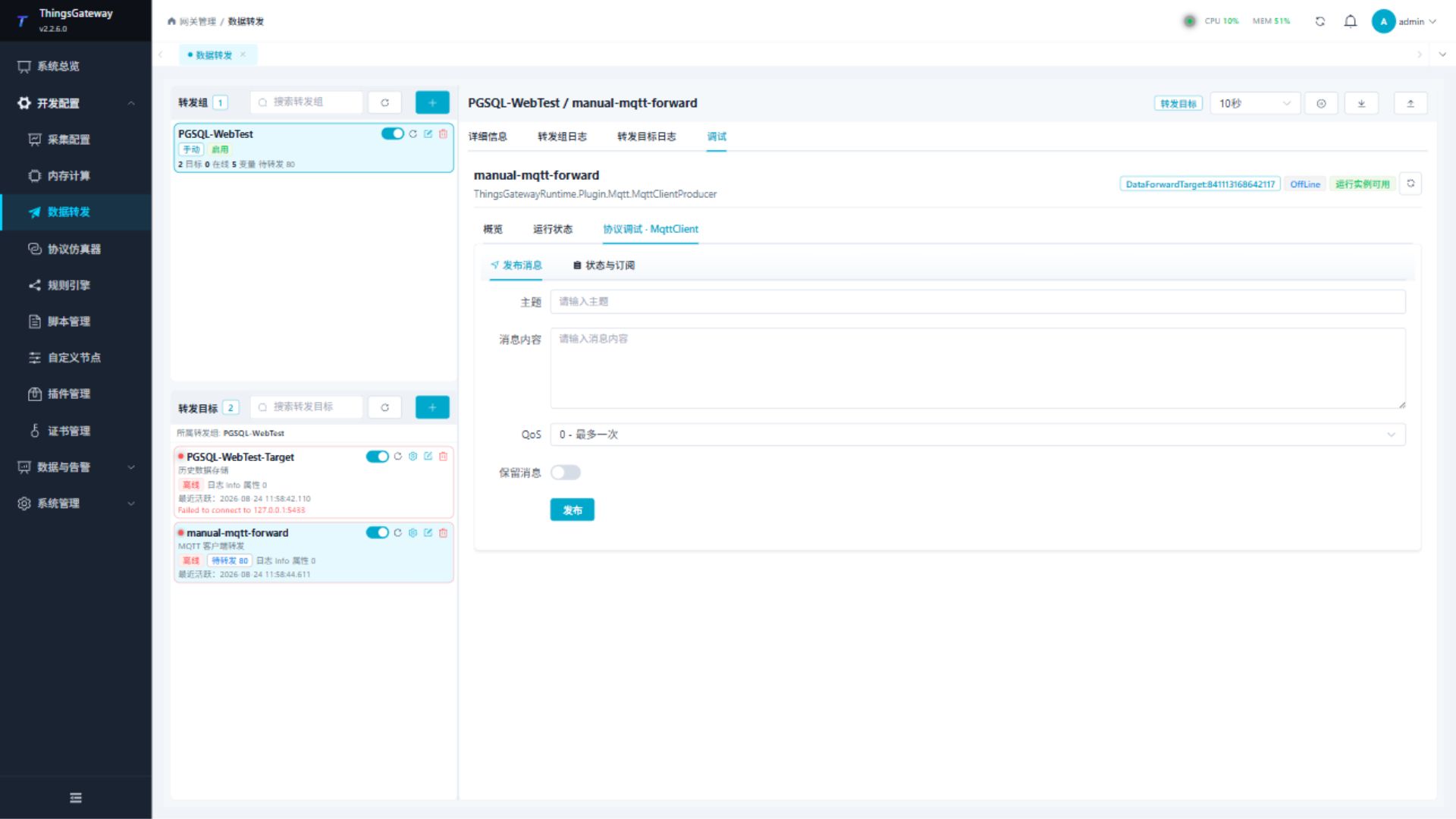
When a target does not start or sends no data, check the Forwarding Target Log first, then the Forwarding Group Log.
| Symptom | Check first |
|---|---|
| Target does not start | Group and target enable states, plugin enable state, and required target properties. |
| No data is sent | Variable range, variable enable state, trigger mode, and online filtering. |
| Target is online but the receiver has no data | Target log, receiver credentials, Topic/URL/table name, and payload format. |
| Scheduled forwarding does not run | Trigger mode includes scheduling and the interval is milliseconds or a valid Cron expression. |
| Change forwarding does not run | The variable really changed; check Group trigger when a whole-group wake-up is required. |
| Offline cache keeps growing | External service recovery, disk space, upload batch size, and concurrency. |
Offline cache and historical backfill
Historical recovery requires a sender that caches each produced sample, a payload that retains source timestamps, and a receiver with historical storage enabled.
| Business plugin | Cache and time behavior |
|---|---|
| MQTT Client, MQTT Server, Kafka, RabbitMQ, Webhook, ZeroMQ (PRO) | Common retry caching retains collection, change and record times in the original samples. List uploads can retain multiple samples per variable; dictionaries, templates and scripts may combine samples or omit timestamps. Receivers must handle the selected format. MQTT server publication success does not prove delivery to an offline subscriber. |
| SyncBridge | The Edge reuses the common cache and removes records after Hub acknowledgement. The Hub routes late and unchanged samples to historical storage while retaining the latest current value. |
| ThingsBoard | Supports caching and retry. Telemetry ts uses the source CollectTime. |
| Historical Data Storage | Provides its own cache and retry. Central Gateway MQTT and SyncBridge samples can retain source times in relational and time-series databases. |
| Real-time Data Storage | Stores the latest state, not complete history. Update time is the current write time; collection time is retained separately. |
| Historical Alarm Storage | Caches actual alarm events. Replayed variable samples do not reconstruct alarms from the disconnected period. |
| Modbus Slave, OPC UA Server, IEC104 Server (PRO) | Primarily maintain current protocol state without a persistent per-sample history replay queue. OPC UA history reads require a configured history database. The IEC104 memory queue is not persistent historical caching. |
| IEC61850 Server (PRO) | Supports a relational Journal with offline caching for protocol events. The variable update queue merges the latest state, so it does not provide historical backfill for every variable sample. |
Database timestamps
Add central mirror variables to an enabled group with a Historical Data Storage target. Received samples enter history independently of current-value changes and follow group scope, enable state and source online filtering. Central scheduled collection can add local records.
| Field | Meaning and storage |
|---|---|
CollectTime | Original Edge collection time, retained in standard history records. |
CreateTime | Time the Edge group produced the record; not replaced with central receipt time. Standard relational tables partition on this field. Standard QuestDB, TDengine and IoTDB history models use it as their primary record time. |
ChangeTime | Last source value or status change. Preserved in the synchronized sample but not stored as a separate standard history column. |
Configured database time zones are applied on storage. Custom SQL, schemas and scripts must retain required fields and define how duplicate variable/timestamp records are handled. Backfill uses the processed source value without reapplying central read expressions.
Disconnection verification
- Enable Edge caching and check scope, triggers and online filtering. Enable the central history target.
- Note test values and collection times, interrupt the upload link during maintenance, and produce multiple samples.
- Confirm backlog growth, restore connectivity and confirm the backlog drains.
- Query the disconnected period and compare values, collection times, record times and online states. Current values must retain the latest sample.
Caching cannot recover records that were never collected or produced, or were evicted by capacity limits. Common retry caching does not guarantee unique writes across messaging and databases. Lost acknowledgements, QoS redelivery, snapshots and batch retries can create duplicates.
During large Gateway MQTT replays, the center rejects messages that exceed its message rate or concurrent processing capacity. Broker-acknowledged messages do not automatically return to the Edge cache after this rejection. Configure batch sizes, publishing rates and central capacity for replay peaks, and check rejection counters.
Target redundancy
Target redundancy switches sending from a primary target to a standby target.
- The primary and standby targets must belong to the same forwarding group.
- The standby target should use the same plugin, with its own connection and credentials.
- A standby target must not also be the standby for another target, and it should not enable its own redundancy.
- Perform one controlled switch before production and verify that the standby target can send.
Import and export
Data-forwarding configuration can be imported and exported for backup, migration, and batch changes. After importing, check failed rows and recheck the group range, target plugin, and target variable properties.
Related links
- Collection Configuration: Configure channels, devices, and variables.
- Plugin Manual Index: View plugin-specific target properties and debug pages.
- System Logs: View backend, operation, and RPC logs.
- System Settings: Configure network, certificates, redundancy, and system controls.