Memory Computation
Memory computation is used to maintain memory variables under the Memory device (virtual device inside the gateway). Memory variables do not directly connect to field devices and are usually used to store script calculation results, intermediate values in rule flow, internal status, statistics, or data that needs to be reused within the gateway.
Create and verify a variable
First Look at Terms
| Terminology | On-site Understanding |
|---|---|
| Memory device | A virtual device inside the gateway. It does not connect to a PLC, instrument, or serial port. |
| Memory variables | Internal gateway points, which can store calculation results, temporary status, statistics, or manually written values. |
| Read expression | A rule for calculating or reading a memory variable. When empty, the variable does not update automatically through calculation. |
| Write expression | A rule applied when a value is written. It can validate, convert, or link the value to another variable. |
| Execution interval | The interval between periodic calculation or refreshing of memory variables. Too short a gap increases CPU pressure. |
| Value Filtering | Collection filters do not establish how a manual memory write behaves; check the actual type and write path. |
| Alarm suppression | A Data Conversion script returns true to allow and false to block; empty adds no condition. |
Function Entry
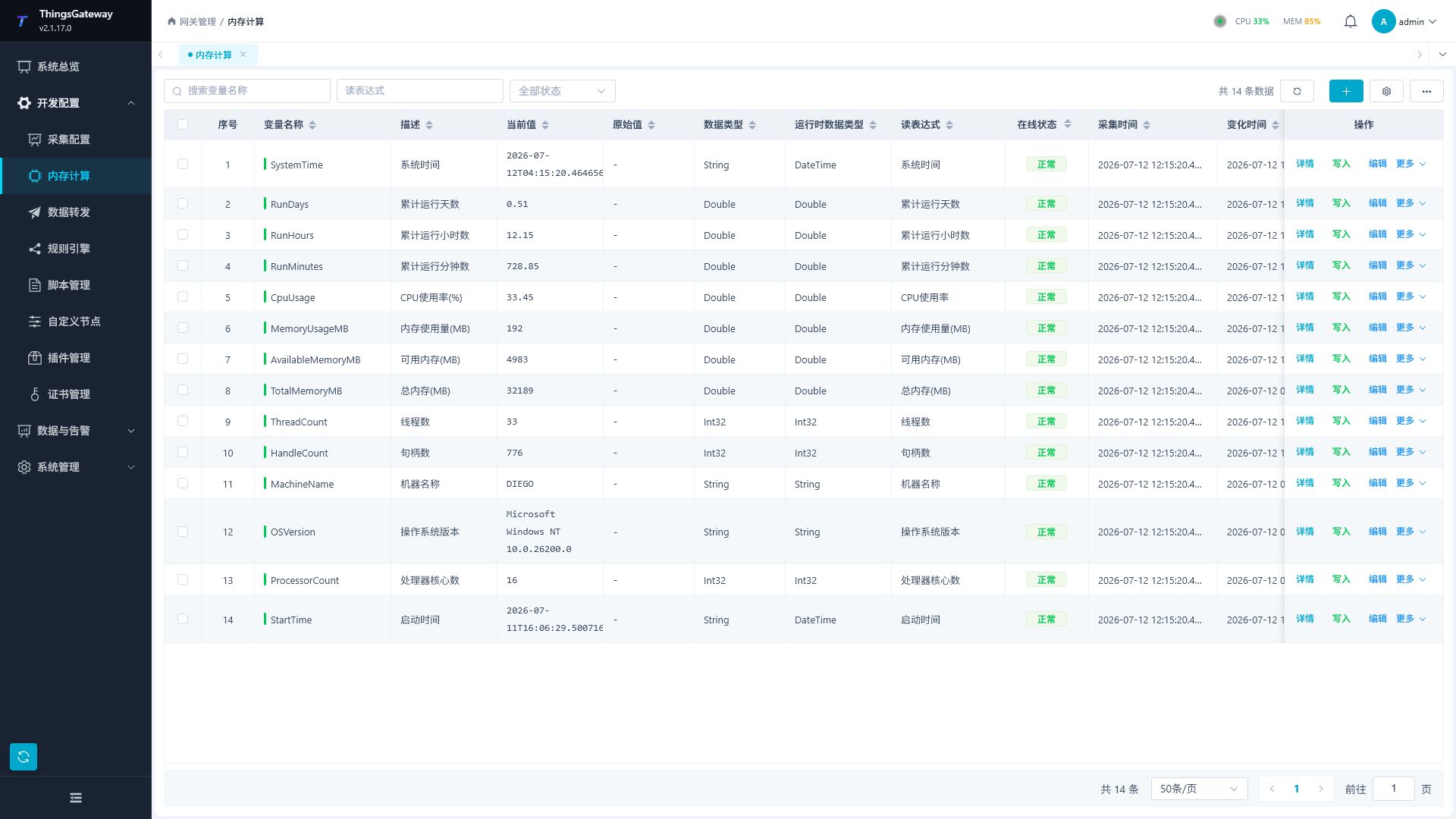
After logging into TGateway Web, click the menu on the left "Develop Configuration → Memory Calculation."
Before you start
- Decide whether each variable is updated by a manual write, a read expression, a script, or a rule flow. Avoid multiple sources overwriting one value.
- Confirm name, unit, initial value, interval, and permissions. Memory configuration uses
Object; inspect the actual runtime type after assigning a value. - If a script, rule, or forwarding group references the variable, keep its name stable after it goes live.
- Review the execution interval before enabling many high-frequency calculations, so CPU usage remains controlled.
Add and Edit Variables
After clicking "Add Variable," the variable configuration popup will open on the page. Variables created on memory calculation pages belong to memory devices by default, without needing to select channels or collection devices.
| Configuration Item | Description |
|---|---|
| Variable Name | Required. It is recommended to use English, numbers, and underlines to facilitate script and rule references. |
| Assigned device | fixed to Memory device. |
| Unit | Engineering unit for variable values. |
| Enable | to control whether variables participate in running. |
| Description | Explanation of variable usage. |
| Read and write permissions | Control whether variables allow read, write, or read/write access. |
| Execution interval | The interval used for periodic calculation or refresh. |
| Read expression parameters | Select or fill in memory variables to calculate the expression parameters used. |
| Write expression parameters | Fill in when you need to handle the write value. |
| Remarks field | can be used for business expansion, grouping, encoding, or external system mapping. |
| Alarm Configuration | Configure alarm groups and numeric state mappings. Alarm expressions use Data Conversion scripts. |
| Value Filtering | Verify actual memory assignment separately from numeric collection filtering. |
After configuration, choose “Save” to keep editing in the popup, or choose “OK” to save and close it.
Minimum usable configuration
- Click Add Variable, name it
ManualValue, keep device Memory and data typeObject, set initial value0, and leave it enabled. - Allow read/write access and leave both expressions empty for this manual test.
- Click OK, find the row, and open Write.
- Enter
12.5without quotes, submit, and refresh. The current value should be12.5.
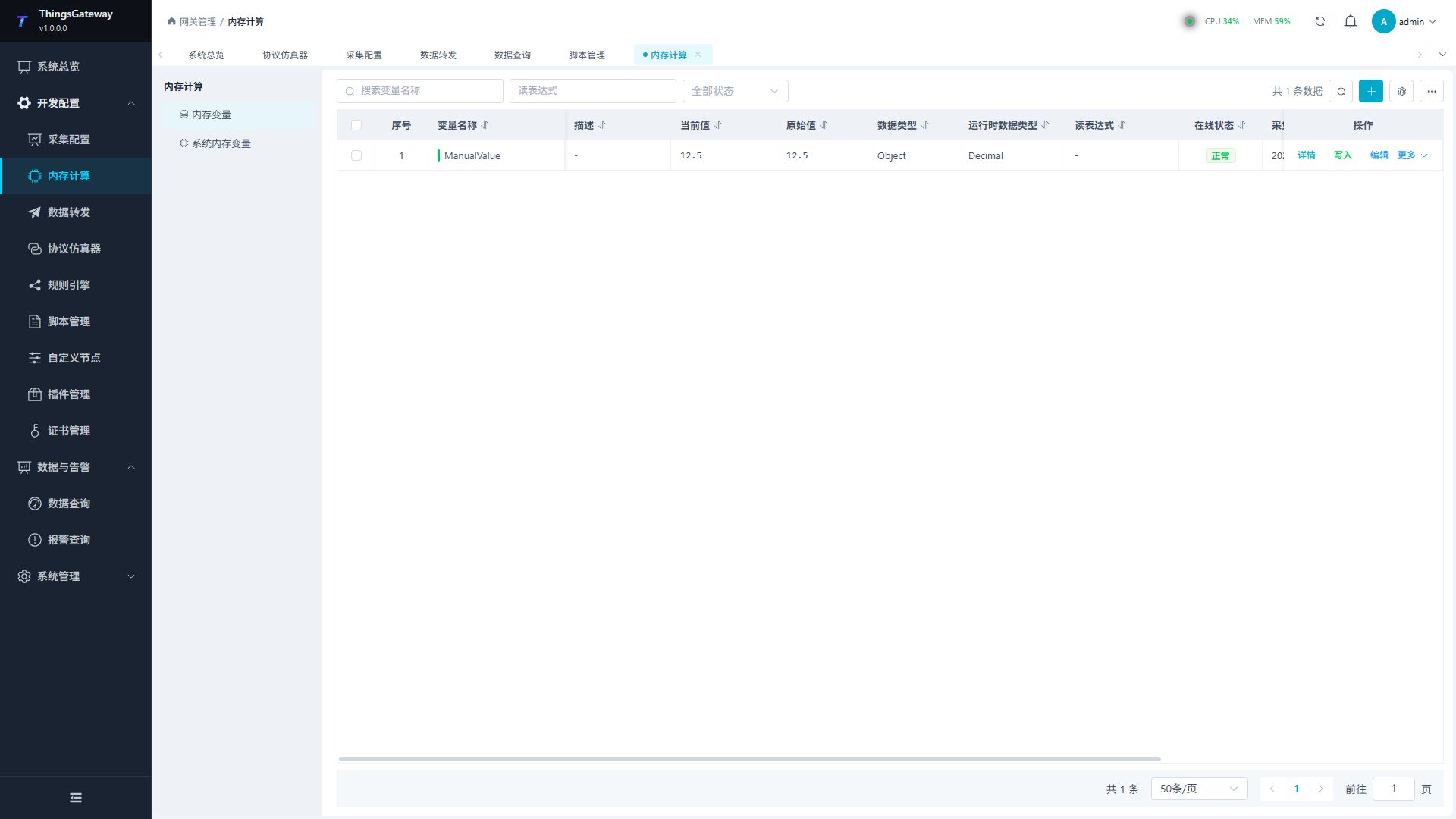
The write dialog recognizes numbers, Boolean values, and JSON objects or arrays. Runtime Data Type describes the stored value; it can show Decimal for this input while configuration remains Object. Use a new test variable, because writing an existing variable referenced by a rule can trigger downstream actions.
For automatic calculation, select a Memory Variable read script, save its arguments, choose a trigger, and check the result after execution. A manual value with no read expression does not recalculate periodically.
Save, enable, and verify
| Check | Pass standard |
|---|---|
| Save result | The variable appears in the list with the expected name, data type, and enabled state. |
| Runtime result | A write or expression updates the value with the expected time and quality. A manually assigned point with no expression need not receive new timestamps between writes. |
| Write result | The page reports success, and the current value plus any rule or script result using it is as expected. |
| Downstream use | After adding the variable to a rule or forwarding group, the downstream log or receiver shows the expected value. |
Saving a variable is not enough when it is disabled, its expression is not running, or a downstream target receives no value.
Variable settings reference
Page Structure
| Region | Description |
|---|---|
| Filter Area | Filter memory variables by variable name, read expression, and state. |
| Operation Area | Displays the total data count, providing refresh, new variable, column settings, variable import, variable export, and export everything. |
| Variable Table | Displays variable runtime values and configuration summaries under the Memory device. |
| Batch Operation Bar | Displays after checking variables, allowing batch editing or batch deletion. |
| Pagination bar | Switch pages and the number of rows displayed per page. |
Variable List
| Column | Description |
|---|---|
| Variable Name | Memory Variable Name. Naming should be stable and avoid frequent modifications after being referenced by scripts, rules, or forwarded configurations. |
| Description | Explanation of variable usage. |
| Current Value | The current value of the variable. |
| Original value | Original value before conversion or formatting. |
| Data Type | Data type configured by variable. |
| Runtime Data Type | Data type corresponding to the current runtime. |
| Read Expressions | Expressions used to calculate or read variable values. |
| Online status | Displays whether the variable is currently normal. |
| Collection time | The time when the variable value was last updated. |
| Change time | The time when the variable value last changed. |
| Error message | Error details when calculation or update fails. |
| Operations | View details, write, edit, copy, or delete variables. |
Calculation triggers
Bind a Memory Variable read script using Tag for dependencies. The write expression uses Data Conversion instead. Verify collection time, change time, quality, and errors along with results.
| Mode | Behavior with registered dependencies |
|---|---|
| On change | Recalculates when a Tag input changes. An interval such as 4000 does not make stable inputs recalculate every four seconds. |
| Scheduled | Milliseconds or six-field Cron, for example 1000 or */2 * * * * *. |
| Scheduled or on change | Either event can run the calculation. |
Empty interval uses the memory device default rather than disabling execution. Scripts without registered Tag dependencies enter periodic scheduling. A time-returning script without dependencies cannot verify change-only behavior.
Dependencies in conditional branches
Change triggers follow the Tag reads actually executed in the current evaluation. After switching branches, sources no longer read leave the dependency set. Read the branch selector through Tag as well so changing it can trigger reevaluation.
For a formula selecting A or B, change A while A is selected and confirm recalculation; changing B should not trigger that branch. Switch to B and reverse the checks. Observe sample timestamps and execution errors, since an unchanged result alone does not mean the formula did not execute.
After a read-chain failure, sources already accessed can still trigger recovery; old dependencies in the unexecuted remainder stop triggering. If no effective source dependency remains, check recovery through periodic scheduling. Remove cyclic dependencies before verifying downstream results.
Create inputs Memory.InputA=10 and Memory.InputB=20, then a read-only sum. Check 30, change A to 15 for 35, and B to 25 for 40. Test stable and changing inputs in each mode. A read-only result blocks external writes while allowing calculation updates. Avoid direct or indirect cycles.
For a write expression multiplying input by Scale, bind 2 and write 5 to obtain 10; bind 3 for 15. Clear the write-expression selection and save, then write 5 again to obtain 5. Check RPC enablement, access permission, and system read-only identity independently.
Initial value and latest snapshot
| Settings | Persistence |
|---|---|
| Save Initial Value off | Runtime values can change without updating the configured starting value. Force Save is disabled. |
| Saving on, Force Save off | Periodic background saving, normally about every 30 minutes unless deployment settings change it. Wait for the actual database write. |
| Both on | Updates merge per variable and are processed about once per second in the background. This is not synchronous persistence of every sample. |
Collection snapshots use the raw value. If a read expression converts raw 1234 into current 12.34, the saved starting point is still 1234. After reconstruction, wait for new collection and conversion before treating a value as a fresh engineering reading.
Snapshots restore state after task reconstruction; they are not history. Fast intermediate values can merge. Use History Storage for a complete process. Disabling saving does not erase a previously saved starting value.
Verify a safe new value, wait for persistence, and restart data tasks in a maintenance window. Check the same variable and continuing collection afterward. Data-task restart also reconstructs collection and simulator tasks.
System status variables
The gateway maintains read-only Memory.<DeviceName>_DS for device status (Default, OnLine, OffLine, Pause) and Memory.<ChannelName>_TS for channel status (true/false), typically refreshed about once per second. Find them under system memory variables. They cannot be manually written, edited, or deleted. Names follow resource renames and disappear with their owner.
A channel that needs no ordinary external connection can report true without proving an associated physical device is online.
Maintain and use variables
Common Operations
| Operations | Description |
|---|---|
| Refresh | Reload the list of memory variables. |
| Column Settings | Select Table Display Columns; column preferences are saved separately without affecting the collection configuration page. |
| Details | Open the variable details drawer to view basic information, alarm information, value filtering, historical data, and historical alarms. |
| Write | Manually write variable values. Before writing, confirm that the variable read/write permissions allow writing. |
| Edit | Change the configuration settings. |
| Copy | Copy existing variables by quantity, suitable for creating memory variables with similar names and configurations. |
| Batch Edit | After checking variables, batch modify some configurations. |
| Batch Delete | Batch delete variables after checking the box. Before deletion, ensure that scripts, rules, and forwarding configurations no longer reference these variables. |
| Import variables | Import memory variables from Excel files. The import result will display failure lines and error messages. |
| Export variables | Export memory variables in the current filtered page. |
| Export all | Export all memory variables. |
Selecting an import file submits it immediately. Use a current export and preserve headers. To upload a new memory point, add it to forwarding scope explicitly. Numeric states and multi-input Boolean alarms are described in Alarm Conditions.
Usage Recommendations
| Scenarios | Recommendations |
|---|---|
| Rule Intermediate Values | Use memory variables to store states that need to be reused across processes or nodes. |
| Script Calculation Values | Put complex computational logic into the script, and memory variables read the script results. |
| Data forwarding auxiliary fields | When internal statistics need to be forwarded externally, memory variables can be included in the data forwarding scope. |
| Manual Write Debugging | During debugging, memory variables can be manually written, but the production environment should control write permissions. |
| Batch Creation | First, create a template variable, then use copy or Excel import to batch generate. |
Usage Precautions
| Scenarios | Recommendations |
|---|---|
| Name Change | Before modifying variable names, first check whether scripts, rule flows, data forwarding, and external calls reference the name. |
| Read expressions are null | Variables do not update according to computational logic and can only rely on writing or other process assignments. |
| Write failure | Check read/write permissions, data types, and value formats. |
| State Anomalies | Check the error message columns and check whether the read expression, script compilation status, and dependencies are normal. |
| Delete variables | Export backups before deleting and confirm that the rule flow and forwarding targets are no longer referenced. |
Fault Handling
| Phenomenon | Handling Recommendations |
|---|---|
| List No Variables | Clear filter conditions and refresh; Double-check whether the variable has been created under the Memory device. |
| Current value does not update | Check whether the variable is enabled, whether the reading expression is correct, and whether the execution interval is reasonable. |
| Import failure | Open the import result pop-up window and correct the Excel template based on the failed row. |
| Alarms do not trigger | Check variable and alarm-group enablement, accepted runtime value/type, strict threshold, delay, and the suppression expression's true/false direction. |
| Data forwarding does not include this variable | Check in the data forwarding group whether the variable range includes the Memory device or the variable. |
Related Links
- Collection Configuration - Maintenance of Channels, Devices, and Regular Collection Variables
- Rule Engine - Using Memory Variables in Processes
- Script Management - Write a memory variable calculation script
- Data forwarding - forward memory variables to external systems