Reverse RPC
Reverse RPC covers external writes and control calls through Web API, MQTT, OPC UA Server, and Modbus Slave. Variable calls check variable permissions; direct plugin method calls check the called device or target's Allow method calls switch. Each entry retains its own authentication.
Check before writing
Terminology
| Term | Meaning |
|---|---|
| Reverse RPC | An external system initiates a write, control, or query request to the gateway. |
| RPC write | An external system writes a variable. Enable it only for points approved for remote control. |
| RPC Write Topic | MQTT Topic prefix used for external write requests. Both sides must agree on request and response Topics. |
| Target-level write switch | Main write permission on server plugins that provide this setting. When disabled, external systems cannot write through that target. |
| Variable-level write switch | Write switch on a single variable; only external systems can write to that variable if both the target and variable levels are allowed. |
| Broker | MQTT message server, responsible for receiving and distributing Topic messages. |
Meaning of Reverse RPC
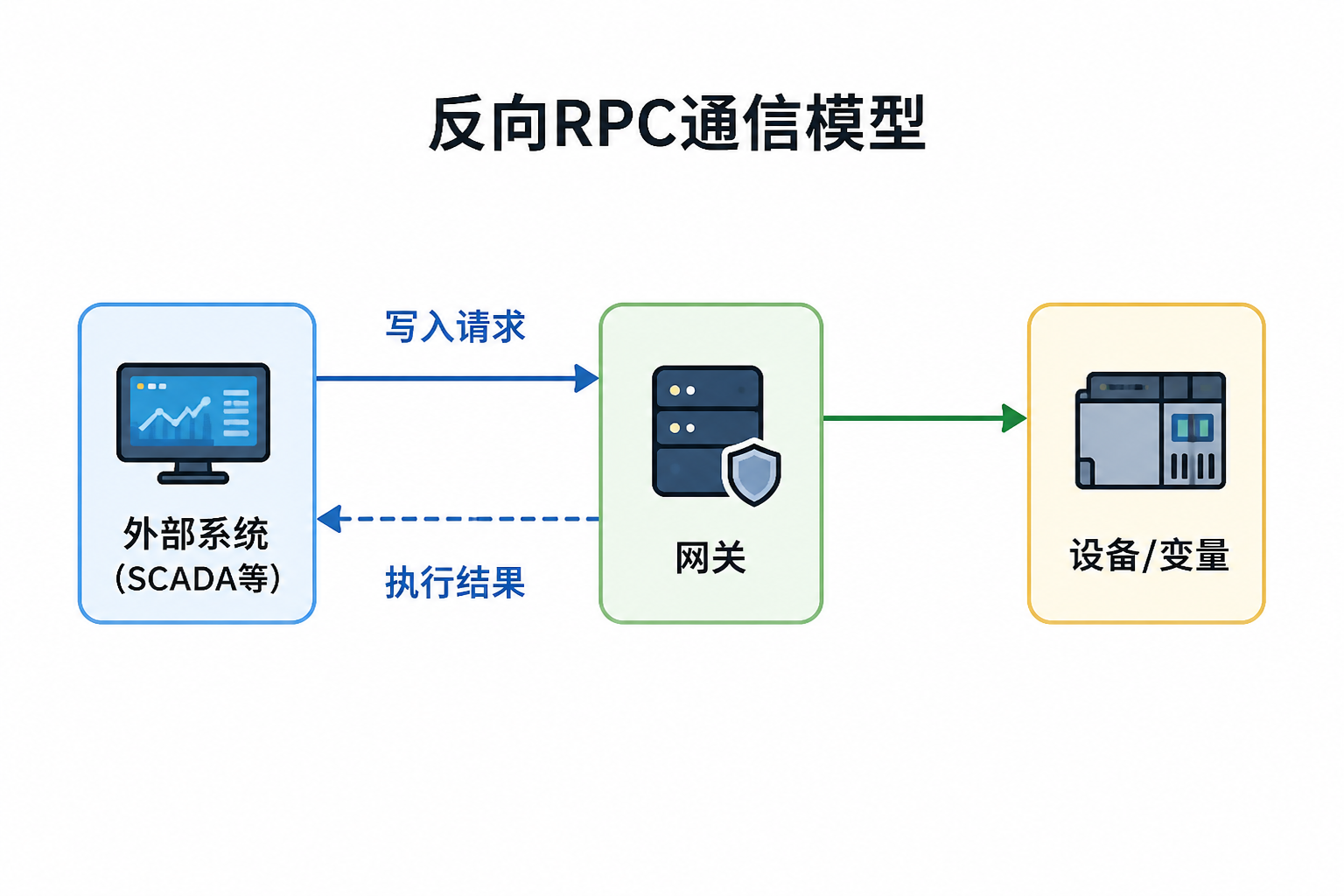
In TGateway, reverse RPC can be understood as "the external system reverse-calling the gateway's write capability." The external system does not passively receive data uploaded by the gateway but can initiate write, control, or query requests to the gateway; After the gateway completes permission verification, variable verification, and plugin writing, it returns the execution result.
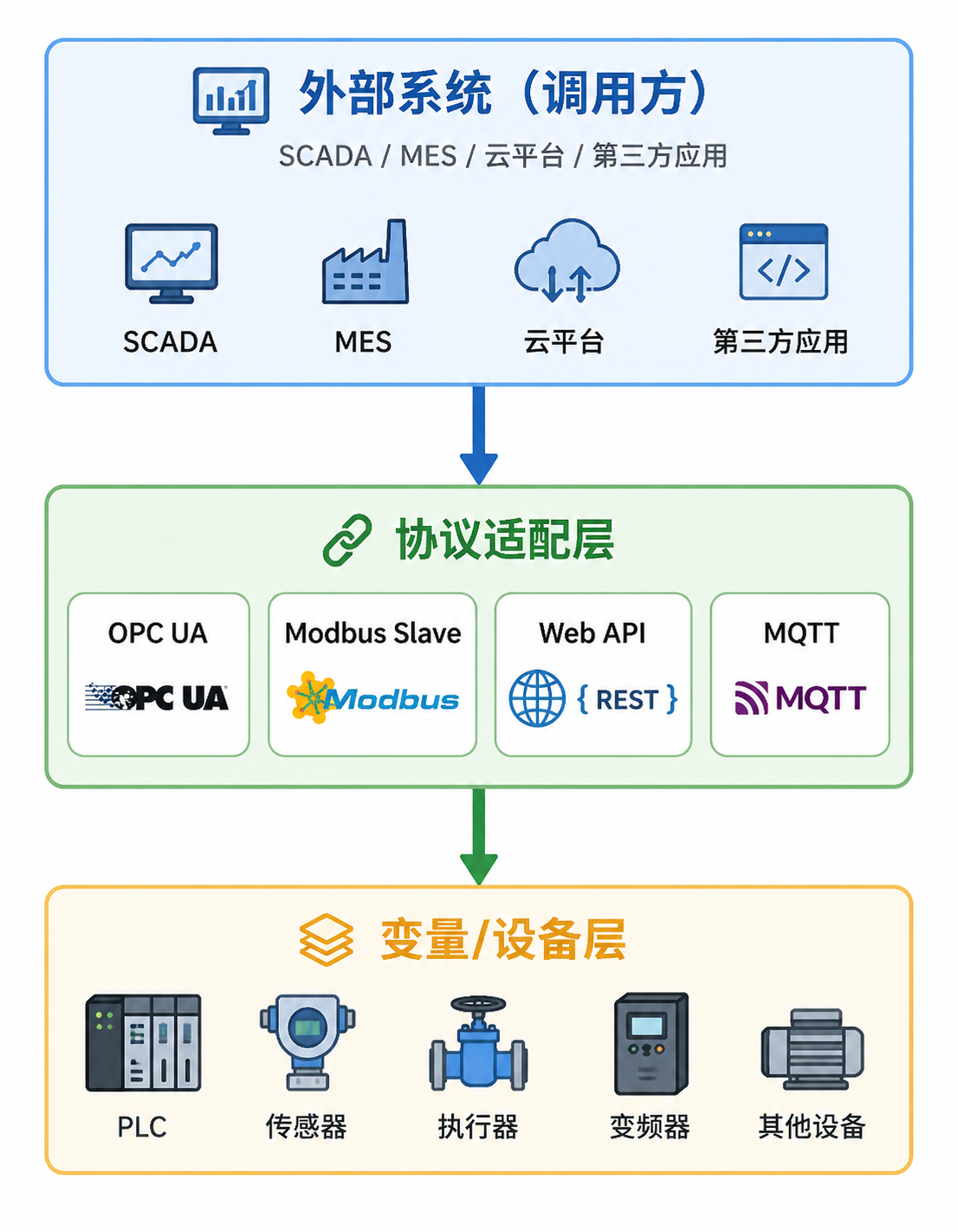
| Link | Description |
|---|---|
| Web API Writing | External system calls variable writing interface after login. |
| MQTT RPC | The external system issues an RPC request to the agreed topic, and after processing it, the gateway issues a response. |
| OPC UA Server | External OPC UA clients write nodes exposed by the gateway. |
| Modbus Slave | External Modbus master writes the coil or register mapped to the gateway. |
| Debug page writing | Operations personnel verify the write link in TGateway Web through variable write pop-ups or device debug pages. |
Write Prerequisites
Whether a reverse RPC succeeds depends not only on the external request format but also on variables, permissions, and plugin capabilities.
| Checklist | Description |
|---|---|
| Variable Read and Write Permissions | Variables should be allowed to be written. Read-only variables should not be written. |
| RPC Write Switch (Allows External System Reverse Write Points) | When RPC writing is required in variable or plugin properties, make sure the corresponding switch is enabled. |
| Write Check | If write check is enabled, after a successful write, the variable will be read again and the callback value will be compared. Points that only write variables, delay after write, or have proportional conversion or writeback rounding should not be enabled arbitrarily. |
| Plugin Write Capability | Collection plugins or server plugins must support the corresponding write method. |
| Device Online Status | When writing to the real device, the channel and device should be in a communicative state. |
| Role API Permissions | Web users or integration accounts need to have corresponding API permissions, such as variable writes, debug writes, or MQTT debugging and publishing. |
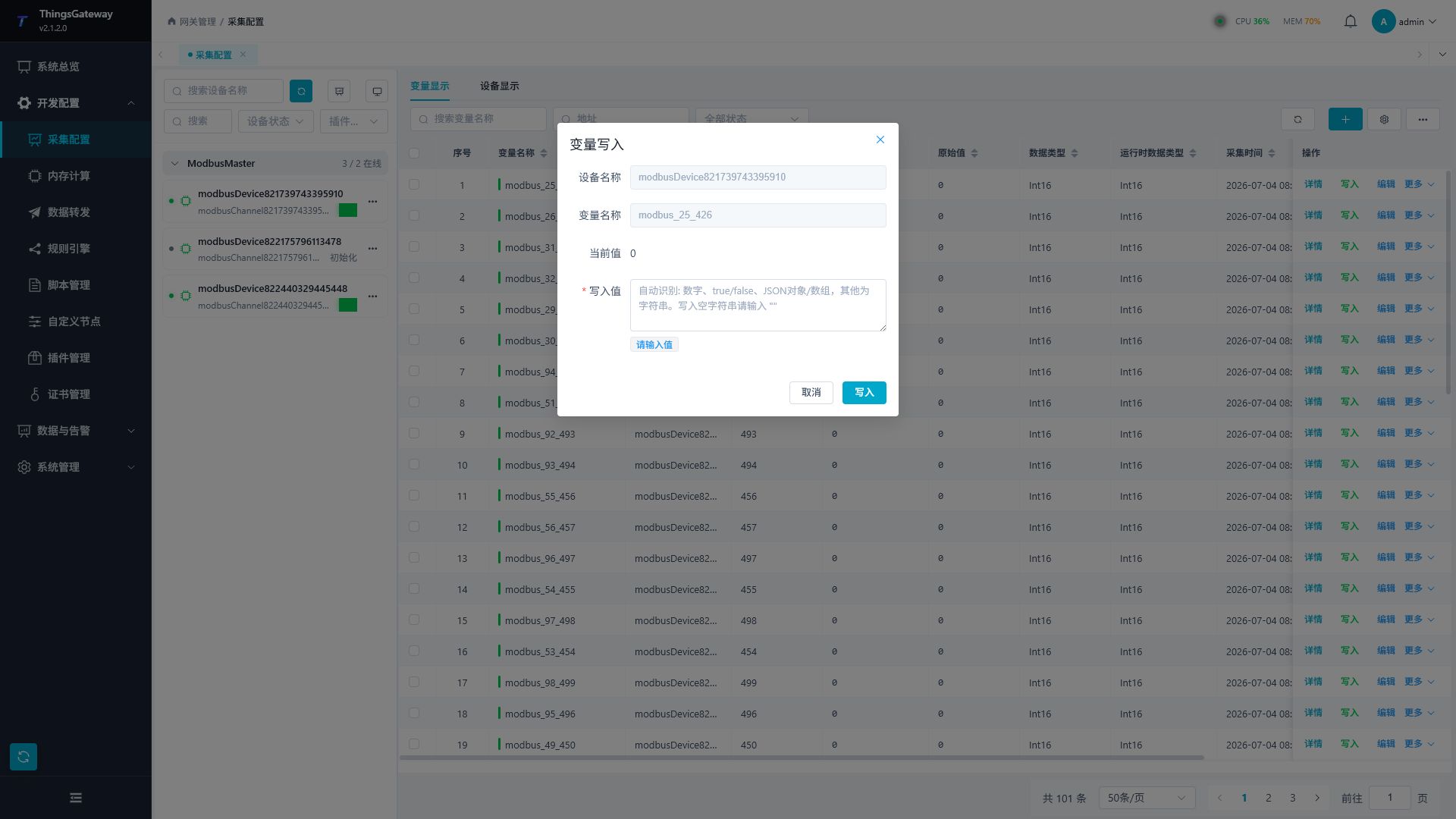
Variable write pop-up can be used to quickly verify on-site whether the variable itself supports writing.
Permission Configuration Recommendations
| Account Type | Recommended Permissions |
|---|---|
| Read-only integrated account | Only grants data query interfaces, not variable write, debug write, or restart interfaces. |
| Control the integrated account | Only grant permission to write variables or MQTT/debug interfaces required for the specified write link. |
| Operations Account | Grants permissions for variable writing, device debugging, log queries, and log exports. |
| Administrator account | grants role authorization, menu maintenance, system settings, and restart permissions. |
Menu button authorization only controls visible web page entrances; API authorization controls interface call capabilities. The production environment should check both types of permissions simultaneously.
Choose a write interface
Web API Writing
Web API writing is suitable for upper-level systems, MES, SCADA, operations platforms, or custom programs to directly call TGateway.
| Steps | Operations |
|---|---|
| Login | Obtain a Bearer Token from the authentication interface, or debug from an authenticated Web session. |
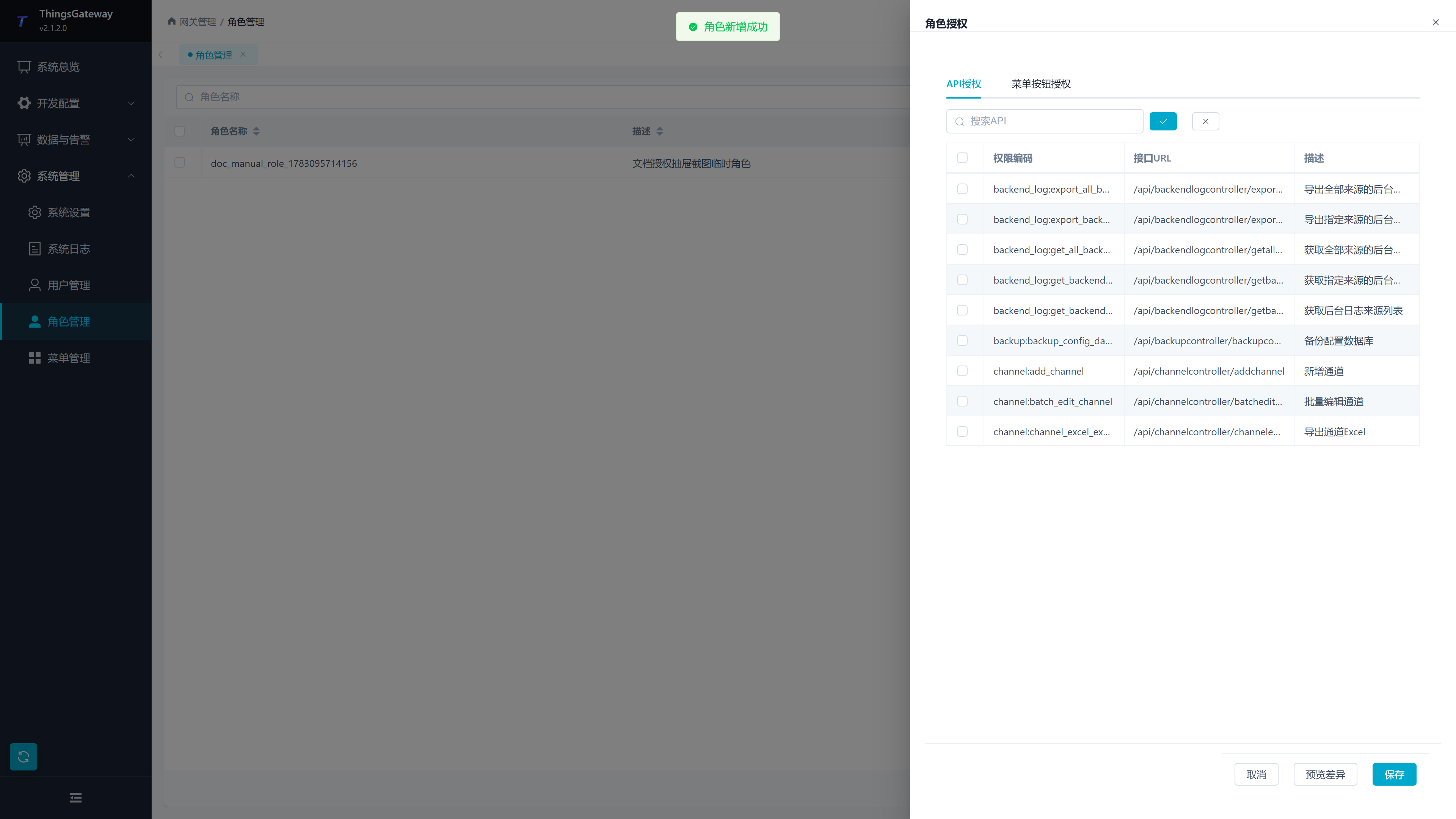
| Authorization | In "System Administration → Role Management → Authorization," assign variable write API permissions to the integration account role. |
| Write | Call the variable write interface from the current API documentation: /api/gatewaywritevariablecontroller/setvariablevalue. |
| Validation | Confirm write results in variable lists, variable details, device logs, or RPC logs. |
API permissions can search for variable write-related permissions in the role authorization drawer.
The request body is usually organized as "device name → variable name → value to write." For the endpoint path, authentication method, and response structure, follow the interface description in the Gateway API documentation.
The request body and each device's variable object must not be null. An invalid structure rejects the entire batch before any write and creates one failed RPC log. An empty device object {} performs no writes; a variable value of null is still handled according to the plugin's write contract.
Bind a collection-plugin special method to a variable
When a variable has a Special method (Other Method), the same variable-write endpoint invokes the plugin method instead of writing a regular point. The method variable must still be writable, allow RPC writing, belong to a device that is not paused, and pass role authorization.
For example, an OPC UA Client method variable selects CallMethodByNodeIdAsync and stores the object and method NodeIds in its address. The external request supplies the method inputs as the variable value:
{
  "OPC device": {
    "Start method": [123, "start"]
  }
}
The outer array is the method argument list. When a method has one array argument, submit a nested array such as [[1, 2, 3]]. See OPC UA Client for variable configuration and OPC UA type-conversion rules. An MQTT RPC script enters the same method-call path after it resolves the same device name, variable name, and JSON value.
Call a plugin method without a variable
Enable Allow method calls on the called device or target to allow all its exposed direct methods through Web API, MQTT method requests, OPC UA native Methods, debug, or rule special-method nodes. It is off by default; there is no caller or per-method allowlist. Variable RPC permissions remain independent.
Use POST /api/gatewayrpccontroller/invokepluginmethod with login and rpc:invoke_plugin_method API permission. Requests contain instance type, ID, method name, and positional arguments, with no business request ID, deduplication, or method capacity policy. MQTT methods use a fixed request topic and /Response, unlike the variable protocol below. See Plugin Method Calls.
MQTT variable RPC
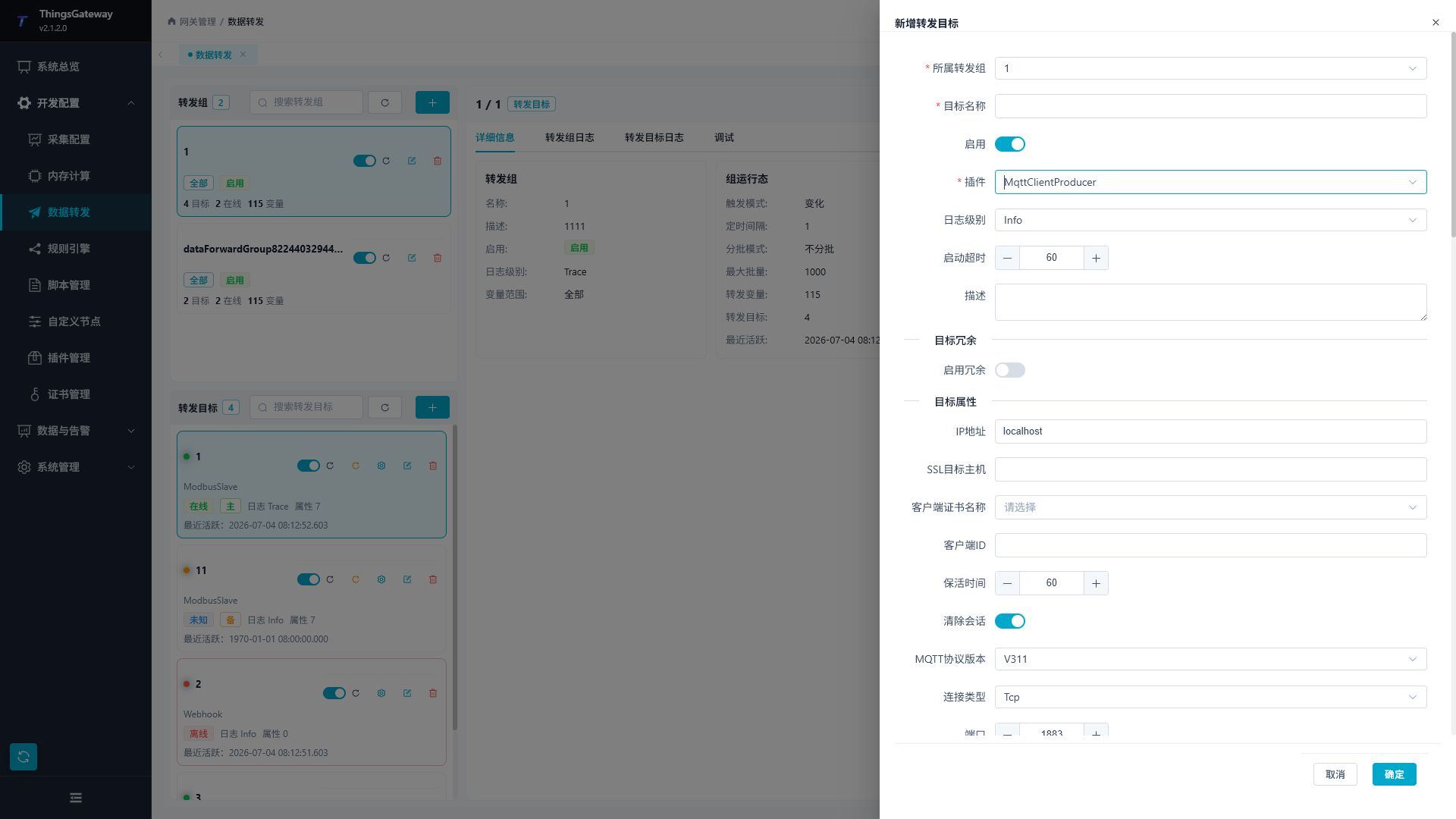
MQTT RPC is suitable for scenarios where external systems already use MQTT Broker. When the gateway is used as an MQTT Client Producer or MQTT Server-related target, RPC Topics and scripts can be configured via target properties.
| Configuration Items | Description |
|---|---|
| RPC Write Topic | Topic prefix for write requests published by external systems. With tg/rpc/write, requests are sent to tg/rpc/write/<request-id>, and responses are read from tg/rpc/write/<request-id>/Response. |
| Data Request Topic | Accepts {"Source":"TGateway","RequestId":"6e8c1a7445064ad6b4bb5d5af9cf28b1"} with a unique lowercase ID. Check configured snapshots and Success=true at DataRequestTopic/Response/RequestId; arbitrary text is not a request. |
| RPC Script | RPC message script for customizing request parsing, write target selection, result processing, or response structure. |
| QoS level | RPC message publishing/subscription quality level. Key write recommendations include choosing the appropriate QoS based on Broker capabilities. |
| Username/password | Broker authentication information. |
| Enable SSL/TLS certificate configuration | Certificate, CA, target host, and protocol configuration in TLS scenarios. |
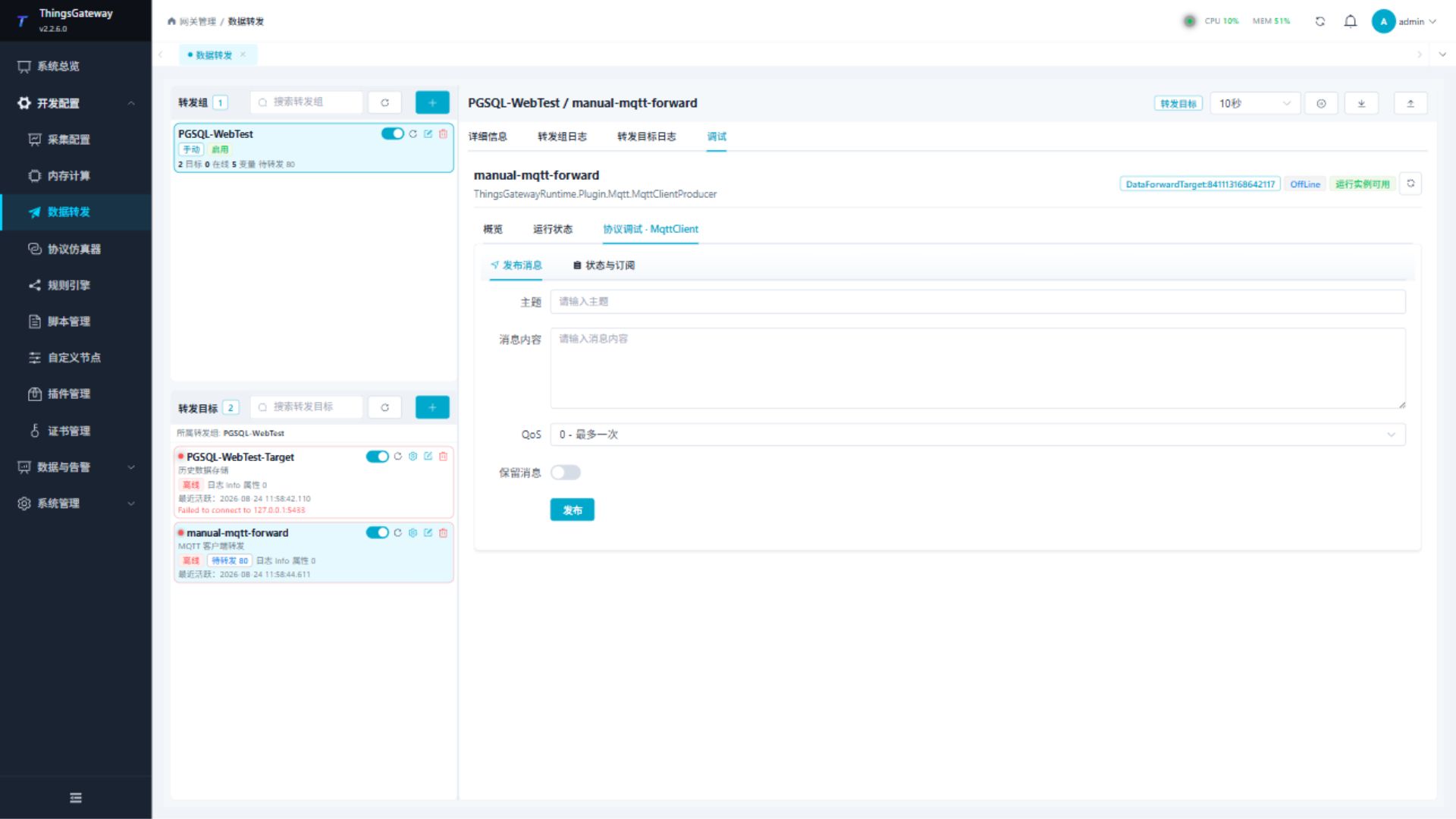
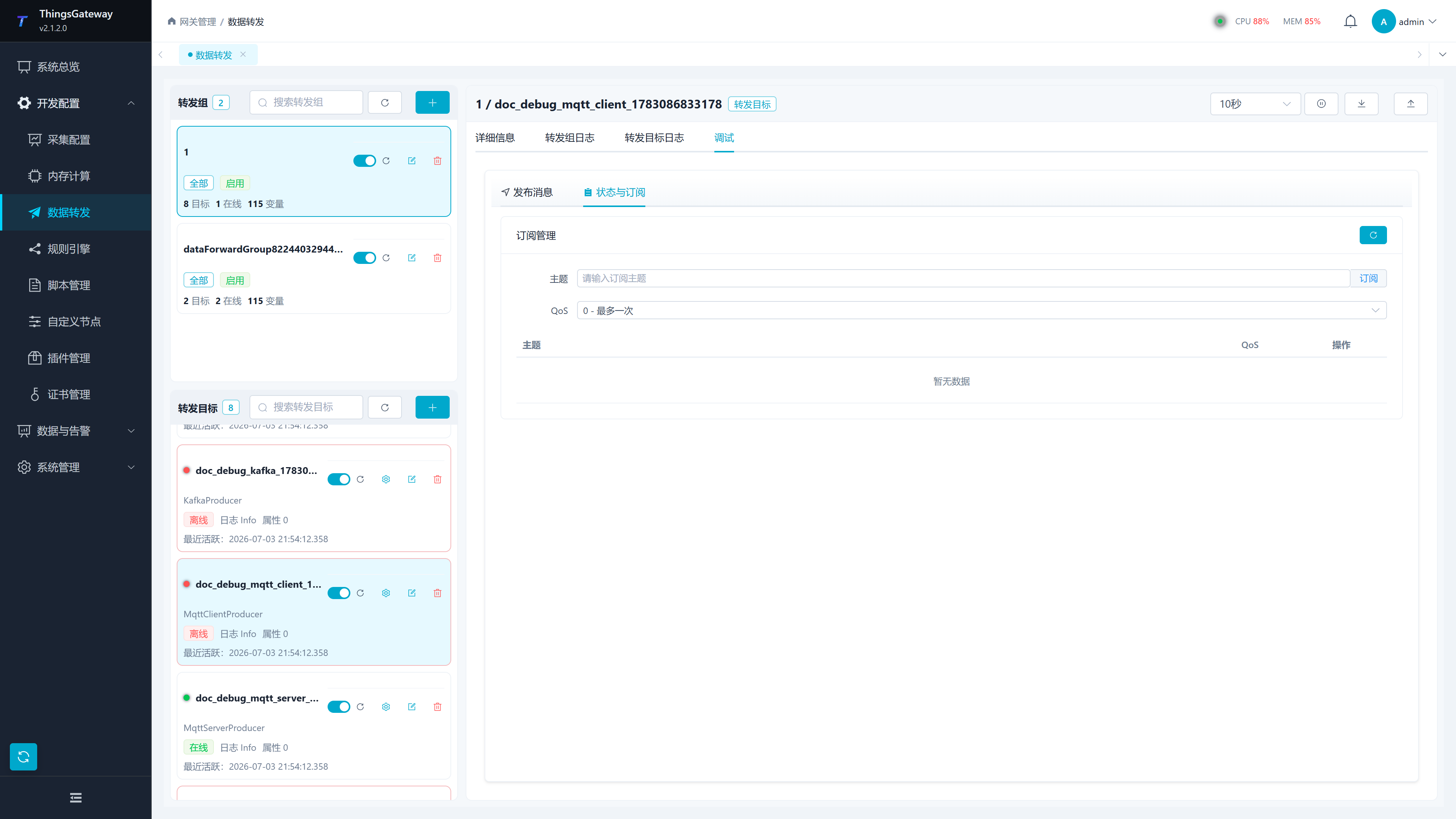
The MQTT Client debug page can be used to validate the publish and subscription links.
| Debug Item | Description |
|---|---|
| Publish Message | Fill in Topic, Payload, QoS, and Retain before publishing the test message. |
| Status and Subscriptions | Add or remove subscriptions belonging to the gateway target itself. |
| Target log and independent receiver | Use target logs for connection, subscription, and processing errors. Inspect request and response bodies in an independent MQTT client, matching Topic and request ID. |
Subscribe to the response Topic before sending a test request with a unique ID. Check each variable's business result and confirm the value at the source device or with an independent protocol read. Publish success and QoS acknowledgement do not establish a successful device write. See MQTT Client Forwarding for a complete write example.
OPC UA Server and Modbus Slave
Server plugins accept connections from external clients, which can write mapped nodes or registers.
| Plugin Type | Write Method | Key Configuration |
|---|---|---|
| OPC UA Server | External clients write nodes exposed by the gateway. | Service address, security policy, username and password, server certificate, target-level write switch, and variable-level write switch. |
| Modbus Slave | External Modbus master writes coils or holds registers. | Listen address, station number, slave variable address, variable data type, target-level write switch, variable-level write switch, client permission list. |
With OPC UA Server security disabled, the None endpoint permits anonymous access; entering username/password does not remove it. Enabling security publishes SignAndEncrypt without None or anonymous tokens. The client must satisfy application-certificate trust and its selected user identity. Writes also require the target and variable RPC switches and source-variable permissions. See OPC UA Server for certificate and identity configuration.
Modbus Slave's "Client Permission List" only applies to client IPs accessed in TCP server mode. When the list is empty, it is not restricted by IP; If the list is not empty, the missed TCP client cannot access the slave; The hit client then clicks "Write Allowed" to decide whether to write to the client. * means matching all clients. When only reading is allowed, you can configure * and disable "Write allowed"; Only allows specifying the host computer to write and configure by IP segmentation by the host computer.
Modbus Slave writes require target-level and variable-level RPC permission plus source-variable write permission. Write to Memory Now controls whether a successful protocol write is immediately retained in slave memory. Disabling it does not stop mapped variables from calling field RPC; collection feedback still updates the served value. Read/write of unmapped memory does not prove a field write. See Modbus Server for permissions and verification.
Debugging and Verification
Before going live with reverse RPC, it is recommended to verify in the following order:
- In "Collection Configuration," confirm the variable read/write type, data type, address, and write check.
- Use the "Write" popup in the variable list to verify whether a single variable can be successfully written.
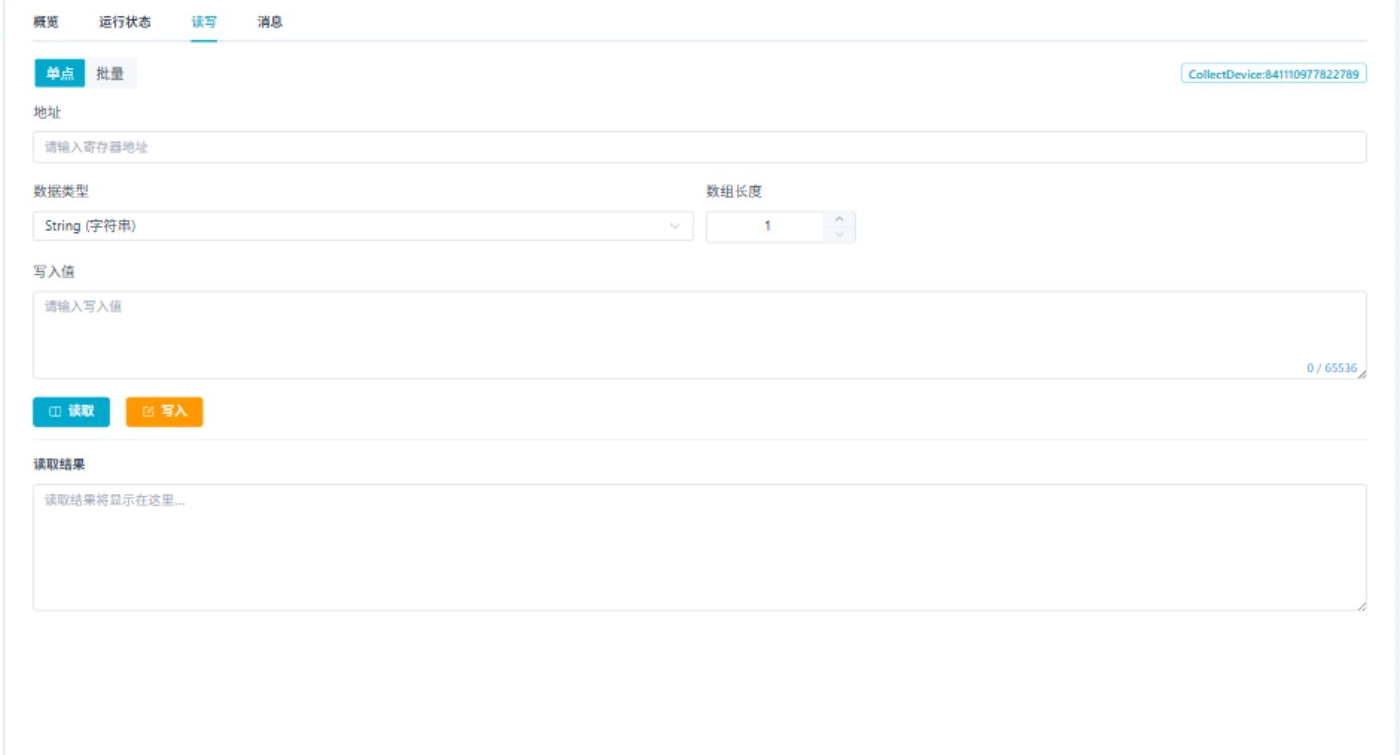
- Select the device in Collection Configuration and use More Functions → Debug to verify protocol address read/write capabilities.
- For MQTT, check connection and protocol actions in the debug page, then match request and response Topics and IDs at an independent client and confirm source readback.
- If using Web API, use the role authorization drawer to confirm API permissions, then check the RPC logs and operation logs.
Foundation debug page is suitable for verifying general address read/write.
Common Issues
| Phenomena | Handling Suggestions |
|---|---|
| Web API returns a permission error | Check variable-write API permission for the current role, then sign in again or refresh permissions. |
| Write button is invisible | Check menu button authorization, variable read/write permissions, and page button permissions. |
| API was called but the write failed | Check data type, input format, device communication, and logs. With write checking enabled, confirm that readback can immediately match the requested value. |
| MQTT unresponsive | checks RPC writing topics, subscribe topics, broker authentication, QoS, TLS, and message logs. |
| Variable-bound method was not executed | Check the selected method, variable write permission, RPC-write permission, paused state, and errors in the RPC log. |
| Direct method was not executed | Check the called device or target's Allow method calls switch, running state, actual method name, positional parameters, and RPC log. |
| OPC UA write failure | Check certificate trust, security policies, username and password, target-level write switch, variable-level write switch, and node writable status. |
| Modbus write fails | Check station number, register address, function code, data type, byte order, both write-permission levels, and the client permission list. |
| After writing, variable values recover again | On-site devices may refuse to write, or the collection cycle may reread the true value; Check device log confirmation. |