OPC UA Client
The OPC UA Client connects to an OPC UA server, browses nodes, reads values, and optionally creates subscriptions for data changes.
Open the plugin
Open Development Configuration → Collection Configuration, create a device, and select OPC UA Client.
This plugin manages its connection in the device properties and does not use an ordinary TCP, UDP, or serial channel. Configure common variables through Collection Configuration.
Plugin properties
Connection and authentication
| Setting | Description |
|---|---|
| Connection URL | Default opc.tcp://127.0.0.1:49320. Enter the OPC UA server endpoint. |
| Username | Username required by the OPC UA server. Leave empty when the endpoint allows anonymous access. |
| Password | Password for the OPC UA user. Do not expose it in screenshots or logs. |
| Security policy | Enables a secure OPC UA endpoint according to the server policy. |
| Accept untrusted certificate | Temporary commissioning option. In production, configure the trust chain instead. |
| Client certificate | Client certificate selected from Certificate Management. Required by the endpoint's security policy. |
Subscription
| Setting | Description |
|---|---|
| Data-change trigger | Selects which OPC UA data changes trigger a notification. Keep the server's required mode. |
| Activate subscription | Enables subscription updates. Disable only when the project uses polling. |
Protocol and data format
| Setting | Description |
|---|---|
| Application name | Default TGateway_OPC_UA_Master. The OPC UA application identity shown to the server. |
| Load server data types | Loads the server's node data types so variables can use the correct runtime type. |
| Use SourceTime | Uses the source timestamp supplied by the OPC UA server when enabled. |
Runtime and grouping
| Setting | Description |
|---|---|
| Update rate | Default 1000 ms. Requests monitored-item sampling in subscription mode; the server may revise it. With subscriptions disabled, it schedules polling groups. It does not set the subscription publishing period. |
| Keep-alive rate | Default 3000 ms. Session KeepAlive interval; 0 selects 5000 ms rather than disabling KeepAlive. |
| Deadband | Default 0. A nonzero value requests an absolute numeric deadband, not a percentage. At zero, the client sends no custom data-change filter. |
| Maximum group size | Default 500. Maximum nodes grouped in one read or subscription operation. |
Data-change trigger options are Status, StatusValue, and StatusValueTimestamp: trigger on status changes, status-or-value changes, or status/value/timestamp changes. Choose the last option when a timestamp-only change must be reported.
Address rule
Regular variables
Use the OPC UA NodeId as the address of a regular collection variable, for example ns=2;s=Channel1.Temperature. Browse and read the node in device debug first, then copy the complete namespace and identifier.
OPC UA method variables
To let an external system call a method on the OPC UA server, create a dedicated variable under the OPC UA device and configure it as follows.
| Setting | Required value |
|---|---|
| Variable name | Use a name that identifies the action, such as Start method or Recipe switch method. External RPC requests use this name to locate the method variable. |
| Other Method | Select CallMethodByNodeIdAsync, currently displayed as 调用 OPC UA 方法 in the plugin method list. |
| Variable address | Enter a standard JSON array containing the object and method NodeIds, for example ["ns=2;s=Machine1","ns=2;s=Machine1.Start"]. The first element must be the object that provides the method; the second must be the method node. |
| Read/Write Permission | Select Write Only. A control method must not enter periodic collection, which could trigger it repeatedly. |
| RPC Write Enable | Enable it. Web API, MQTT, and other external entries reject the call when this permission is disabled. |
| Write Check | Disable it. A method call is not a readable point; verify it from the RPC result and device state. |
After saving the variable, provide the external RPC value in the same order as the OPC UA method's InputArguments. The outer JSON array is the argument list.
| Method inputs | RPC variable value |
|---|---|
| No input arguments | [] |
| One scalar argument | [123] |
| Two arguments | [123, "start"] |
| One array argument | [[1, 2, 3]] |
The client reads the standard InputArguments metadata from the server and converts each JSON value to the declared OPC UA data type. All output arguments are returned in order as a JSON array; a method without outputs returns an empty array.
Bind method variables only to control methods approved for the site. Grant the integration account only the required variable-write permission, and commission the call with an object and parameters that cannot affect production.
External RPC call
Web API
Call /api/gatewaywritevariablecontroller/setvariablevalue. Organize the request as device name → method variable name → input argument array:
{
  "OPC device": {
    "Start method": [123, "start"]
  }
}
The gateway checks that the variable exists, is writable, allows RPC writing, and does not belong to a paused device before calling the OPC UA method. The variable result's Content contains the server output-argument array. For a failed call, inspect ErrorMessage, the RPC log, and the device log.
MQTT and other entries
MQTT RPC and every other entry connected to the variable RPC service use the same method variable. After the target RPC topic or script resolves the device name, variable name, and JSON argument array, it invokes the same OPC UA method. See Reverse RPC for topic, authentication, and response rules.
Device debug
Open Development Configuration → Collection Configuration, select the OPC UA device, and click More Functions, then open Debug.
OPC UA client protocol panel
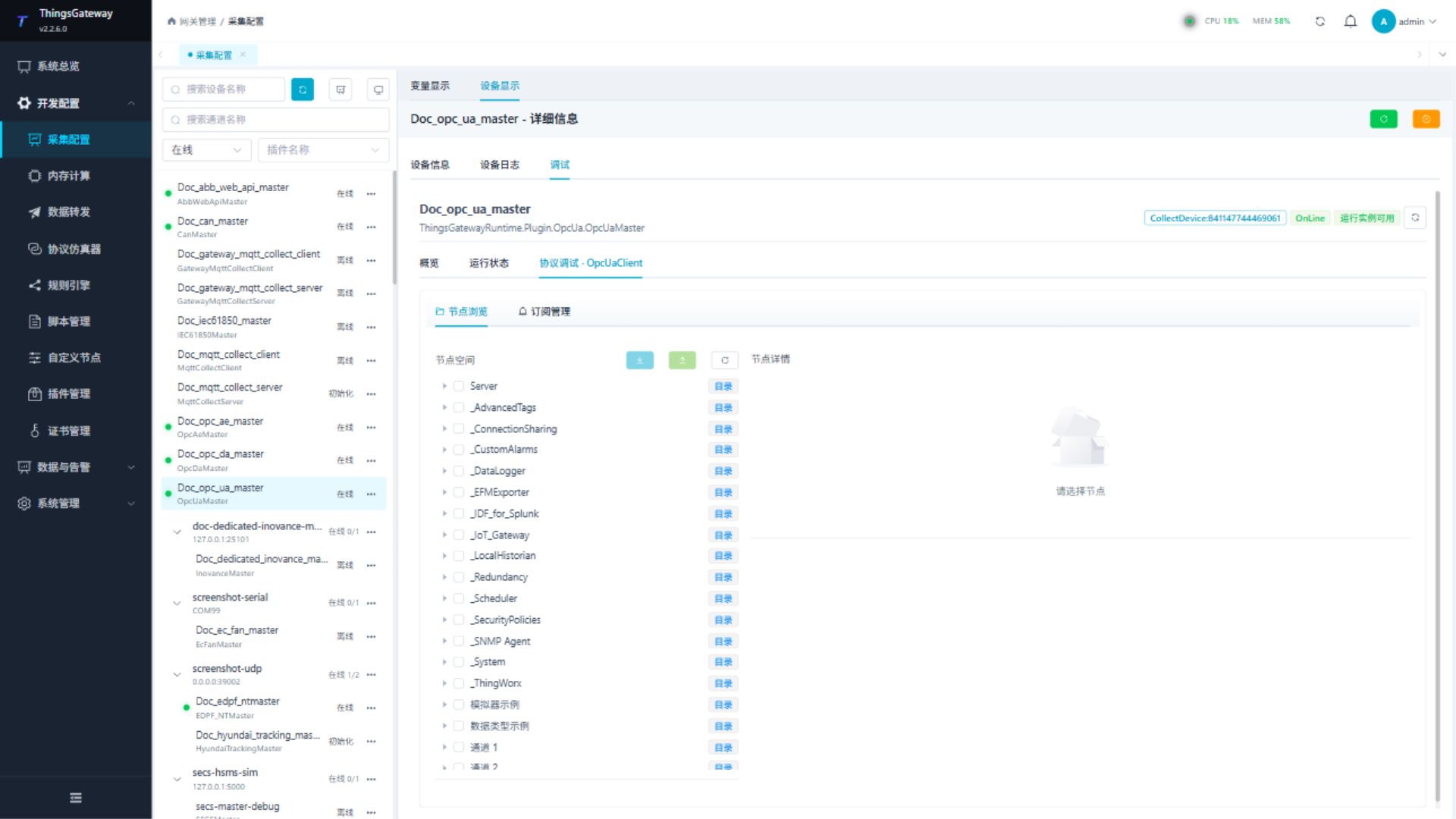
Browse the server namespace, select a node, and read it before importing variables. Use write operations only for approved writable nodes.
Debug checklist
- Confirm the endpoint URL and security mode.
- Browse the namespace and copy the exact
NodeId. - Read one node and compare its value and data type with the server tool.
- Create a subscription only after single-node reading works.
Functions
| Function | Purpose |
|---|---|
| Browse nodes | Browse the OPC UA namespace and inspect NodeId, data type, value, status, and timestamp. |
| Read and write nodes | Read one selected node; write only to a server-approved test node. |
| Export and import | Export selected nodes to a variable file or import them into the current device. |
| Subscription management | Create, inspect, or cancel subscriptions for selected NodeIds. |
Subscription and trust checks
Update frequency requests a monitored-item sampling interval; the server can revise it. It is not the subscription publishing period. Heartbeat 0 uses 5000 ms rather than disabling KeepAlive. Nonzero deadband requests an absolute numeric deadband, not a percentage.
Triggers Status, StatusValue, and StatusValueTimestamp observe status, status/value, or status/value/time changes. The current client submits this custom filter only with a nonzero deadband. With zero deadband, no custom filter is sent. Compare direct reads against subscriptions: with deadband 10, 1234 → 1239 can appear in a direct read without a notification, while 1250 crosses the threshold. Status-only filtering does not notify ordinary value-only changes.
The maximum group size chunks reads and automatic subscription organization; repeated NodeIds in a group can be deduplicated. More groups increase session work. SourceTime selection must be checked against correct server and gateway clocks. After writes, read the source node again; shared duty-cycle/write-priority fields do not establish an automatic read after every OPC UA write.
Accept Untrusted only permits the untrusted-certificate validation case. It does not waive expiry, application-URI, or host-name errors. Establish application certificate trust on both sides and select the proper user identity separately. An endpoint URL must include the actual scheme, host, port, and required path.
Verify the configuration
- Browse to a known
NodeIdand read it. Confirm that the status code is good. - Change the approved test node on the server and confirm that the read result or subscription value updates.
- Import a small set of test nodes and check NodeId, data type, value, and timestamp.
- When subscriptions are enabled, confirm the update rate, data-change trigger, deadband, and group size.
- Write only to a server-approved test node, then read it again.
- Call a non-production test method first and verify the object NodeId, method NodeId, and input-argument count.
- Invoke the method once from the variable write dialog and once from the intended external RPC entry. Compare the output arguments, RPC log, and server-side result.
Troubleshooting
| Symptom | Check |
|---|---|
| Cannot connect | Endpoint URL, server availability, firewall, security policy, certificate trust, and username/password. |
| Certificate rejected | Identify the rejecting side. A client rejection requires checking the server certificate and local trust; a server rejection requires checking its trust in the client application certificate. Check validity and application URI on both sides. |
| Browse returns no nodes | Session security, user permissions, namespace selection, and the starting NodeId. |
| Read returns an error | Exact NodeId spelling, namespace index, node access permission, and server data type. |
| Subscription does not update | Activate subscription, data-change trigger, deadband, update rate, and server subscription limits. |
| Value type is wrong | Enable Load server data types and compare the variable data type with the OPC UA node type. |
CallMethodByNodeIdAsync is missing | Confirm that the device uses the current OPC UA Client plugin and restart TGateway after updating the application. |
| Input-argument count is invalid | The outer RPC array is the argument list. For one array argument, use a nested array such as [[1, 2, 3]]. |
| Input type does not match | Compare the payload with the method's InputArguments data types and value ranks, and confirm that the server publishes the standard metadata. |
| Method is invalid or not executable | Check that the object owns the method, the OPC UA user can execute it, and the method is executable. |
| Method runs repeatedly | Set the method variable to Write only so periodic collection cannot invoke it. |
| External RPC is rejected | Enable RPC writing on the method variable, confirm that the device is not paused, and grant the integration account variable-write permission. |
Related links
- Collection Configuration: Devices, variables, certificates, and common debug entry.
- Certificate Management: Manage client and CA certificates.
- Reverse RPC: Configure Web API, MQTT RPC, permissions, and log verification.
- Plugin Manual Index: Other collection and data-forwarding plugins.