ABB Robot Web Services
This plugin uses ABB Robot Web Services (RWS) to read controller status, IO, joints, robot targets, RAPID tasks, and event logs. It is named AbbWebApiMaster in the device selector.
See Collection Configuration for common device, variable, and interval settings. This page covers only the ABB RWS connection, addresses, methods, and debug tools.
Open the plugin
Open Development Configuration → Collection Configuration, create a device using AbbWebApiMaster, and configure its plugin properties. The plugin opens its own HTTP/HTTPS connection and does not use common TCP, UDP, or serial channel settings.
Supported scope
| Item | Description |
|---|---|
| Channel | Plugin-managed HTTP/HTTPS connection. |
| Data type | String only; complex results are returned as text or JSON strings. |
| Writes | Normal variable writes are not supported. Use the explicit raw POST method only for approved control requests. |
Plugin properties
| Setting | Default | Range | Description |
|---|---|---|---|
| Robot host | 127.0.0.1 | Host name or IP | Enter only the host, without scheme, port, or path. |
| Web API port | 80 | 1 to 65535 | ABB RWS listening port. |
| Use HTTPS | No | Yes / No | Uses HTTPS for robot requests. |
| User name | - | - | Enter when the controller requires authentication. |
| Password | - | - | Password for the configured user. |
| Allow invalid server certificate | No | Yes / No | Use only for a trusted self-signed controller certificate. |
| Request timeout (ms) | 3000 | 1 to 600000 | Timeout for one RWS request. |
| Maximum response bytes | 1048576 | 1 to 16777216 | Rejects larger responses to limit memory use. |
Variable addresses
Use String for every variable.
| Address | Returned content |
|---|---|
CtrlState, ErrorState, SpeedRatio, OperationMode | Controller state, error state, speed ratio, and operation mode. |
jointtarget, PhysicalJoints, robtarget | Joint target, physical joints, and robot target. |
ioin, ioout, io2in, io2out, ServoEnable | Local/extended IO and servo-enable signal. |
log, logN, system | Event logs and system information; N in logN is the log count. |
RapidExecution, RapidTasks | RAPID execution state and task list. |
Special methods
Choose the method under the variable's Special Method field and enter the listed arguments in the variable address field.
| Selector value | Purpose | Arguments |
|---|---|---|
GetRawAsync | Run a raw GET | path=source-relative path |
PostRawAsync | Run a raw POST | path,body,contentType |
GetCtrlStateAsync | Read controller state | None |
GetErrorStateAsync | Read error state | None |
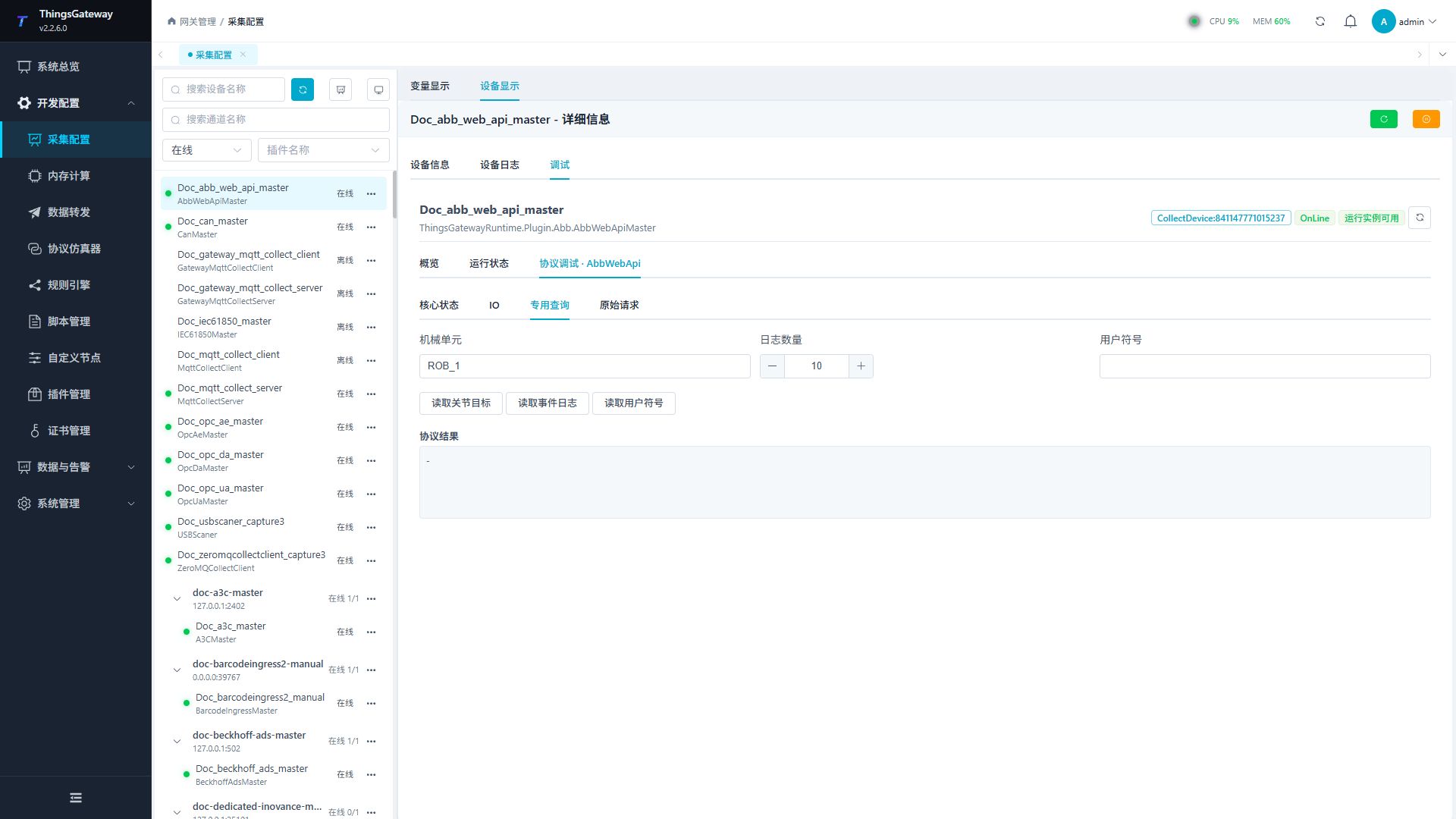
GetJointTargetAsync | Read a joint target | mechanicalUnit, default ROB_1 |
GetSpeedRatioAsync | Read speed ratio | None |
GetOperationModeAsync | Read operation mode | None |
GetIoInAsync / GetIoOutAsync | Read local input/output | None |
GetIo2InAsync / GetIo2OutAsync | Read extended input/output | None |
GetLogAsync | Read event logs | logCount, default 10 |
GetSystemAsync | Read system information | None |
GetRobotTargetAsync | Read robot target | None |
GetServoEnableAsync | Read servo-enable signal | None |
GetRapidExecutionAsync | Read RAPID execution state | None |
GetRapidTasksAsync | Read RAPID tasks | None |
GetUserValueAsync | Read a user value | name=user symbol |
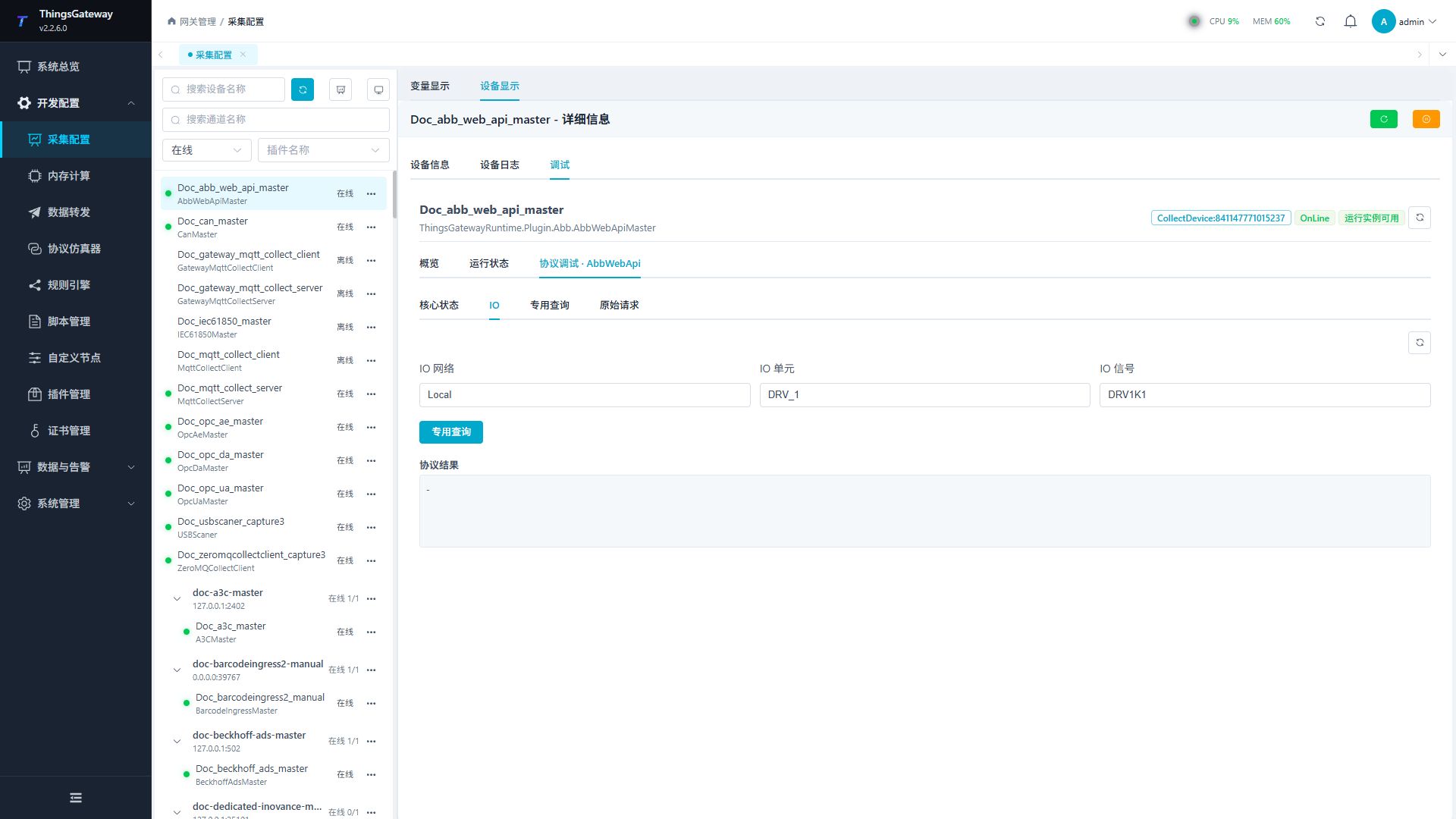
GetIoSignalAsync | Read a selected IO signal | network,unit,signal, default Local,DRV_1,DRV1K1 |
Device debug
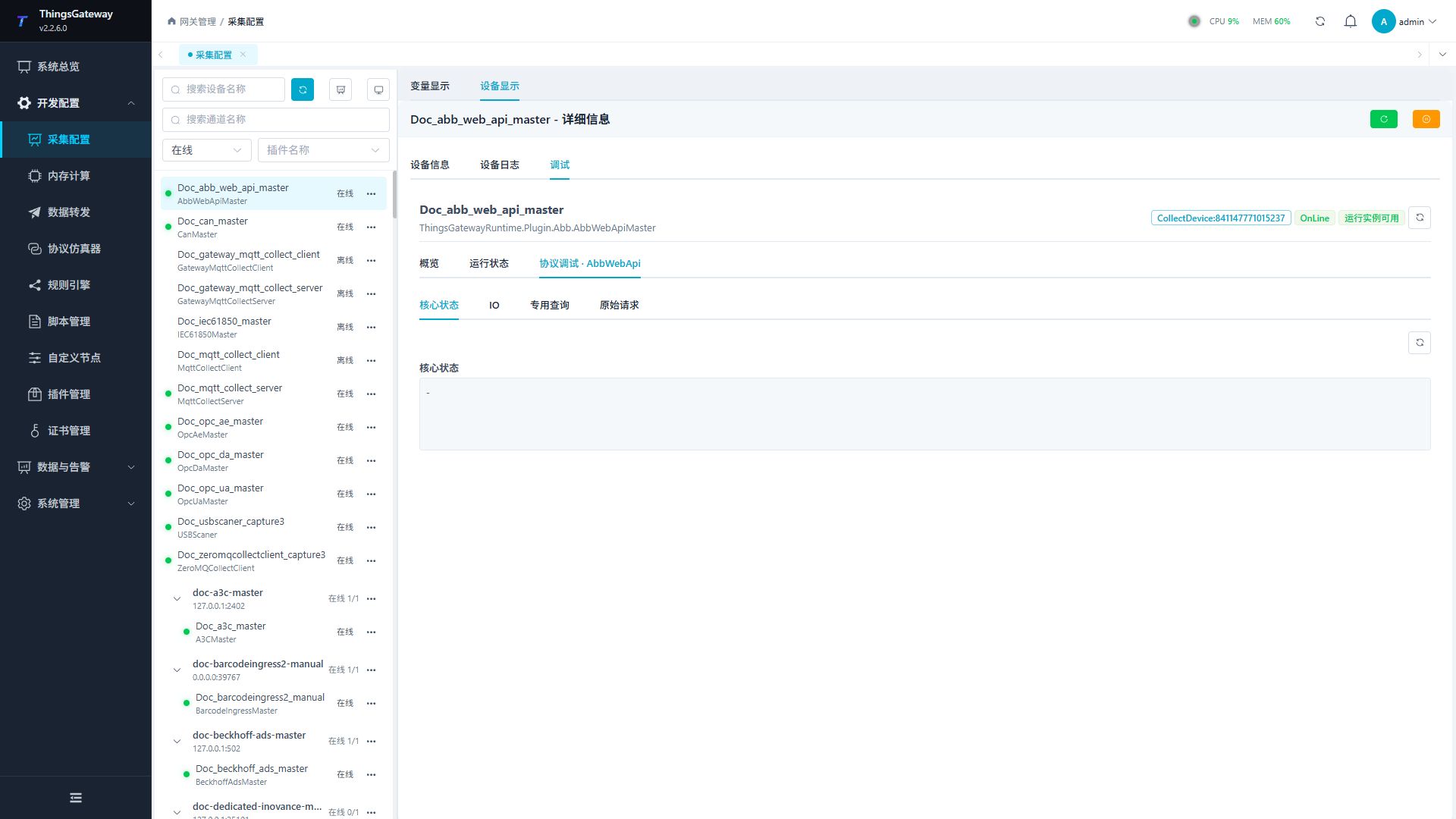
Open Development Configuration → Collection Configuration, select the ABB RWS device, then open Debug → Protocol Debug · AbbWebApi.
| Feature | Purpose |
|---|---|
| Core Status | Shows controller status, authentication, and connection results. |
| IO | Queries an IO signal by network, unit, and signal. |
| Dedicated Query | Queries joints, logs, and user symbols. |
| Raw Request | Runs a GET or POST against an RWS-relative path. |
Core status
Refresh the controller core status first to verify authentication, network access, and the RWS service.
IO
Enter the IO network, unit, and signal, then run the dedicated query.
Dedicated query
Read a joint target by mechanical unit, event logs by count, or a user symbol by name.
Raw request
Enter a device-relative path beginning with /. GET performs a query; POST also requires a request body and media type.
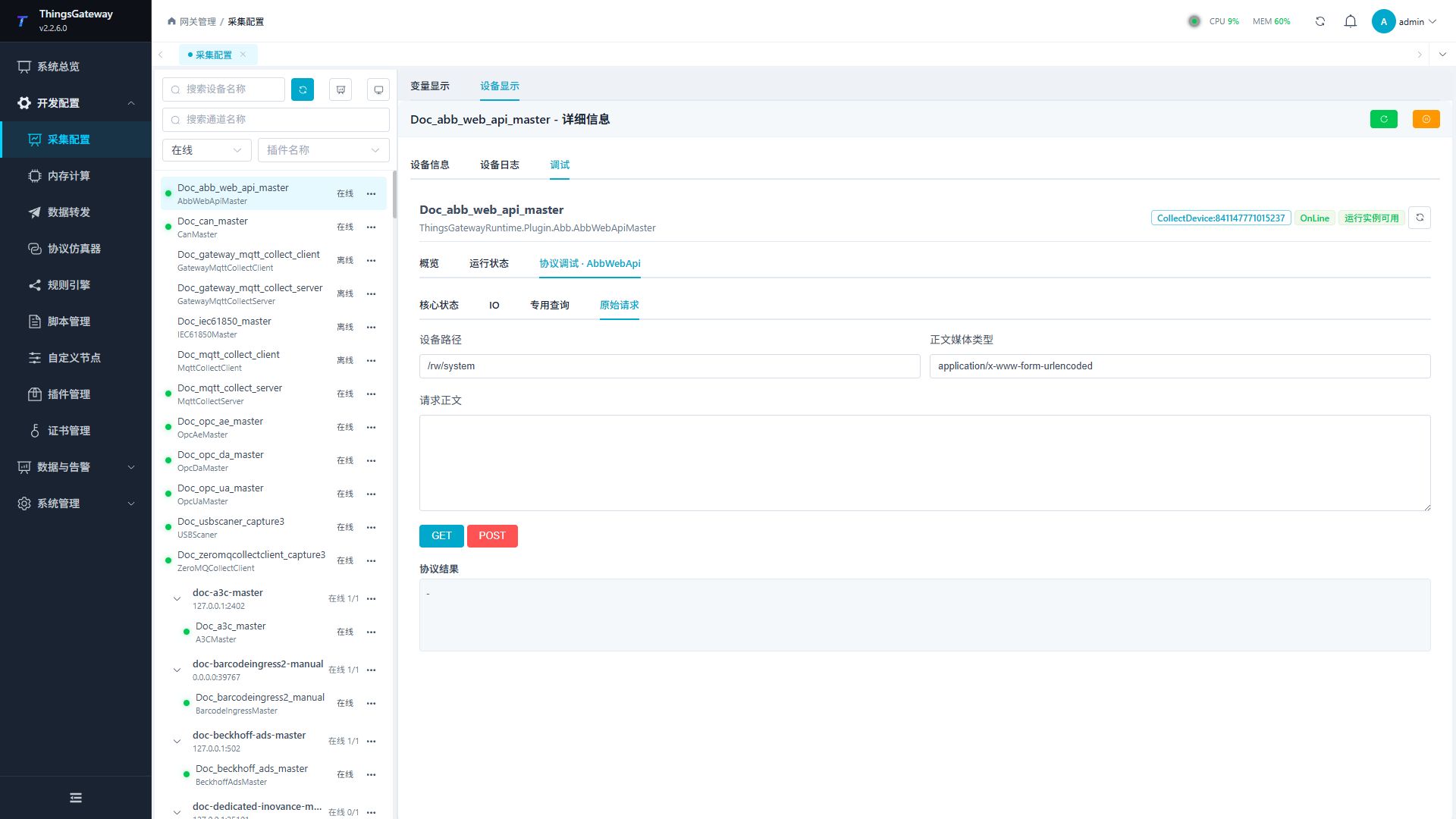
A raw POST can change robot state. Verify the path, body, controller mode, and site safety before using the high-risk action permission to confirm it.
Functions
| Function | Purpose |
|---|---|
| Read or monitor | Read current values or monitor the latest device update. |
| Plugin operation | Use the controls on this plugin page and review the returned result. |
| Read or monitor | Read current values or monitor the latest device update. |
| Raw request | Use Raw request to send or inspect protocol frames and view the device or target response. |
Verify the configuration
- Refresh Core Status and confirm the current controller state is returned.
- Read the
ROB_1joint target or event logs under Dedicated Query. - Configure one
Stringvariable with a supported address and confirm its value updates.
Troubleshooting
| Symptom | Check |
|---|---|
| Unauthorized response | User name, password, and controller RWS permissions. |
| HTTPS connection fails | Port and certificate validity. Ignore certificate errors only for a trusted self-signed certificate. |
| Address has no data | Address spelling, String data type, and controller support for the RWS resource. |
| Response is too large | Increase Maximum response bytes or reduce the log/query scope. |
| Raw request fails | The path must be source-relative; POST also requires the correct body and media type. |
Related links
- Collection Configuration: Common devices, variables, and intervals.
- Plugin Manual Index: Other collection and data-forwarding plugins.