Estun Robot
This plugin uses a fixed Modbus TCP interface to collect Estun robot registers and status and provides project start/stop, error reset, project load/unload, and global-speed control. It is named EstunRobotMaster in the device selector.
Open the plugin and supported scope
Create a TCP client channel and device and select EstunRobotMaster. Supported types include Boolean, Byte, common integers, Float, Double, and String.
See Collection Configuration for common channel, variable, and data-format settings.
Plugin properties
| Setting | Default | Description |
|---|---|---|
| Modbus framing | ModbusTcp | Fixed to Modbus TCP. |
| Robot station | 1 | Must match the controller address. |
| Holding registers per frame | 100 | The status snapshot reads 100 holding registers. |
| Other batch limits | Modbus defaults | Adjust FC1, FC2, FC4, FC15, and FC16 limits only when required by the controller. |
Addresses and special methods
Cyclic variables use standard Modbus 00001, 10001, 30001, and 40001 addresses. Add ;s=2; for station 2 or ;w=16; for FC16 writes.
| Method | Purpose | Parameters |
|---|---|---|
ReadRobotStatusAsync | Read robot status snapshot | - |
StartProgramAsync | Start the current project | - |
StopProgramAsync | Stop the current project | - |
ResetErrorAsync | Reset robot errors | - |
LoadProjectAsync | Load a project | projectName |
UnloadProjectAsync | Unload the current project | - |
SetGlobalSpeedAsync | Set global speed | value |
ResetCommandStatusAsync | Reset command state | - |
Every method except status reading can change robot state. Confirm the safety area, operating mode, emergency stop, and site authorization first.
Device debug
Open Development Configuration → Collection Configuration, select the Estun device and click More Functions, then open Debug → Protocol Debug · EstunRobot.
| Feature | Purpose |
|---|---|
| Robot status | Refreshes robot and current-project state. |
| Project control | Starts, stops, loads, or unloads a project. |
| Maintenance control | Resets errors, sets global speed, or resets command state. |
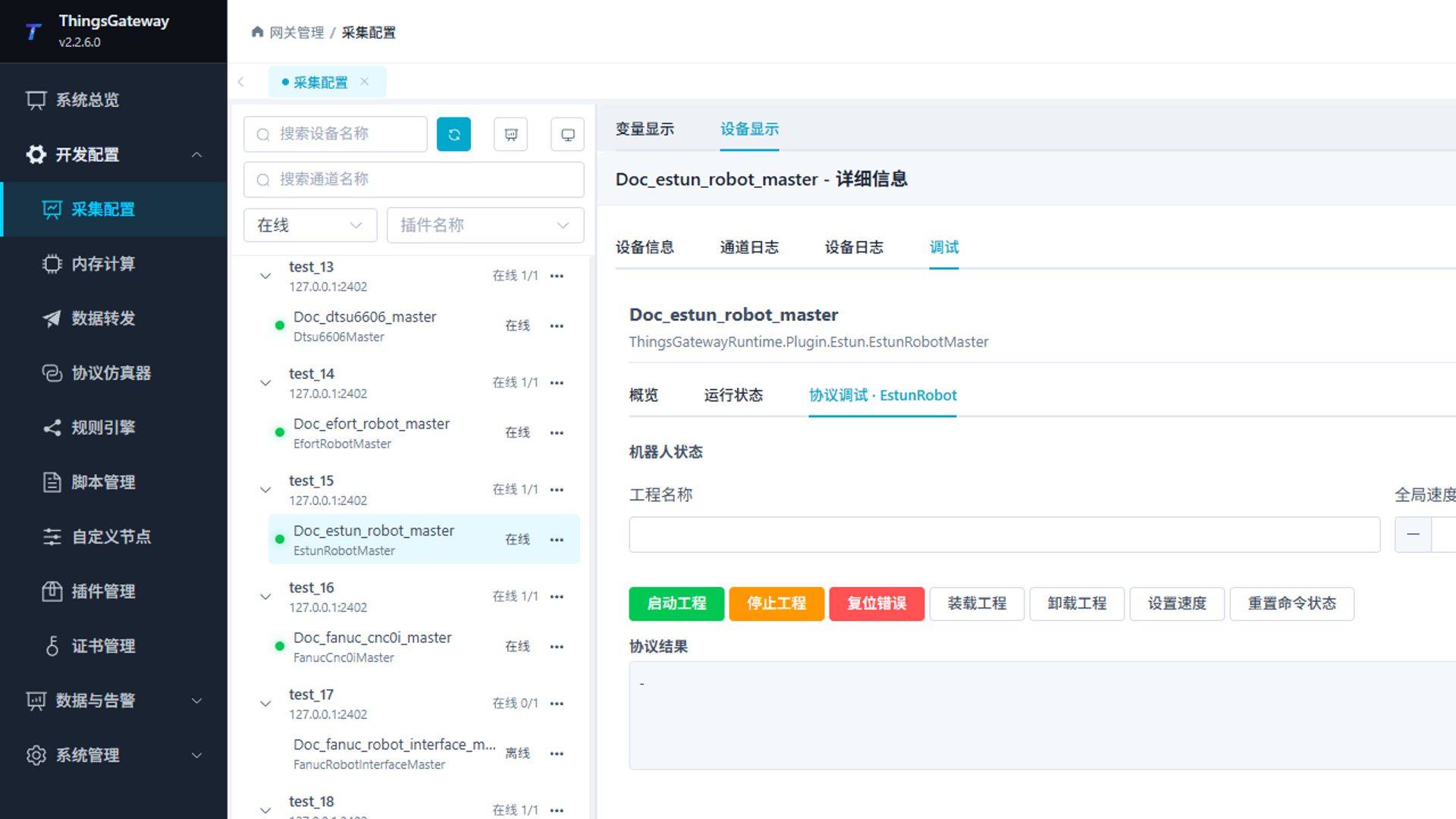
Refresh status first. Use control buttons only after confirming that robot motion or production cannot be affected unexpectedly.
Functions
| Function | Purpose |
|---|---|
| Robot status | Use Robot status to inspect mapped values, status, counters, recent messages, or the latest result. |
| Control operation | Use Control operation with an approved test point and confirm site safety before execution. |
| Maintenance control | Use Maintenance control with an approved test point and confirm site safety before execution. |
Verify the configuration
- Confirm that the device is online and compare robot status with the teach pendant.
- Read one known register variable.
- Test one control only during an approved maintenance window and verify robot feedback.
Troubleshooting
| Symptom | Check |
|---|---|
| Cannot connect | Controller IP, Modbus TCP port, station, and network. |
| Status snapshot fails | Holding-register range, frame limit, and controller permission. |
| Project control is rejected | Robot mode, project name, emergency stop, alarms, interlocks, and user permission. |
| Speed setting has no effect | Speed range, controller mode, and current program state. |
Related links
- Collection Configuration: Common channel, device, and variable operations.
- Plugin Manual Index: Other plugins.