BACnet/IP Master
BACnet/IP Master reads device properties through a UDP channel and supports discovery, paged object browsing, ReadProperty, ReadPropertyMultiple (RPM), priority writes, and COV. For shared device and variable operations, see Collection Configuration. This plugin uses IPv4 BACnet/IP. MS/TP, BACnet/SC, BBMD, and Foreign Device registration are outside its scope.
Create a channel and device
Open Development Configuration → Collection Configuration. Create a UDP channel with a local binding and the remote BACnet/IP endpoint, normally on port 47808. Add a BACnet/IP Master device, save it, and enable it. The channel owns the local binding.
| Parameter | Description |
|---|---|
| Target device instance | 0–4194303. Must match the remote I-Am and each variable's deviceInstance. A device uses its channel's fixed remote endpoint. |
| Broadcast endpoint | Who-Is destination; default 255.255.255.255:47808. Choose the correct subnet and interface. |
| Enable device discovery | Allows Who-Is from the debug panel. An optional instance range limits discovery. |
| Request timeout | 100–120000 ms; default 3000. |
| Maximum RPM properties | 1–32; default 16. Collection splits properties into batches and reads individually when the peer explicitly rejects RPM or segmentation. |
| Maximum datagram bytes | 64–1476; default 1476. Includes BVLL, NPDU, and APDU. A single request that exceeds the limit fails. The minimum must accommodate the standard 50-byte response APDU and outer headers. |
| Write priority | 1–16; default 16. Lower numbers have higher priority. |
| Write application type | Default Real; must match the actual property type. |
| Enable COV subscriptions | Creates object subscriptions while retaining polling for unconfirmed or expired relationships. |
| COV lifetime | 30–3600 seconds; default 300. Renewed before expiry. |
| Maximum COV subscriptions | 1–64; default 32. |
| Confirmed COV notifications | Match the device's capability. Valid confirmed notifications receive an acknowledgement. |
Configure variable addresses
{"deviceInstance":12,"objectType":2,"objectInstance":4,"propertyIdentifier":85}
This example reads Present_Value of Analog Value 4 on device 12. Obtain the actual identifiers from the online device. All fields are numeric. Optional arrayIndex uses 0 for array length and indices starting at 1 for elements. deviceInstance must match the device settings. Common property identifiers include 77 for Object_Name, 117 for Units, and 111 for Status_Flags; check that the object supports them.
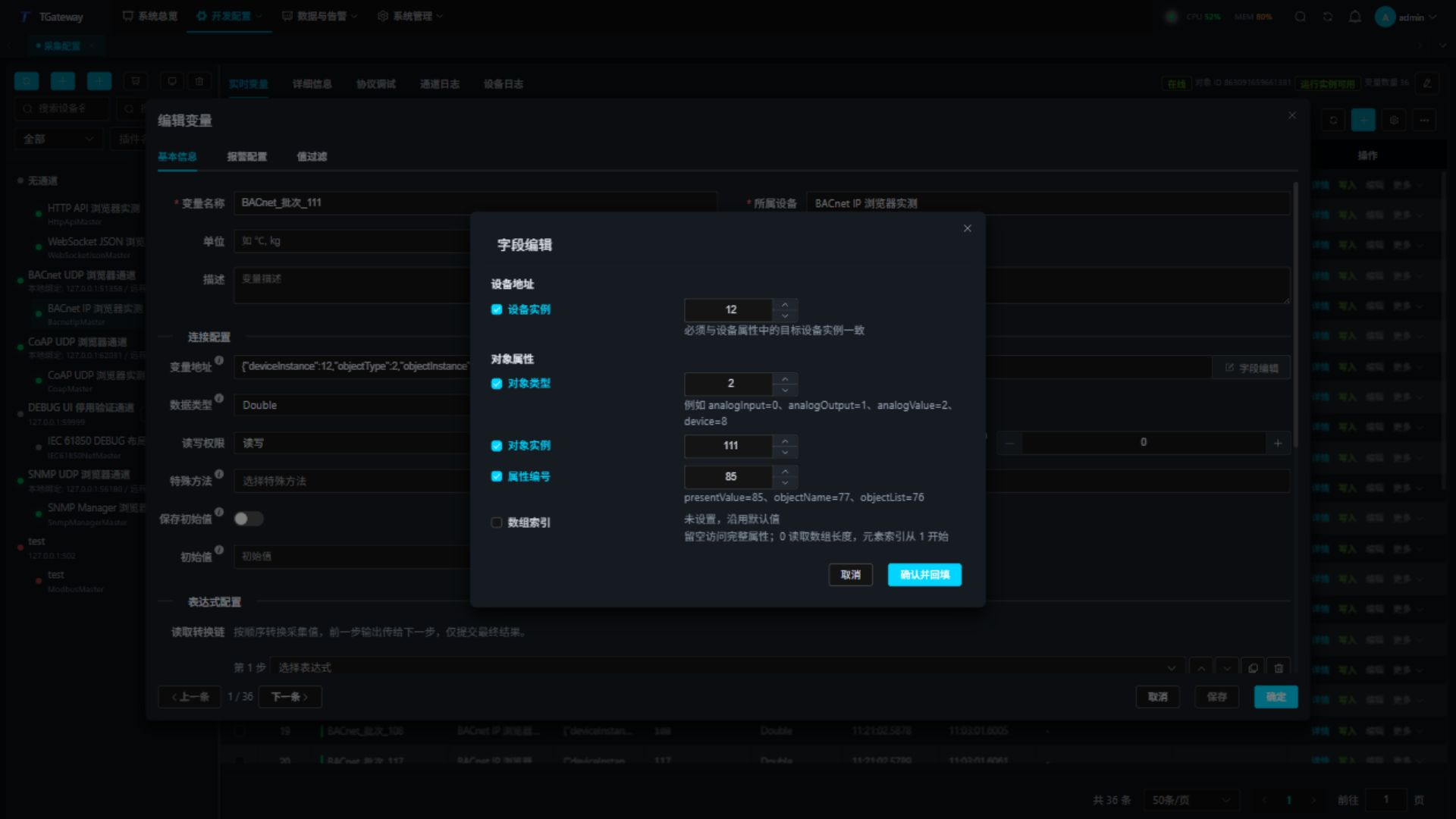
- Add or edit a variable in Real-time Variables and open Field editor beside its address.
- Enter the device instance, object type, object instance, and property identifier. Enable the array index only when needed; enter 0 explicitly to read the length.
- Confirm and fill back the address, review the generated JSON, then save the variable.
- Reopen the editor to verify the saved fields. Cancel discards changes in the field editor.
Check real-time values
Enable the variables and open Real-time Variables. Check the configured address, runtime source address, value, online state, and error for every point. Collection time advances on successful reads; change time can remain unchanged while the value stays the same. Change a source value or perform an authorized write, then verify the value and change time.
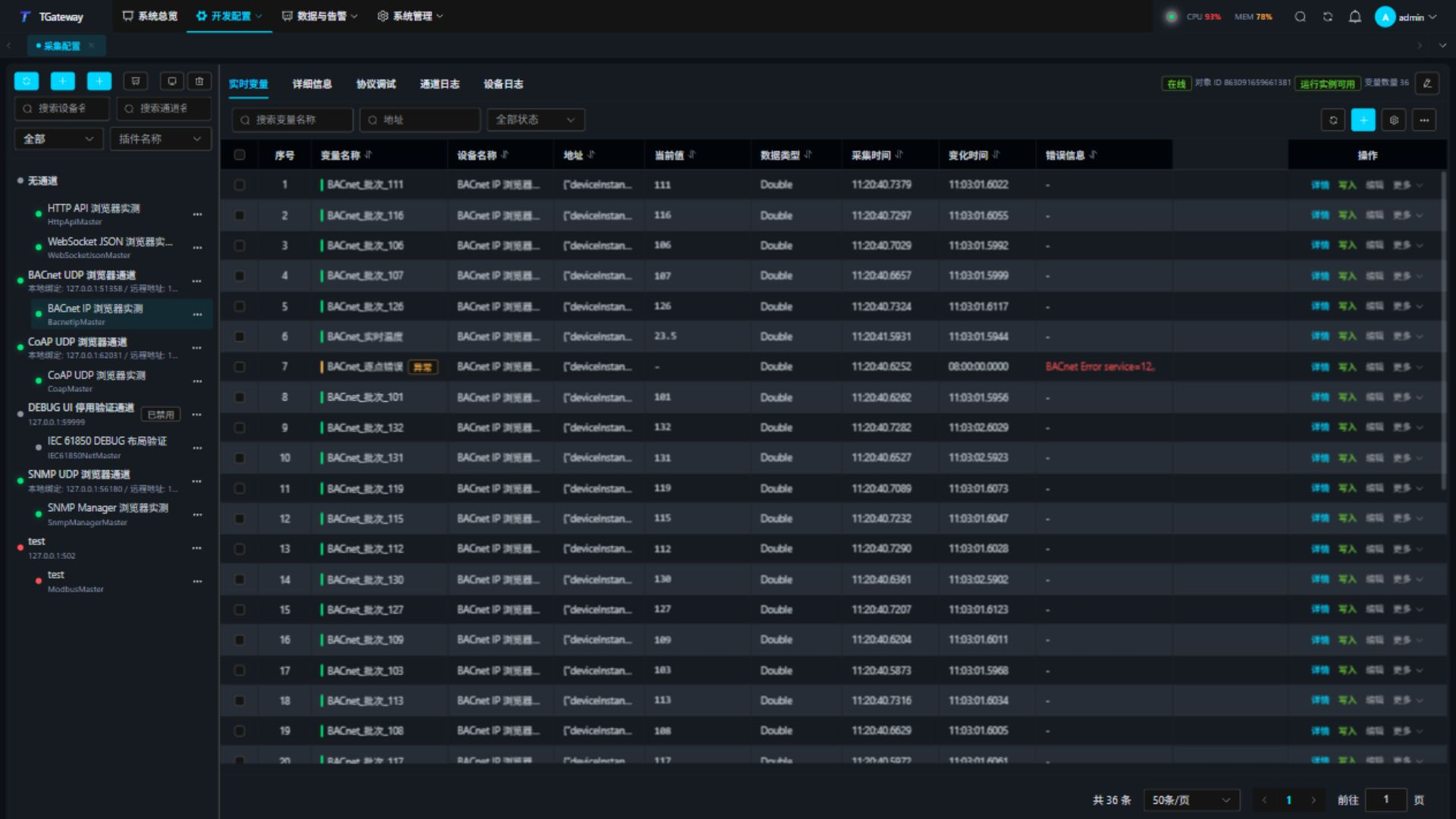
An invalid object, property, or array index reports an error for that variable without preventing other valid points from updating. After correcting it, confirm that the point returns online and its error clears.
Protocol debugging
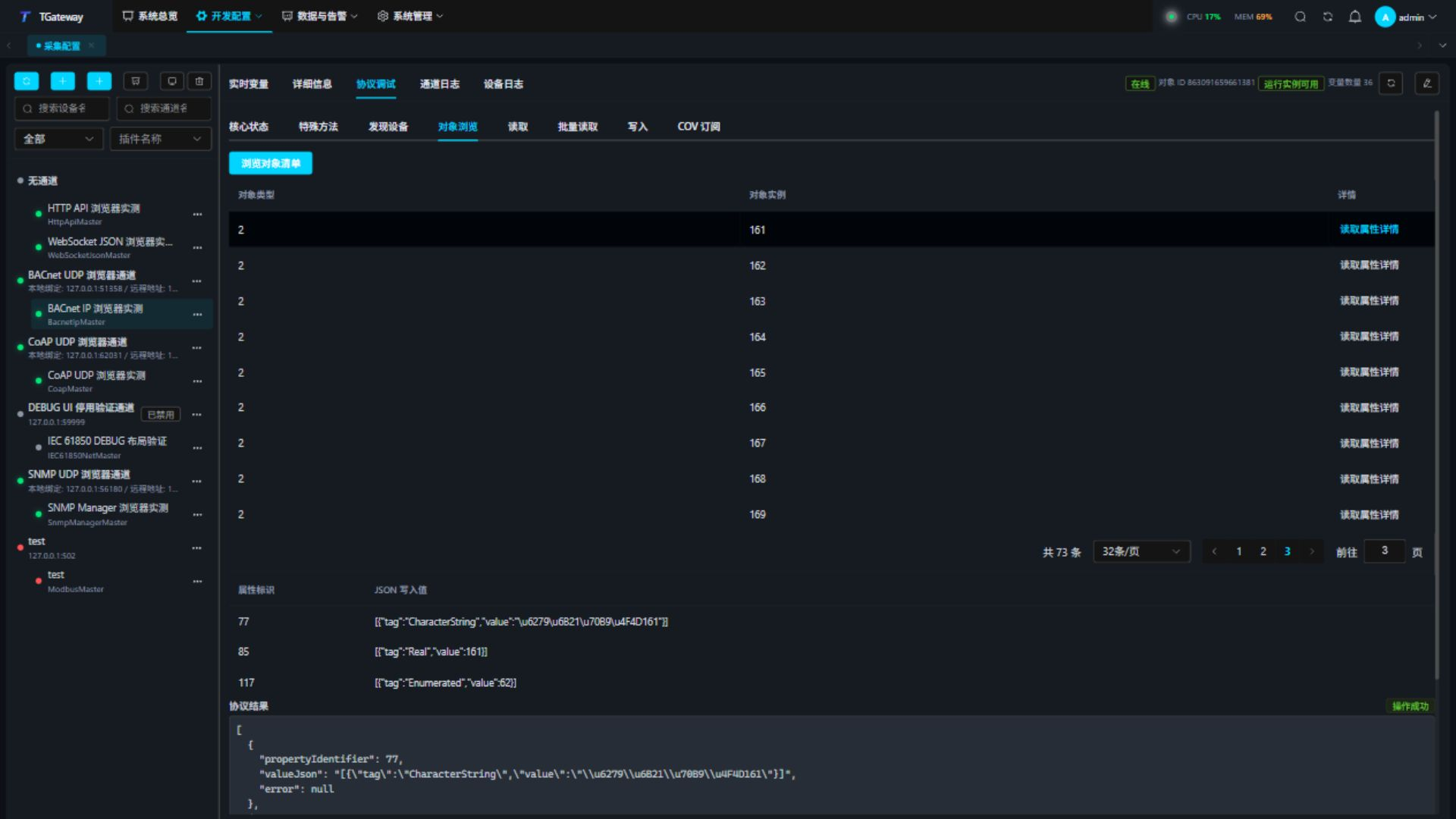
Select the device and open Protocol Debug. Core Status shows device capability and datagram budgets; Special Methods and the protocol tabs follow it. Use the workspace Refresh action to update status. Discovery results, COV relationships, errors, and notifications have separate pagination, with 20 rows per page by default. Auto-refresh preserves the current page. Object browsing reads at most 64 objects per page. Display pagination does not change RPM batches or APDU capability.
- In discovery, enter both instance limits or leave both empty. Check the returned instance, endpoint, vendor, maximum APDU, and segmentation capability. Discovery does not change the channel's remote endpoint.
- Browse objects by page. The plugin first reads Object_List length, then the requested array indices.
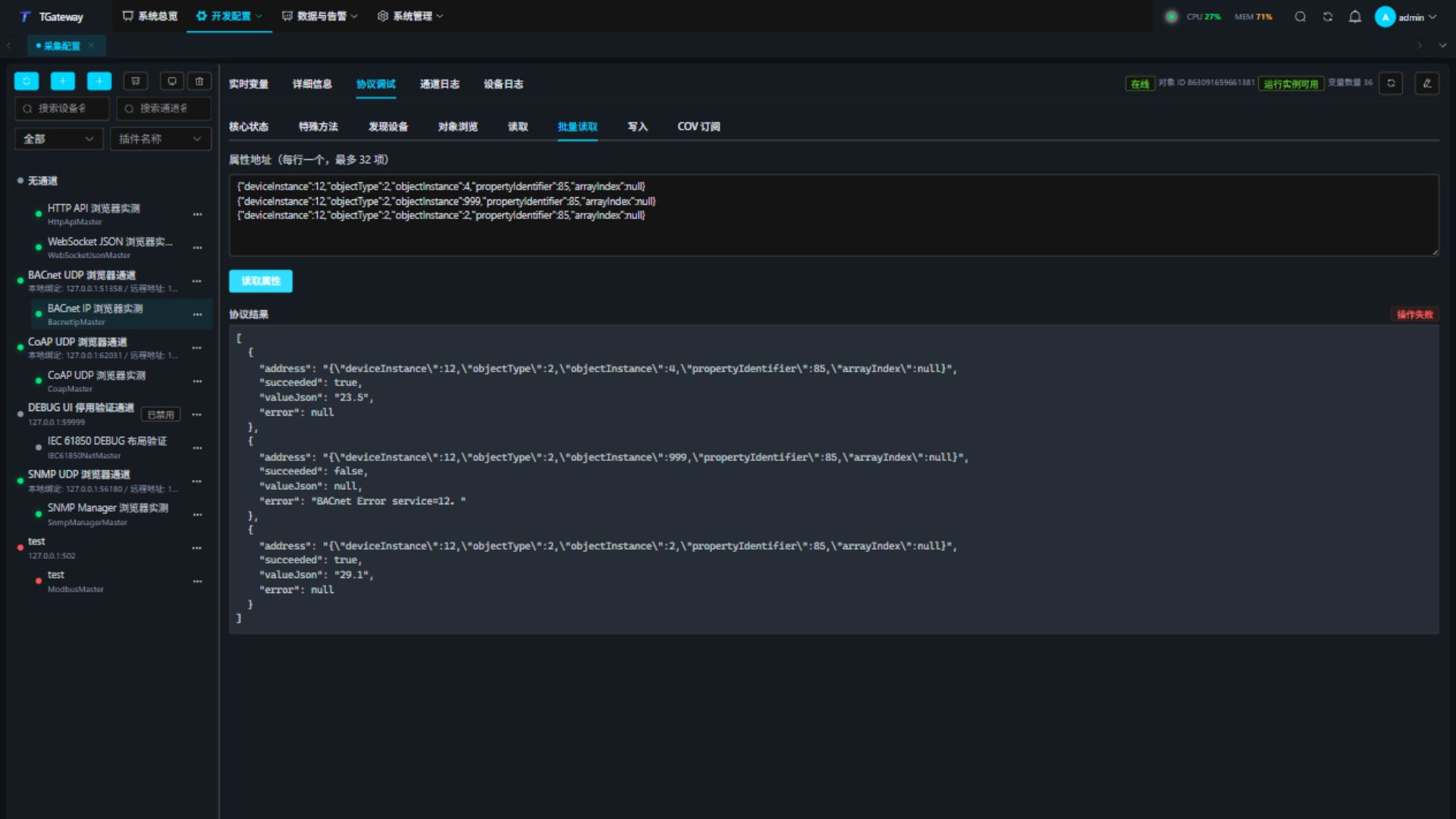
- Read a full property address. For batch reads, enter one address per line, up to 32, and inspect each result.
- Before writing, read the current value, type, and priority. Enter the JSON value, application type, and priority, confirm, then read back.
- Relinquish priority writes Null into the selected slot. Present_Value may still be controlled by another priority.
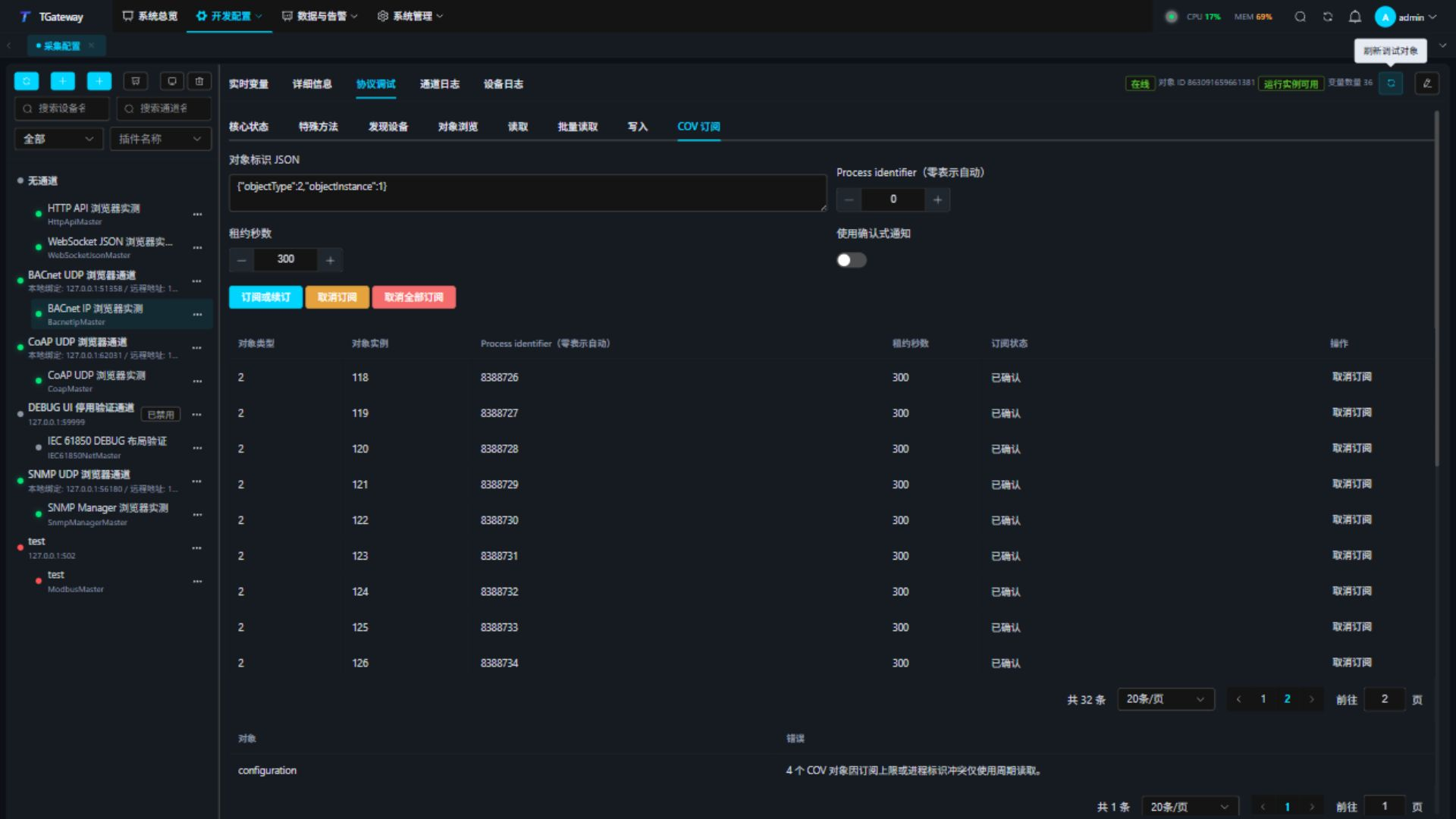
- Create a COV relationship and check confirmation, retry/cancellation state, lease, and recent notifications. Change the source value to verify updates, then cancel the test relationship.
Batches, segmentation, and small devices
Collection groups properties into RPM batches of 1–32. Every request must also fit the complete datagram budget. The advertised response APDU size uses a standard size that fits the remaining space after BVLL and NPDU; a 64-byte datagram budget advertises a 50-byte APDU. Explicit RPM rejection, segmented ComplexACK, or a local size limit triggers individual ReadProperty requests in the original order. Each point retains its own result. Malformed, missing, duplicate, or mismatched acknowledgements fail directly.
All chunks and individual fallback reads in one batch operation share the configured request timeout. The deadline does not restart for each point. Reaching it fails the whole operation with a timeout; cancellation stops the remaining reads. Adding points does not multiply the wait when the remote device is offline.
Object_List is read by length and array indices rather than as a whole array. For devices that accept only individual reads, set maximum RPM properties to 1. Collection, property details, special methods, and debugging then use ReadProperty individually.
Include valid addresses and one invalid address in a batch. Inspect each succeeded and error, including valid points after the failed one. The overall panel reports failure when any point fails. This example uses one property per batch and a 64-byte complete datagram budget:
Each manual COV relationship retains its own process ID, lifetime, and confirmation mode. Failed cancellation stops renewal and is retried. Device shutdown cancels relationships and closes the channel within a bounded deadline. Only notifications matching the device, object, property, and array index update a variable.
Writes support Null, Boolean, Unsigned, Signed, Real, Double, OctetString, CharacterString, Enumerated, and ObjectIdentifier. BitString, Date, and Time are currently read types. CharacterString uses UTF-8, including Chinese characters.
Special methods
Open Protocol Debug → Special Methods. Switching protocol tabs preserves the current device's drafts and results.
| Method | Parameters and purpose |
|---|---|
| DiscoverDevicesAsync | Optional lowLimit and highLimit; sends Who-Is and returns bounded results. |
| BrowseObjectsAsync | startIndex starts at 1; pageSize is 1–64. |
| ReadPropertyAsync / ReadPropertiesMultipleAsync | A single addressJson, or addressesJson containing an array of JSON address strings. |
| WritePropertyAsync / RelinquishPropertyAsync | Property address, application type / JSON value, and priority; waits for the peer's response. |
| SubscribeCovObjectAsync | objectJson, such as {"objectType":2,"objectInstance":4}, plus process identifier, lifetime, and confirmation mode. |
| CancelCovObjectAsync / CancelAllCovAsync | Cancels one object relationship or all relationships for the device. |
Enter parameters as a JSON array in method order, or use the field editor. Trailing optional parameters can be omitted. Discovering only instance 12 uses [12,12]. Browsing 16 objects from index 65 uses [65,16]; a final page may contain fewer rows while preserving the total count.
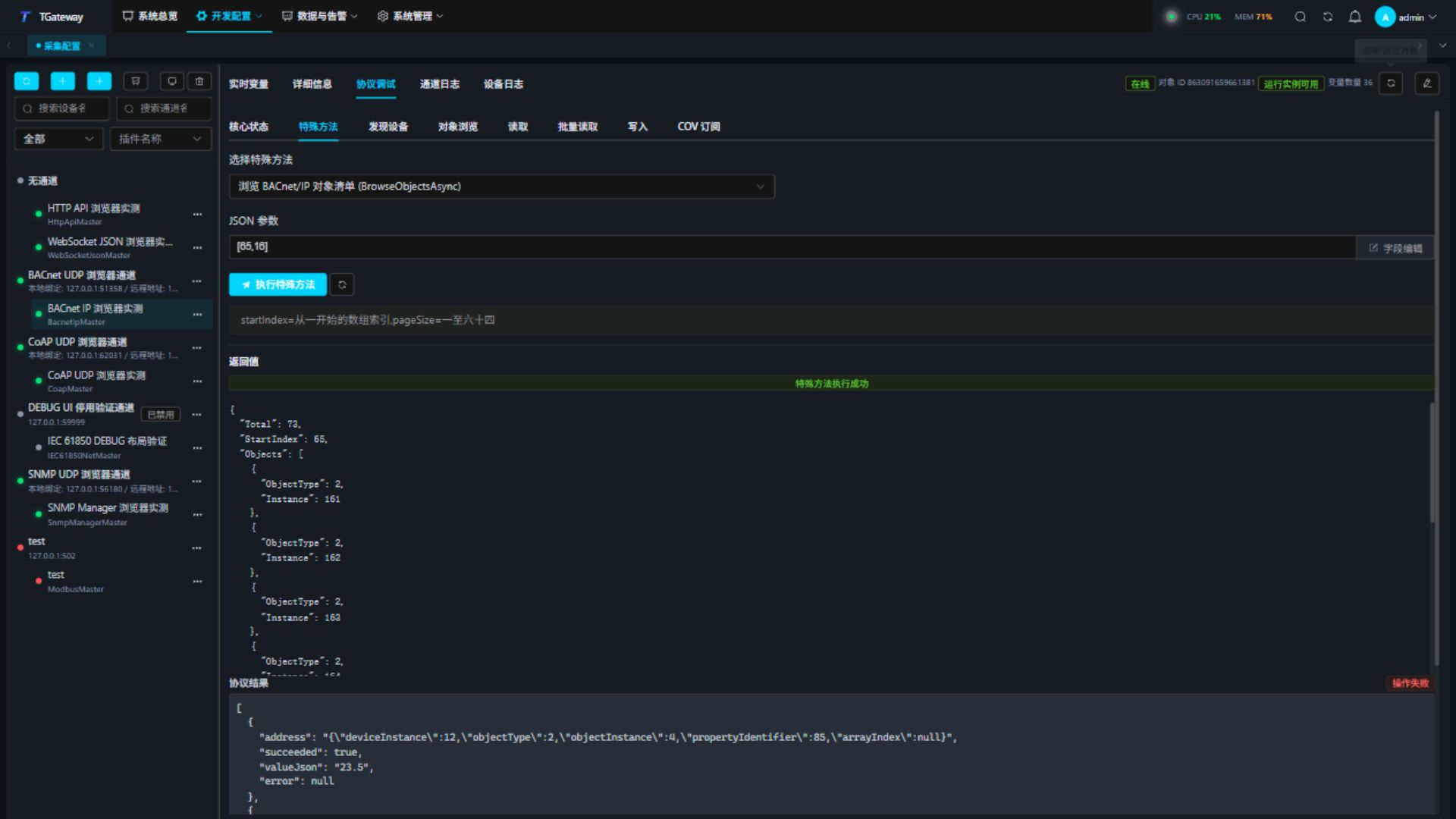
A successful special-method invocation can still contain per-property errors. Inspect every Error. A ReadProperty address is a string parameter and requires JSON escaping:
["{\"deviceInstance\":12,\"objectType\":2,\"objectInstance\":4,\"propertyIdentifier\":85}"]
Troubleshooting
| Symptom | Check and action |
|---|---|
| No discovery results | Check broadcast subnet, interface, UDP binding, firewall, and instance range. Directed reads use a different path from broadcast discovery. |
| Wrong source or timeout | Check the remote endpoint, device instance, and port. |
| One RPM property fails | Inspect its error and verify object, property, array index, and service support. |
| RPM rejected or segmented ComplexACK | Inspect the individual read results. Malformed or incomplete acknowledgements fail without retrying as individual reads. |
| Write accepted but value unchanged | Read Priority_Array, Present_Value, and Out_Of_Service; check higher priorities. |
| No COV notifications | Check support, lifetime, confirmation mode, increment threshold, and relationship state. Verify polling first. |