SNMP Manager
SNMP Manager collects Agent OIDs, performs Set, GetNext, Walk, and GetBulk, and receives Trap/Inform notifications. For shared operations, see Collection Configuration. To publish gateway variables as an Agent, use the SNMP Agent forwarding plugin.
Create a channel and device
Open Development Configuration → Collection Configuration. Create a UDP channel with a local binding and the Agent endpoint, normally on port 161. Add an SNMP Manager device, select the matching version and security settings, save it, and enable it.
| Parameter | Description |
|---|---|
| SNMP version | V1, V2c, or V3. Authentication failure does not downgrade the version. V1 has no GetBulk. |
| Community | V1/V2c credential; must match the Agent and notification sender. |
| USM username and contextName | V3 identity and context configured by the Agent. |
| USM security level | NoAuthNoPriv, AuthNoPriv, or AuthPriv. Match the authentication and privacy settings. |
| USM authentication | MD5 or SHA1 with the matching passphrase. Store credentials in device settings. |
| USM privacy | AES128 for AuthPriv, with the required authentication settings. |
| Request timeout | 100–120000 ms; default 3000. |
| Maximum message bytes | Default 65507. Limits the complete BER request and response, including USM and varbind overhead. Minimum 64 for v1/v2c, 484 for v3. V3 advertises this value as msgMaxSize. |
| Maximum Walk varbinds | 1–4096; default 1024. Bounds traversal. |
| GetBulk repetitions | 1–128; default 16. A response is also limited to 512 varbinds. Walk switches to GetNext when the Agent explicitly rejects Bulk. |
| Enable Trap/Inform reception | Creates a notification listener owned by this device; a second collection channel is unnecessary. |
| Notification binding | Default 0.0.0.0:162. Choose a suitable interface and free port. |
| Notification authoritative engine ID | Required for v3 notifications: 5–32 bytes in hexadecimal. Keep it stable and unique. |
| Recent notification capacity | 1–1024; default 64. |
| Maximum notification datagram bytes | Default 65507. Separately limits notification reception and acknowledgements; minimum 64 for v1/v2c and 484 for v3. |
Configure OID variables
{"oid":"1.3.6.1.2.1.1.3.0","syntax":"TimeTicks"}
Use numeric OIDs, optionally with one leading dot. Confirm the OID and write permissions against the target MIB and Agent.
| Syntax | JSON value |
|---|---|
| Integer | Signed 32-bit integer, from -2147483648 to 2147483647. |
| BitString | Boolean array in most-significant-bit order, for example [true,false,true]. |
| Counter32 / Gauge32 / TimeTicks | Unsigned 32-bit number. Unsigned32 shares Gauge32 encoding; TimeTicks uses hundredths of a second. |
| Counter64 | Unsigned 64-bit number. Preserve large-integer precision in downstream systems. |
| OctetString / Opaque | Base64 string preserving the original bytes. |
| ObjectIdentifier / IpAddress | Numeric OID string / IPv4 string. |
| Null / NoSuchObject / NoSuchInstance / EndOfMibView | Null or protocol exception semantics. Exception values are not normal collection values. |
For example, text browser-set is the OctetString JSON value "YnJvd3Nlci1zZXQ=". SNMPv2 MIB BITS normally uses OCTET STRING and must be interpreted according to its MIB; standalone ASN.1 BIT STRING uses the Boolean array above.
Reads and writes enforce each syntax's numeric range. Values outside Integer or unsigned 32-bit ranges are rejected without truncation. Use Counter64 over v2c/v3 for unsigned 64-bit counters. IpAddress requires a four-byte IPv4 value; encoding sixteen IPv6 bytes with this syntax produces a protocol error.
V1 responses cannot contain Counter64, NoSuchObject, NoSuchInstance, or EndOfMibView, and error-status must be 0–5. Receiving these v2c/v3 syntaxes or an extended error-status fails the read with a protocol error. Check the versions configured on the Manager, Agent, and notification sender. An Agent should report noSuchName for a missing object queried over v1.
- Add or edit a variable in Real-time Variables and open its address Field editor.
- Enter the complete numeric OID and the MIB's ASN.1 type. A leading dot is removed when filling back.
- Confirm and fill back, inspect
oidandsyntax, save the variable, and reopen it to verify.
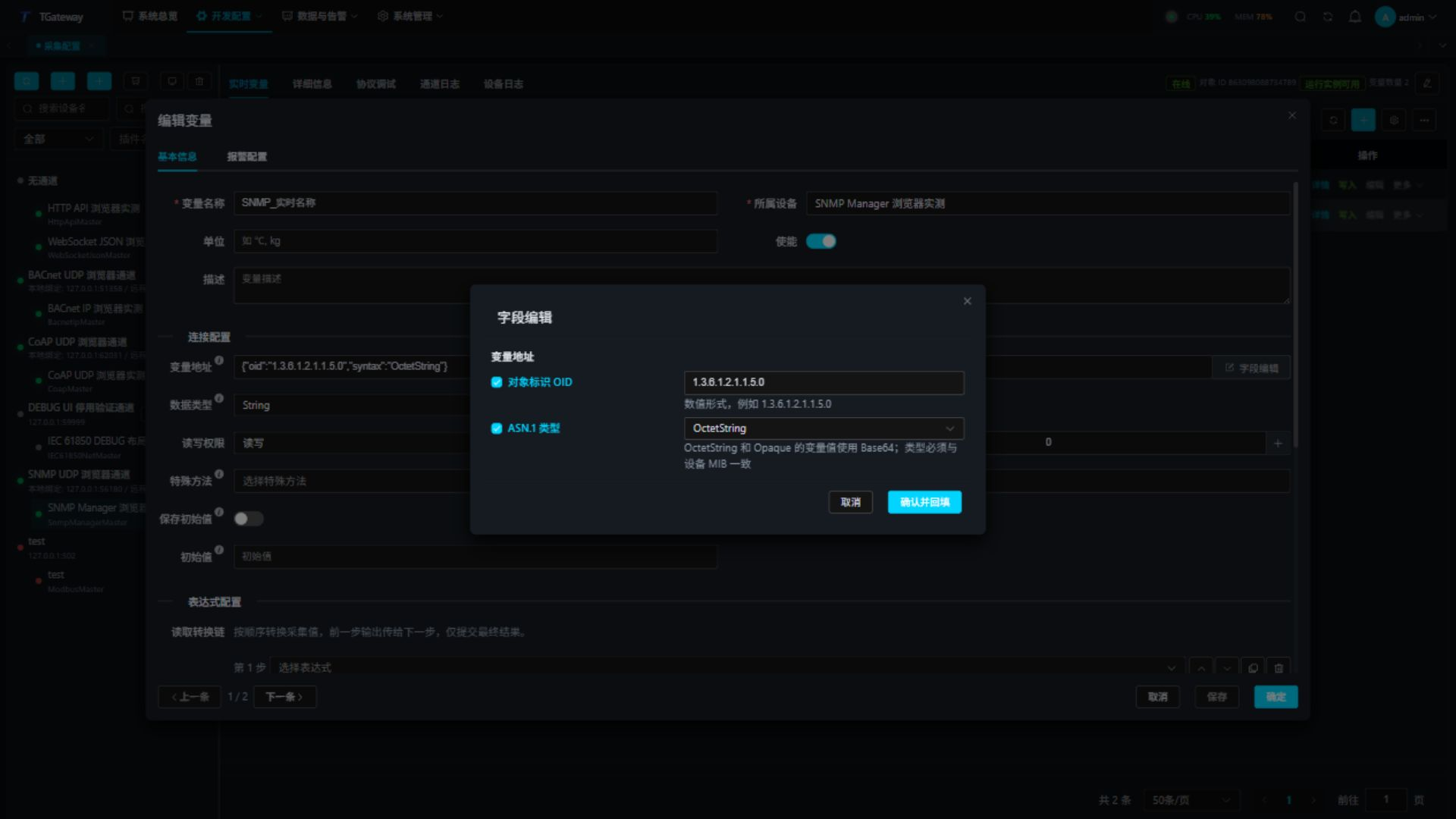
NoSuchObject, NoSuchInstance, and EndOfMibView are response exceptions and should not be configured as variable types. V1 variables cannot use Counter64. Cancel discards editor changes.
Check values and notifications
In Real-time Variables, inspect each OID, value, online state, collection time, and error. Successful Get requests advance collection time; change time advances only when the value changes. Matching Trap/Inform notifications also update variables. OctetString values are shown in Base64.
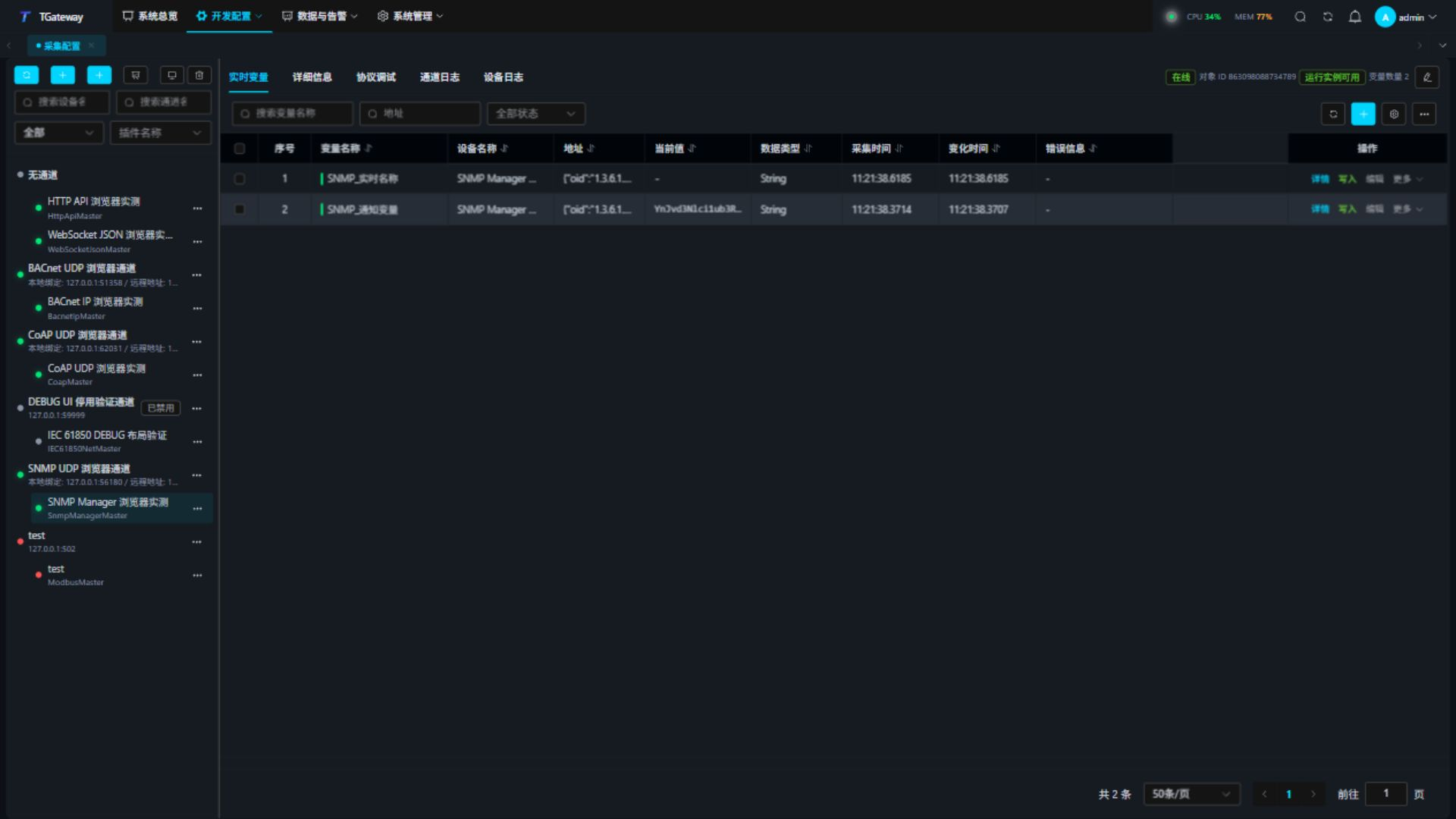
After sending a notification, also inspect its source, OIDs, contents, and Inform acknowledgement in Trap / Inform. Verify Manager requests and notification reception separately.
Protocol debugging
Select the device and open Protocol Debug. Core Status shows connection, security settings, message budgets, and listener state. Use the workspace Refresh action to update status. Notification pagination defaults to 20 rows and preserves the current page during updates; it does not change GetBulk repetitions or message budgets.
- Use Read for Get. GetNext returns the next OID in numeric lexicographic order; inspect the returned address.
- For Batch Get, enter one
{oid,syntax}address per line, up to 32. - For Walk, enter a root OID and limit. Traversal stays within that subtree. V1 uses GetNext; v2c/v3 start with GetBulk and switch to GetNext on explicit rejection.
- For GetBulk, enter the OID, nonRepeaters, and maxRepetitions. Use GetNext or Walk for v1.
- For Write, enter the typed address and JSON value, confirm Set, then Get the value back. A successful Set requires a matching remote OID, type, and value echo.
- In Trap / Inform, inspect version, notification type, source, USM user, and varbinds. An acknowledged Inform means the receiver sent an acknowledgement. Trap has no delivery acknowledgement.
Batches and small Agents
Polling uses an individual Get for each OID. Debug batch Get accepts up to 32 OIDs; a single Manager request accepts up to 128 varbinds. GetBulk also observes its repetition, 512-varbind response, and byte limits. When WalkBulk is explicitly rejected after successful pages, traversal resumes with GetNext from the last successful OID. If the first page is rejected, it starts from the root. The entire traversal and retry sequence share one deadline. Malformed BER, non-increasing OIDs, source mismatches, and timeouts fail the operation.
This example uses a 64-byte Manager budget and one repetition: the first Bulk page succeeds, the next is rejected, and GetNext retrieves the remaining entries. Check all four OIDs and their order:
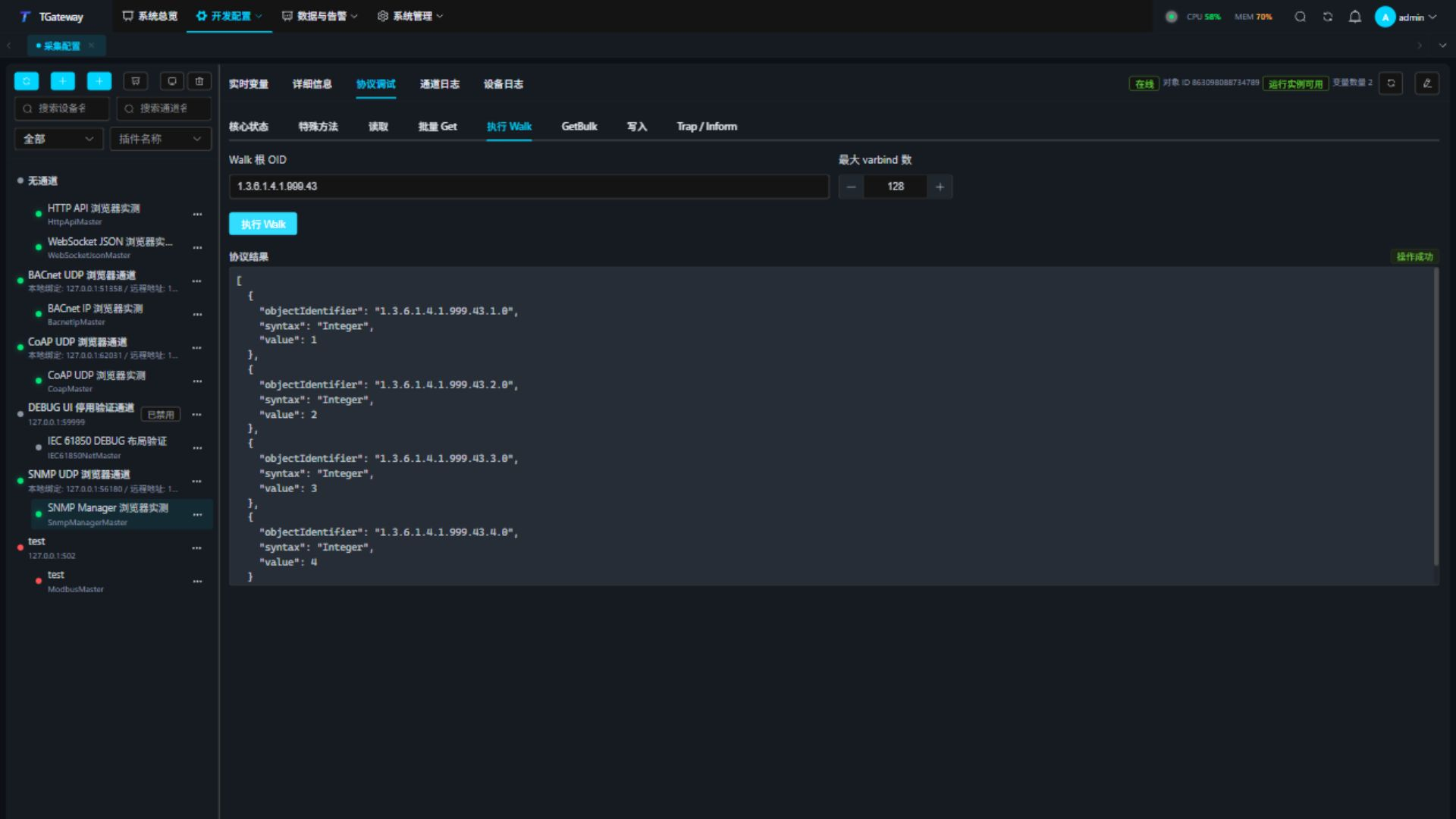
A GetNext timeout during the continued traversal fails the whole Walk without returning partial success. User cancellation remains a cancellation. After correcting the problem, issue a new Get to verify recovery.
Trap/Inform uses a separate listener and request state. With reception enabled, the debug panel refreshes listener state every 1.5 seconds. Check Manager responses and notifications independently.
In a V1 Trap header, agent-addr must be a four-byte IPv4 address, generic-trap must be 0–6, specific-trap must be a signed 32-bit integer, and the TimeTicks timestamp must be 0–4294967295. Invalid headers record a notification parsing error without entering the recent-notification cache or updating variables. Valid notifications continue to work after correcting the sender.
SNMP does not split a BER message at the application layer. Start with single Get and one Bulk repetition for small Agents. A single long value can exceed the byte budget even when there is only one varbind. Reduce repetitions or adjust the data or budget; truncated data is not a valid result. V3 needs at least 484 bytes including its security envelope.
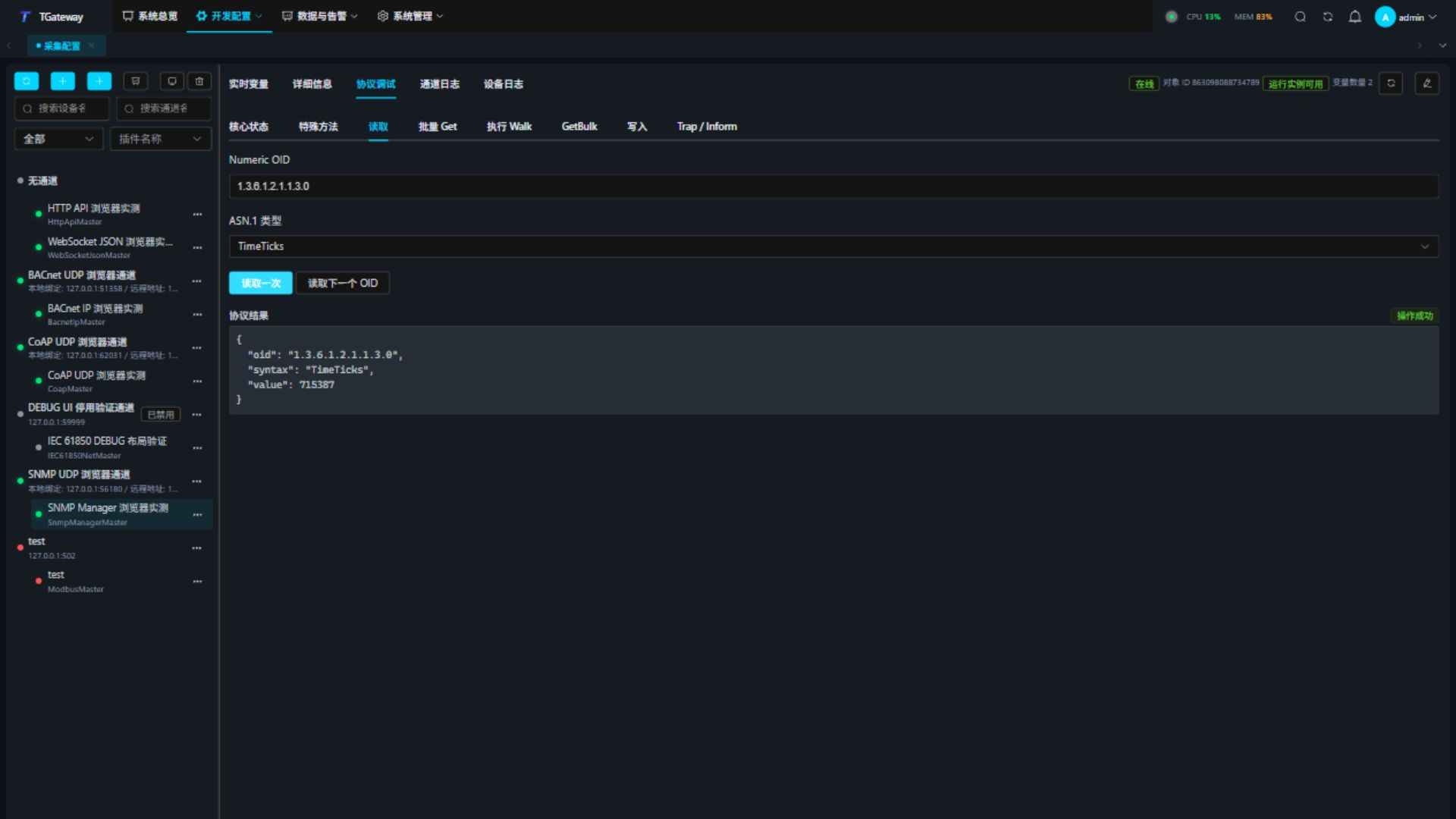
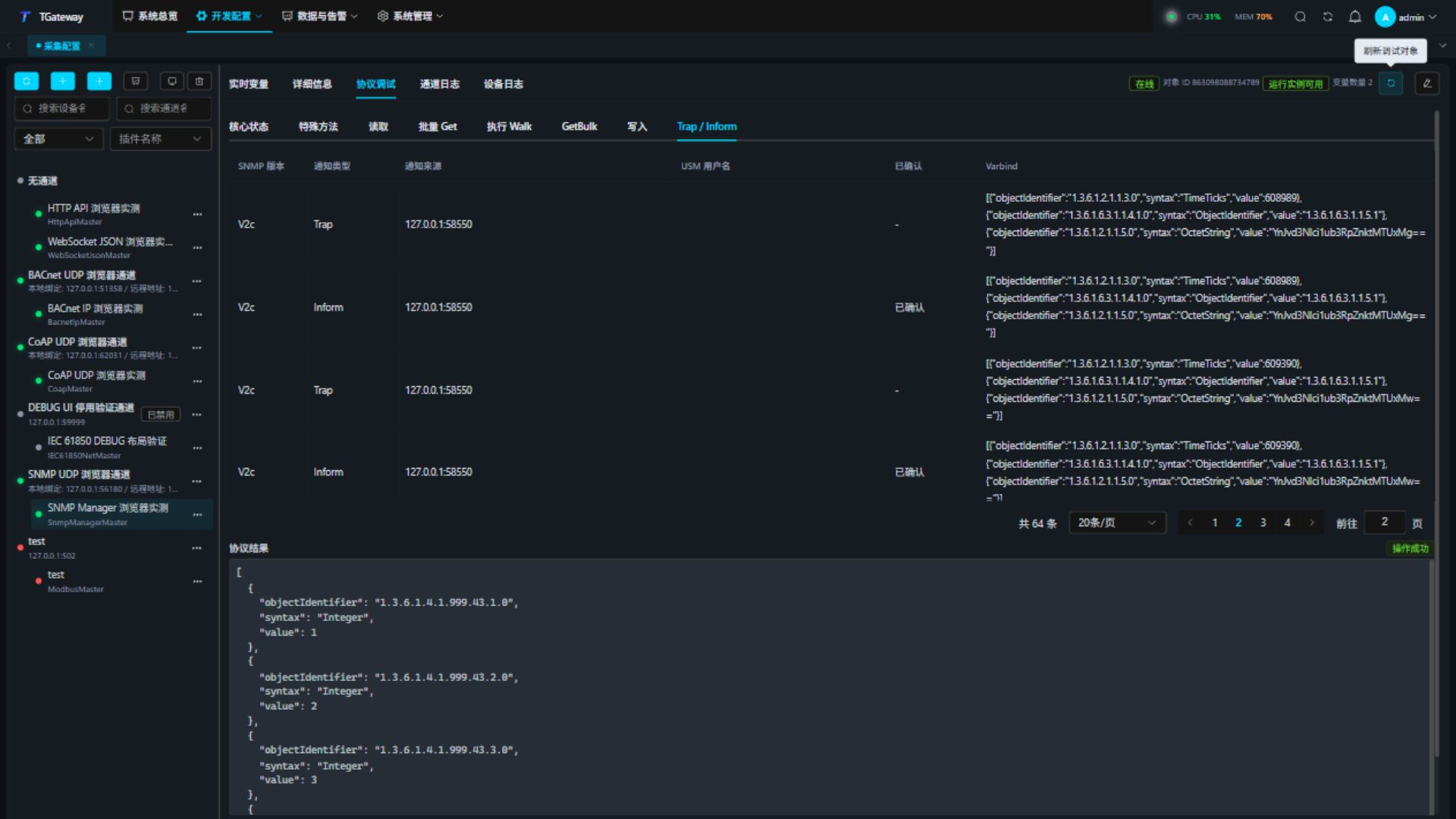
The Manager can be offline without recent Get responses while its notification listener remains online. Check both timestamps and states.
Community, USM user name, and contextName use the printable ASCII required by the configuration and match byte for byte. ? is a literal character, not a wildcard; bytes in another encoding cannot be replaced with ? and accepted. A response with a different identity or invalid encoding cannot complete a pending read or refresh its response timestamp. Such notifications cannot enter the cache or update variables. Check the sender's actual identity bytes, then verify recovery on the same connection.
Special methods
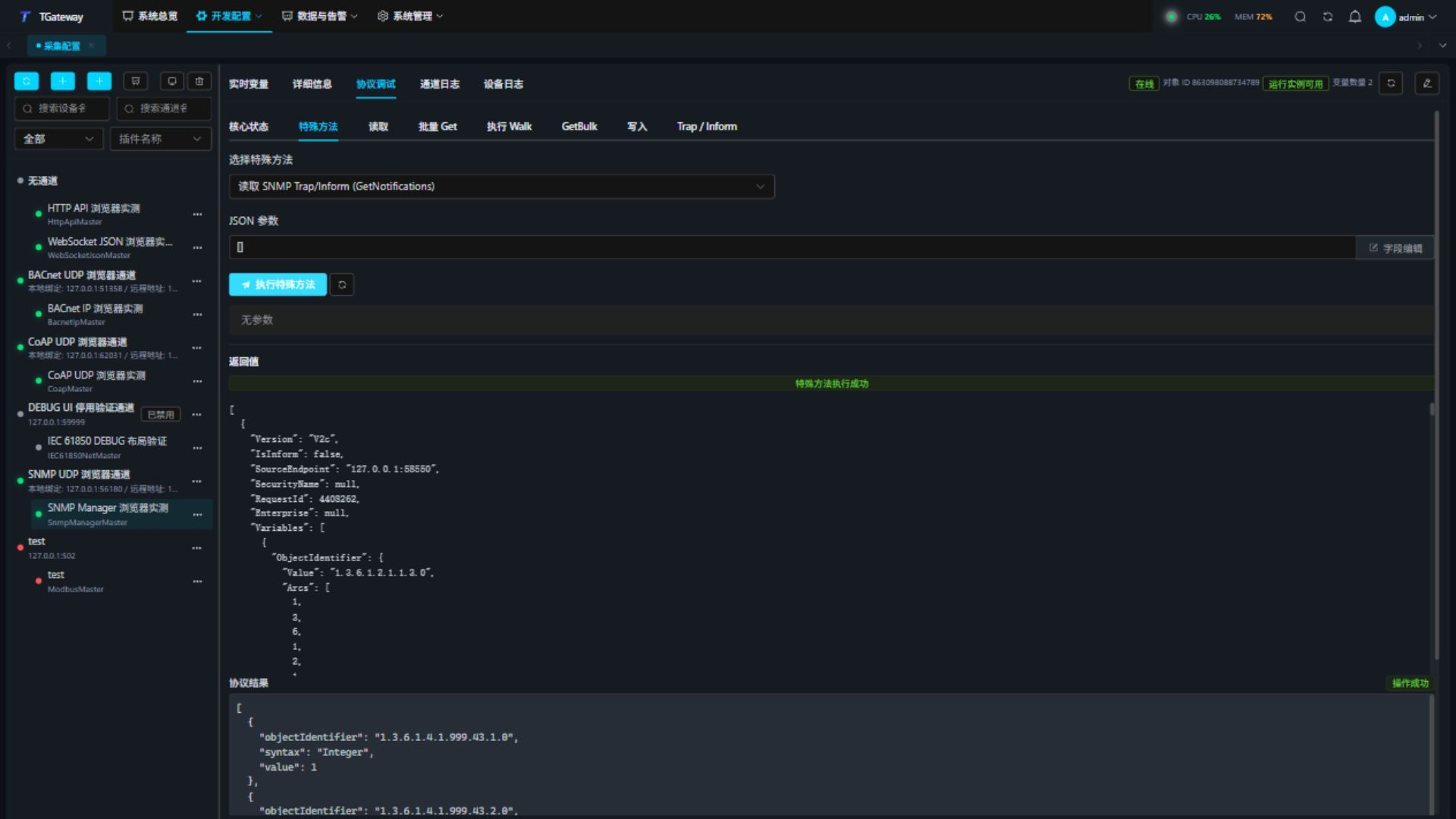
Open Protocol Debug → Special Methods. Available methods are GetAsync, GetBatchAsync, GetNextAsync, WalkAsync, GetBulkAsync, SetAsync, and GetNotifications. Batch objectIdentifiersJson contains an array of OID strings. Set accepts an address JSON string and typed value JSON text.
Enter a JSON array in method parameter order, or use the field editor. Trailing optional parameters can be omitted. For GetAsync:
["1.3.6.1.2.1.1.3.0"]
Use [] for GetNotifications. The dedicated batch panel accepts address JSON; the batch special method accepts OID strings.
Troubleshooting
| Symptom | Check and action |
|---|---|
| Timeout | Check remote endpoint, UDP 161, firewall, version, and community. |
| V3 discovery or authentication failure | Check user, context, algorithms, passphrases, Agent engine boots/time, and the time window. |
| noSuchObject / noSuchInstance | Check the MIB, scalar .0 suffix, version, and user view. |
| Set wrongType / noAccess | Use the MIB's declared type and permitted range. |
| Walk ends early | Check subtree boundaries, EndOfMibView, and the configured count limit. |
| No notifications | Check binding, sender destination, credentials, version, and firewall. |
| Repeated Inform | A sender may retry without an acknowledgement. The receiver acknowledges duplicates without delivering the variable update twice. |