Product Introduction

Product Positioning

ThingsGatewayRuntime is an Industrial IoT Edge Gateway Runtime Platform focused on edge-side data acquisition, processing, and forwarding. The platform is deployed at industrial sites and communicates directly with PLCs, sensors, instruments, and other devices to perform real-time data acquisition, conversion, alarm detection, and business processing.

This documentation is aligned with GatewayRuntime 2.1.22 configuration and Web UI. If a site package changes ports, plug-ins, or menu permissions, follow the deployed environment.

What is an Edge Gateway?

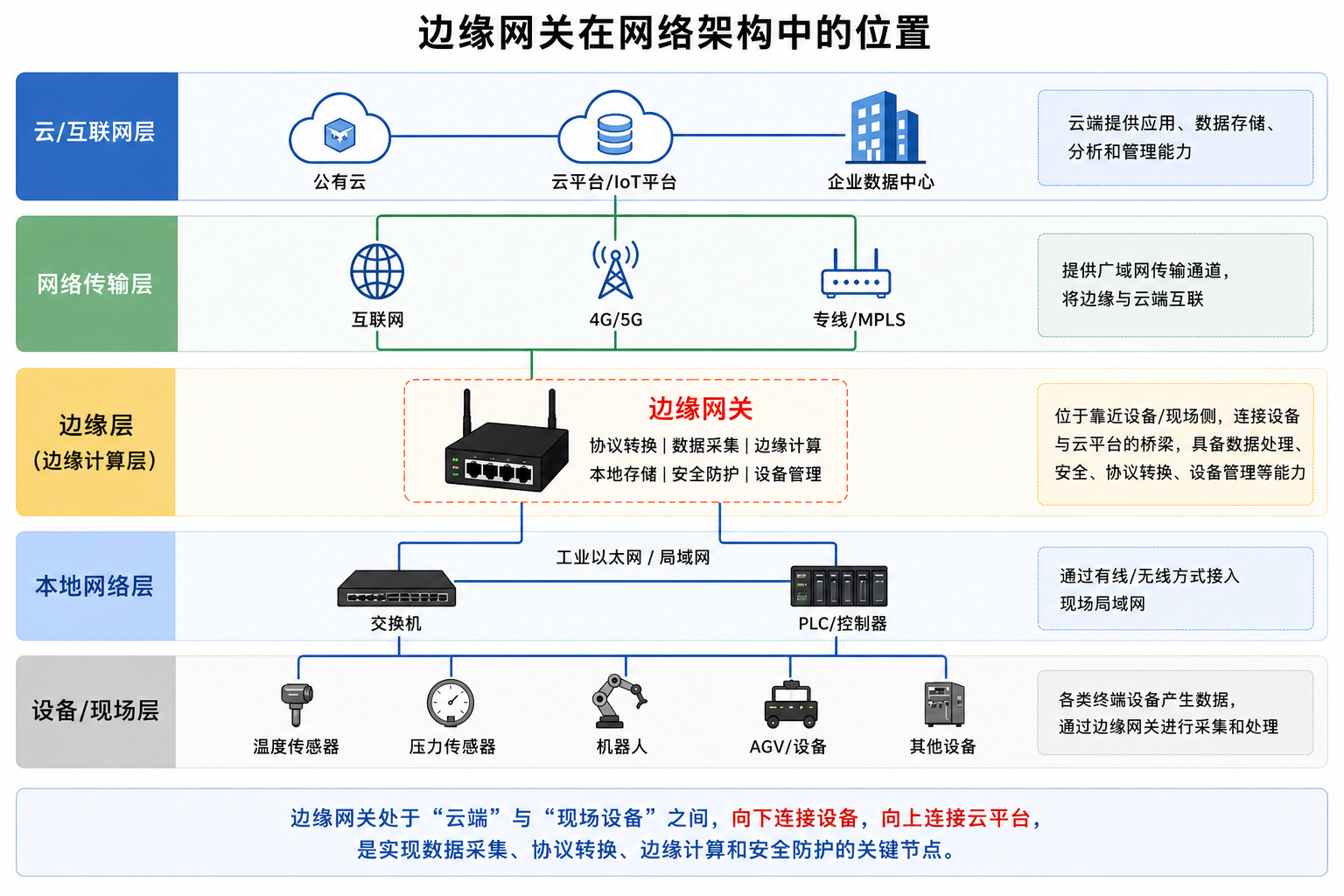
An edge gateway is an intelligent device deployed at industrial sites, positioned between the field device layer and the upper-level management system. Its core role is to complete data processing at the data source, rather than transmitting all raw data to the cloud for processing.

Edge Gateway Position Diagram:

边缘网关在网络架构中的位置

Traditional Mode vs Edge Computing Mode

Comparison ItemTraditional Mode (Cloud Processing)Edge Computing Mode (Local Processing)
Data FlowField Devices → All Data → Cloud Server → Data ProcessingField Devices → Edge Gateway → Processed Data → Cloud Server
Network BandwidthHigh UsageLow Usage
Response LatencyHighLow
CostHighLow
ReliabilityNetwork-dependentLocal Processing, High Reliability

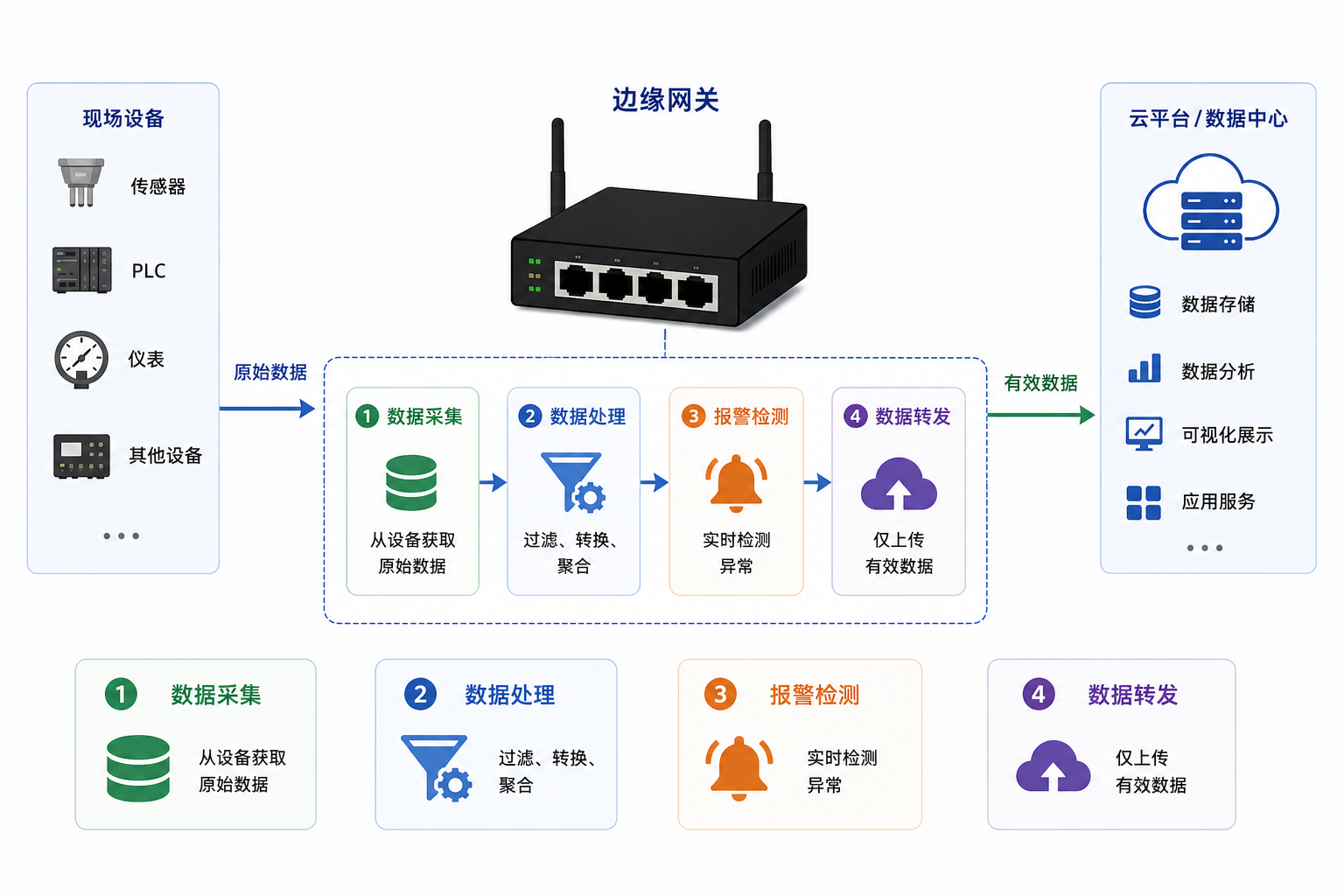
Core Functions of Edge Gateway

Edge Gateway Core Functions Diagram:

边缘网关核心功能示意图

FunctionDescription
Data AcquisitionObtain raw data from devices
Data ProcessingFiltering, conversion, aggregation
Alarm DetectionReal-time anomaly detection
Data ForwardingUpload only valid data

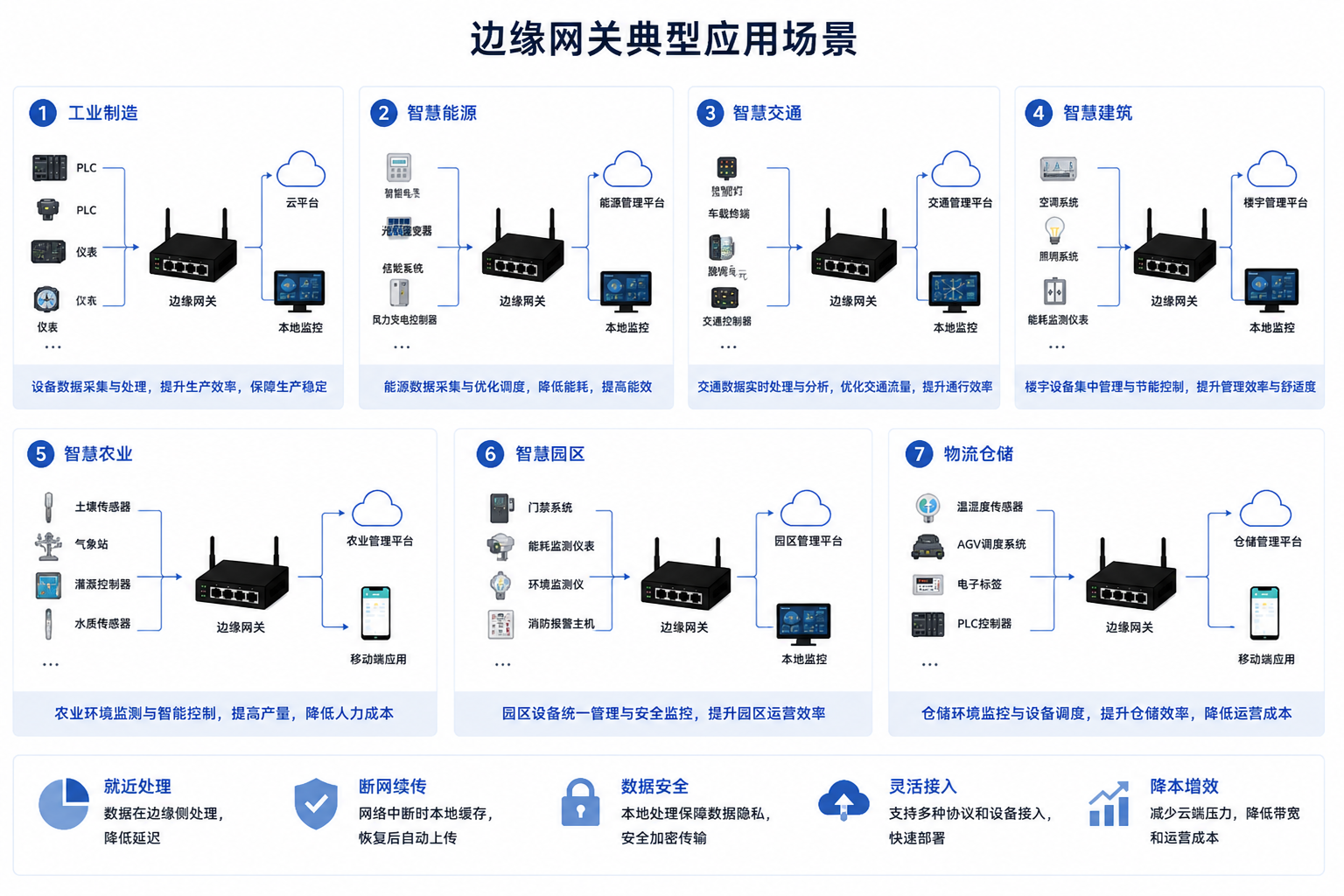
Application Scenarios of Edge Gateway

Application Scenarios Overview Diagram:

边缘网关典型应用场景

Core Value

Value PointDescriptionBenefit
Edge IntelligenceComplete data processing at the site sideReduce network transmission, lower latency
Protocol ConversionSupport multiple industrial protocolsBreak through device communication barriers
Real-time ResponseMillisecond-level data acquisitionMeet real-time monitoring requirements
High ReliabilityRedundancy and auto-recovery mechanismsEnsure business continuity
Flexible ScalabilityPlugin-based architecture designAdapt to different business scenarios
Easy DeploymentOut-of-the-boxReduce implementation costs
Visual ManagementWeb interface managementLower the barrier to use

Product Composition

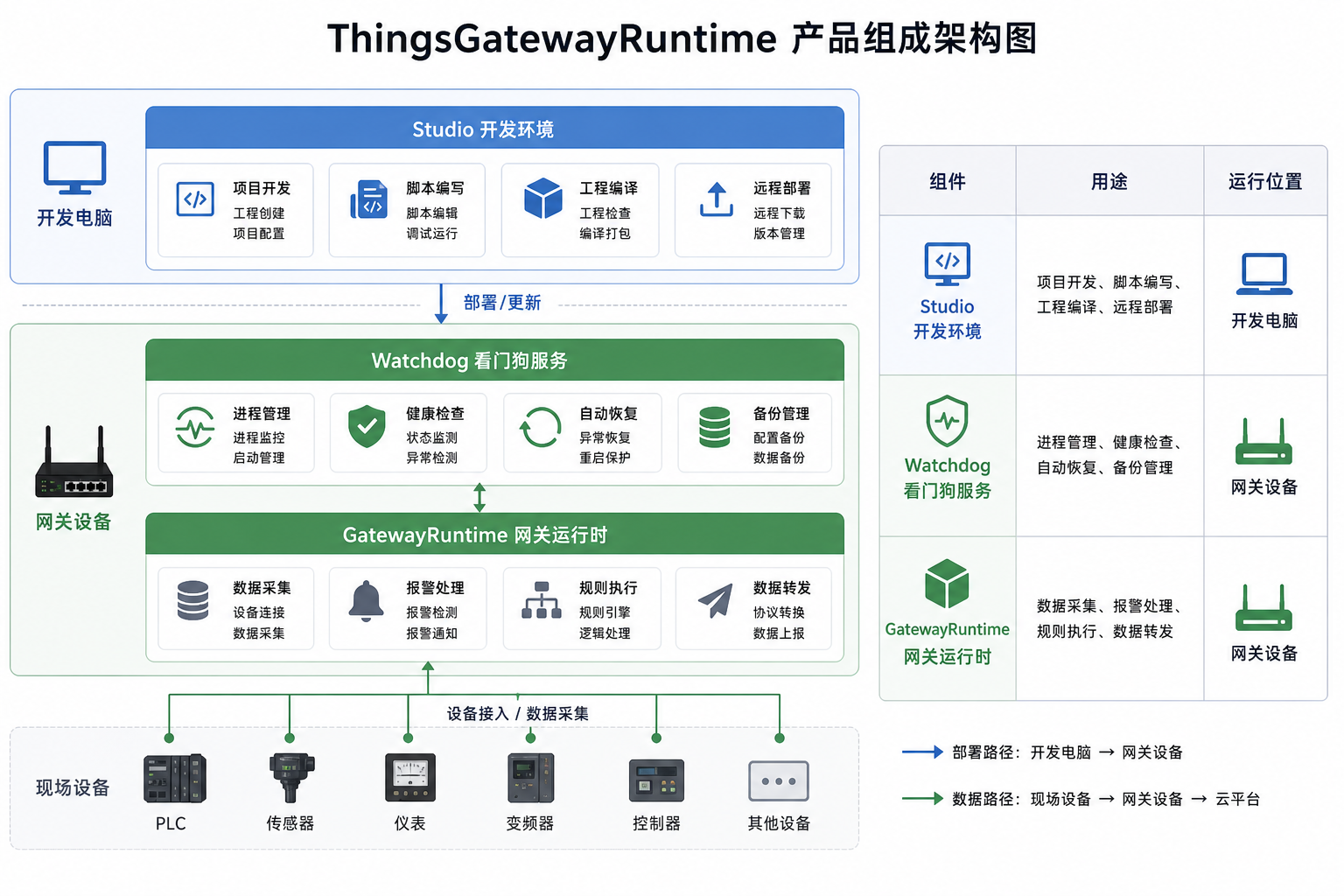
ThingsGatewayRuntime consists of three core components that work together to complete edge computing tasks.

Component Overview

Product Composition Architecture Diagram:

ThingsGatewayRuntime产品组成架构图

ComponentPurposeRunning Location
Studio Project ManagementProject management, local runtime verification, and remote deploymentEngineering workstation
Watchdog ServiceProcess management, health check, auto-recovery, backup managementGateway Device
GatewayRuntimeData acquisition, alarm processing, rule execution, script compilation, data forwardingGateway Device
Product Entry Points
  • Use Studio to manage projects, start or stop a local runtime, configure Watchdog connections, and upload or download projects.
  • Use Watchdog to manage gateway process status, project packages, backups, logs, tunnels, and runtime parameters on the gateway device.
  • Use GatewayRuntime to configure collection, forwarding, alarms, rules, scripts, nodes, users, roles, logs, certificates, and system settings.

Studio Project Management

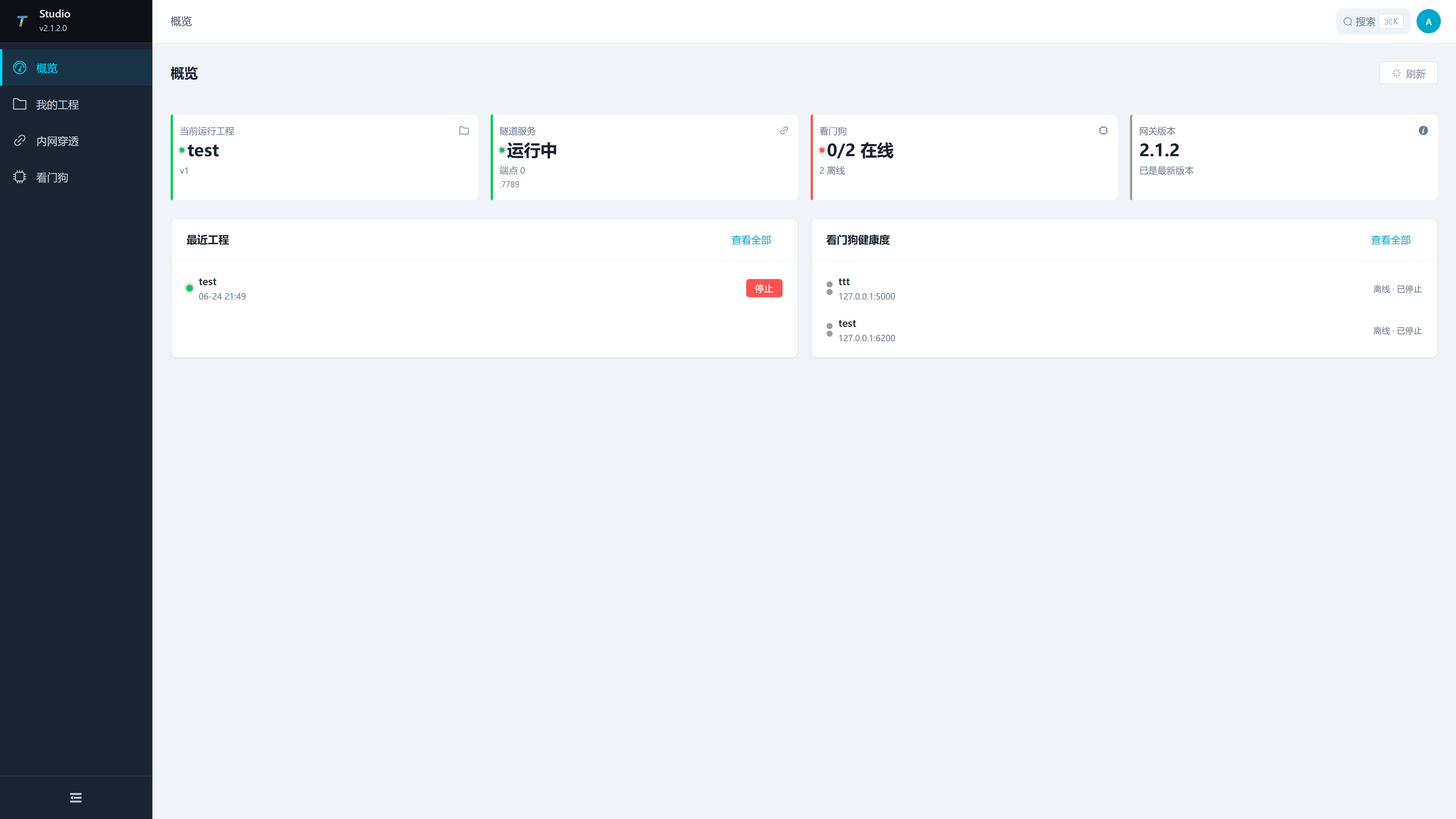
Studio is the ThingsGateway project maintenance and deployment tool. It manages local projects, local runtime verification, Watchdog connections, and remote deployment.

Studio Project Management Interface:

Studio开发环境界面

Studio Main Functions

Function ModuleFunction Description
Project ManagementCreate projects, open projects, maintain project information, and publish projects
Script ManagementCreate and edit scripts, configure parameters, and check compilation results
Custom Node ManagementMaintain node logic and parameters, and check compilation results
Watchdog ManagementConfigure Watchdog connections, upload projects, and monitor target gateways

Studio Usage Scenarios

  • Used by project configuration and maintenance personnel
  • Complete project configuration and pre-deployment verification
  • Publish projects after validation
  • Upload projects to Watchdog in the production environment

Watchdog Service

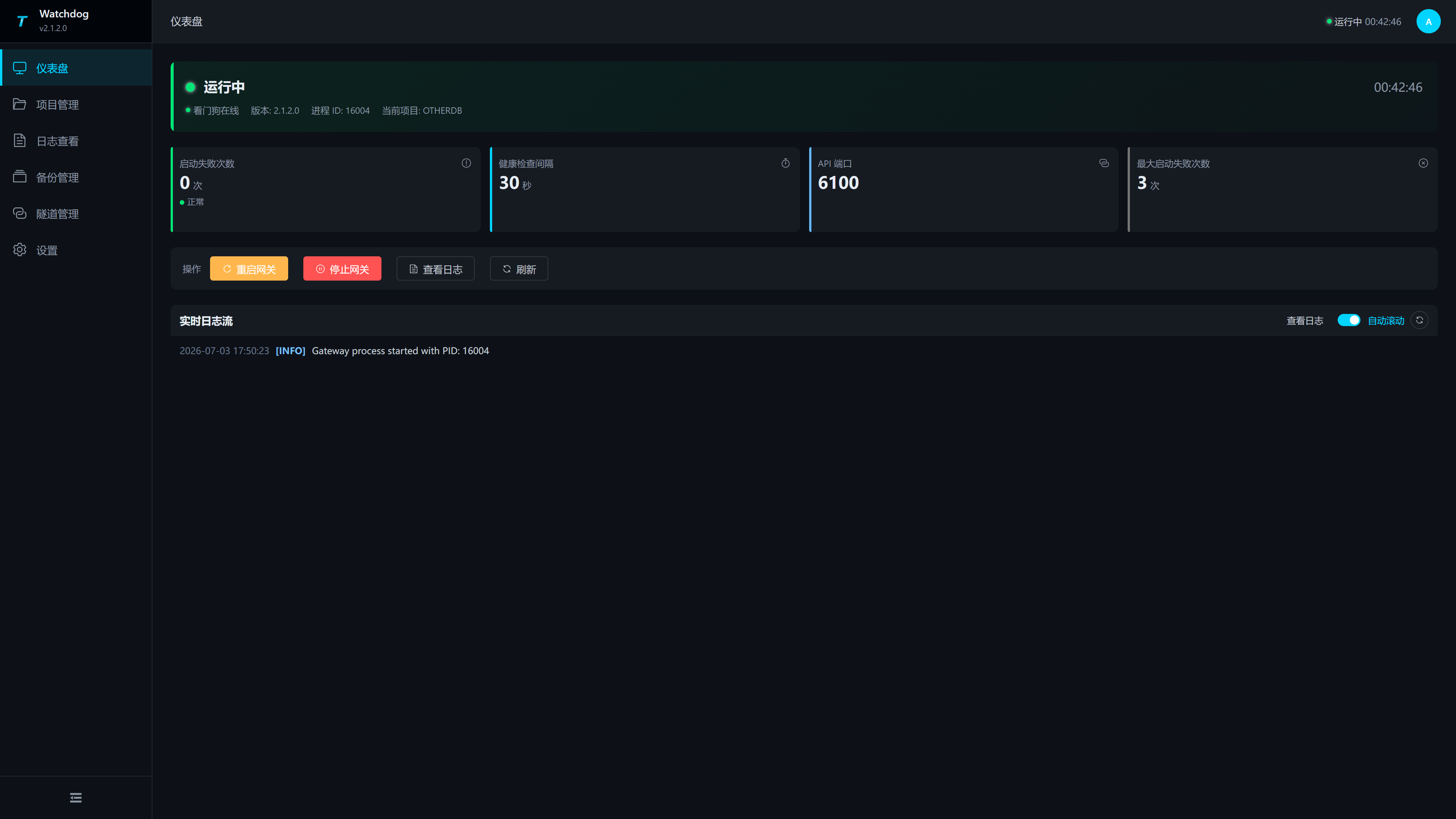
Watchdog is the daemon process of the gateway runtime, responsible for managing and monitoring the gateway runtime process.

Watchdog Main Functions

FunctionDescription
Process ManagementStart, stop, restart gateway runtime process
Health CheckPeriodically check process status and API availability
Auto RecoveryAutomatically restart when the process exits abnormally
Project ManagementManage multiple project configurations and switching
Backup ManagementProject backup and recovery functions

Watchdog Usage Scenarios

  • Deployed on the gateway device as a system service
  • Monitor gateway runtime status 24/7
  • Automatically recover services in abnormal situations
  • Support remote project upload and deployment
Note

The watchdog provides a Web management interface with default port 6200, which can be accessed via browser at http://<gateway-IP>:6200. The gateway's Web interface is provided by GatewayRuntime with port 6100.

Studio uses http://<Studio-server-IP>:5100, and Watchdog uses http://<gateway-IP>:6200. Their packaged configuration supports plain HTTP IP access. A one-time RSA-OAEP-SHA256 challenge encrypts the login password, but Bearer tokens, project packages, and other management data still require HTTPS for full transport protection.

GatewayRuntime

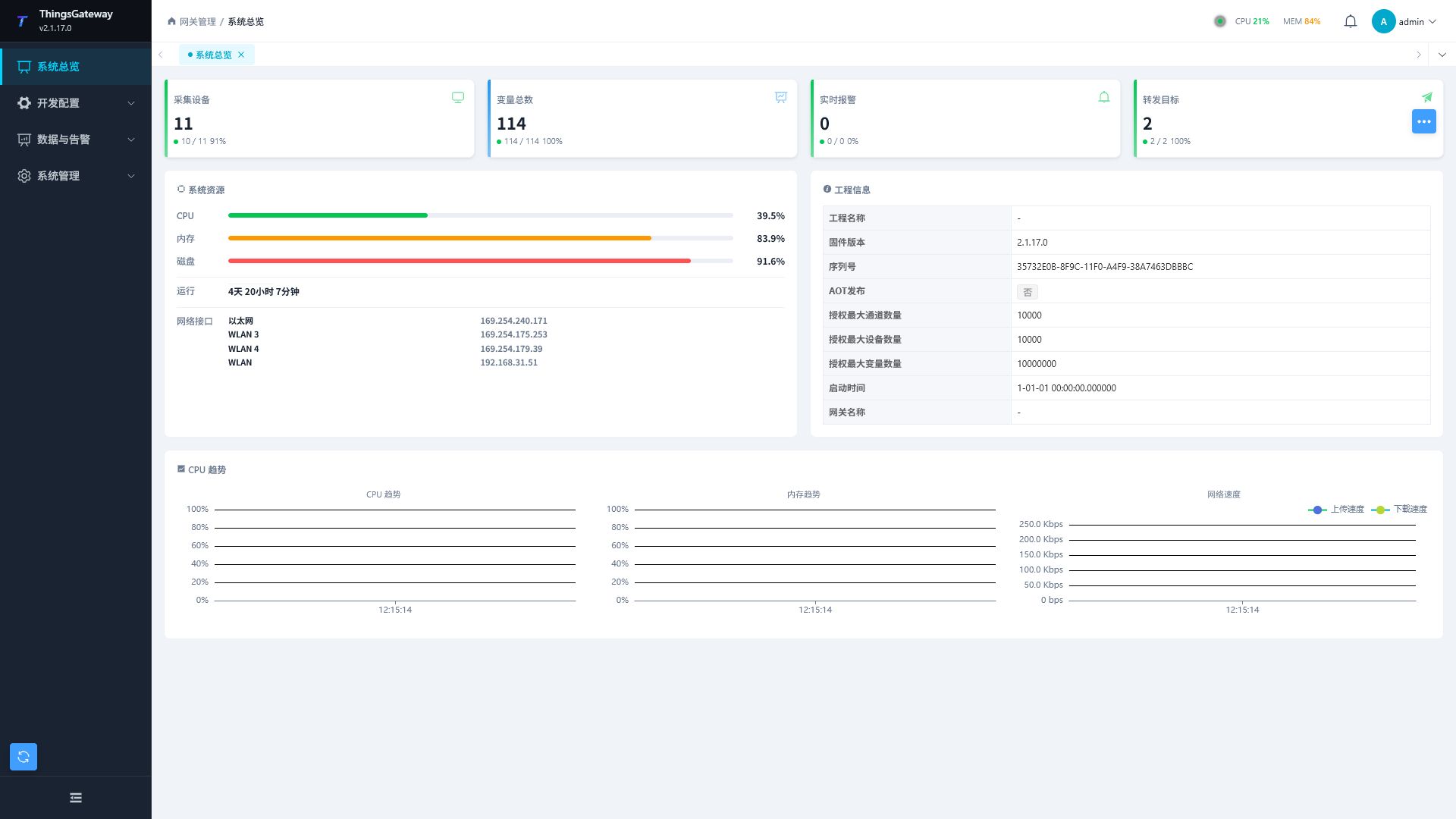
GatewayRuntime is the core runtime engine, responsible for executing core business logic such as data acquisition, alarm detection, and rule processing.

Gateway Runtime Interface:

网关总览

GatewayRuntime Main Functions

Function ModuleFunction Description
Data AcquisitionAcquire data from devices through communication plugins
Alarm DetectionDetect anomalies based on configured alarm rules
Rule EngineExecute visually orchestrated business processes
Script ExecutionRun user-maintained C# scripts after they pass validation
Data ForwardingPush data to upper-level systems
Web ManagementProvide Web interface for configuration and management

GatewayRuntime Usage Scenarios

  • Automatically started and managed by the watchdog
  • Execute data acquisition and business processing
  • Provide Web management interface
  • Perform data interaction with upper-level systems

GatewayRuntime Running Mode

  • Automatically started by the watchdog
  • Or manually run ThingsGatewayRuntime
  • Default port: 6100 (Web management interface)

Product Features

High Reliability

FeatureDescription
Process GuardianWatchdog automatically monitors and recovers processes
Redundancy SupportActive/standby site automatic switching
Exception HandlingComprehensive exception capture and handling mechanism
Data PersistenceConfiguration and data automatically saved

High Performance

FeatureDescription
High-concurrency AcquisitionSupport simultaneous acquisition from a large number of devices
Low-latency ProcessingMillisecond-level data processing latency
Efficient StorageOptimized data storage mechanism
Low Resource ConsumptionCan run with minimum 256MB memory

Ease of Use

FeatureDescription
Web ManagementManage via browser, no client installation required
Visual ConfigurationGraphical configuration interface
Online DebuggingReal-time view of acquired data and logs
Quick DeploymentOut-of-the-box, fast go-live

Scalability

FeatureDescription
Plugin ArchitectureCommunication plugins are extensible
Script ExtensionC# scripts for custom functionality
Custom NodesRule engine nodes are extensible
Open APIPermission-controlled Web API integration

Technical Specifications

Studio System Requirements

ItemRequirement
Operating SystemWindows 10/11, Linux
Runtime.NET 10.0 SDK
CPUx64 architecture, 2 cores or more recommended
Memory2GB or more recommended
Storage4GB or more recommended

GatewayRuntime Runtime

ItemRequirement
Operating SystemWindows 10/11, Windows Server 2016+, Linux
Runtime.NET 10.0 Runtime or AOT standalone deployment
CPUx64 architecture, 1 core is sufficient
MemoryMinimum 256MB, 512MB or more recommended
Storage2GB or more recommended

Performance Indicators

IndicatorValue
Supported Variables1,000,000+
Acquisition CycleMinimum 10ms
Alarm Detection Latency<10ms
Rule Execution Latency<10ms

Network Ports

ComponentDefault PortDescription
Studio5100Web management interface
GatewayRuntime6100Web management interface
Watchdog6200Web management interface

Studio and Watchdog listen on 0.0.0.0 by default. For IP access, also verify the remote-management switches, firewall, and plain-HTTP permission described in the Quick Start.