Complete Collection Project and Delivery
This example keeps the same devices and variables throughout temperature collection, Fahrenheit calculation, MQTT, history, alarms, and fan control. Verify data from the real source through reception and physical feedback.
Start with Your First Point. Replace test addresses and values with the field point list and confirm that control testing is permitted.
Variables and calculations
1. Create process and actuator variables
In Development Configuration → Collection Configuration, create a Modbus channel and device with the correct endpoint, station, and interval. The example device is Demo_Modbus_Device.
| Variable | Test configuration |
|---|---|
Demo_Modbus_Value | Holding register 40001, Int16, scalar array length 0, source 1234; verifies basic communication. |
Temperature | Holding register 40011, Int16, scalar length 0, source 75, unit ℃. |
Fan | Coil 00001, Boolean, scalar length 0, initially false; enable read/write and RPC for the test. |
Check all three at the source or through an independent client, then verify gateway values, raw values, quality, and new collection times.
2. Calculate Fahrenheit
- Create a memory-variable script using
Tagto read the same device'sTemperatureand return Celsius ×9÷5+32. See Script Development. - Compile, save, and verify availability at the binding point.
- Create read-only
Temperature_Fin Memory Calculation, keep typeObject, and bind the read script. - Select change-triggered calculation and unit
℉.
Enter this method body in the script editor. Convert to floating point before division to preserve fractional results:
// 按源温度计算华氏值,使用浮点运算保留换算后的小数。
var temperature = Convert.ToDouble(Tag("Demo_Modbus_Device", "Temperature").Value);
return Math.Round(temperature * 9.0 / 5.0 + 32.0, 1);
| Source Celsius | Expected Fahrenheit |
|---|---|
75 | 167 |
76 | 168.8 |
85 | 185 |
65 | 149 |
Units do not perform conversion. Change the real input and check the result, quality, and time rather than compilation alone.
Forwarding, storage and alarms
3. Upload the same variables
Create a manual-scope forwarding group containing Temperature, Fan, and Temperature_F, then add an MQTT client target.
- Enter the actual Broker, unique client ID, and test Topic.
- Keep default JSON and enable group and target.
- Check device/name/value identities at an independent subscriber.
- Set the source to
85, verify new85and185messages, then restore75.
An online target or manual publication does not establish group delivery. Customize formats afterward with Upload Templates.
4. Save history and inspect trends
Add a history target to the same scope with a dedicated database or table, retention, and offset.
- Change the real source through
75 → 85 → 65 → 75, waiting for each collection and write. - Open Data and Alarms → Data Query → History and select this
group/target. - Select only
Temperatureand a window covering the sequence. - Compare table, raw trend, and physical records by identity and sample time.
The chart uses a separate whole-window series query. Select raw points and check returned aggregation, point count, and truncation. The current table page is not a complete trend.
This example's numeric target uses +08:00: SQLite stores local time text, while typed queries return UTC. Convert physical fields by that offset before matching variable ID, collection time, and record time. The alarm target below uses +00:00; check each target separately.
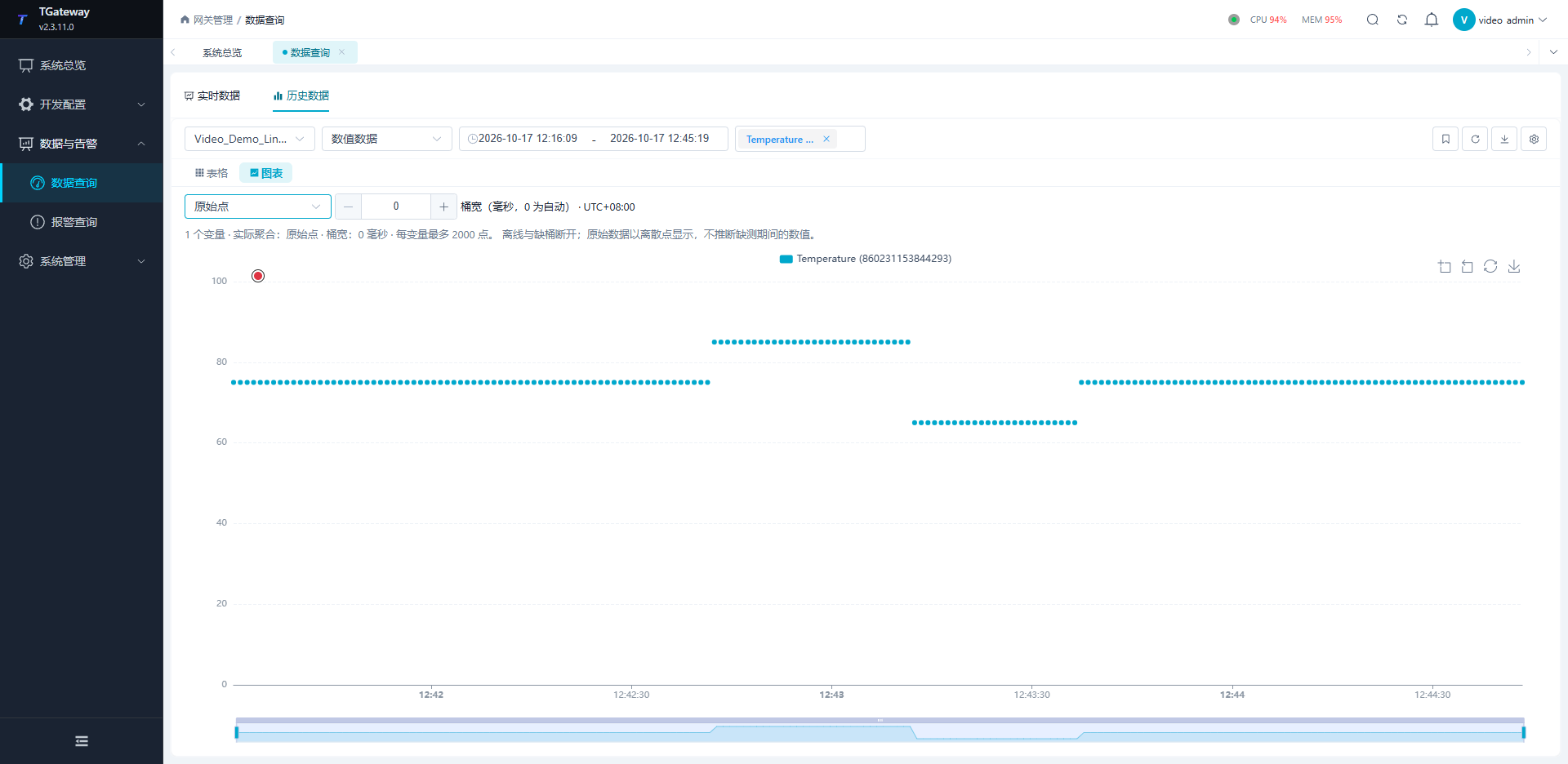
Export and verify the current page; export other pages separately. See Database Storage.
5. Complete an alarm lifecycle
Enable only the test high alarm on Temperature.
Before triggering it, add and enable an alarm-history target whose group includes Temperature, minimum level is 3, and time-zone offset is +00:00 for this example. Confirm that the target has started so it can receive the entire lifecycle.
| Parameter | Value |
|---|---|
| High limit | 80 |
| Severity | 3 |
| Delay | 0 ms |
| Text | Agreed high-temperature description. |
- Set the source to
85; check the real alarm's identity, value, limit, and time. - Open details and acknowledge with an explanation.
- Keep
85and verify that acknowledgement does not clear the condition. - Restore
75and check recovery. - Query that alarm-history target and match occurrence, acknowledgement, and recovery from the same alarm identity.
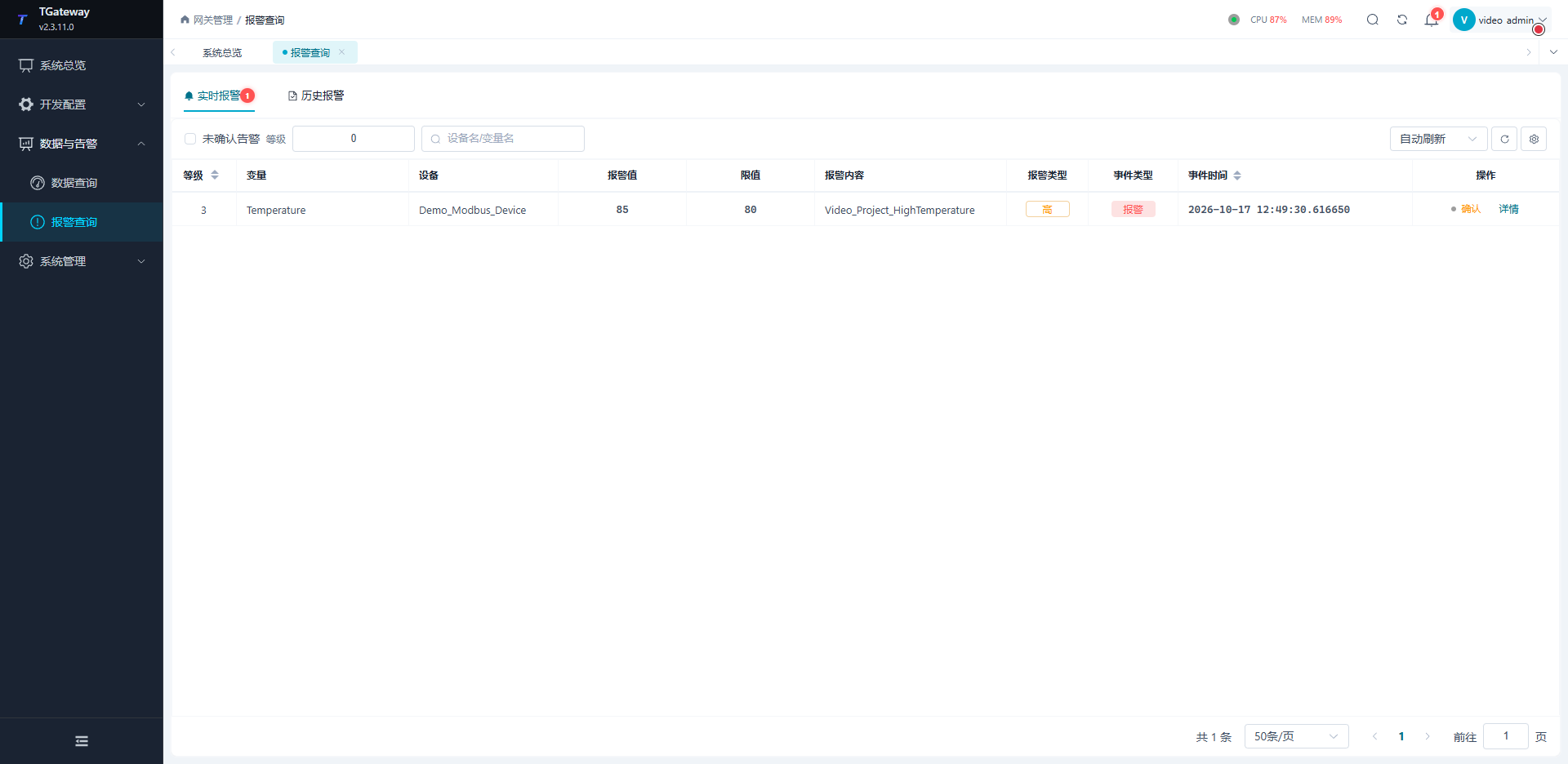
Retention settings alone do not establish expiry cleanup. Alarm acknowledgement and physical recovery are separate; see Alarms.
Control and fault drills
6. Build hysteresis fan control
Create the rule flow disabled until parameters and connections are ready.
| Node/connection | Configuration |
|---|---|
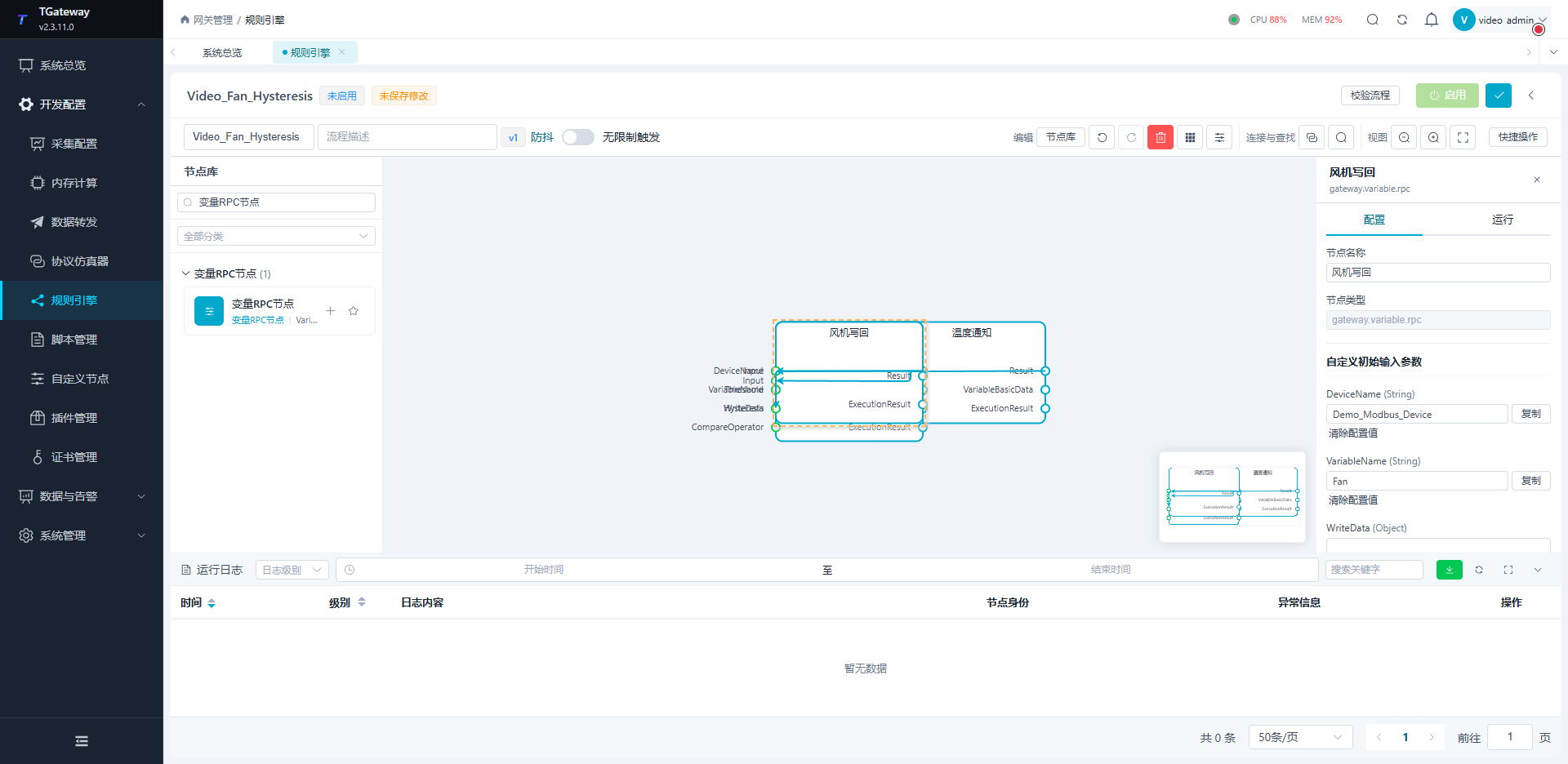
| Variable notification | Filter Demo_Modbus_Device and Temperature. |
| JSON numeric extraction | Convert the notification's value to the numeric input; distinguish full snapshots and value ports. |
| Threshold | Threshold=75, Hysteresis=5, CompareOperator=>. |
| Variable RPC | Select Fan; connect Boolean Triggered to WriteData. |
Save, enable, and reopen the flow. Compare node results, RPC, the independent source coil, and gateway readback.
| Sequential input | Fan feedback |
|---|---|
85 | On, true. |
Return to 75 | Remains on in the hysteresis region. |
65 | Off, false. |
Return to 75 | Remains off. |
This example uses strict greater-than. Verify boundaries for the chosen operator. Hysteresis reduces switching near the threshold; keep independent equipment interlocks and field permissions.
7. Verify faults and redundancy
| Test | Acceptance |
|---|---|
| Broker interruption | Enter 76, 77, 78 offline; match source identities/times after recovery and record missing, duplicate, and backlog counts. |
| Short source interruption | New samples, calculation, alarms, control, and delivery resume. |
| Working Runtime stops | Standby handles new inputs, alarms, and real fan feedback; verify a single working node. |
| Original node returns | Check current authorization and synchronization before a confirmed handback. |
See Offline Compensation and Redundancy.
Bounded replay test
Temporarily set the same group to change-triggered, all-batch processing. Enable MQTT retry cache with 10000 persistent rows, 1000 memory entries, chunk 1000, concurrency 1, QoS 1, and Retain disabled.
- At an independent subscriber, request a snapshot with
Source: "TGateway"and a unique 32-character lowercaseRequestId; see Snapshot Request. - Confirm baseline values and the matching completion response, empty cache, and receive boundary.
- Stop the test Broker and enter
76,77,78, waiting for each new sample. - Restore the same Broker, wait for the independent subscriber to reconnect and confirm its subscriptions, then allow the gateway connection to resume cached sending. With Retain disabled, messages published before subscription will be missed.
- After the receive boundary, match variable ID, value, and source-change time; count missing and duplicate records separately and watch the backlog drain. Do not replace offline samples with a new current-data request.
- Restore the process value and normal trigger policy.
The configured capacity must cover the fault window. QoS 1 and retries permit duplicates; this finite test does not establish universal exactly-once delivery.
Redundancy handover
After synchronization, compare original IDs, properties, and relationships for channels, devices, variables, scripts, groups, targets, and rules. Matching names are insufficient. Configuration sync does not copy external history files.
Stop the working node and verify new business through the standby. Restart the original node with its original data directory and check actual work authorization. It remains standby while the other holds valid authorization. Use confirmed manual handback when required, then recheck one working node and real feedback.
Backup and handover
8. Back up and restore
Configuration database
System Settings → System Control → Back Up Configuration Database supports SQLite configuration databases and downloads a consistent single-file snapshot including committed WAL data, project configuration, and account permissions. Restore a configuration backup produced by this action and confirm that the current configuration database is also SQLite. For other database types, follow that database's backup and restoration procedure. Preserve independent history databases, cache, certificate files, and the complete program directory separately.
- Download the backup and record its owner and file identity.
- In an approved test environment, save a clear difference such as a test unit change.
- Select the original backup, review replacement scope, submit once, and wait for actual restart. An accepted request is only the beginning of verification.
- Log in with the backup account. Compare original IDs, parameters, relationships, calculation source, and rule definitions, including removal of the test difference.
- Run new
85 → 75 → 65inputs and verify collection, calculation, MQTT, alarms, and fan feedback.
Complete runtime directory
The following scope is restoration under the same Windows account and path. Other hosts, accounts, or paths require verification of private keys and protected settings.
- Stop the owned instance and confirm exit before copying its whole directory. Preserve program files, configuration, certificates, databases and WAL, local history/cache, and the key environment.
- Record relative paths, lengths, and SHA256; protect sensitive backups. Back up external sources, Broker, and external databases separately.
- Preserve the pre-restoration directory, restore to the original path, verify files, then start.
- Log in with the backup account, compare project IDs, and locate old history by original variable and time.
- Run new
85 → 75 → 65inputs, verifying on, hysteresis hold, and off along with new calculations, alarms, and messages.
Verify configuration-file and full-directory restoration separately. Old charts and snapshot values cannot establish new business execution.
Delivery checklist
| Deliverable | Verification |
|---|---|
| Point and connection lists | Device, address, type, unit, period, and control permission match the field. |
| Backup | Actual restoration, login, and continuing business. |
| Scripts and rules | Clear dependencies, parameters, enabled state, inputs, and physical feedback. |
| Upload and database | Receiver, schema, types, time zones, retention, and replay checked. |
| Certificates and accounts | Purpose, expiry, storage, and operational permissions recorded. |
| Fault handling | Takeover, recovery, logging, and reconnection procedures available. |