Database Models, Storage, and Query Verification
Database targets receive records from forwarding groups. Decide whether to keep current values, samples, or alarm events before choosing a target. A working database connection does not put points into its scope.
Verify the first stored values
Select a target
| Requirement | Target |
|---|---|
| Latest value for each variable | Realtime Storage, overwriting the same variable. |
| Changes, scheduled samples, and trends | History Storage, retaining multiple records. |
| Alarm occurrence, acknowledgement, and recovery | Alarm History, using event times. |
An overwritten realtime table cannot reconstruct history. Alarm and ordinary variable histories are queried separately.
Start with two points
- Verify one numeric and one string variable with good quality.
- Create a manual-scope group in Development Configuration → Data Forwarding, save it, and add both variables.
- Choose the trigger. Change mode records changes; interval mode also produces stable-value snapshots. Check per-member overrides.
- Add a history target and configure database, connection, table names, and time zone.
- Save and enable it; inspect initialization, pipeline, outbox, and errors.
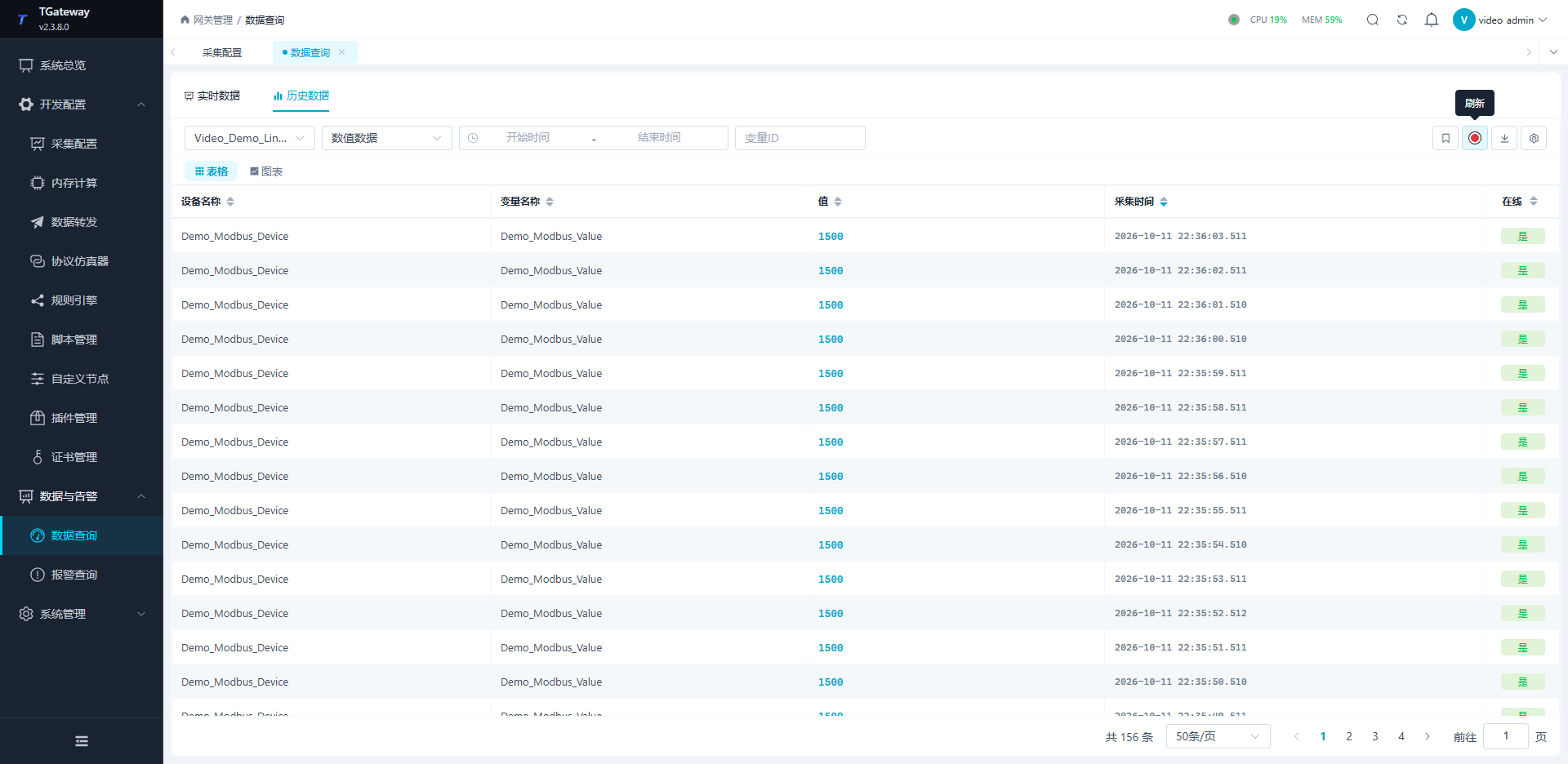
- Change each point, check both physical tables, and compare Data and Alarms → Data Query → History.
For SQLite, use a dedicated file such as Data Source=DB/history-demo.sqlite;journal mode=WAL. The path is relative to the gateway runtime directory and must be writable. Give targets explicit file or table ownership.
Databases and data models
Database and model choices
| Database/model | Capabilities |
|---|---|
| SQL Server, MySQL, SQLite, PostgreSQL | Standard relational tables, custom SQL, and table scripts. Standard numeric, string, and variable-information data use separate tables. |
| QuestDB | Native connection and timestamp column; native TTL. Custom wide tables must use its SQL syntax. |
| TDengine | Native database and retention. Match connection protocol, port, and database keyword. |
| IoTDB Table | Model=table;Database=...; standard tables or custom SQL wide tables. |
| IoTDB Tree | Model=tree;RootPath=...; device paths and measurements, without custom SQL wide tables. |
IoTDB Table and Tree are different physical models; do not combine Database and RootPath. Relational databases use History Table Script. QuestDB, TDengine, and IoTDB use Time-Series History Script. Script and custom SQL modes are mutually exclusive.
Configure IoTDB
Table example:
DataSource=127.0.0.1;Port=6667;Username=root;Password=<password>;Model=table;Database=tgateway_history;PoolSize=8;FetchSize=1024;ConnectionTimeoutInMs=5000;PoolWaitTimeoutInMs=10000;Compression=false;ZoneId=UTC;UseSSL=false
- Replace endpoint, account, and database; first verify standard writes with custom SQL disabled.
- Inspect numeric/string tables and actual column types with a database client.
- Change the source and verify new rows through the gateway query.
- Enable a Table wide model only after standard storage works.
- Configure server trust and client certificates separately for TLS. File paths belong to the gateway host.
Pool, fetch, compression, and timeout options change connection/query overhead; they do not convert Tree to Table or rewrite schemas.
Compare physical models
| Item | Standard Table | Standard Tree |
|---|---|---|
| Location | Numeric/string tables in Database. | Measurements under RootPath.device_<device ID>. |
| Identity | String TAGs device_id and variable_id. | Numeric n_<variable ID> and string s_<variable ID>; do not infer paths from display names. |
| Value and quality | value is STRING; is_number and is_online are BOOLEAN. Numeric gateway queries convert value text. | Time and value; no extra device-name, variable-name, or quality columns on the standard path. |
| Time | Built-in time, plus millisecond collect_time and create_time. | Measurement timestamp. |
| Custom wide tables | Supported with column mapping or explicit SQL. | Unsupported. |
Changing names or paths affects new writes without moving old samples. Check both numeric and string data at the new location. Table permissions do not replace Tree path/schema permissions; automatic creation also requires the relevant create permissions.
Connection settings
| Parameter | Meaning |
|---|---|
NodeUrls | Comma-separated bootstrap host:port list. Check these entries when present; changing only Port may not change the chosen endpoint. |
PoolSize | Connection-pool limit for this target, not a variable count. |
FetchSize | Rows fetched per batch, not the total query limit. 1 can still return a full page through repeated fetches. |
ConnectionTimeoutInMs | Native connection budget in milliseconds. |
PoolWaitTimeoutInMs | Wait for a pool connection; more waiting does not add capacity. |
Compression | RPC transport compression, matched to the server. |
ZoneId | Session time zone. Standard samples use absolute UTC milliseconds; the target's general offset does not shift every sample by eight hours. |
IoTDB does not use relational table partitioning, variable-information tables, or relational dual-database mirroring. Selecting a daily strategy does not create daily suffix tables.
Table wide models and scripts
Start with a DOUBLE reading mapped to a numeric point and a STRING status mapped to a string point. A missing-variable STRING origin can use default gateway. Without grouping each variable has its own row; device grouping still separates field devices and Memory. For remark grouping, set matching remarks on the actual inputs.
Automatic IoTDB wide tables use built-in time of type TIMESTAMP and a group_key tag. General time-column name/type settings do not rename this column. IsRequired does not create a physical NOT NULL constraint. Use explicit SQL and validation where required.
Disable custom SQL before binding a time-series script. It owns schema and cleanup; standard history queries cannot infer an arbitrary script schema. Verify retention through the script's actual cleanup behavior.
TLS
- Confirm a TLS-capable endpoint and matching service name.
- Trust the server's issuing CA in the system store used by the gateway account, with valid dates and revocation checks.
- Use
UseSSL=true;CertificatePath=....CertificatePathconfigures a client certificate; it does not import the server CA. A public certificate alone does not establish private-key ownership. - Save and query new samples, testing Table and Tree separately.
- Diagnose trust, missing files, and account permissions independently.
Keep certificate, name, and revocation validation active. When returning to plaintext, match the port and TLS setting.
Standard tables, scripts, and wide tables
| Mode | Verify |
|---|---|
| Standard tables | Numeric, string, and variable-information names; identity, value, quality, and time. |
| Relational table script | Dynamic SQL for the four relational engines; initialization, batch writes, and cleanup. |
| Time-series history script | QuestDB, TDengine, or IoTDB script schema and actual writes. |
| Custom SQL wide table | Table, time column, field types, mappings, and actual column names. |
| Partitioning | Relational physical tables for the chosen time ranges. |
| Retention days | Actual maintenance or native retention, in addition to saved settings. |
Verify numeric, string, offline, and alarm paths independently. Database/connection/table changes affect later writes without migrating old history. Custom relational partitioning requires a deployed partition service.
QuestDB and TDengine
QuestDB uses HTTP REST SQL/CSV on port 9000 by default, rather than the PostgreSQL protocol port. Inspect its designated timestamp and numeric/string tables. TDengine WebSocket uses Protocol=WebSocket;Port=6041;db=.... Native uses 6030 and requires native client libraries; the database key is lowercase db.
Verify standard storage before a time-series script. Check new numeric/string samples, QuestDB partitions and timestamps, or TDengine supertables, variable subtables, and tags. Clearing a script resumes standard writes without deleting old script tables. See Time-Series Scripts.
Time and reliability
Distinguish timestamps
| Field | Purpose |
|---|---|
CollectTime | Source sample time, used for freshness and offline history. |
ChangeTime | Last value change; it may precede the sample time for stable snapshots. |
CreateTime | Forwarding record creation time; standard relational partitioning uses it, as do some native record timestamps. |
The offset is a storage convention. Z denotes UTC; interpret local wall-clock fields using the configured offset without adding it twice. Align queries, charts, exports, and database clients on time zone and time column.
Reliability and database mirroring
History retry cache can replay pending rows after database recovery. Realtime storage waits for new changes or snapshots. Cache capacity, retention, and mirroring control separate stages.
Standard relational history supports two distinct physical databases from the supported engines. Custom SQL, table scripts, and native time-series models do not use this mirroring mode. Check primary writes, backlog, standby contents, and differences separately.
In Target Debug → Dual-Database Check and Repair, select a CreateTime range. Check numeric and string data and both directions before repair, then repeat the same range. A new standby does not automatically backfill all history. Cancellation does not undo completed chunks. See Mirror Maintenance.
Duplicate records and content conflicts
Reliable writes in standard relational history identify a record by RecordKey. The same key with the same core content is a duplicate. The same key with a different variable identity, value, or sample time is a reported conflict. The same checks apply within an input batch; different content is not silently counted as already saved.
| Symptom | Verification |
|---|---|
| A retry inserts fewer rows than supplied | Query the same record keys and compare stored variable identity, value, and time with the input. |
| Logs report a RecordKey conflict | Preserve the data and check primary/standby sources, key generation, times, and values. Resolve the cause before retrying. |
| A batch fails | Check target logs and actual table contents for the original record range. A batch submission or cache count alone does not prove every row was saved. |
Differences in source-node or commit-batch metadata do not by themselves constitute a business-content conflict. These rules concern standard relational history; verify scripts, custom SQL, and native time-series storage against their own write contracts.
Query and export verification
- Select the correct
group/target, one variable, and a clear time window. - Compare new values, sample/record times, and quality.
- Include a rise and fall in the trend and compare table rows.
- Export and check current-page row counts; export other pages separately.
- After recovery, verify old samples, decreasing backlog, and continuing new samples.
See Data Query and Offline Compensation.