Historical Data Storage
Historical Data Storage is a data-forwarding target. It writes values from the forwarding-group range to SQL Server, MySQL, SQLite, PostgreSQL, QuestDB, TDengine, or Apache IoTDB for trends, reports, and historical queries.
Sampling, variable range, and batching are configured on the forwarding group. This page covers target-specific database, table, cache, mirror, and custom-template settings; see Data Forwarding for the common workflow.
Store the first value locally
SQLite uses a local file, so this exercise needs no separate database server.
- Add forwarding group
Demo_History_Groupunder Development Configuration → Data Forwarding. Choose manual scope, interval triggering, and1000ms; save it. - Reopen the group, select
Demo_Modbus_Device.Demo_Modbus_Valueor another working point, click the adjacent +, confirm the row appears, and save. - Add target
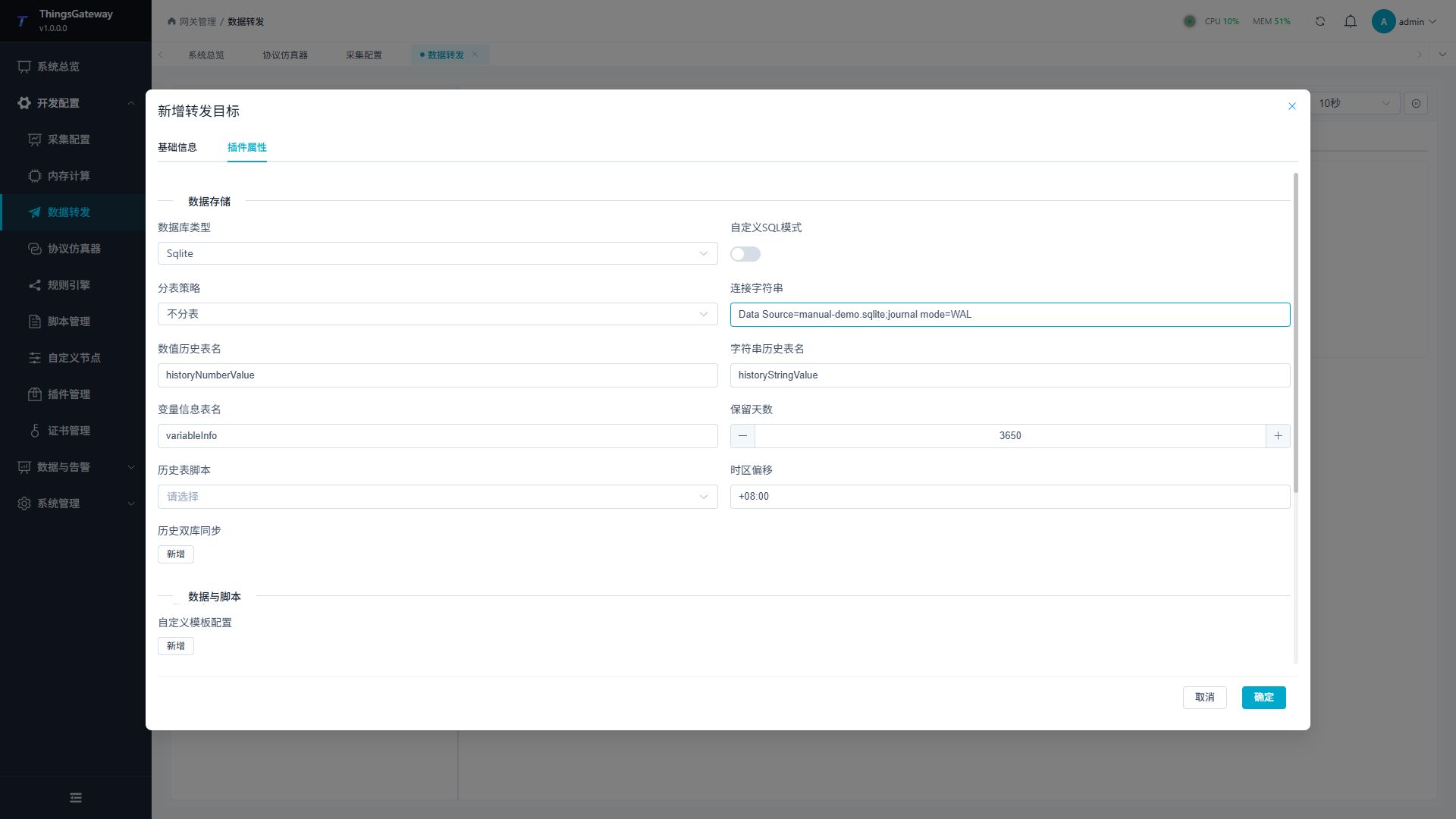
Demo_History_Targetwith Historical Data Storage. In plugin properties, selectSqliteand connection stringData Source=manual-demo.sqlite;journal mode=WAL. - Disable custom SQL, use no table splitting, leave scripts and mirroring empty, and keep table names
historyNumberValue,historyStringValue, andvariableInfo. Keep offset+08:00for this exercise. - Save and enable the group and target. Confirm one group variable and an online target. The SQLite file belongs to the gateway host's runtime directory, which must be writable.
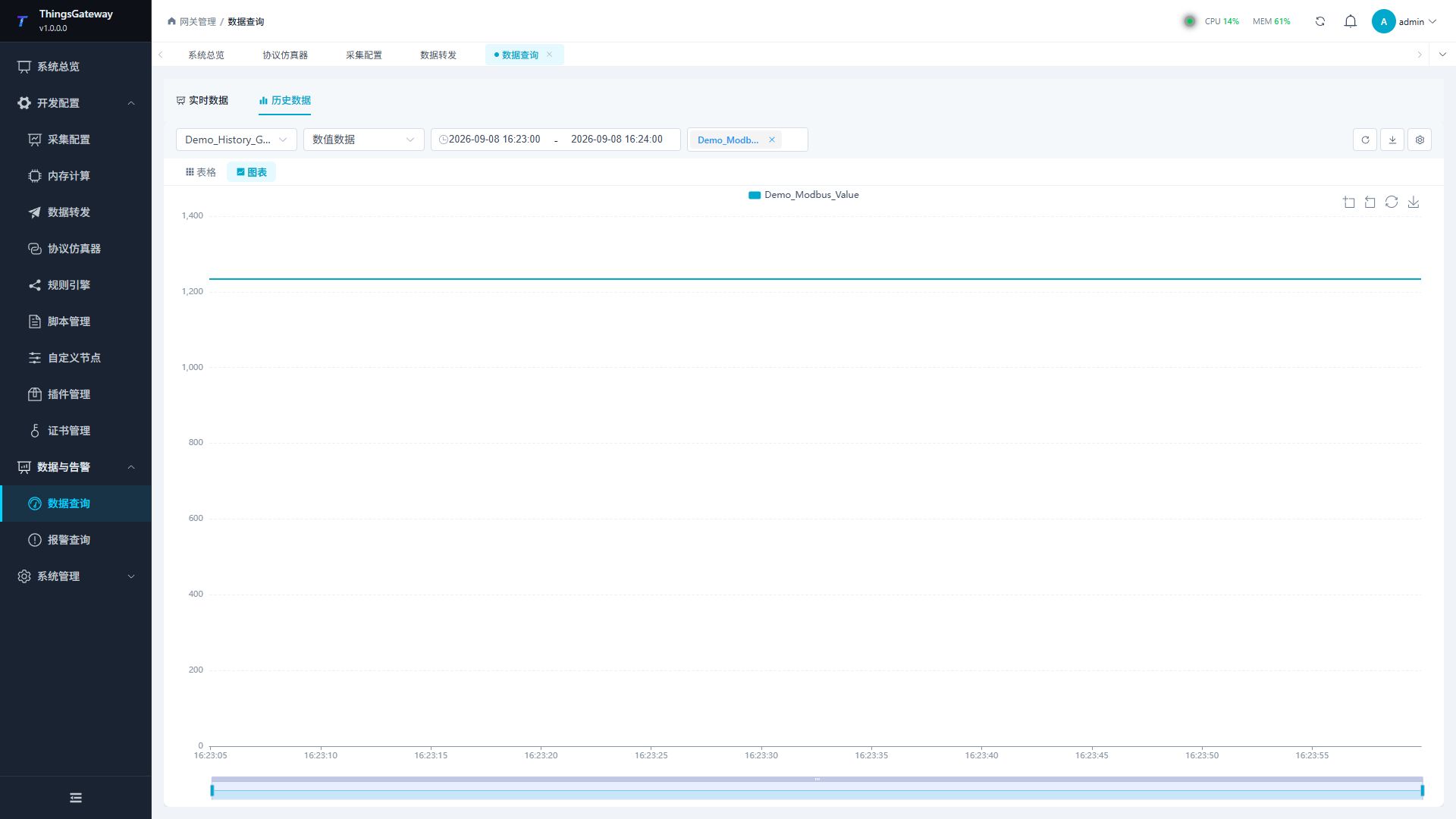
- Wait several intervals, then open Data and Alarms → Data Query → History and select
Demo_History_Target. - Choose numeric data and the example variable. Set a time range covering collection, confirm the time panel, then refresh the query.
- Check new rows and switch to the chart. A stable value produces a horizontal line. See Data Query for paging and export.
Prerequisites
- For a server database, confirm the service is reachable and the gateway account can create, query, insert, and delete history data. For SQLite, confirm local file and directory permissions.
- Use an isolated database or table namespace for each target so records remain distinguishable in the query page.
- For Apache IoTDB, choose Tree or Table before writing the connection string.
- For TDengine, choose WebSocket or Native and use its matching port.
Configure the target
Open Development Configuration → Data Forwarding and:
- Configure and save the forwarding group range, trigger, interval, online filter, and batching.
- Add a target, choose Historical Data Storage, and fill in the basic target information.
- Open Target properties, choose the database and paste a matching connection string.
- Configure table names, retention, time zone, cache, and optional templates.
- Save and enable the group and target, then verify the target debug panels and the history query page.
Basic target information
| Setting | Default | Configuration |
|---|---|---|
| Group | - | Select a saved forwarding group. The target receives only variables in this group. |
| Target name | - | Required and unique within the group. Include the database or environment name. |
| Enable | Enabled | Disable to stop the target from starting or writing. |
| Plugin | - | Select Historical Data Storage. |
| Log level | Info | Temporarily use Debug when diagnosing connection or write errors. |
| Start timeout | 60 seconds | Valid range is 1 to 3600 seconds. |
| Description | Empty | Optional environment or ownership note. |
Project storage settings
Database storage
| Setting | Default | Configuration |
|---|---|---|
| Database type | SqlServer | Select SqlServer, MySql, Sqlite, PostgreSql, QuestDb, TDengine, or IoTDB. Use that database's connection-string syntax. |
| IoTDB model | Tree | Visible only for IoTDB. Tree uses device paths and measurements; Table uses database, table, TAG, ATTRIBUTE, and FIELD. |
| Custom SQL mode | Disabled | Available for relational databases, QuestDB, TDengine, and IoTDB Table. It must be disabled for IoTDB Tree. |
| Split-table strategy | No split | Relational targets can split by day, week, month, quarter, year, or a custom split service. Native time-series targets keep their native storage layout. |
| Connection string | Development example | Replace the example with the actual endpoint, database, account, and password. See Connection strings. |
| Numeric history table | historyNumberValue | Standard-mode numeric history table. Custom SQL mode uses the template TableName. |
| String history table | historyStringValue | Standard-mode string history table. Use a valid database identifier. |
| Variable information table | variableInfo | Used by relational standard mode for variable metadata needed by history queries. |
| Retention days | 3650 | Enter a positive integer. Values below 1 are normalized to 1. QuestDB uses TTL, TDengine uses KEEP, and IoTDB Table uses the cleanup task. |
| History table script | Empty | Relational Dynamic SQL mode only. Select a saved Dynamic SQL expression; it owns table creation, writes, and cleanup. Do not combine it with Custom SQL mode. |
| Time-series history script | Empty | QuestDB, TDengine, and IoTDB logic script owning its schema, writes, and cleanup; mutually exclusive with custom SQL. |
| Time-zone offset | +08:00 | Enter a fixed offset such as +08:00 or -05:00; empty means UTC. Use the same convention when querying. |
| Custom template configuration | Empty | Used only by Custom SQL mode. The three SQL templates may all be empty and will then be generated. |
| Dual-database mirror | Disabled | Relational standard tables only. It cannot be combined with Custom SQL, a history-table script, or native time-series targets. |
Dual-database mirroring supports standard relational history tables in SQL Server, MySQL, SQLite, and PostgreSQL. The primary and backup must be different physical databases. QuestDB, TDengine, and IoTDB use native write protocols and are outside this relational mirror path. Mirroring cannot be used with Custom SQL mode or History table script.
Connection strings
The examples below use an isolated database named tgateway_history. Replace <password>, addresses, and accounts, then paste the complete string into Connection string.
| Database | Example | Notes |
|---|---|---|
| SQL Server | Server=127.0.0.1,1433;Database=tgateway_history;User Id=history_user;Password=<password>;TrustServerCertificate=True; | Default port 1433. |
| MySQL | Server=127.0.0.1;Port=3306;Database=tgateway_history;Uid=history_user;Pwd=<password>;Allow User Variables=true;AllowLoadLocalInfile=true; | Default port 3306. |
| SQLite | Data Source=DB/history.db;journal mode=WAL | The path is relative to the gateway directory; the directory must be writable. |
| PostgreSQL | Host=127.0.0.1;Port=5432;Database=tgateway_history;Username=history_user;Password=<password>; | Default port 5432. |
| QuestDB | host=127.0.0.1;port=9000 | REST SQL uses port 9000. QuestDB has no database namespace; isolate targets with table names. |
| TDengine WebSocket | Host=127.0.0.1;Port=6041;Username=root;Password=<password>;Protocol=WebSocket;db=tgateway_history | WebSocket uses 6041; the database key must be db=, not Database=. |
| TDengine Native | Host=127.0.0.1;Port=6030;Username=root;Password=<password>;Protocol=Native;db=tgateway_history | Native uses 6030 and requires the TDengine Native client library. |
| IoTDB Tree | DataSource=127.0.0.1;Port=6667;Username=root;Password=<password>;Model=tree;RootPath=root.tgateway;PoolSize=8;FetchSize=1024;ConnectionTimeoutInMs=5000;PoolWaitTimeoutInMs=10000;Compression=false;ZoneId=UTC;UseSSL=false | Tree requires Model=tree and RootPath; do not set Database. |
| IoTDB Table | DataSource=127.0.0.1;Port=6667;Username=root;Password=<password>;Model=table;Database=tgateway_history;PoolSize=8;FetchSize=1024;ConnectionTimeoutInMs=5000;PoolWaitTimeoutInMs=10000;Compression=false;ZoneId=UTC;UseSSL=false | Table requires Model=table and Database; do not set RootPath. |
TDengine requires Host, Port, Username, Password, Protocol, and db. Optional keys include timezone, connTimeout, readTimeout, writeTimeout, useSSL, enableCompression, autoReconnect, reconnectRetryCount, reconnectIntervalMs, token, bearerToken, and (for WebSocket) adapterHA.
IoTDB requires Model=tree or Model=table. Tree and Table are mutually exclusive: Tree uses RootPath; Table uses Database. PoolSize, FetchSize, ConnectionTimeoutInMs, and PoolWaitTimeoutInMs must be positive. TLS requires UseSSL=true and CertificatePath.
CertificatePath configures the client certificate rather than trusting the server CA. Establish server trust in the gateway account's system store. Standard Table uses STRING value, BOOLEAN quality/type fields, and device/variable TAGs; Tree uses ID-based measurements without extra name/quality columns. FetchSize is a fetch batch, not the total row limit. See IoTDB Models and TLS.
Bind a time-series script
Compile a TimeSeriesSQL_VariableBasicData script based on TimeSeriesSQLBase<VariableBasicData>, disable custom SQL, then bind it. Implement DBInit and DBSavable returning Task and DBDeletable returning Task of int, using the context, logger, cancellation token, and supplied record batch. The target owns connection lifecycle; the context provides execution, queries, identifier quoting, and literal encoding. See Script Development.
The script owns its schema. Default numeric/string tables need not continue receiving data. Verify both data classes with a physical query; standard queries do not infer arbitrary schemas. Clearing the binding resumes standard writes without deleting script tables.
Standard tables and database modes
| Choice | Storage structure | Notes |
|---|---|---|
| SQL Server, MySQL, SQLite, PostgreSQL, Custom SQL disabled | Numeric, string, and variable-information tables | Supports split tables, history-table scripts, and dual-database mirroring. |
| SQL Server, MySQL, SQLite, PostgreSQL, Custom SQL enabled | One custom relational wide table | Use Custom template configuration; do not fill a history-table script. |
| QuestDB, Custom SQL disabled | Numeric and string tables | Uses native REST/CSV writes and native partitioning; isolate targets with table names. |
| QuestDB, Custom SQL enabled | Custom wide table | The time column must be a QuestDB-supported timestamp. |
| TDengine, Custom SQL disabled | Numeric and string supertables with child tables | SaveDays maps to KEEP; split-table selection does not change TDengine layout. |
| TDengine, Custom SQL enabled | Custom supertable/child-table wide table | Custom create SQL must follow TDengine supertable syntax; empty means generated schema. |
| IoTDB Tree | Measurements under device paths | No custom wide table or Custom SQL. |
| IoTDB Table, Custom SQL disabled | Standard Table-model numeric and string tables | Uses TIME, TAG, ATTRIBUTE, and FIELD. |
| IoTDB Table, Custom SQL enabled | Table-model custom wide table | Available only for Table; the history page shows the returned columns. |
When IoTDB is selected, choose Tree or Table explicitly. Tree cannot use Custom SQL mode; Table can. QuestDB and TDengine use their native protocols. History table script is only for SQL Server, MySQL, SQLite, and PostgreSQL relational paths; it cannot be combined with Custom SQL mode.
Automatically generated QuestDB and TDengine standard/custom tables use TTL and KEEP respectively; custom create or cleanup templates take precedence when supplied. IoTDB cleanup is executed by the target cleanup task. When a relational History table script is used, the script or database must own the cleanup policy; do not rely on the target's Retention days setting alone.
Custom template configuration
When Custom SQL mode is enabled, define how several variables are placed into one wide-table row. All three SQL templates may be empty; the current database-specific statements are then generated automatically.
| Field | Default | Configuration |
|---|---|---|
TableName | CustomHistoryData | Actual wide-table name. Use a valid database identifier only. |
TimeColumnName | CollectTime | Time column used for ordering, filtering, and cleanup. |
TimeColumnType | datetime | Type supported by the selected database, such as datetime2, timestamp, or TIMESTAMP. |
Columns | Empty | Add business columns. Each column is configured below. |
GroupMode | CollectGroup | Group by collection group, device name, Remark1 to Remark5, or no grouping. |
GroupTimeWindowMs | 1000 | Positive time window applied within the current upload batch, not across all historical batches. |
CustomInitSQL | Empty | Custom create-table SQL; empty means generated SQL. |
CustomInsertSQL | Empty | Custom insert SQL; empty means generated SQL. |
CustomDeleteSQL | Empty | Custom cleanup SQL; empty means the default cleanup strategy. |
Columns
| Field | Configuration |
|---|---|
ColumnName | Unique database column name that follows the database identifier rules. |
ColumnType | Supported type such as float, double, decimal(18,3), int, bit, varchar(200), json, or jsonb. The default editor type is nvarchar(200). |
VariableName | First matches a forwarded variable name; it can also be DeviceName, CollectGroup, or Remark1 to Remark5. Empty falls back to a same-name variable. |
DefaultValue | Value used when no mapping is found; empty writes NULL. It must convert to ColumnType. |
IsRequired | Generates NOT NULL for generated DDL. A row without a value or default can then be rejected by the database. |
For automatic IoTDB wide tables, physical time stays TIMESTAMP and group_key is created. General time-name/type settings do not change it, and IsRequired does not generate a NOT NULL constraint there. Within a grouped current batch, row time comes from the first record and repeated variable values use the last record; no averaging or cross-batch history reconstruction is performed.
Example: add a temperature column of type float, map it to Temperature, choose device-name grouping, and set a 1000 ms window.
SQL placeholders
Placeholders describe SQL structure. Identifiers are quoted for the selected database and values are encoded as parameters or native literals. Never place passwords, tokens, or complete connection strings in a template.
| Placeholder | Used in | Replacement |
|---|---|---|
{TableName} | Create, insert, delete | Quoted wide-table name. |
{TimeColumn} | Create, insert, delete | Quoted time-column name. |
{Columns} | Create | Quoted custom-column list. |
{ColumnNames} | Insert | Custom-column list, excluding the time column. |
{TimeParam} | Insert | Time parameter, normally @CollectTime. |
{ValueParams} | Insert | Parameters for custom columns. |
{UpdateSet} | Insert | Update expressions for dialects that support UPSERT. |
{Days} | Delete | Current retention-days value. |
Validate custom SQL both in the target log and with a database client. SQL quoting, time types, UPSERT syntax, and TDengine supertable syntax are database-specific.
Dual-database mirror settings
| Setting | Default | Configuration |
|---|---|---|
| Sync to a backup database | Disabled | Writes standard history tables to both primary and backup databases. |
| Backup database type | SQL Server | Select SQL Server, MySQL, SQLite, or PostgreSQL. Native time-series targets are not supported. |
| Backup database connection | Empty | Paste the complete backup connection string. It must be a different physical database. |
| Local pending limit | 262144 | Maximum local mirror Journal rows waiting to be committed. |
| Peer pending limit | 1048576 | Maximum rows visible to the peer but not copied; it cannot be below the local limit. |
| Automatic check interval (minutes) | 0 | 0 disables scheduled consistency checks; maximum 1440. |
| Automatically fill differences | Disabled | Automatically backfill missing rows found by a check. |
Mirror maintenance
Select a CreateTime range in target debug and check numeric/string data and both directions separately. Inspect differences before repair, then recheck the same range. A new standby is not automatically backfilled with all old history. Interval 0 disables scheduled checks rather than dual writes. Cancellation does not undo completed chunks. Compare exact record identities and database rows, not only target online status.
The reliable mirror queue rejects new events at capacity instead of evicting the oldest rows as ordinary retry caching does. Before changing database connections, table settings, or synchronization capacity, pause periodic production and wait for both the forwarding input and pending mirror commits to drain. Then change settings and resume production; records retained for the previous configuration cannot simply be redirected.
Variable mapping
This target has no target-variable-specific fields. Whether a variable enters the target and how it is triggered are controlled by the forwarding-group range and group-variable settings; after saving the target, do not repeat sampling settings in a target-variable editor.
Forwarding-group policy
Historical targets do not have target-level default sampling, interval, or condition fields. Configure these on the forwarding group; the manual variable list can override the update mode for an individual group member.
Historical Data Storage has no target-variable sampling properties, so sampling does not need to be configured again in Variable properties.
| Group setting | Default | Configuration |
|---|---|---|
| Variable range | Manual | Choose all variables, manual selection, collection device, or collection group. |
| Scope configuration | Empty | For device or collection-group scope, enter comma-separated names. |
| Trigger mode | Change | Change triggers on value changes; Interval uses the scheduler; Interval or change enables both. |
| Interval | 1000 | Enter integer milliseconds such as 1000 or a valid Cron expression, rather than a duration such as 00:00:01. Both scheduled modes need a valid interval, and member Update overrides must allow scheduling. |
| Online filter | Disabled | Filters offline variables before they reach the target. |
| Batch mode | None | Optionally split a trigger by data group, device, or collection group. |
| Maximum batch size | 1000 | Valid range is 1 to 100000. |
For manual scope, group variables also expose Enable, Data group, Update, Group trigger, and Alias. These fields affect membership and triggering only; they do not replace target database settings.
Cache and capacity
Set these inherited target properties in the Cache and reliability or Capacity limits group.
| Setting | Default | Configuration |
|---|---|---|
| Enable failed-write retry cache | Enabled | Keeps failed records in local CacheDB for replay after recovery. When disabled, records rejected during backoff may be discarded. |
| Cache file maximum rows | 262144 | Maximum rows in this history target's CacheDB, shared by numeric and string records. Exceeding it evicts the oldest pending rows; it does not cancel a batch already fetched for a database write. |
| Upload chunk size | 2000 | Maximum records read from this history target's own CacheDB per replay batch. It does not set the group interval or rows per SQL statement; numeric and string records still use their respective storage paths. |
| Memory queue limit | 100000 | At capacity, persist pending records to CacheDB first. If persistence fails, retain accepted records and reject new records for upstream retry. |
| Filter offline data | Disabled | Filters offline values when the target dequeues them. The group online filter also applies. |
| Upload concurrency | 1 | The current history writer processes writes serially and does not use this common field to increase concurrency. Setting 4 does not start four parallel writers; keep 1. |
Debug, query and verify
Target debug
Open Development Configuration → Data Forwarding, select the forwarding group and target, and open Debug.
| Feature | Purpose |
|---|---|
| Forwarding pipeline | Shows the variable range, trigger mode, filtering result, and data entering historical storage. |
| Cache outbox | Shows the memory queue, CacheDB pending rows, retry retention, and the latest error. |
Forwarding pipeline
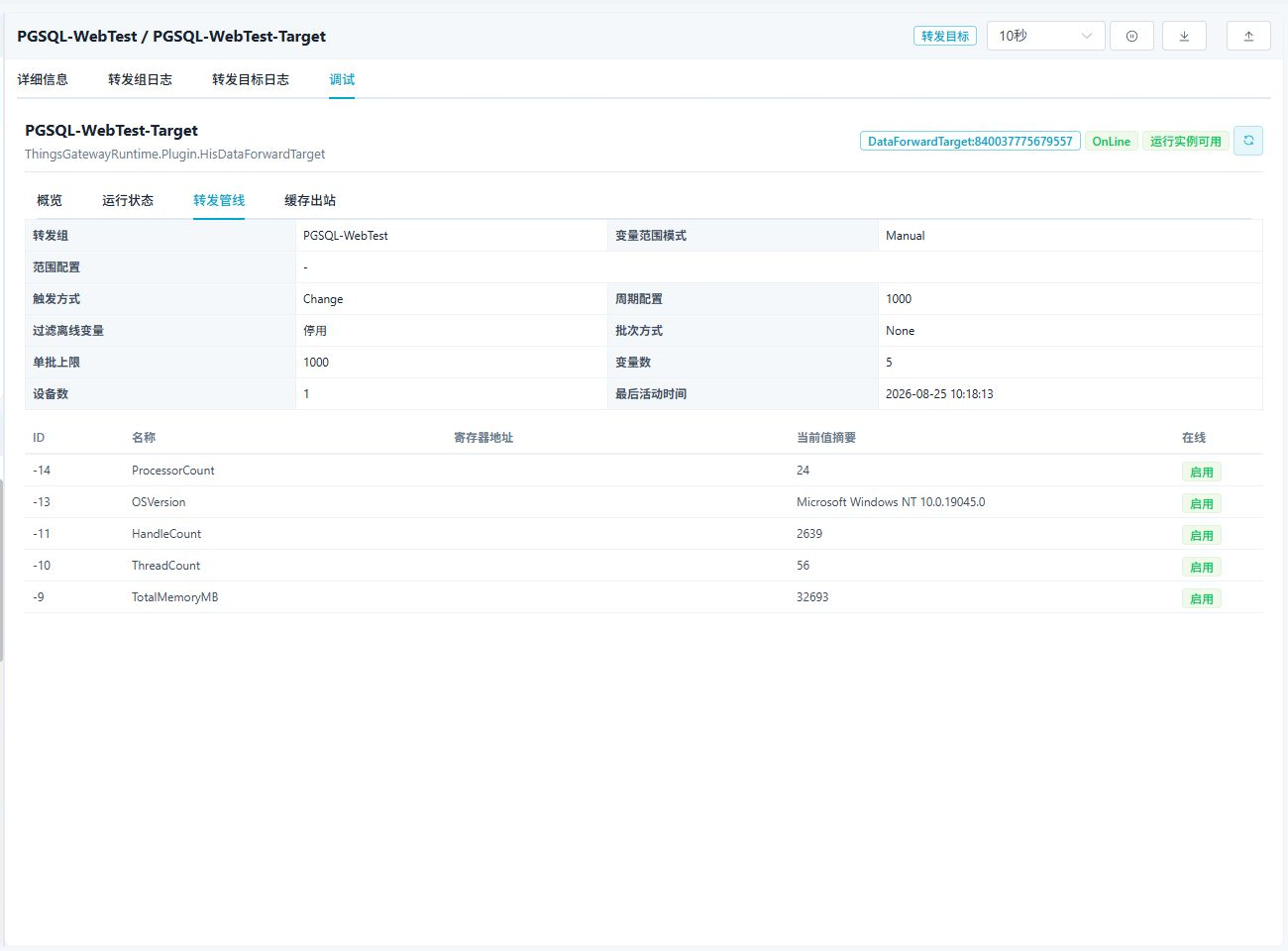
Use the pipeline to confirm the variable range, trigger, and data summary entering the target.
Cache outbox
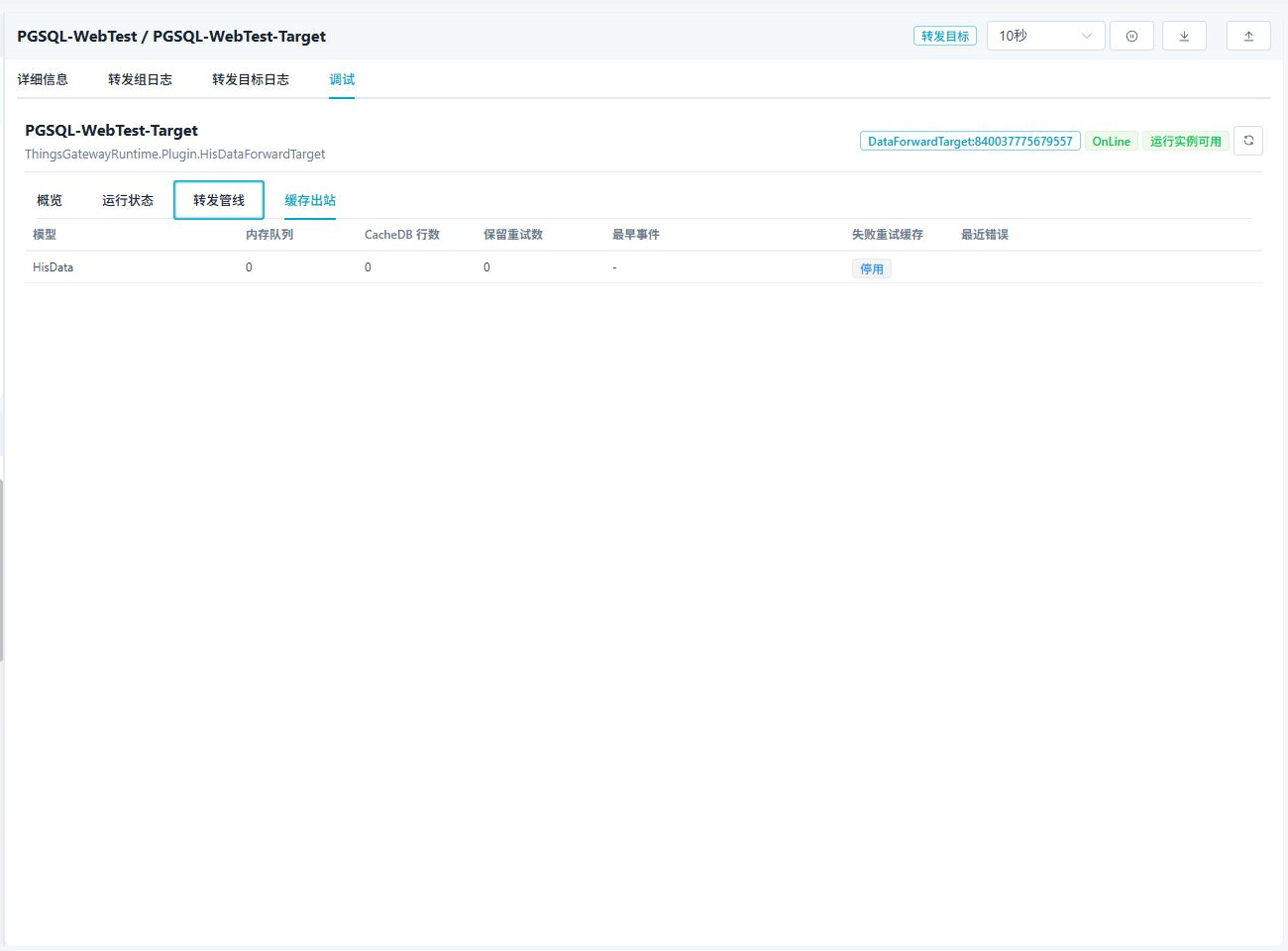
The cache outbox shows the memory queue, CacheDB pending rows, retained retries, and latest error. When offline cache is enabled, pending records are written after the database recovers.
Save and verify
- Save the group and target, confirm the target is online, and check that initialization produced no error.
- Change an included variable or wait for one interval trigger.
- In target Debug, review Forwarding pipeline and Cache outbox. Pending rows should fall after a successful write.
- Query the database and check the newest row's identifiers, device name, value, nulls, collection time, and record time. For Custom SQL mode, check every configured column.
- In Data Query → History, switch to this target and compare total count, pagination, newest sort, and time-zone display with the database result.
Time and queries
- Time-zone offset is the storage convention, not the browser time zone. With a browser in
Asia/Shanghai, UTC storage may be returned with aZsuffix, while+08:00storage may appear as a local wall-clock value. They can represent the same instant; keep storage and query conventions consistent. - Standard mode uses numeric and string history tables. Custom SQL mode returns the actual wide-table columns; do not assume standard names such as
variableIdorvalue. - QuestDB, TDengine, and IoTDB native modes may return a native timestamp or an integer timestamp. Verify the actual time-column type and every field in the newest row.
Troubleshooting
| Symptom | Check |
|---|---|
| Target does not start | Check the database service, connection-string keys and port, permissions, identifier names, IoTDB model, and mutually exclusive options. |
| TDengine database not found | Use db=database_name, not Database=database_name; use 6041 with WebSocket and 6030 with Native, and keep Protocol aligned with the port. |
| IoTDB connection fails | Tree requires Model=tree;RootPath=...; Table requires Model=table;Database=...; never set both RootPath and Database. TLS also requires CertificatePath. |
| No new historical row | Check the group range, group enable state, trigger mode, interval, group online filter, and target online state. Historical targets have no separate target-level sampling fields. |
| No replay after database recovery | Enable the failed-write retry cache and inspect CacheDB pending rows and the target log. When disabled, failed backoff records may have been discarded. |
| Count or newest time is wrong | Confirm the selected target and table, sort field, time range, split strategy, and time-zone offset. Custom SQL uses the actual wide-table columns. |
| Custom SQL create or insert fails | Check column names, types, variable mappings, required values, placeholders, quoting, time type, and database-specific UPSERT or supertable syntax. |
| Dual-database mirror cannot start | The primary and backup must be different relational databases, and Custom SQL and history-table scripts must be disabled. |
Related links
- Data Forwarding: Forwarding groups, ranges, triggers, cache, redundancy, and target runtime operations.
- Plugin Manual Index: Other collection and data-forwarding plugins.