ThingsBoard MQTT
This target connects to ThingsBoard through MQTT and publishes gateway telemetry and device attributes. It can also handle ThingsBoard gateway RPC requests when write permissions are enabled.
Configure the forwarding group and target through Data Forwarding. This page covers ThingsBoard connection properties, fixed platform Topics, variable write permission, and debug verification.
Open the plugin
Open Development Configuration → Data Forwarding and:
- Configure and save the forwarding group range, trigger, interval, online filter, and batching.
- Add a target, choose ThingsBoard MQTT, and fill in the basic target information.
- Open Target properties and configure the ThingsBoard MQTT endpoint, token authentication, TLS, and runtime options.
- Save and enable the target, confirm the gateway device is online in ThingsBoard, and then open Target debug.
Basic target information
| Setting | Default | Configuration |
|---|---|---|
| Group | - | Select a saved forwarding group. |
| Target name | - | Required and unique within the group. |
| Enable | Enabled | Disable to stop the connection. |
| Log level | Info | Temporarily use Debug for connection or publish diagnostics. |
| Start timeout | 60 seconds | Valid range is 1 to 3600 seconds. |
Target properties
Connection
| Setting | Default | Configuration |
|---|---|---|
| Connection type | Tcp | Use TCP or WebSocket according to the platform endpoint. |
| IP address | localhost | ThingsBoard host or IP without a scheme. |
| Port | 1883 | Common MQTT port is 1883; TLS commonly uses 8883; WebSocket uses the platform port. |
| WebSocket path | /mqtt | Used only for WebSocket and must start with /. |
| Client ID | Empty | Empty generates a client ID; fixed IDs must be unique. |
| MQTT version | V500 (MQTT 5) | Match the ThingsBoard endpoint. |
| Clean session | Enabled | Disable when a persistent session is required. |
| Keep-alive | 60 seconds | Keep Alive interval accepted by the platform. |
TLS and authentication
| Setting | Default | Configuration |
|---|---|---|
| Enable SSL | Disabled | Enable TLS and use the platform TLS port. |
| SSL target host | Empty | DNS name in the server certificate SAN; empty uses the IP. |
| Client certificate | Empty | Select a client certificate with private key for mutual TLS. |
| CA certificate | Empty | Select a custom CA when required. |
| Allow untrusted certificate | Enabled | Current default is enabled for development self-signed certificates; disable in production. |
| SSL protocol | None (system default) | Select a specific TLS version only when required. |
| Check certificate revocation | Disabled | Enable according to security policy. |
| Username | Empty | ThingsBoard commonly expects the device Access Token in this field. |
| Password | Empty | Fill according to the platform authentication mode; token setups commonly leave it empty. |
Runtime and message options
| Setting | Default | Configuration |
|---|---|---|
| QoS | AtMostOnce (0) | Select the level required by the ThingsBoard deployment. |
| Retain | Disabled | Usually keep disabled; enable only when the platform requires retained state. |
| Detail log | Disabled | Enable temporarily for MQTT connection and message diagnostics. |
The plugin uses the current ThingsBoard gateway Topics:
| Purpose | Topic |
|---|---|
| Device attributes | v1/gateway/attributes |
| Telemetry | v1/gateway/telemetry |
| RPC requests | v1/gateway/rpc |
This target does not expose the generic device/variable/alarm Topic templates. Topic names are fixed by the ThingsBoard Gateway MQTT contract.
Target variable property
| Setting | Description |
|---|---|
| Allow RPC write | Default enabled. Allows ThingsBoard gateway RPC to write this variable. Enable only for approved control points. |
The variable must already be inside the forwarding group's range. A target variable property does not add a member to the group.
Messages, templates and cache
Cache and capacity
| Setting | Default | Configuration |
|---|---|---|
| Enable failed-write retry cache | Disabled | Enable to retain telemetry and device-connect messages in CacheDB while the platform is unavailable and replay them after recovery. |
| Cache file maximum rows | 262144 | Maximum CacheDB outbox rows; oldest rows are removed after the limit. |
| Upload chunk size | 2000 | Maximum replay batch size. |
| Memory queue limit | 100000 | Maximum in-memory records, including the device-connect queue. |
| Filter offline data | Disabled | Filters offline variables at dequeue; the forwarding-group filter also applies. |
| Upload concurrency | 1 | This target publishes over one connection; keep 1. |
Target debug
Open Development Configuration → Data Forwarding, select the forwarding group and target, and open Debug.
ThingsBoard MQTT protocol panel
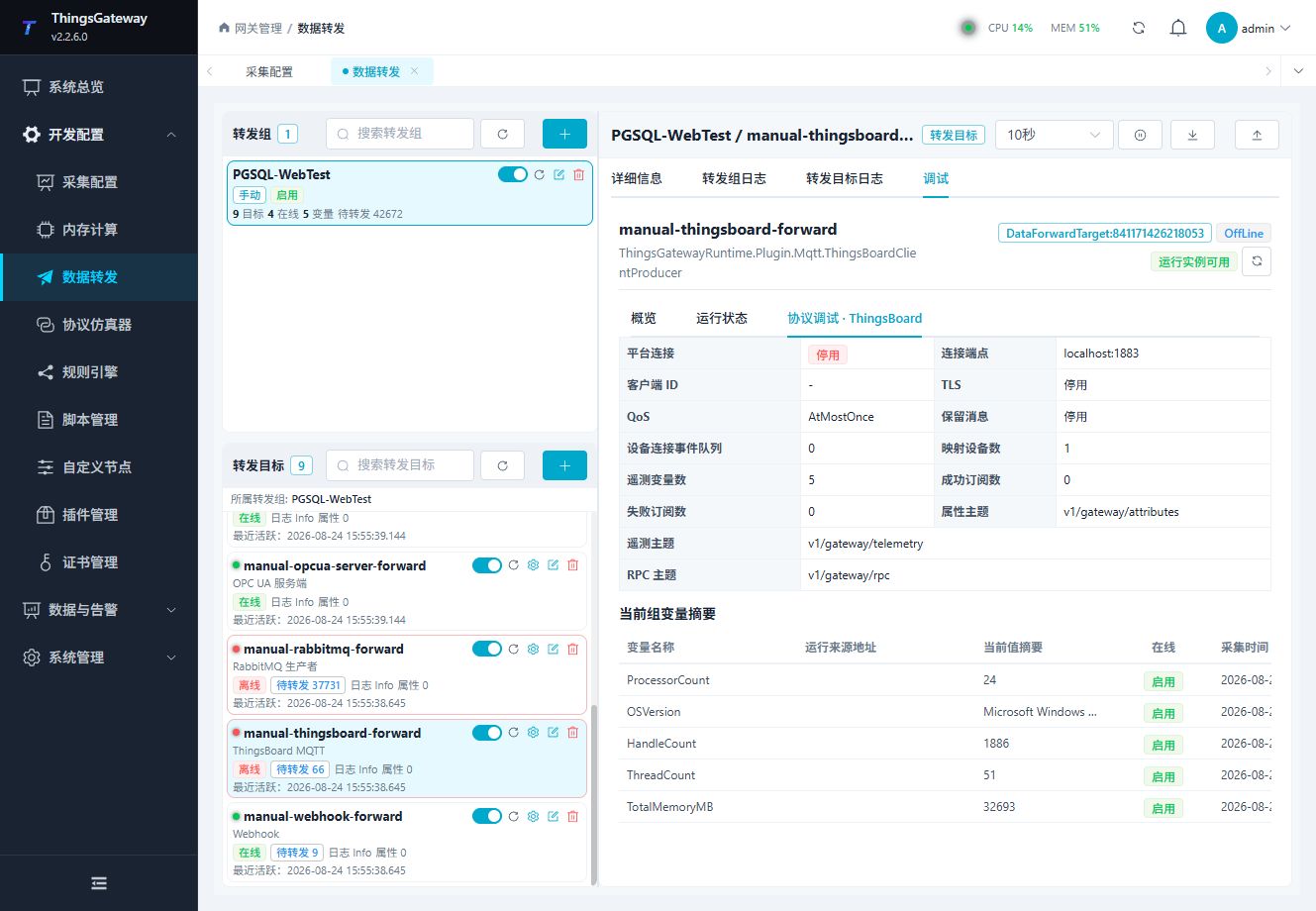
Use the panel to inspect connection state, endpoint, client ID, TLS, QoS, Retain, device-connect queue, mapped variables, subscriptions, and the three fixed Topics.
Verify the target
- Confirm the ThingsBoard host, port, MQTT version, credentials, and TLS settings.
- Confirm that the forwarding group includes one test variable.
- Check that telemetry appears in the ThingsBoard gateway device or telemetry view.
- Compare device, key, value, and timestamp with TGateway.
- Test an RPC write only when the target and variable permissions allow it, then verify the response and the variable value.
Troubleshooting
| Symptom | Check |
|---|---|
| No telemetry in ThingsBoard | Host, port, credentials/device token, MQTT version, fixed telemetry Topic, group range, target state, and platform device state. |
| Authentication fails | ThingsBoard device token or credentials, client ID, TLS, and endpoint port. |
| Telemetry key is missing | Source variable name, forwarding group membership, variable value, and target log. |
| RPC write fails | Target variable RPC permission, source variable write permission, ThingsBoard RPC payload, and target log. |
| Connection repeatedly drops | Keep-alive, broker/platform limits, TLS settings, firewall, and network stability. |
| Device-connect messages accumulate | Check acceptance of v1/gateway/attributes, enable the failed-write retry cache, and inspect the device-connect queue and CacheDB pending count. |
| Changing a Topic has no effect | ThingsBoard uses fixed Topics and does not expose generic Topic templates; check the platform subscription and target type. |
Related links
- Data Forwarding: Forwarding groups, triggers, cache, redundancy, and common target operations.
- Certificate Management: Manage MQTT client and CA certificates.
- Plugin Manual Index: Other collection and data-forwarding plugins.