OPC UA Server
This target exposes variables from a forwarding group through an embedded OPC UA server. External OPC UA clients can browse, read, and, when permitted, write the exposed nodes.
Configure the forwarding group and target through Data Forwarding. This page covers OPC UA endpoint, security, history targets, node mapping, and debug actions.
Open the plugin
Open Development Configuration → Data Forwarding and:
- Save the forwarding-group variable range; only included variables create OPC UA nodes.
- Add a target, choose OPC UA Server, and fill in the basic target information.
- Open Target properties and configure endpoints, identity, security, certificates, and history-target bindings.
- Save and enable the target, then configure data type and write permission in Variable properties.
Basic target information
| Setting | Default | Configuration |
|---|---|---|
| Group | - | Select a saved forwarding group. |
| Target name | - | Required and unique within the group. |
| Enable | Enabled | Disable to stop the OPC UA server. |
| Log level | Info | Temporarily use Debug for certificate, session, or node diagnostics. |
| Start timeout | 60 seconds | Valid range is 1 to 3600 seconds. |
Native Method calls
Enable Allow method calls on the called device or forwarding target, then start or restart this UA target. Browse ThingsGateway/Methods by instance name, supply TimeoutMs first and business arguments next. No method variable is required; current UA session authentication still applies.
Closing the called instance's switch rejects calls through existing nodes. Methods enabled later or changed plugin definitions require restarting this UA target and browsing again. Native UA types represent basic values; complex objects, Decimal, and nullable values use JSON strings. See Plugin Method Calls for outputs and verification. Existing variable-node writes retain target and variable RPC write permissions.
Target properties
Endpoint
| Setting | Default | Configuration |
|---|---|---|
| Server address | opc.tcp://127.0.0.1:48410 | Separate multiple endpoint URLs with semicolons. Every URL must be reachable by the client. |
| Application name | TGateway_OPC_UA_Server | Identify application name and subject used when the server certificate is generated. |
Security and authentication
| Setting | Default | Configuration |
|---|---|---|
| Security policy | Disabled | Disabled publishes only None; enabled publishes SignAndEncrypt with Basic256Sha256, Aes128_Sha256_RsaOaep, and Aes256_Sha256_RsaPss. Select a combination supported by the client. |
| Allow certificate login | Disabled | Available on secure endpoints; enables X509 user-token login. |
| Client certificate trust mode | ManualTrustList | Manual mode uses the debug-maintained trust stores; SpecifiedCA accepts certificates issued by the selected CA. |
| Trusted client CA | Empty | In SpecifiedCA, select the required issuing CA. Empty automatically trusts valid client certificates without restricting their organization/issuer. |
| Username | Empty | Fixed username for username login; the client must submit a non-empty value. |
| Password | Empty | Password paired with the username. |
| Server certificate | Empty | Select a server certificate with private key; empty lets the system generate one from the application name. |
| Server issuer CA | Empty | Select the issuing CA when clients need the complete certificate chain. |
Establish a secure identity
- In Certificate Management, prepare a server certificate with its private key, the client-facing DNS/IP names, and a matching OPC UA Application URI.
- Select that certificate and its issuer CA on the target, enable the security policy, and save. Discover endpoints again from the client.
- Check
SignAndEncrypt, server identity, Application URI, and the complete chain. With security disabled, username/password settings do not remove anonymous access. - Establish a new session with the configured username/password and read a node. Then test an incorrect password with another new session.
- For X509 user login, enable Allow Certificate Login, confirm the Certificate token in endpoint discovery, and activate a session with an independently trusted user certificate.
Trust application certificates and user certificates separately. Manual mode provides trusted and issuer stores for each. Issuer stores complete chains; they do not by themselves establish trust. CA-based trust also needs the required CRLs. In SpecifiedCA mode, choose the intended CA explicitly; an empty CA does not limit trust to your organization.
Write permission and history
| Setting | Default | Configuration |
|---|---|---|
| Allow RPC write | Enabled | Enables writes from external OPC UA clients. Variable and OPC UA user permissions must also allow the write. |
| Historical data target | Empty | Enter a stable target name in group/target form. Leave empty to disable OPC UA historical-data reads. |
| Historical alarm target | Empty | Enter a stable historical-alarm target name in group/target form. Leave empty to disable OPC UA historical-event reads. |
Target-variable properties
| Setting | Default | Description |
|---|---|---|
| Data type | Object | Data type exposed for this target variable. Match it with the source variable and the OPC UA client's expected type. |
| Allow RPC write | Enabled | Allows the client to write this node when target-level, variable-level, and user permissions all allow it. |
The variable must already be included in the forwarding group's range. A target variable property does not add a variable to the group.
Target debug
Open Development Configuration → Data Forwarding, select the forwarding group and target, and open Debug.
Certificate stores
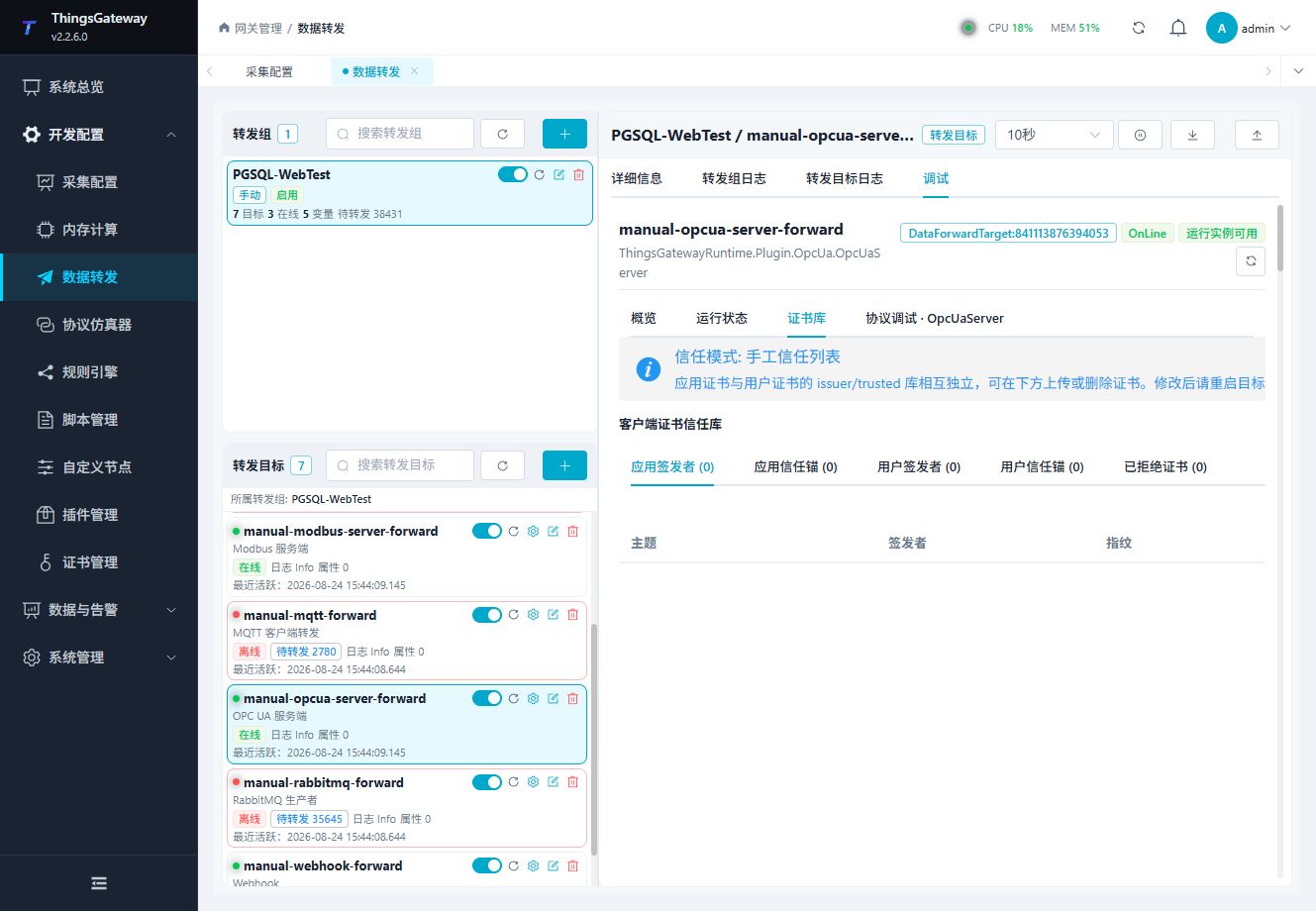
Use the certificate-store panel to maintain client trust certificates when the target uses a manual trust list. After adding or deleting certificates, restart the target when the page requests it.
OPC UA server protocol panel
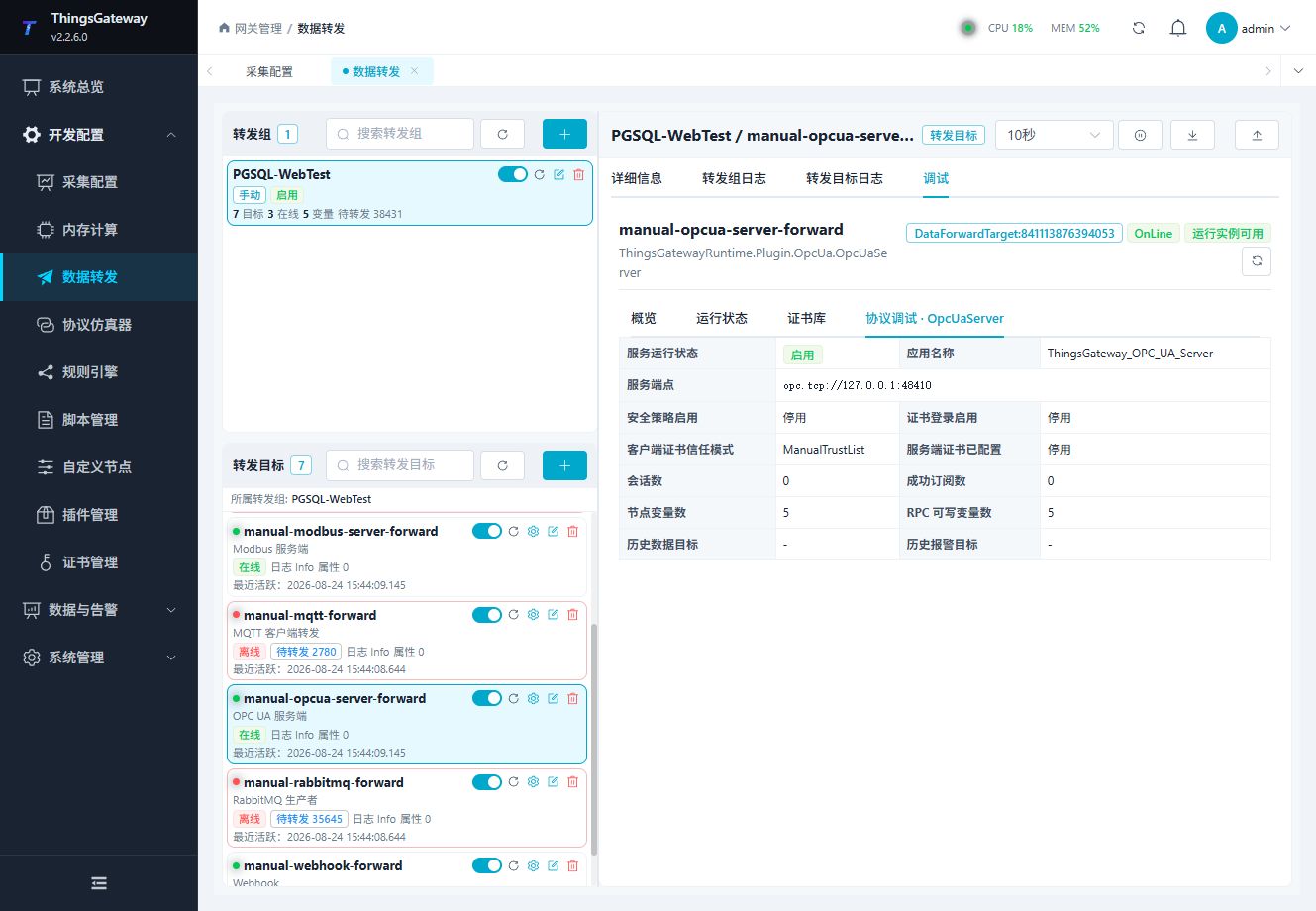
Use the protocol panel to inspect the server endpoint and perform plugin-specific operations. Certificate changes, node writes, and client disconnect actions require the appropriate permission and site approval.
A listed UploadAsync special method does not mean this server supports arbitrary Topic messages. This target returns a business failure stating that no generic message-upload channel is provided. Use an OPC UA client or the relevant debug controls for node reads and writes, and inspect the method result rather than only the outer request status.
Debug checklist
- Confirm the endpoint address and target runtime state.
- Confirm the client certificate trust mode and selected certificates.
- Connect an OPC UA client and browse the exposed nodes.
- Read one node before testing any write.
Trust and value verification
Application certificates and X509 user certificates have separate trust decisions. Manual mode has application trusted/issuer stores and user trusted/issuer stores. Include intermediate chains and required CRLs. A None endpoint remains anonymous when security is disabled; filling a username does not remove anonymous access. Secure mode does not publish None/anonymous endpoints.
Inspect both node DataType and actual Variant type at an independent client. Explicit Decimal uses a DecimalDataType ExtensionObject, Byte arrays remain one-dimensional arrays rather than ByteString scalars, and Object infers the source type, with decimal projected as Double. A String target turns numeric 100 into text "100"; a wider target type does not widen the physical source's range.
Verify one permitted write with source readback. Disable the target-level write switch and then the node-level switch in separate tests, saving and reconnecting each time. Reads should remain available, writes should fail, and the physical value should stay unchanged. Restore permissions and repeat the write.
Raw history and event history
- Store at least two different values for the same variable and confirm them in the gateway's history query.
- Bind the history target using its stable
group/targetname. Save, reconnect, and check Historizing and HistoryRead on the node. - Execute Raw HistoryRead over a UTC window containing those records. Check values, quality, source times, and continuation information. Repeated current-value reads do not verify history.
- For events, bind a separate alarm-history target after generating an actual alarm. Run event HistoryRead on the root event notifier and interpret returned fields in selection order.
- Clear each binding and reconnect. Check that its history access is removed while realtime nodes and stored database records remain available.
For subscriptions, record SubscriptionId, publishing/sampling intervals, and queue settings; change a source and verify a subsequent notification. An initial snapshot is not a change notification. After deleting the subscription, ordinary Read should still work; the session and nodes remain.
Verify the target
- Start the target and connect with an OPC UA client.
- Browse the namespace and locate one variable included in the forwarding group.
- Read the value and compare it with the source variable.
- Test a write only when target, variable, client, and site permissions allow it.
- If history targets are configured, verify historical data or events with a time range that contains stored records.
Troubleshooting
| Symptom | Check |
|---|---|
| Client cannot connect | Server address, target state, firewall, security policy, server certificate, and client trust settings. |
| Client certificate is rejected | Trust mode, manual trust stores, selected CA, certificate chain, and certificate purpose. |
| Username login fails | Username/password, certificate-login setting, endpoint security policy, and account permissions. |
| Nodes are not visible | Forwarding group range, target variable properties, target restart state, and client namespace browse permissions. |
| Read value is incorrect | Source variable state, target variable data type, forwarding group membership, and target logs. |
| Write is rejected | Target RPC write, target variable RPC write, OPC UA user permission, node access level, and site safety policy. |
| Historical reads are empty | Historical target name, target type, stored records, and the query time range. |
Related links
- Data Forwarding: Forwarding groups, triggers, cache, redundancy, and common target operations.
- Certificate Management: Maintain server, client, and CA certificates.
- Plugin Manual Index: Other collection and data-forwarding plugins.