Historical Alarm Storage
This target writes alarm occurrence, acknowledgement, and recovery events at or above a selected level to a database. Use the stored records for historical queries and reports.
Configure forwarding group ranges, offline cache, and runtime state through Data Forwarding. This page covers only the alarm table, level filter, dual-database mirror, and debug panels specific to historical alarms.
Save and query one alarm
- Configure a test high-limit alarm on a memory variable.
- Open Development Configuration → Data Forwarding, create
Demo_Alarm_Groupwith Manual selection, and save it. Edit the group again, select the test variable under Forwarding variables, click + to add it to the member table, and save. - Add target
Demo_Alarm_Targetwith the Historical Alarm Storage plugin. - Set database type to
Sqliteand connection string toData Source=manual-alarm.sqlite;journal mode=WAL. Keep tablehistoryAlarmand minimum level0; leave the script empty and mirroring disabled. - Save and enable the group and target. The gateway runtime directory must be writable for the SQLite file.
- Generate a new alarm, acknowledge it with a note, and then restore the test value. Events that occurred before the target started do not validate this storage path.
- Open Data and Alarm → Alarm Query → Historical Alarm, select
Demo_Alarm_Group/Demo_Alarm_Target, confirm a time range covering the entire lifecycle, and refresh. Match variable identity, event times, and acknowledgement text.
For a production database, replace the database type and connection string. The target's minimum level filters stored events; it does not set the variable's alarm threshold. A Dynamic SQL alarm script and dual-database mirroring are mutually exclusive.
Basic target information
| Setting | Default | Configuration |
|---|---|---|
| Group | - | Select a saved forwarding group. |
| Target name | - | Required and unique within the group. |
| Enable | Enabled | Disable to stop alarm-table initialization and writes. |
| Log level | Info | Temporarily use Debug for database or alarm-write diagnostics. |
| Start timeout | 60 seconds | Valid range is 1 to 3600 seconds. |
Target properties
| Setting | Default | Configuration |
|---|---|---|
| Database type | SqlServer | Supports SqlServer, MySql, Sqlite, and PostgreSql. |
| Split-table strategy | No split | Relational databases can split by day, week, month, quarter, year, or a custom split service. |
| Connection string | Development SQL Server example | Replace with the actual endpoint, database, account, and password; the account needs create, query, insert, and delete permissions. |
| Historical alarm table | historyAlarm | Stores occurrence, acknowledgement, and recovery events. Use separate target table names where appropriate. |
| Retention days | 3650 | Positive integer; values below 1 are normalized to 1. Cleanup uses alarm EventTime. |
| Historical alarm table script | Empty | Select a saved Dynamic SQL expression. The script owns table creation, writes, and cleanup; empty uses the standard table. |
| Time-zone offset | +08:00 | Enter a fixed offset such as +08:00 or -05:00; empty means UTC. Use the same convention when querying. |
| Minimum alarm level | 0 | Stores only events with AlarmLevel >= this value, including acknowledgement and recovery. Query-level filtering is separate. |
| Dual-database mirror | Disabled | Relational standard tables only; fill a different physical backup database. |
Relational connection strings
| Database | Example |
|---|---|
| SQL Server | Server=127.0.0.1,1433;Database=tgateway_alarm;User Id=history_user;Password=<password>;TrustServerCertificate=True; |
| MySQL | Server=127.0.0.1;Port=3306;Database=tgateway_alarm;Uid=history_user;Pwd=<password>; |
| SQLite | Data Source=DB/alarm.db;journal mode=WAL |
| PostgreSQL | Host=127.0.0.1;Port=5432;Database=tgateway_alarm;Username=history_user;Password=<password>; |
Dual-database mirroring supports SQL Server, MySQL, SQLite, and PostgreSQL. The primary and backup must be different physical databases, and Historical alarm table script must be empty. The automatic check, automatic fill, and capacity fields are the same as Historical Data Storage.
Time zones and partitions
The storage offset affects new physical timestamps. Query display converts the same instant; changing the offset does not rewrite old rows. Establish a project convention first. None writes the base table; Day uses the event date, Week its Monday date, Month its year/month, Quarter its year/quarter, and Year its year. Custom requires a deployed partition service; with no rule it writes the base table. Name/strategy changes do not merge old tables. Generate a new lifecycle and inspect physical tables plus standard queries.
Alarm table scripts
Compile a Dynamic SQL alarm-data script with DBInit, DBSavable, and DBDeletable, then bind it here. It owns creation, parameterized batch writes, and retention with cancellation. Preserve identity, event time/type, and confirmation text. Standard queries cannot infer arbitrary script schemas. Clearing the binding resumes standard writes without deleting script tables, data, or registration. See Script Development.
Mirroring and retention
Compare the same lifecycle's stable identities, times, types, levels, text, and acknowledgement in both databases. Check interval 0 disables scheduled checking, not dual writes. Disabling synchronization stops later mirror writes without deleting existing data. Inspect differences before filling and recheck; cancellation leaves completed chunks. See Mirror Maintenance.
Retention uses EventTime, independent of acknowledgement or realtime visibility. Values below one normalize to one day. Shortening retention can remove old rows; raising it later cannot recover them. Custom scripts own their cleanup.
Target-variable properties
This plugin has no target-variable properties. Alarm inclusion is controlled only by the forwarding-group range and Minimum alarm level.
Messages, templates and cache
Cache and capacity
| Setting | Default | Configuration |
|---|---|---|
| Enable failed-write retry cache | Enabled | Retains alarms when the database is unavailable and replays them after recovery. |
| Cache file maximum rows | 262144 | Maximum CacheDB outbox alarm rows. |
| Upload chunk size | 2000 | Maximum alarms per write or replay batch. |
| Memory queue limit | 100000 | At capacity, persist pending alarms first. If persistence fails, retain accepted alarms and reject new records for upstream retry. |
| Filter offline data | Disabled | The property is exposed by the common target, but alarm acceptance is controlled by group range and minimum alarm level. |
| Upload concurrency | 1 | The alarm writer follows its own queue; entering 4 does not create four alarm write threads. |
Chunk size controls the alarm outbox batch rather than HTTP requests. Memory and persistent counts are different stages, while retained retries are included in persistent rows. Disabled retry leaves already-attempted failures without durable retry. A full queue evicts oldest rows and can leave partial lifecycles; an in-flight batch can still succeed. More capacity does not restore evicted events.
Target debug
Open Development Configuration → Data Forwarding, select the forwarding group and target, and open Debug.
| Feature | Purpose |
|---|---|
| Forwarding pipeline | Shows the forwarding group range and alarm data entering the target. |
| Cache outbox | Shows pending alarms, retained retries, and the latest error. |
Forwarding pipeline
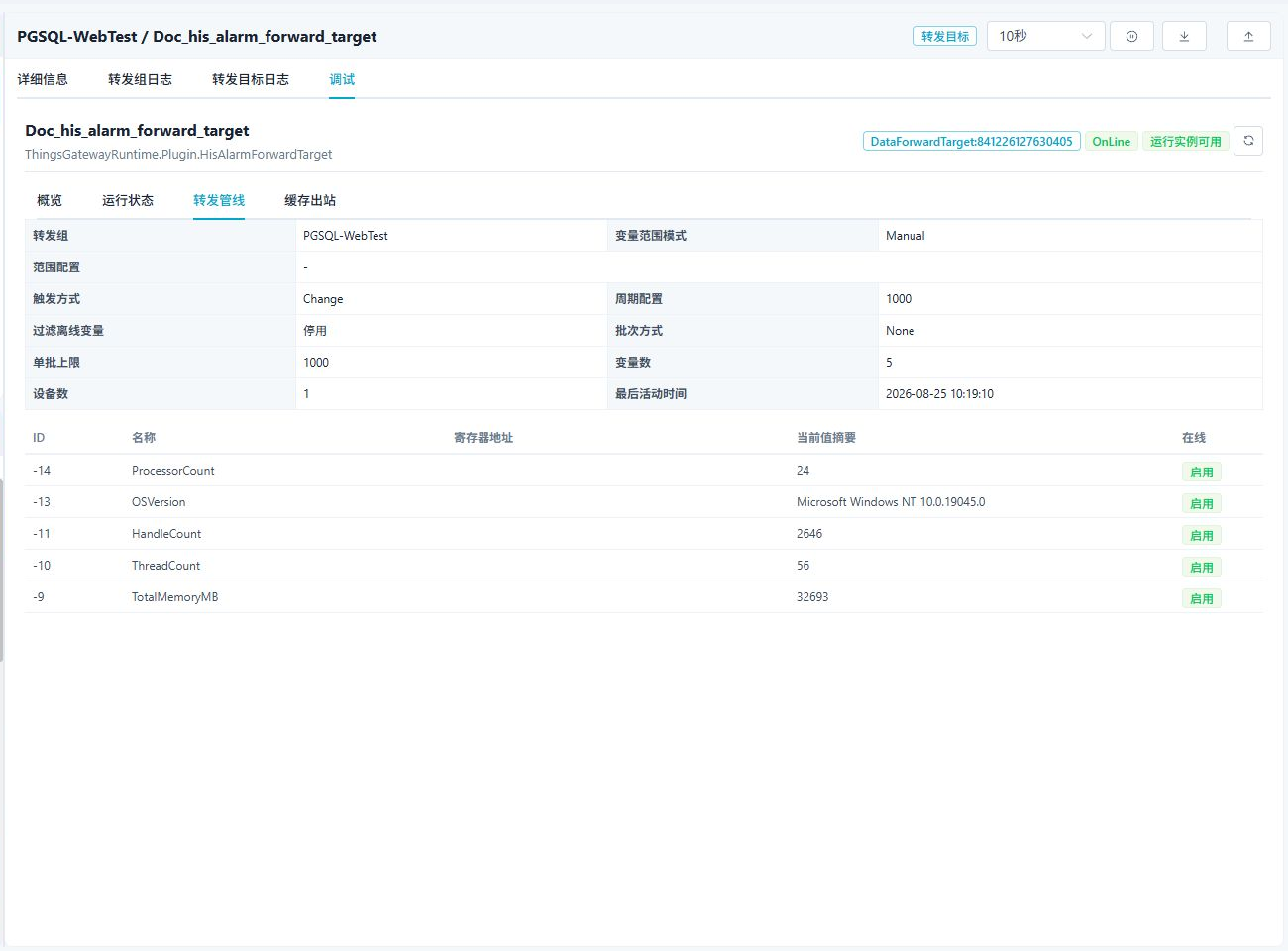
Use the pipeline to confirm the forwarding group range, target state, and alarm data entering the target.
Cache outbox
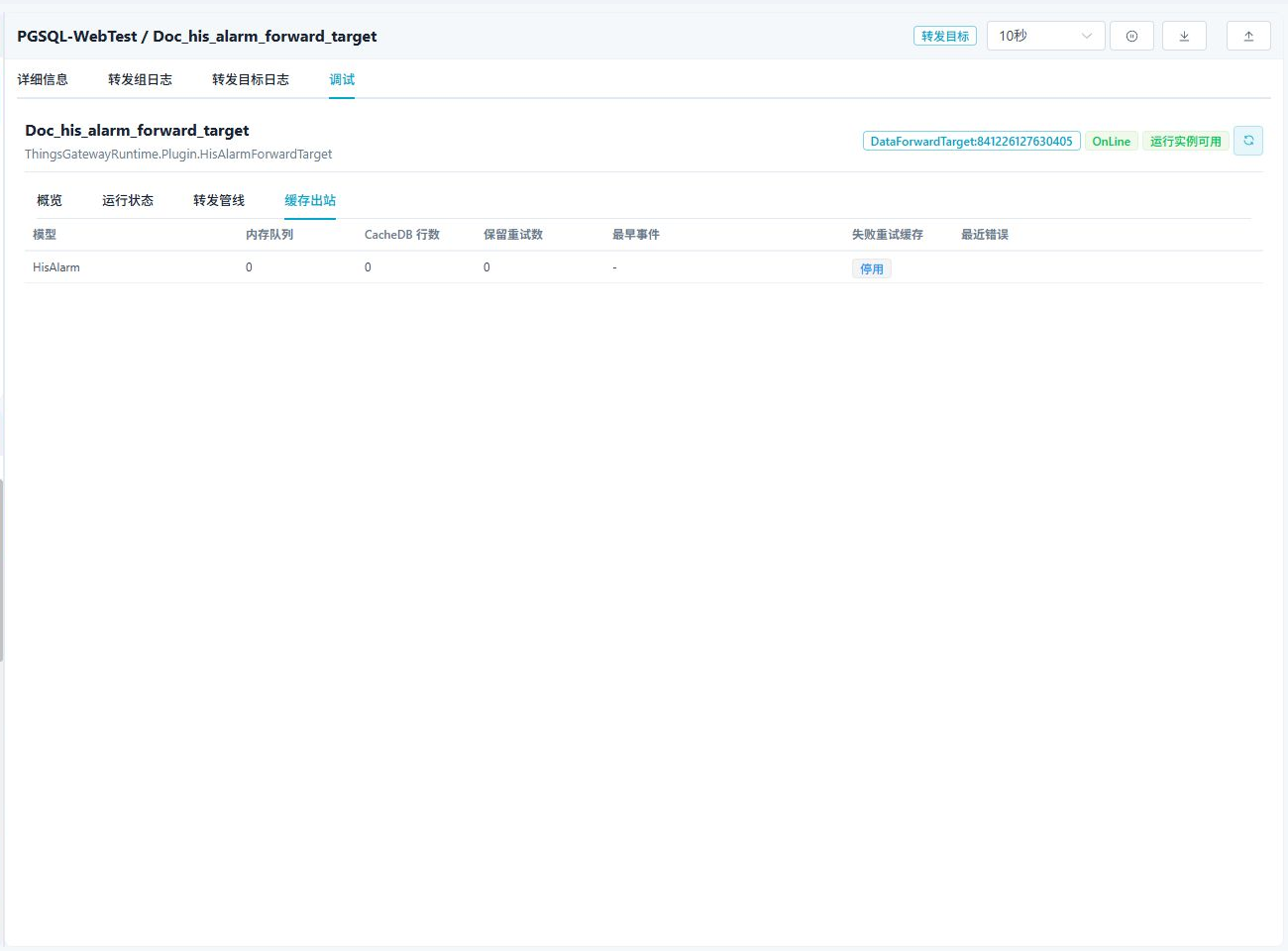
The cache outbox shows the alarm queue, CacheDB pending rows, retained retries, and latest error. When offline cache is enabled, pending alarms are written after the database recovers.
Verify the target
- Enable the forwarding group and target, then confirm that the target is online.
- Use an approved test variable to activate an alarm at or above Minimum alarm level, acknowledge it with a note, and then restore the value.
- Match
Alarm,Confirm, andConfirmAndFinishby identity and occurrence time. An unacknowledged recovery can useFinish, depending on the removal setting. - Raise the storage minimum and generate a lower-level test lifecycle. Realtime operation continues while that target excludes its new events; existing history remains.
Troubleshooting
| Symptom | Check |
|---|---|
| Alarm is not stored | The alarm was activated, its level meets the minimum, and the target is online. |
| Target does not start | Database connection, table name, split-table strategy, and account permissions. |
| Alarms are not written after recovery | Offline cache setting, cache outbox, and target log. |
| Dual-database mirror cannot start | The primary and backup are different, both database types are supported, and the historical alarm table script is empty. |
Related links
- Data Forwarding: Forwarding groups, ranges, triggers, cache, redundancy, and target runtime operations.
- Alarm Configuration: Configure alarm conditions and levels.
- Plugin Manual Index: Other collection and data-forwarding plugins.