IEC104 Server
This target maps variables from a forwarding group to IEC 60870-5-104 information objects. A control-center client can perform general interrogation, read indications and measurements, and issue remote controls when permitted. The plugin is named IEC104Slave in the target selector.
Configure the forwarding group range, common channel fields, and target runtime state through Data Forwarding. This page covers only IEC104 station, information-object mapping, write permission, and debug behavior.
Create the server target
Open the plugin
Open Development Configuration → Data Forwarding, select or create a forwarding group, and add a target using IEC104Slave.
Server properties
| Setting | Default | Description |
|---|---|---|
| Common address | 1 | Target-level CA used when a variable does not override it. Valid range is 1–65534. |
| Send window K | 12 | Maximum unacknowledged I frames sent by the server. Keep it within the control-center receive capacity. |
| Receive acknowledgement threshold W | 8 | Number of received I frames that triggers an S-frame acknowledgement. |
| Channel type | TcpService | A standard IEC104 server uses a TCP service channel and Local bind address. Use another channel only when the project architecture requires it. |
| Allow writes | Enabled | Target-level switch for remote-control write-back. Disabling it rejects writes to every mapped variable. |
| Send delay | 0 ms | Delay before each protocol send. Change it only when the receiver requires an inter-message delay. |
| Maximum pending changes | 4096 | Bounded queue for spontaneous changes. Repeated changes to one point are coalesced; overflows are logged and rejected. |
| Selection timeout | 30 s | Validity of a Select-Before-Operate selection before execution. |
TCP, serial, DTU, SSL, heartbeat, timeout, and connection-limit fields are common channel settings. Fill only the group that matches the selected Channel type.
Target variable properties
Save the target, open Variable Properties, and map every variable that must be exposed through IEC104.
| Setting | Default | Description |
|---|---|---|
| Common address | Empty | Optional override of the target CA, valid 1–65534. |
| Information object address | 0 | Required three-byte IOA, valid 0–16777215. The same CA, monitoring base type, and IOA combination must be unique. |
| Interrogation group | Empty | Optional group 1–16, corresponding to QOI 21–36. Ungrouped points participate only in general interrogation. |
| Type identification | ScaledMeasurement | Select the monitoring TypeId used by the control center, including single/double point, step, bit string, normalized/scaled/short-float measurement, counter, and CP56Time2a variants. |
| Allow writes | Enabled | Variable-level remote-control permission. Both target and variable permissions must allow a write. |
| Select before operate | Disabled | When enabled, the control center must send a matching select command before execution, within the selection timeout. |
The variable must already be inside the forwarding group's range. Match TypeId with the source value and the control-center point list. CP56Time2a TypeIds 30–37 use the source variable collection time; TypeId 21 carries no quality byte.
General interrogation (QOI=20) returns all points for the requested CA. Group interrogation returns only points matching both the CA and group. Debug interrogation publishing follows the same rule; an empty group returns no points. Spontaneous updates are independent of interrogation groups.
Debug and verify
Target debug
Open Development Configuration → Data Forwarding, select the IEC104 target, and open Debug.
| Feature | Purpose |
|---|---|
| Forwarding pipeline | Shows the group range, trigger, variable count, and data entering the IEC104 server. |
| Runtime status | Shows server state, point mappings, clients, and pending spontaneous changes. |
| Control-center connections | Shows STARTDT and I-frame acknowledgement state for each client. |
| Point values and interrogation | Confirms the encoded CA, TypeId, IOA, quality, timestamp, and write state. |
| Test interrogation publish | Publishes an approved test interrogation to selected STARTDT-ready clients. |
| Messages | Shows sent and received APDUs and error details. |
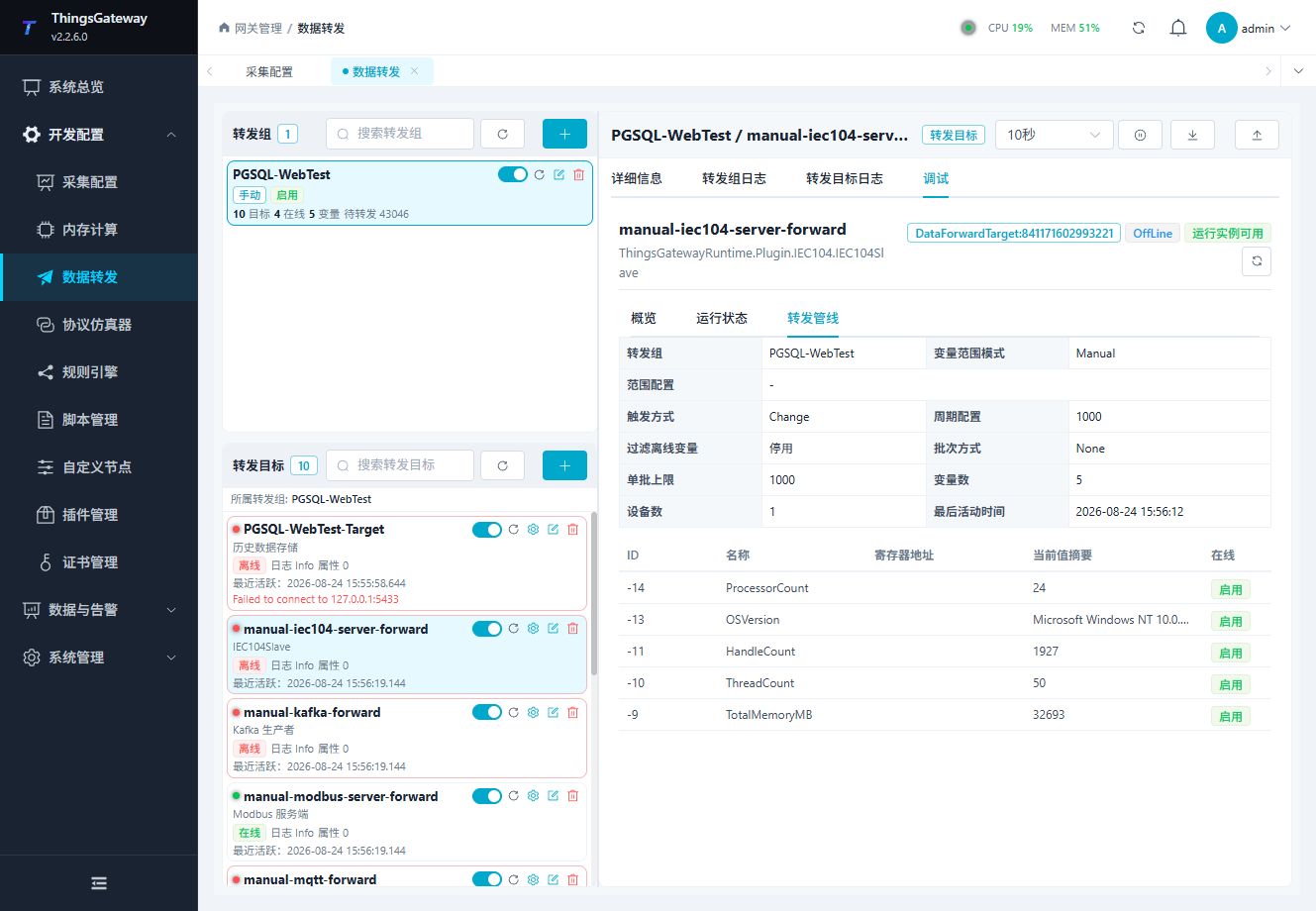
Confirm that the expected variables reach the target before connecting an IEC104 client and running general interrogation. Test remote controls only on approved points and under the site safety procedure.
Functions
| Function | Purpose |
|---|---|
| Runtime status | Confirm server state, CA, K/W, point count, connected control centers, active data-transfer sessions, and pending changes. |
| Control-center connections | Inspect STARTDT state, sequence numbers, unacknowledged frames, last activity, and errors. |
| Point values and interrogation | Filter and sort the point table by CA, TypeId, IOA, quality, timestamp, or write status. |
| Test interrogation publish | Select a STARTDT-ready client, CA, and qualifier, then publish a real general interrogation. |
| Messages | View IEC104 requests, responses, protocol fields, and errors. |
Verify the target
- Enable the forwarding group and target, then confirm that the target runtime is available.
- Configure the control-center client with the server address, port, and matching station, then connect and run general interrogation.
- In the point table, compare one indication and one measurement by CA, TypeId, IOA, value, quality, and timestamp.
- Run the test interrogation and confirm the result count is the number of encoded information objects, not the point-table total.
- Test remote control only after confirming target permission, variable permission, select-before-operate settings, and site approval.
Troubleshooting
| Symptom | Check |
|---|---|
| Client cannot connect | Channel type, local bind address, port conflict, firewall, and target state. |
| General interrogation returns no points | Forwarding group range, target variable properties, information-object addresses, data types, and station. |
| Value or quality is incorrect | Source variable value, online state, IEC104 data type, and client type identification. |
| Remote control is rejected | Target and variable write permission, information-object address, source-variable write permission, and site interlocks. |
| Client connects but I frames are rejected | Confirm that the client completed STARTDT_ACT/CON and that K/W values match the peer. |
| Interrogation is incomplete | Check CA, qualifier 20–36, TypeId, IOA uniqueness, APDU size, K/W, and the pending-change limit. |
| Timestamp or quality is wrong | Check CP56Time2a TypeId 30–37, source collection time, online state, and TypeId 21 quality rules. |
Related links
- Data Forwarding: Forwarding groups, ranges, common channel fields, and target runtime operations.
- Certificate Management: Maintain server, client, and CA certificates used by SSL.
- Plugin Manual Index: Other collection and data-forwarding plugins.