MQTT Server Forwarding
This target starts an embedded MQTT server and publishes gateway variables, devices, alarms, and plugin events to connected MQTT clients.
Configure the forwarding group and target through Data Forwarding. This page covers the MQTT server's listener, security, Topic templates, and server debug operations.
Open the plugin
Open Development Configuration → Data Forwarding and:
- Configure and save the forwarding group range, trigger, interval, online filter, and batching.
- Add a target, choose MQTT Server Forwarding, and fill in the basic target information.
- Open Target properties and configure the listener, security, message topics, scripts, templates, and cache.
- Save and enable the target, connect a test MQTT client, and then use Target debug.
Basic target information
| Setting | Default | Configuration |
|---|---|---|
| Group | - | Select a saved forwarding group. |
| Target name | - | Required and unique within the group. |
| Enable | Enabled | Disable to stop listening. |
| Log level | Info | Temporarily use Debug for listener, authentication, or publish diagnostics. |
| Start timeout | 60 seconds | Valid range is 1 to 3600 seconds. |
Target properties
Listener and security
| Setting | Default | Configuration |
|---|---|---|
| Connection type | Tcp | Tcp listens for MQTT TCP; WebSocket listens through HTTP WebSocket. |
| Port | 1883 | Listener port. Use the deployed TLS or WebSocket port when applicable. |
| WebSocket path | /mqtt | Used only for WebSocket and must start with /. |
| Enable SSL | Disabled | Enables TLS. A server certificate is required. |
| Server certificate | Empty | Select a server certificate with private key from Certificate Management. |
| CA certificate | Empty | Select a CA when validating client certificates for mutual TLS. |
| Allow untrusted certificate | Disabled | When disabled, the server requires and validates a client certificate; external clients need a valid certificate with its private key and the configured CA or system trust. Enabling it bypasses validation and removes that requirement; use only for temporary experiments. |
| SSL protocol | None (system default) | Select a specific TLS version only when required. |
| Check certificate revocation | Disabled | Enable according to the security policy. |
| Allowed Client ID prefix | Empty | Non-empty values accept only Client IDs beginning with this text. |
| Username | Empty | When non-empty, clients must provide this exact username. |
| Password | Empty | Password paired with the username. |
Messages and RPC
Direct methods check the called device or target's Allow method calls switch, without variable binding or per-method allowlists. Requests forbid Retain. The method entry adds no payload-size cap; MQTT protocol and server packet settings still apply. Method routes cannot overlap variable, history, or snapshot request/response topics. The entry retains this target's connection authentication. See Plugin Method Calls.
| Setting | Default | Configuration |
|---|---|---|
| QoS | 0 | QoS used for server publications. |
| Retain | Disabled | Forwards the Retain flag to currently connected subscribers. The built-in Broker does not store the last Topic payload or replay it to late subscribers. |
| RPC write Topic | RpcWrite | Prefix without wildcards. Requests use {prefix}/+; responses use {prefix}/{requestId}/Response. |
| Plugin Method RPC Topic | RpcMethod | Fixed request topic; response adds /Response, with no ID suffix. Empty disables method requests on this connection. |
| Historical-read RPC Topic | RpcHistory | Prefix without wildcards for history requests and chunked responses. |
| Data request Topic | Empty | Accepts a request with Source and RequestId, then sends configured snapshots and the matching completion marker. |
| Device Topic template | Empty | Empty disables device records; otherwise use ${field}. |
| Variable Topic template | TGateway/Variable | Use ${DeviceName}, ${Name}, or other variable fields. |
| Alarm Topic template | Empty | Empty disables alarm records. |
| Plugin-event Topic template | Empty | Empty disables plugin-event records. |
| RPC script | Empty | Select a saved MQTT dynamic RPC script when custom request/response handling is needed. |
Snapshot, write, and history requests
Use the same current request contracts as MQTT Client Snapshot Requests. Snapshot example: {"Source":"TGateway","RequestId":"6e8c1a7445064ad6b4bb5d5af9cf28b1"}. Completion uses DataRequestTopic/Response/RequestId. Writes use prefix/requestId and prefix/requestId/Response. History uses camelCase requestId, operation, responseChunkBytes, and input; decode each Base64 chunk in sequence, concatenate, then gzip-decompress.
- For a snapshot, configure a dedicated request Topic and subscribe to both data and completion routes first. Generate a unique 32-character lowercase hexadecimal ID for each request. Check new model payloads and the matching completion marker separately.
- For a write, send
{"Demo_Modbus_Device":{"Demo_Modbus_Value":1700}}to the write prefix plus a unique request ID. Check each variable's response, then source readback and the forwarded value. Disable that target variable's RPC permission and confirm the same operation is rejected while collection continues. - For history discovery, send
{"requestId":"6e8c1a7445064ad6b4bb5d5af9cf28b1","operation":"targets","responseChunkBytes":4096,"input":null}to the history prefix plus the same ID. Check success, order chunkIndex through chunkCount, Base64-decode each chunk, concatenate the decoded bytes, then decompress gzip. - To query records, first create history storage with different source values. Use its stable target name, actual variable ID, and UTC time window. Query pagination, upload batch size, and response byte chunks are separate limits.
Start subscribers before publishing. No subscriber does not necessarily make publication fail or create per-client retry backlog. The target cache is not an offline subscription inbox. Test exact Topics, client-ID restrictions, credentials, TLS/mutual TLS, and WebSocket paths separately. Debug publish text is raw UTF-8 rather than an extra JSON-string wrapper. Recheck client/subscription pagination and actual disconnection after kicking a session.
Target-variable properties
The server target adds RPC permission and inherits the optional text fields Data1 to Data10. A variable must already be inside the forwarding-group range.
| Setting | Default | Configuration |
|---|---|---|
| Allow RPC write | Enabled | Allows a connected MQTT client to write this variable. Keep it disabled for monitoring-only points. |
| Data1 to Data10 | Empty | Project-specific metadata. MQTT does not publish these values automatically; reference them in a script or upload template when needed. |
Messages, templates and cache
Data and scripts
The target inherits Detail log, JSON indentation, Ignore JSON nulls, device/variable/alarm/plugin-event list and dictionary upload, four entity scripts, and Upload template configuration. Configure these the same way as MQTT Client Forwarding; the server and client use the same entity fields and ${field} placeholders.
Default dictionary leaves are full entities. Text templates produce string leaves, while Json leaves follow the rendered JSON type. Ignore Null controls default entity properties and does not remove explicit template nulls. A content template with list upload disabled adds an outer JSON-string layer. Entity scripts change upload objects without changing source values.
Upload template fields
In Upload Template Configuration, choose Text or Json for each entity and insert ${field} placeholders. Empty content uses default JSON serialization; preview before saving.
| Entity | Available fields |
|---|---|
| Variable | Id, Name, DeviceName, Value, RawValue, LastSetValue, CollectGroup, CollectTime, CreateTime, ChangeTime, IsOnline, DataType, Unit, RegisterAddress, OtherMethod, Description, ProtectType, RpcWriteEnable, Remark1 to Remark5, ValueInited, IsMemory |
| Device | Id, Name, ActiveTime, DeviceStatus, PluginName, Description, LastErrorMessage, Remark1 to Remark5 |
| Alarm | AlarmId, VariableId, Name, DeviceName, AlarmCode, AlarmLevel, AlarmLimit, AlarmText, RecoveryCode, AlarmTime, EventTime, FinishTime, ConfirmTime, ConfirmText, AlarmType, EventType, Remark1 to Remark5 |
| Plugin event | DeviceName, ObjectValue |
An entity script runs before Topic grouping and payload rendering. An empty Topic template disables that entity type.
Cache and capacity
| Setting | Default | Configuration |
|---|---|---|
| Enable failed-write retry cache | Enabled | Keeps failed publications in CacheDB for replay after recovery. A disconnected subscriber alone does not make a publication fail. |
| Cache file maximum rows | 262144 | Maximum CacheDB outbox rows. |
| Upload chunk size | 2000 | Read limit for cached change records. Whole interval snapshots can retain their group boundary, so this does not determine every message's point count. |
| Memory queue limit | 100000 | At capacity, persist pending records to CacheDB first. If persistence fails, retain accepted records and reject new records for upstream retry. |
| Filter offline data | Disabled | Filters offline variables at dequeue; the group filter also applies. |
| Upload concurrency | 1 | Server publishes over shared connections; keep 1 until load is tested. |
Target debug
Open Development Configuration → Data Forwarding, select the forwarding group and target, and open Debug.
MQTT server protocol panel
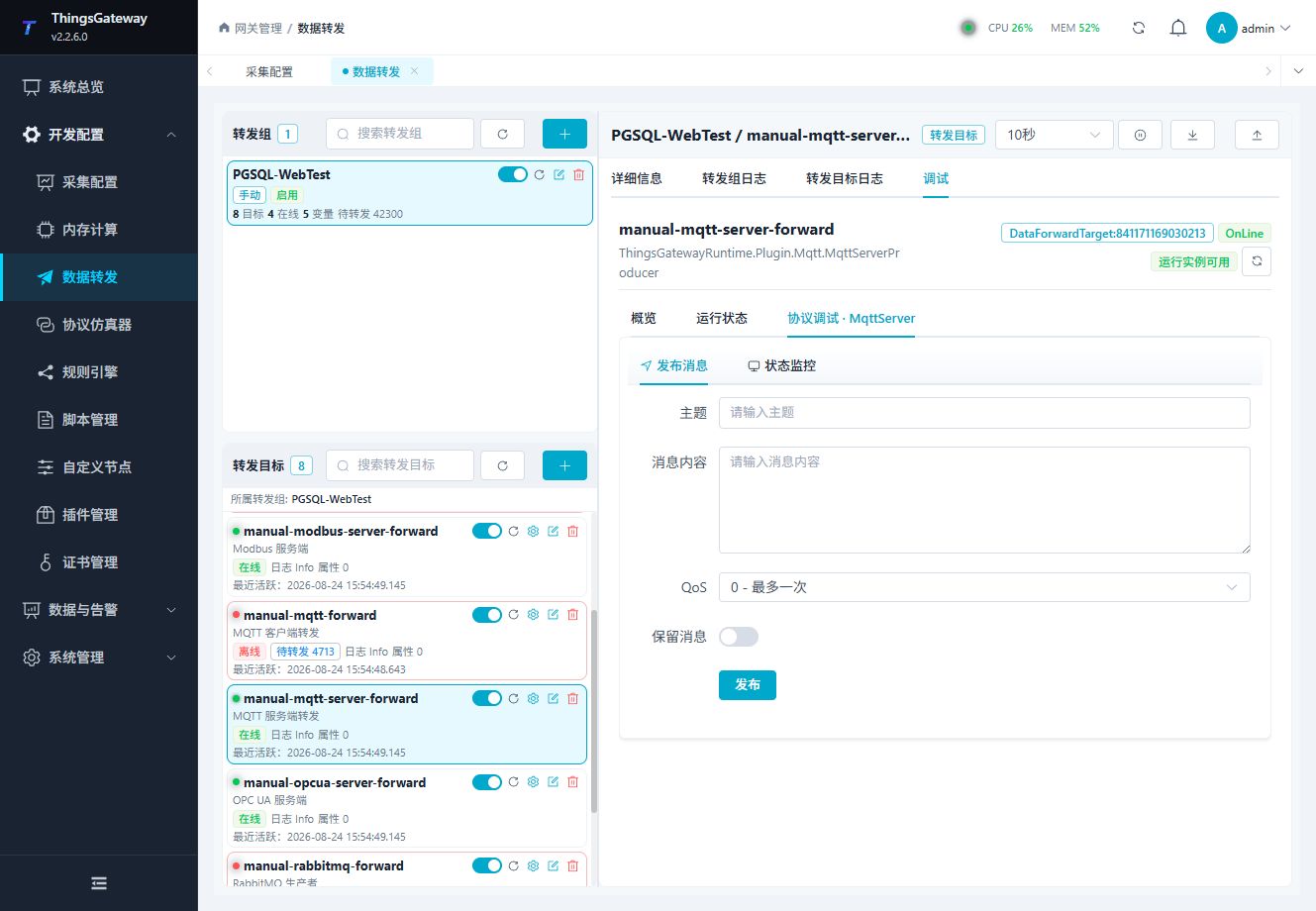
Inspect the server state, connected clients, subscriptions, and MQTT operations.
Publish message
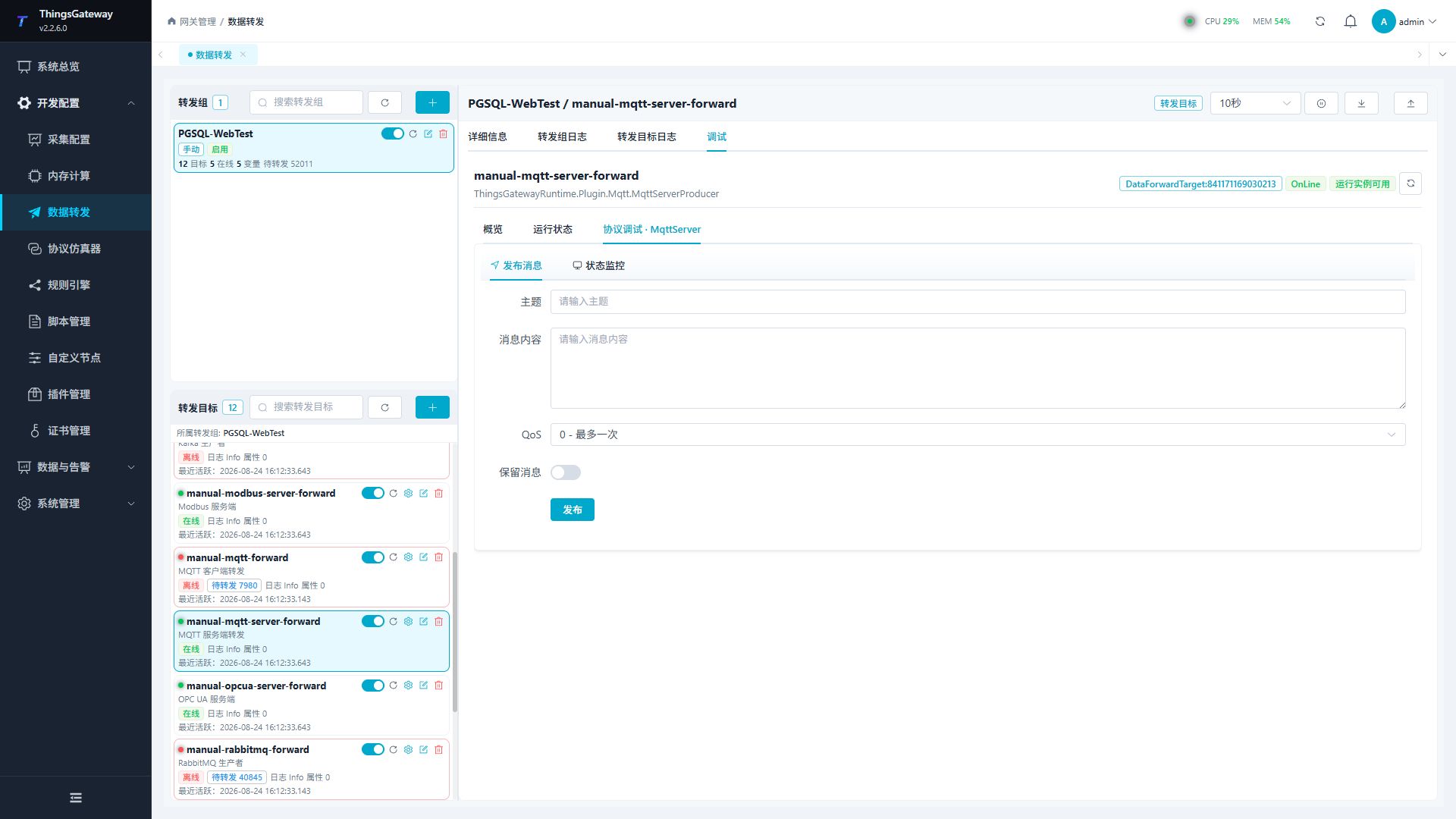
Enter a test Topic and payload to verify server publishing.
Status monitor
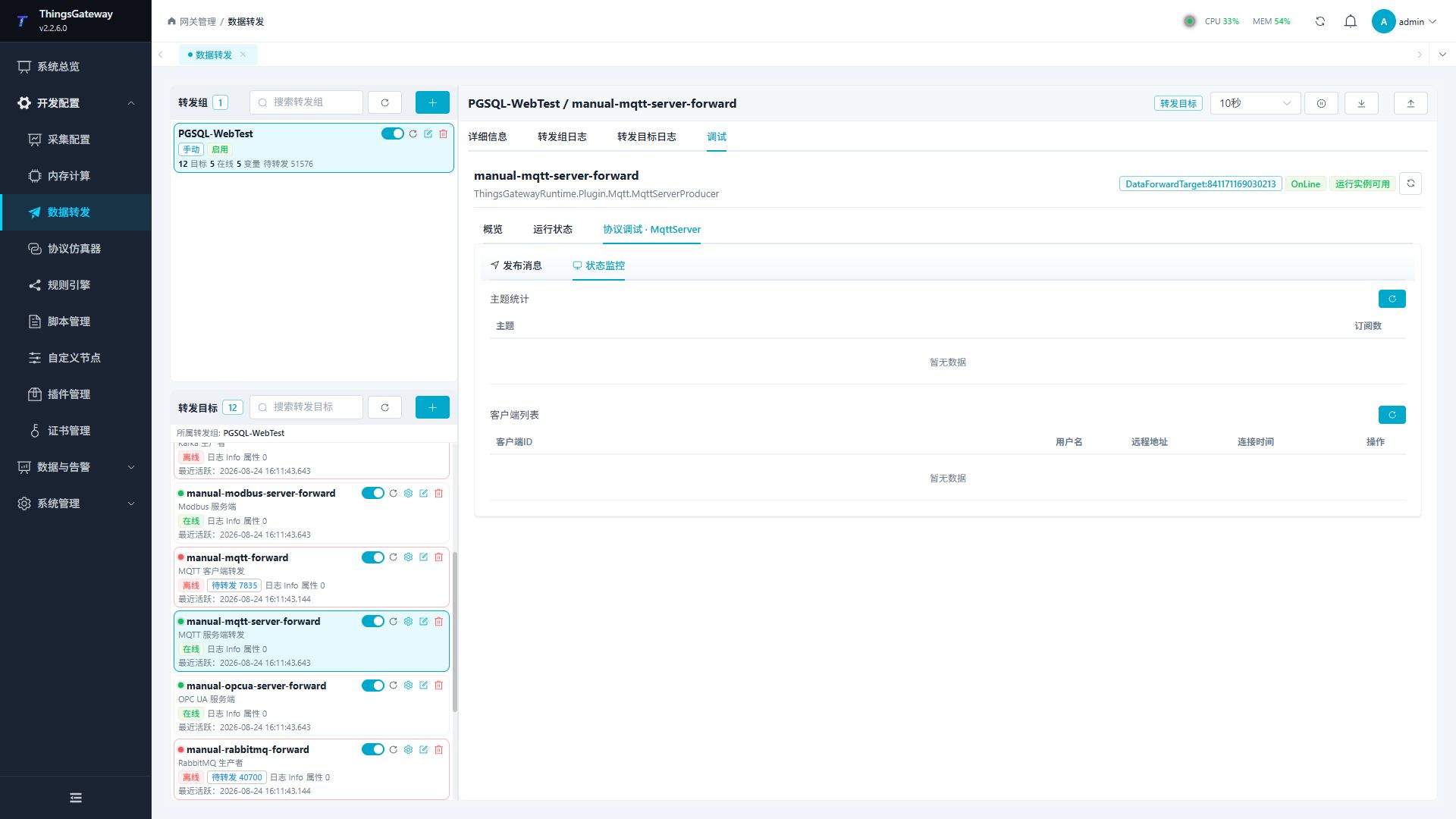
Check client connections, subscriptions, and message activity.
Disconnecting a client interrupts its connection. Confirm the affected client before using a kick or disconnect action.
Verify the target
- Start the target and confirm the listener is available.
- Connect a test MQTT client with an approved Client ID.
- Subscribe to the configured variable Topic.
- Change one variable inside the forwarding group.
- Confirm Topic, payload, QoS, retain flag, and message count.
Troubleshooting
| Symptom | Check |
|---|---|
| Client cannot connect | Port, connection type, firewall, TLS certificate, credentials, and allowed Client ID prefix. |
| Subscriber receives no message | Group range, target state, Topic template, QoS, client subscription, and target log. |
| A late subscriber receives no old value | The embedded service does not store last-Topic payloads. Request a structured current snapshot and verify its matching completion marker. |
| RPC write fails | Target-variable and source write permissions, group membership, RPC Topic, payload format, and response Topic. |
| Template output is invalid | Template preview, placeholder names, JSON syntax, and the entity values used by ${key}. |
Related links
- Data Forwarding: Forwarding groups, triggers, cache, redundancy, and common target operations.
- Certificate Management: Manage MQTT server and CA certificates.
- Plugin Manual Index: Other collection and data-forwarding plugins.