Plugin Method Calls
Call an exposed business method on a running collection device or forwarding target without creating a variable. Web API, MQTT method requests, OPC UA native Methods, the debug workspace, and special-method rule nodes all check the called instance's Allow method calls switch and record RPC logs.
This applies to loaded collection and data-forwarding plugins in both Standard and Professional editions, including custom plugins that expose direct methods. Examples include Modbus reads and writes, S7 date operations, DL/T 645 controls, and Webhook uploads. Use the running instance's Special methods catalog for the actual names, parameters, and business validation. Ordinary public members and methods that do not permit direct calls are not automatically exposed as RPC.
MQTT and OPC UA provide protocol entry points; they do not restrict which plugin can be called. Web API, debug, and rule nodes can also call devices and targets using other protocols. Dedicated protocol debug tools retain their own behavior; not every debug button is a special-method RPC.
Variable writes and methods bound to variables continue to use variable write permissions and the RPC write switch. Direct methods do not match addresses against configured variable permissions.
Enable an instance
- For a device, open Development → Collection configuration and edit the device.
- For a forwarding target, open Development → Data forwarding, select its group, and edit the target.
- Enable Allow method calls, save, and reopen the editor to confirm the saved value.
- Confirm that the device and channel, or target and group, are enabled and the plugin has initialized and started. Standby instances cannot execute methods; collection devices must also be unpaused.
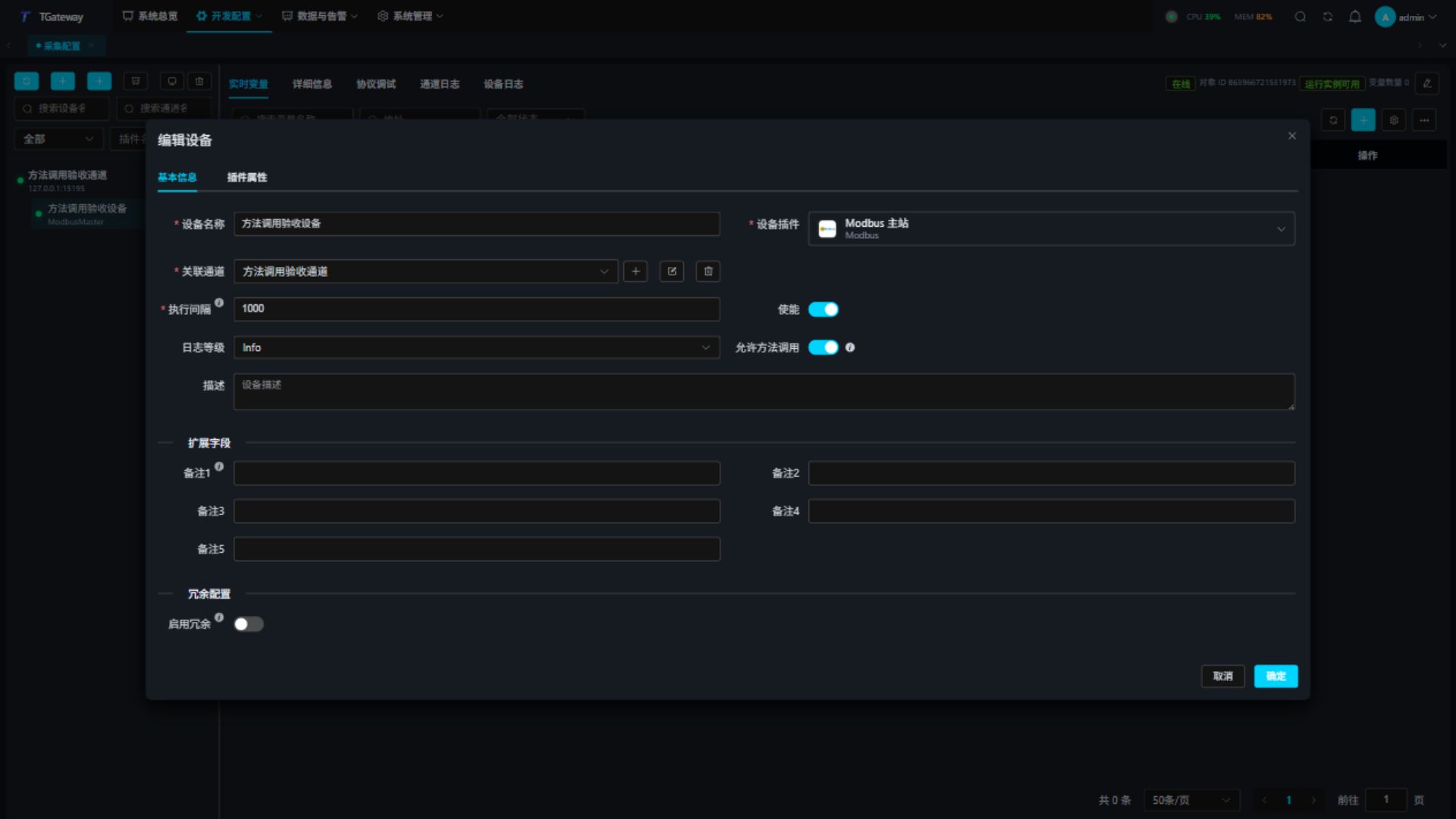
| Setting | Description |
|---|---|
| Allow method calls | Off by default. Enables every exposed direct method on this instance. There is no per-method or per-caller allowlist. |
| Device or target name | Identifies the called object in the workspace and RPC logs. |
| Enable | Controls instance operation; allowing methods does not start a disabled instance. |
Each entry keeps its existing authentication: Web login and API permissions, MQTT Broker/connection authentication, or OPC UA session authentication. A MQTT or UA target's own switch controls calls to that target. Calls through it to another instance check that other instance's switch.
Requests waiting for the plugin execution lock are checked again before execution. Closing the switch, disabling, pausing, switching to standby, or rebuilding an instance blocks waiting calls. A method that has already entered its body continues to finish.
Verify in the debug workspace
- Open the device or target's debug workspace and select Special methods.
- Refresh the directory and select a listed action.
- Enter business parameters as an outer JSON positional array, or apply a field-editor draft.
- Execute and wait. Method selection, parameter editing, and directory refresh are disabled while the call is pending.
- Verify the actual effect at the device or an independent receiver, then inspect Logs → RPC logs.
For an exposed Modbus ReadAsync method:
["400001", "UInt16", 1]
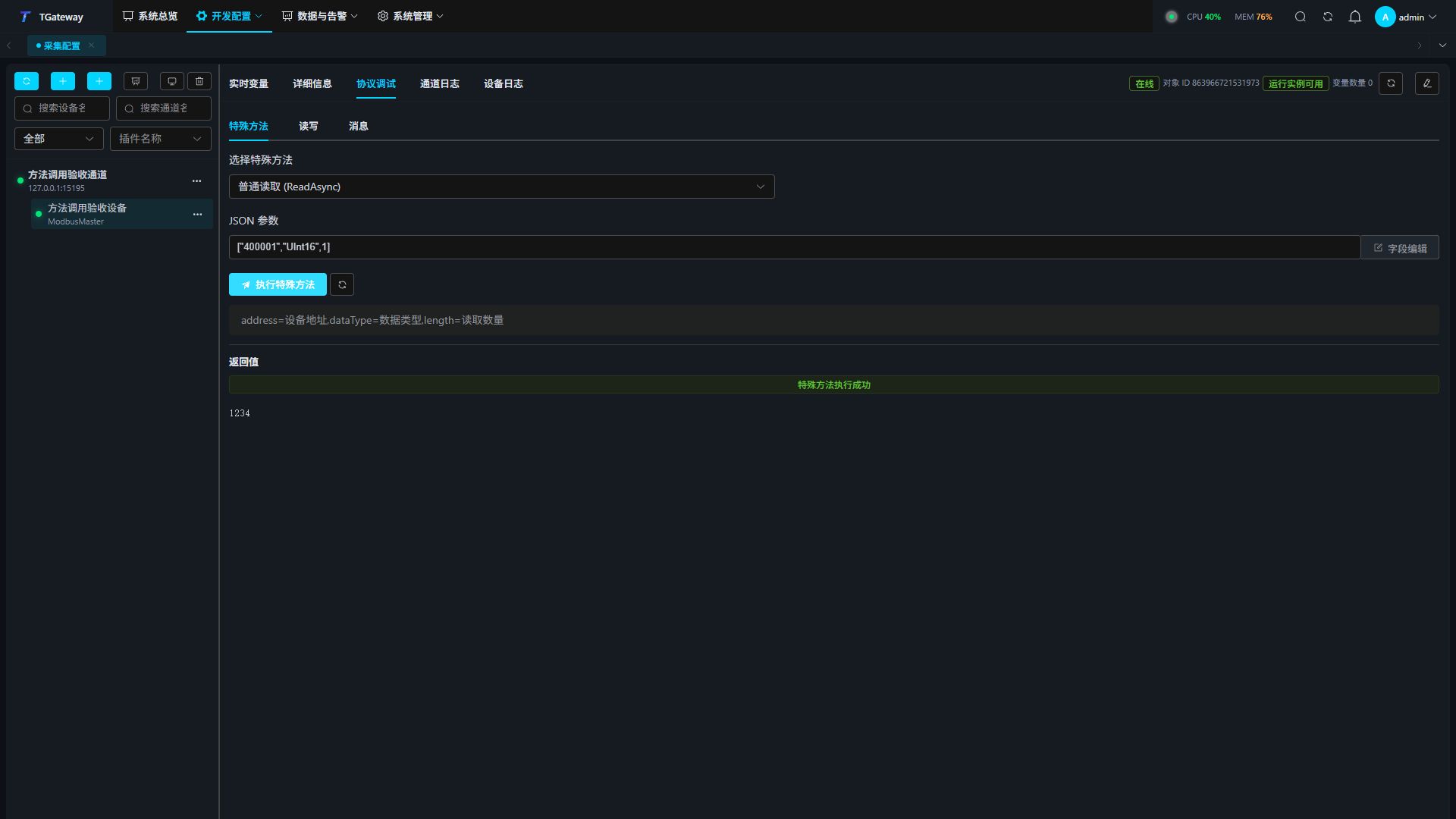
Use the address rules of the selected plugin. Byte arrays accept Base64 text or a nested array of byte numbers; ordinary message text is not a byte payload. Changing the method or parameters clears the previous result. A confirmed success with a diagnostic displays both.
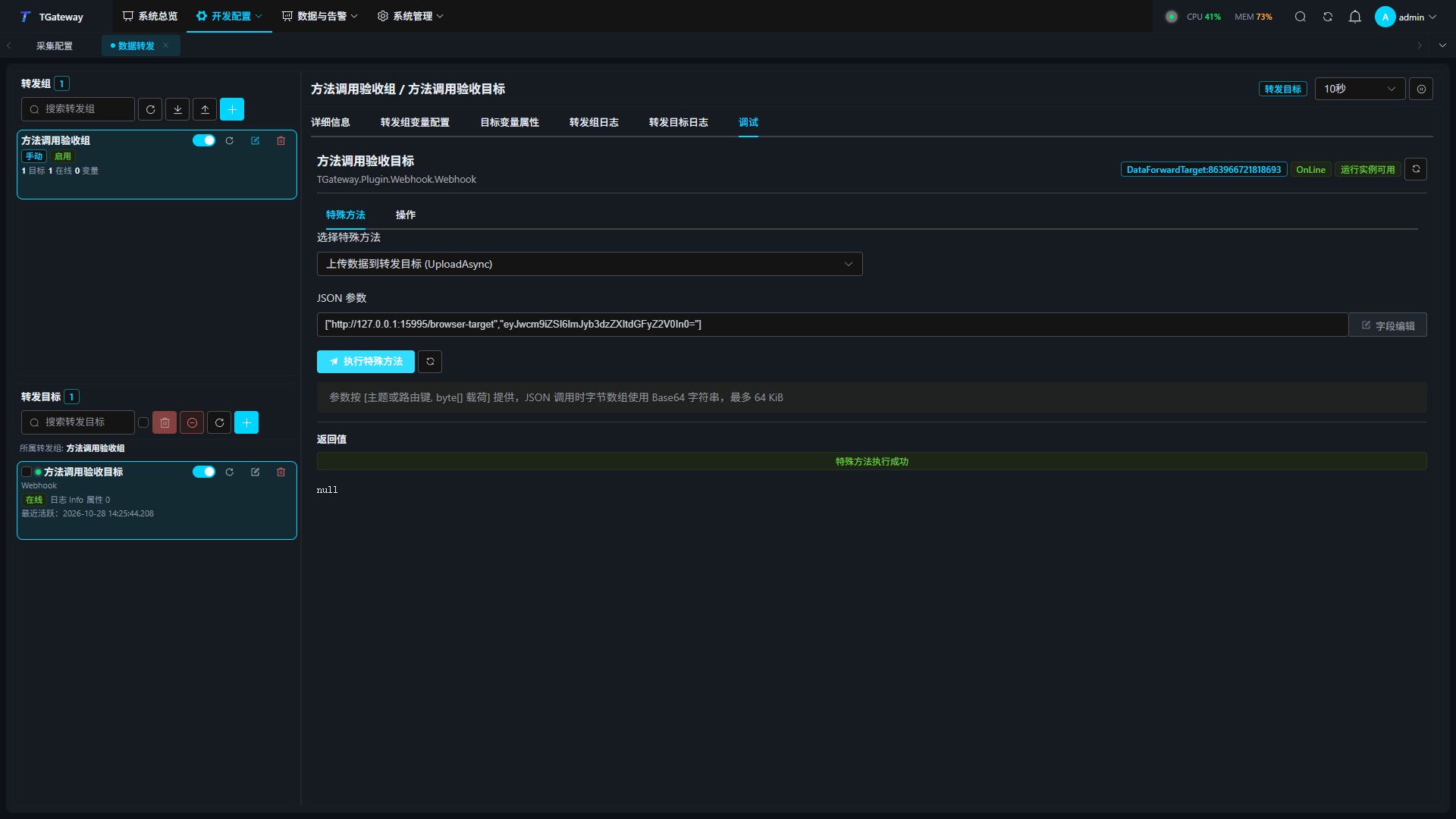
Forwarding targets use the same workflow. The Webhook example below calls UploadAsync with [URL, Base64 payload]; verify the received body at the HTTP receiver. Other targets use the topics, routing keys, and parameters shown in their own catalogs.
Web API
Use a Bearer Token and the rpc:invoke_plugin_method API permission. The debug workspace retains its dangerous-debug permission.
POST /api/gatewayrpccontroller/invokepluginmethod
Authorization: Bearer <token>
Content-Type: application/json
{
  "subjectType": "CollectDevice",
  "subjectId": 1001,
  "methodName": "ReadAsync",
  "parameters": ["400001", "UInt16", 1],
  "timeoutMs": 30000
}
| Parameter | Description |
|---|---|
subjectType | CollectDevice or DataForwardTarget. |
subjectId | Actual device or target ID; replace example 1001. Names are displayed, while IDs locate instances. |
methodName | Case-sensitive exposed method name, up to 256 characters. |
parameters | Full positional business arguments. Use [] or null for no arguments, and an outer array around a single array argument. Trailing optional arguments may be omitted; cancellation tokens occupy no position. |
timeoutMs | Defaults to 30000 ms; range 1–120000 ms; cooperative cancellation. |
The unified HTTP response's data contains:
{
  "status": "Success",
  "isSuccess": true,
  "operCode": 0,
  "message": null,
  "content": 1234,
  "executionTime": 12,
  "executionMayHaveOccurred": true
}
Check the business status and message separately from HTTP success. Requests do not contain source, caller identity, or a business request ID; the entry supplies trusted audit context.
MQTT method requests
Both MQTT forwarding plugins provide Plugin Method RPC Topic, default RpcMethod. Leave it empty to disable method requests on that connection while retaining its other protocols.
- Configure the topic, connection authentication, and required Broker Topic access.
- Subscribe an independent client to
RpcMethod/Responsebefore publishing. - Publish the same JSON request as Web API to
RpcMethodwith Retain off. - Read the method response and independently verify the actual effect.
| Item | Rule |
|---|---|
| Request topic | Fixed, such as RpcMethod; no request-ID suffix. |
| Response topic | Request topic plus /Response; responses are not retained. |
| Payload | The method entry adds no payload-size cap. MQTT protocol and Broker packet settings still apply. Retained requests, unknown fields, malformed JSON, and trailing JSON are rejected and audited. |
| Topic conflicts | Method request/response topics must not overlap variable-write, history, or snapshot request/response topics. Conflicts fail target initialization. |
| Response publication | Five-second budget. A publication failure is logged and does not execute the method again. |
When Gateway connects to an external Broker, that Broker authenticates publishers and enforces Topic ACLs; the RPC audit caller is broker. The built-in MQTT Server records the connection's validated identity, or anonymous when username authentication is not configured.
The shared response topic provides no request-ID correlation. Arrange separate topics or serial calls when multiple callers share the connection. Existing variable, history, and snapshot protocols retain their own topic and ID contracts.
OPC UA native Methods
Enable methods on the called instance, then start or restart the UA server target. Connect with its configured security policy and session identity, browse ThingsGateway/Methods, and find the instance by name. Supply TimeoutMs first, followed by business arguments.
Outputs are Status, OperCode, Message, ExecutionTime, ExecutionMayHaveOccurred, and Content. Scalars and one-dimensional arrays use native UA types; byte arrays use ByteString; complex objects, Decimal, and nullable value types use JSON strings to preserve precision and null.
Nodes are built when the UA target starts. Restart it to publish methods enabled later or to publish changed plugin definitions. Closing a called instance's switch immediately rejects calls through already published nodes. See OPC UA Server for certificates and session authentication.
Logs, timeouts, and repeated submissions
| Behavior | Current rule |
|---|---|
| Authorization | One switch per called instance; all exposed direct methods; no entry/caller/method allowlist or per-argument permission. |
| Concurrency and rate | No method-wide concurrency quota, MQTT pending-task count limit, caller quota, or requests-per-second limiter. Existing plugin locks and protocol-host resource settings remain in effect. |
| Repeated submissions | Each executes independently; no business request ID, deduplication cache, or cached result. |
| Timeout | Cooperative cancellation followed by plugin cleanup; actual completion can exceed the budget and does not prove the command had no effect. |
| Automatic retry | The service does not retry control commands. Verify the actual effect before deciding what to do next. |
| Confirmed outcome | Content serialization failure cannot overwrite a confirmed success or explicit business rejection; the diagnostic is retained. |
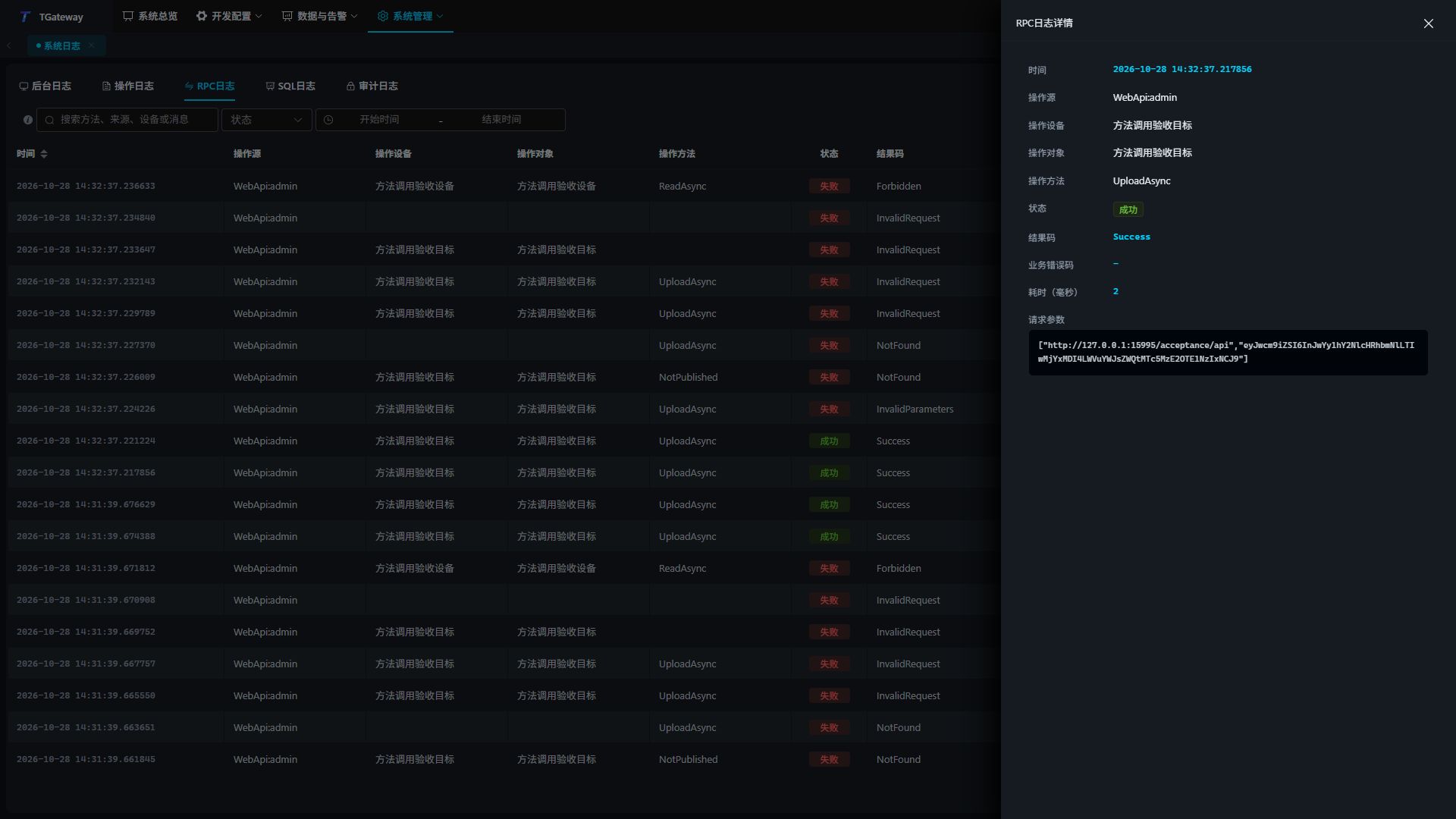
| RPC logs | Instance name, method, source, parameters, result, duration, status, and business code. Ordinary successes follow the RPC-success-log setting; failures and diagnostics are still logged. |
ExecutionMayHaveOccurred means the execution chain was entered, including time waiting for a lock; it is not proof of device execution. Logs are written asynchronously, so refresh after a short delay if needed. They do not provide durable message delivery across an abnormal process exit.
| Status | Action |
|---|---|
Forbidden | Check the called instance's switch and whether the method is exposed for direct calls; also check Web API permission. |
NotFound | Check instance type, actual ID, and case-sensitive method name. |
Unavailable | Check enable, pause, standby, and startup state; republish stale UA nodes. |
InvalidRequest / InvalidParameters | Check timeout, argument positions, types, required values, array nesting, and byte payload format. |
Rejected | Follow the plugin's business code and message. |
Timeout / Cancelled / UnknownEffect | Check the actual effect and logs before submitting another control command. |
Related: Reverse RPC, Collection debugging, Data forwarding, Logs.