Offline Cache, Replay, and Backlog
Cache retains records already accepted by a target but not successfully delivered. Generate several distinct offline values and match them individually after recovery.
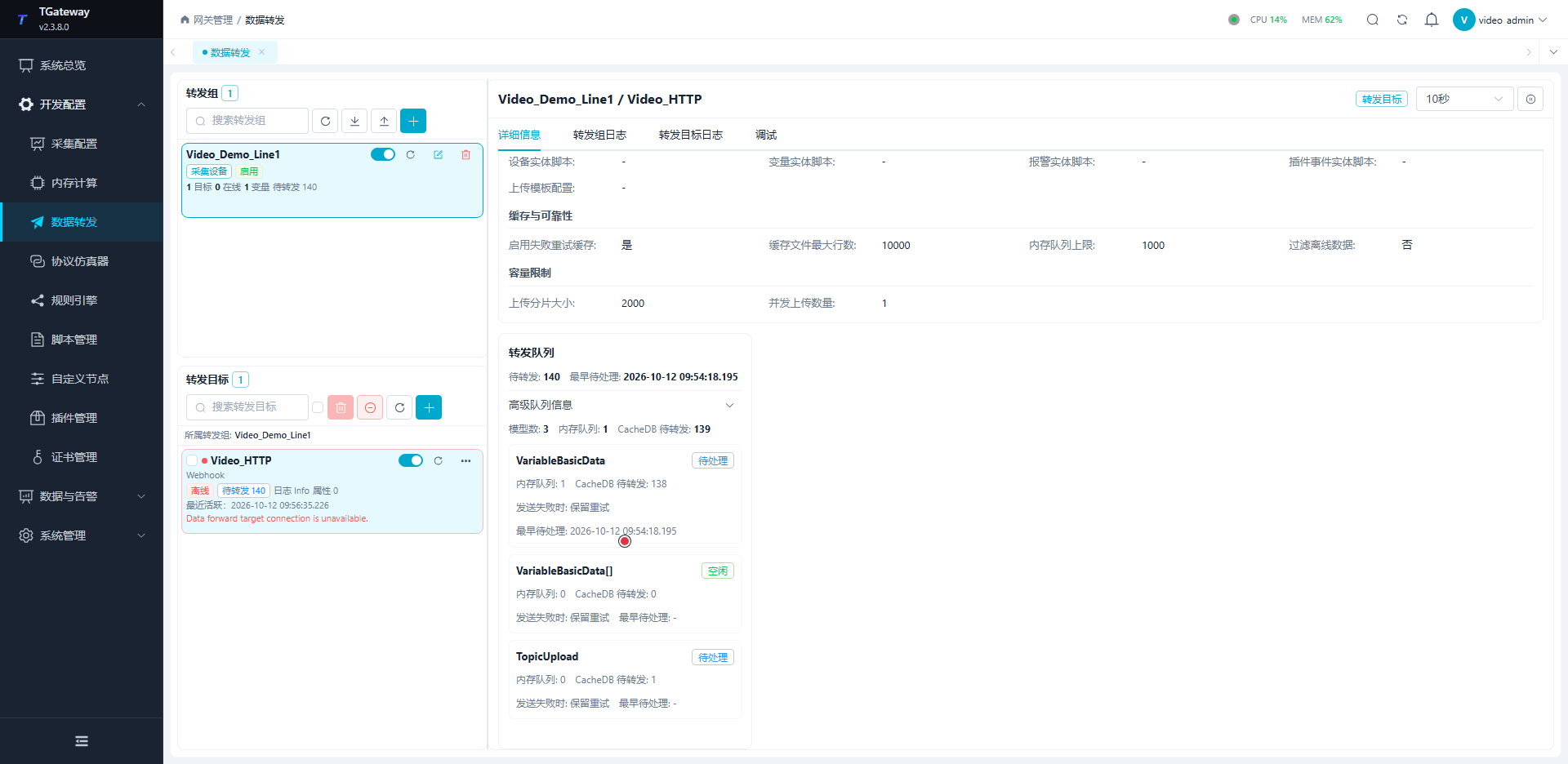
Open Development Configuration → Data Forwarding, edit a cache-capable target's reliability and capacity settings, then observe its details or Debug → Cache Outbox.
Set cache capacity
Capacity layers
| Parameter | Meaning |
|---|---|
| Enable failure retry cache | Retains failed/offline records for retry. When disabled, failed records are not retained for retry, although normal processing may still stage data in CacheDB. |
| Memory queue limit | Short buffer threshold. On reaching it, attempt persistence; if persistence fails, retain accepted records and reject new ones for upstream retry. |
| Cache file maximum rows | Limit for each CacheDB outbox model queue. Oldest rows are evicted beyond it. It is neither bytes nor a total across all queues. |
| Upload chunk size | Read limit for the applicable change/replay cache, separate from group batching; whole interval snapshots can retain their group boundary. |
| Upload concurrency | Depends on the plugin. Follow requirements such as 1 for ordered SyncBridge confirmation or a single MQTT connection. |
| Filter offline data | Target dequeue filtering; group-level quality filtering can exclude data earlier. |
If production continuously exceeds delivery, more cache only delays exhaustion. Monitor growth, oldest-record age, free disk space, and receiver capacity.
The HTTP exercise here uses common upload caching with separate model queues. A history target uses its own queue, with numeric and string records sharing row capacity and replay chunks read as history records. The reliable dual-database mirror queue rejects new events at capacity instead of evicting the oldest pending records. Check the target-specific capacity rules.
Capacity exhaustion
If a persistent queue permits only 3 rows, further input can evict its oldest pending rows. Raising the limit later cannot recover evicted data. A batch already fetched and being sent can still arrive; trimming does not retract it. For an eviction test, first confirm that the old batch being compared has actually failed and returned to pending state.
A row can be a change or a whole snapshot. Estimate rows = observed incoming rows per second × planned offline seconds, then allow for bursts and new input during recovery. Measure payload size and real file growth as well.
Compare memory peaks under the same input and slow-response window. A configured limit is not an observed memory result.
Compare strategies with controlled input
- Failure retention: record and exclude existing backlog, disable retry, stop the test receiver, and confirm an actual send failure. Generate
2101,2102,2103, holding each through a group trigger, then hold2104. Check replay only for old records confirmed by logs/queue state as already handled by the failure policy. Track normal staging and in-flight records separately. Repeat with retry enabled and different values, checking retained failures and delivery of old and new records. - Persistent capacity: set one queue to
3, produce more than three actual model rows, and verify bounded backlog, newer delivery, and old-row eviction. Restore capacity and check new input. - Memory persistence: use successful but delayed responses, for example
3.5seconds with a5second HTTP timeout and100ms group period. Compare memory thresholds2and100over equal windows. A slow successful response is not a send failure.
At the memory threshold, persistence is attempted first. If that fails, the original batch is retained and the new one rejected for upstream handling.
Disabling failed-write retry does not clear normal queues or retract requests already sent. Lost acknowledgements after receiver processing, records not yet attempted at recovery, and newly generated current snapshots can all produce the same value again. Use source/record times and receiver boundaries to distinguish them before concluding that failed records were replayed.
Inspect and verify replay
Read the outbox
| Field | Interpretation |
|---|---|
| Model | Separate change, snapshot, device, alarm, and event queues; check each limit. |
| Memory queue | Accepted records not yet persisted. |
| CacheDB rows | Persistent pending records; one row is not necessarily one variable. |
| Retained retries | Failed rows already included in CacheDB rows; do not add them again. |
| Oldest event | Backlog time boundary; calculate age as well as count. |
| Latest error | Current delivery/processing cause, distinct from cumulative failures. |
With retry disabled, staging, in-flight data, and new input can still create transient queues. Check retained failures and old-value delivery rather than requiring every queue to remain zero. Recovery requires old values arriving, backlog falling, and new values continuing.
Memory counts, persistent rows, and response times are not one atomic snapshot. Diagnostics can themselves wait for storage; retain consecutive samples and do not treat response completion as the common sampling time for every counter. A temporarily missing queue list during target reinitialization does not establish zero backlog.
Verify a complete replay
Use a controlled test target without interrupting a shared production service.
- Add the test point to the group, enable retry cache, and establish normal reception.
- Record the receiver boundary/time, then interrupt that test receiver.
- Enter distinct values such as
1500and1700. Hold each through at least one applicable group trigger and verify both its source sample and entry into the target queue. - Inspect backlog, oldest event, and errors.
- Restore the same endpoint and match both old values in the new receive window.
- Wait for backlog reduction, then verify a new value.
Receiving only the final current value does not establish intermediate replay. Match device, variable, value, and source time. Retries can duplicate deliveries, so consumers need business-key idempotency.
Understand delivery boundaries
Batches, chunks, and bodies
Group batching determines produced records; target chunking determines how many cache records are retrieved; list/dictionary settings determine the final body. Snapshot boundaries can remain intact, so chunk size alone does not determine every body length.
For four independent Webhook records, list mode with chunk 1 produces single-element arrays; larger chunks may combine them. Different slow URLs can overlap when concurrency is supported. Plugin locks, such as Kafka's send lock, may still serialize delivery.
Test group and target quality filters separately. Without filtering, an offline point can retain its last value with IsOnline=false. With filtering, it is excluded while online points continue. After source recovery it should return; old offline history is not deleted.
Delivery acknowledgement boundaries
| Path | Additional check |
|---|---|
| MQTT client | Broker acknowledgement is separate from downstream processing. Check QoS, sessions, consumers, and duplicates. |
| MQTT server | Successful publication does not establish delivery to an offline subscriber. |
| Custom Webhook | HTTP 2xx determines success; a failure field inside business JSON does not automatically trigger retry. |
| History target | Verify database results, old and new rows, and its own outbox. |
| SyncBridge | Edge removes a batch after Hub application acknowledgement. A downstream database target has its own cache; Hub acknowledgement is not database commit. |
Cache only retains records the group produced and the queue has not evicted. It cannot reconstruct unproduced, filtered, or model-merged samples.
Central history backfill
Gateway MQTT or SyncBridge receivers need a separate central history target with the mirrored variables in its scope.
- Enable edge cache and preserve collection, change, and record times.
- Establish central reception and normal history writes.
- Interrupt the link, generate multiple values, and query the offline source-time window after recovery.
- Confirm backfilled old samples do not regress the current realtime value.
- Record missing and duplicate counts separately. Zero missing rows does not establish universal exactly-once delivery.
See Offline History and SyncBridge.
Troubleshooting
| Symptom | Check |
|---|---|
| No backlog after disconnect | Members, triggers, quality filtering, target enablement, and retry policy. |
| Backlog does not fall | Authentication, payload, response, timeouts, chunks, receiver speed, and disk errors. |
| Duplicate records | Lost acknowledgements and retries; deduplicate by source identity and retain source times. |
| Earliest values missing | Capacity, filtering, batching, and merging. More capacity cannot restore evicted rows. |
| Realtime works, central history missing | History group scope, target connection, time zone, source times, and outbox. |