Webhook
The Webhook target sends variables, devices, alarms, and plugin events to DingTalk robots, WeCom message push, or a custom HTTP endpoint. Select the platform explicitly; it controls message wrapping, signing, and business-response validation.
Configure the forwarding group and target through Data Forwarding. This page covers Webhook-specific request settings, templates, and debug actions.
Open the plugin
Open Development Configuration → Data Forwarding and:
- Configure and save the forwarding group range, trigger, interval, online filter, and batching.
- Add a target, choose Webhook, and fill in the basic target information.
- Open Target properties and configure endpoint templates, message format, authentication, scripts, templates, and cache.
- Save and enable the group and target, then use Target debug for a read-only probe or a confirmed test request.
Verify one custom HTTP record
- Prepare a test endpoint that records the method, path, headers, body, and response. Confirm it is reachable from the gateway host.
- Include one online numeric variable in the group and use an interval such as
1000ms. - Select platform
Custom, message formatRaw, the complete variable URL, and no signing secret. For example, use header{"X-Route":"line-one"}and timeout5seconds. - Select
Jsonvariable content with{"tag":"${Name}","device":"${DeviceName}","value":${Value}}. Keep variable-list upload enabled, then save the template and target. - At the receiver, check
POST, the complete path,application/json,X-Route, and an object array with numericvalue. - Change the source, wait for collection readback, and verify a new body and response for that variable. A debug test body does not verify live forwarding.
Basic target information
| Setting | Default | Configuration |
|---|---|---|
| Group | - | Select a saved forwarding group. |
| Target name | - | Required and unique within the group. |
| Enable | Enabled | Disable to stop requests. |
| Log level | Info | Temporarily use Debug for HTTP, signing, or template diagnostics. |
| Start timeout | 60 seconds | Valid range is 1 to 3600 seconds. |
Configure the connection and message platform
Target properties
Message and endpoints
| Setting | Default | Configuration |
|---|---|---|
| Webhook platform | Custom | Choose DingTalk, WeCom, or Custom for the actual receiver. The URL does not select the platform automatically. |
| Message format | Raw | DingTalk and WeCom support Text and Markdown wrapping, or Raw with a complete vendor JSON body. Custom HTTP accepts Raw only. |
| Device Topic template | Empty | HTTP/HTTPS URL for device records. Empty disables device posts. |
| Variable Topic template | http://127.0.0.1:7502/TGateway/Variable | URL for variable records. ${DeviceName} and ${Name} can be used. |
| Alarm Topic template | Empty | URL for alarm records; empty disables alarm posts. |
| Plugin-event Topic template | Empty | URL for plugin-event records; empty disables plugin-event posts. |
| Request timeout (seconds) | 10 | Positive maximum wait for one POST request. |
In this plugin, “Topic template” means the final HTTP request URL, not an MQTT Topic. ${field} must exist on the entity or entity-script output.
Security
| Setting | Default | Configuration |
|---|---|---|
| Signing secret | Empty | DingTalk robot signing Secret only. The target appends timestamp and sign query parameters automatically. Leave it empty for WeCom and Custom. |
| Custom headers | Empty | A JSON object of string pairs, for example {"Authorization":"Bearer <token>","X-Environment":"test"}. Invalid JSON causes the request to fail. |
The signing secret, DingTalk URL access_token, WeCom URL key, and header values are sensitive. Keep them out of templates, screenshots, and public reports. Signing does not replace the Token in a DingTalk URL or another receiver's required credentials.
DingTalk and WeCom configuration
| Platform | Setup and result |
|---|---|
| DingTalk | Copy the complete robot URL, select DingTalk, and enter the SEC... Secret only when signing is enabled. With Text, the generated content is in text.content; Markdown uses markdown.title and markdown.text. A successful request needs HTTP 2xx and errcode equal to numeric 0 or numeric string "0". |
| WeCom | Copy the complete message-push URL including key, select WeCom, and leave Secret empty. Text uses text.content; Markdown uses markdown.content. A successful request needs HTTP 2xx and an errcode that parses to integer zero. |
| Custom | Select Custom and Raw, leave Secret empty, and supply the receiver's complete JSON and authentication. Success is based on HTTP 2xx; response-body business fields are not interpreted. |
For a complete vendor-specific body, use Raw. Advanced WeCom messages that reference media_id require uploading media through WeCom separately. This target does not perform that upload.
Keep DingTalk and WeCom within 20 requests per minute per robot/message-push entry. Use grouping and intervals to reduce requests and keep upload concurrency at 1. WeCom text is limited to 2048 UTF-8 bytes and Markdown to 4096 bytes. DingTalk signing also requires an accurate gateway clock; configure NTP and check the robot's keyword or IP rules when applicable.
Messages, templates and cache
Target-variable properties
Webhook inherits the optional text fields Data1 to Data10, all empty by default. They are not added to HTTP bodies automatically. Configure membership, aliases, trigger, and batching in Data Forwarding.
| Setting | Default | Configuration |
|---|---|---|
| Data1 to Data10 | Empty | Project-specific metadata. Reference values explicitly from an entity script or upload template; never store passwords or tokens here. |
Data and scripts
| Setting | Default | Configuration |
|---|---|---|
| Detail log | Disabled | Enabled with a Trace target threshold uses Trace summaries; otherwise summaries use Debug and remain subject to the target threshold. Summaries contain only the Topic and count; inspect complete HTTP bodies at the receiver. |
| JSON indentation | Enabled | Disable to reduce request-body size. |
| Ignore JSON nulls | Enabled | Controls default entity null properties; explicit nulls in content templates remain. Numeric zero, false, and empty strings remain. |
| Device list upload | Enabled | POST devices as a list; disable for one request per device. |
| Variable list upload | Enabled | POST variables as a list; disable for one request per variable. |
| Variable dictionary upload | Disabled | Applies to list mode, keyed by device and variable name. Without a content template, each leaf is a complete entity/script output; with a template, it is the rendered result. |
| Alarm list upload | Enabled | POST alarms as a list; disable for one request per alarm. |
| Alarm dictionary upload | Disabled | Applies only to alarm-list mode; groups by device and variable. |
| Plugin-event list upload | Enabled | POST plugin events as a list; disable for one request per event. |
| Entity scripts | Empty | Select saved device, variable, alarm, or plugin-event scripts before URL and body rendering. |
Upload template fields
For each entity in Upload Template Configuration, choose Text or Json and insert ${field} placeholders. Empty content uses default JSON serialization; preview before saving.
| Entity | Available fields |
|---|---|
| Variable | Id, Name, DeviceName, Value, RawValue, LastSetValue, CollectGroup, CollectTime, CreateTime, ChangeTime, IsOnline, DataType, Unit, RegisterAddress, OtherMethod, Description, ProtectType, RpcWriteEnable, Remark1 to Remark5, ValueInited, IsMemory |
| Device | Id, Name, ActiveTime, DeviceStatus, PluginName, Description, LastErrorMessage, Remark1 to Remark5 |
| Alarm | AlarmId, VariableId, Name, DeviceName, AlarmCode, AlarmLevel, AlarmLimit, AlarmText, RecoveryCode, AlarmTime, EventTime, FinishTime, ConfirmTime, ConfirmText, AlarmType, EventType, Remark1 to Remark5 |
| Plugin event | DeviceName, ObjectValue |
An entity script changes the upload object before endpoint grouping and template rendering. Keep placeholders aligned with the script output. An empty URL template disables that entity type.
Cache and capacity
| Setting | Default | Configuration |
|---|---|---|
| Enable failed-write retry cache | Enabled | Retains failed requests in CacheDB for replay after recovery. Disabling it stops retaining failures for retry. |
| Cache file maximum rows | 262144 | Maximum CacheDB outbox rows; oldest rows are removed after the limit. |
| Upload chunk size | 2000 | Read limit for cached change records. Whole interval snapshots can retain their group boundary, so this does not determine every HTTP request's point count. |
| Memory queue limit | 100000 | At capacity, persist pending records to CacheDB first. If persistence fails, retain accepted records and reject new records for upstream retry. |
| Filter offline data | Disabled | Filters offline variables at dequeue; the forwarding-group filter also applies. |
| Upload concurrency | 1 | Keep 1 for DingTalk and WeCom and configure group intervals to meet their limits. Increase for a Custom endpoint only after verifying its capacity. |
Debug and verify
Target debug
Open Development Configuration → Data Forwarding, select the forwarding group and target, and open Debug.
HTTP Webhook protocol panel
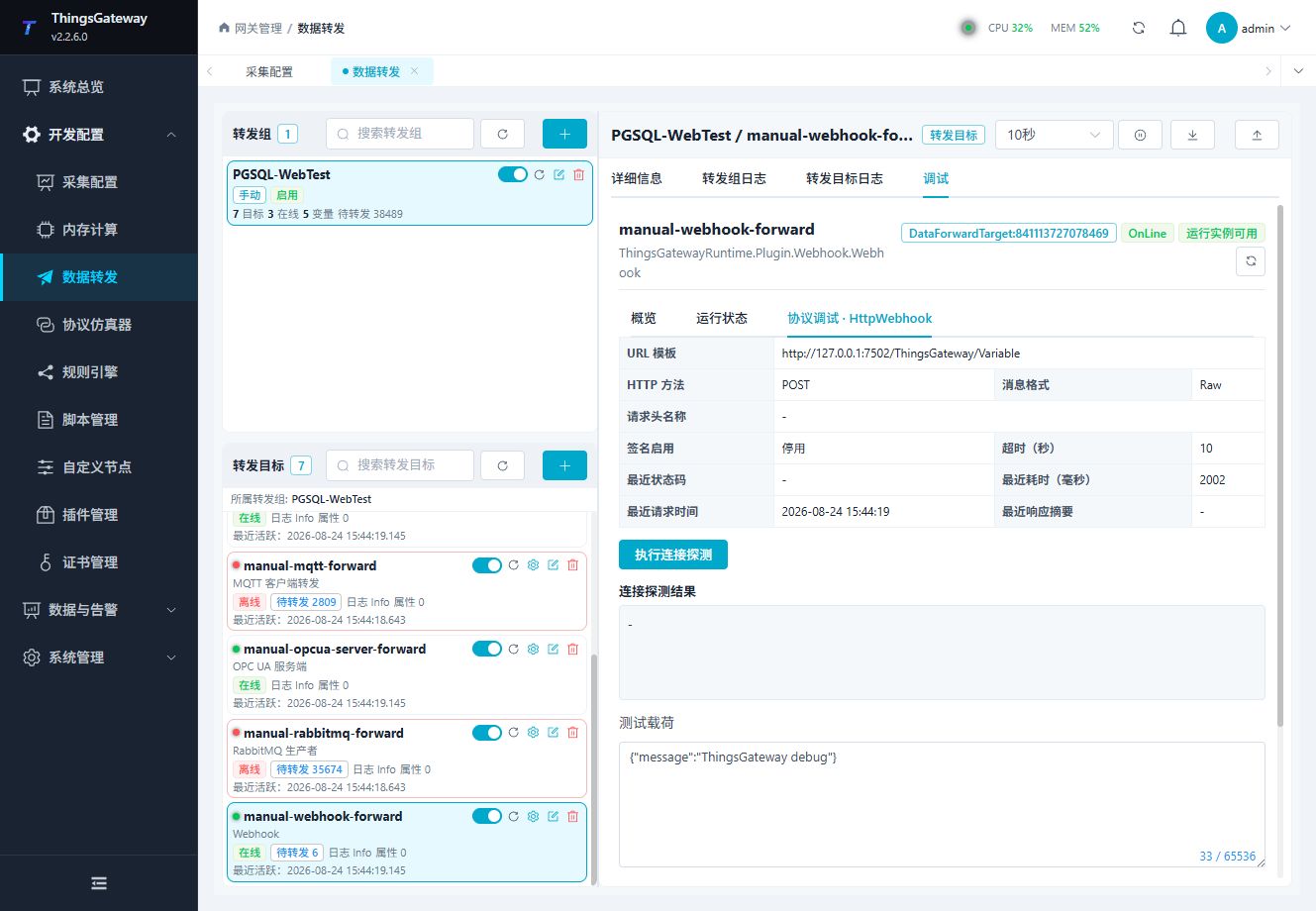
Use Probe for DNS and HTTP HEAD only; it never sends a business payload. Use Send test request to send a bounded payload to the current variable URL after confirmation. The test body is limited to 64 KiB.
Do not call production write or delete endpoints during routine debugging. Use a test URL with a small payload.
Verify real requests and replay
Start with one real variable and an independent HTTP receiver. Check the actual POST path, headers, body, response, and new source time. A DNS/HEAD probe does not establish a successful business POST. The probe does not attach custom business headers or a platform signature. Inspect its HTTP status even when the probe operation succeeds: 401 or 405 means a rejection response was received, without establishing authentication or proving that the configured business POST will fail.
Custom mode accepts HTTP 2xx even if the business JSON says failure. DingTalk and WeCom also inspect their error codes. A receiver may accept the body but delay its response beyond timeout; retry can then duplicate processing. Verify the body at the receiver and use business idempotency.
Content-template single mode adds an outer JSON-string layer. For independent change records, list mode with chunk size 1 produces a one-element array; the target does not wait for a full batch. Whole snapshots can retain a larger group boundary. Event fields follow ObjectValue, for example ${ObjectValue.samples[0]}. Debug requests must satisfy both the 65536-character and 64 KiB UTF-8 limits. See Upload Templates and Offline Compensation.
Verify the target
- Select
DingTalk,WeCom, orCustomand configure its test endpoint and authentication. - Choose a message format allowed by that platform and preview the generated body.
- Send one test variable or event.
- Confirm URL, HTTP method, status code, headers, body, and receiver logs.
- Check the target log for timeout, authentication, or retry errors.
Troubleshooting
| Symptom | Check |
|---|---|
| HTTP request fails | Endpoint URL, HTTP method, TLS certificate, firewall, receiver status code, and target log. |
| Invalid platform configuration | Custom requires Raw. WeCom and Custom require an empty signing secret. |
| Receiver rejects authentication | Check the full DingTalk access_token URL or WeCom key URL; for Custom, check header JSON and Token validity. |
| Receiver accepts request but data is wrong | Message format, template preview, entity fields, and entity-script output. |
| WeCom Markdown is invalid | Select WeCom so the body uses markdown.content. A Raw body must follow the complete WeCom schema. |
| Notification format is invalid | Check the selected platform and format; advanced message types require complete vendor JSON in Raw mode. |
| Requests time out | Endpoint reachability, receiver load, request timeout, and target retry/cache state. |
| Test request fails | Run Probe first, then check the URL, headers JSON, signing secret, message format, and target log. |
| Signature is rejected | Use the signing secret only for DingTalk signing. The target appends timestamp and sign; do not append them manually. |
Related links
- DingTalk custom robot messages
- WeCom message push
- Data Forwarding: Forwarding groups, triggers, cache, redundancy, and common target operations.
- Plugin Manual Index: Other collection and data-forwarding plugins.