Kafka Producer
This target publishes variables, devices, alarms, and plugin events to Apache Kafka topics.
Configure the forwarding group and target through Data Forwarding. This page covers Kafka connection, security, Topic templates, and Kafka debug operations.
Open the plugin
Open Development Configuration → Data Forwarding and:
- Configure and save the forwarding group range, trigger, interval, online filter, and batching.
- Add a target, choose Kafka Producer, and fill in the basic target information.
- Open Target properties and configure the Kafka endpoint, security, message, script, and cache settings.
- Save and enable the group and target, then use Target debug to verify publishing.
Basic target information
| Setting | Default | Configuration |
|---|---|---|
| Group | - | Select a saved forwarding group. |
| Target name | - | Required and unique within the group. Include the environment or cluster name. |
| Enable | Enabled | Disable to stop the producer. |
| Log level | Info | Temporarily use Debug when diagnosing connection or publish errors. |
| Start timeout | 60 seconds | Valid range is 1 to 3600 seconds. |
Target properties
Connection
| Setting | Default | Configuration |
|---|---|---|
| Service address | 127.0.0.1:9092 | Enter Kafka bootstrap servers. Separate multiple nodes with commas, for example kafka-a:9092,kafka-b:9092. Do not include a Topic or protocol prefix. |
| Publish timeout | 5000 ms | Positive timeout for one publish operation. Failures follow the target cache policy. |
Security
| Setting | Default | Configuration |
|---|---|---|
| Username | Empty | Fill only when the Broker requires SASL. |
| Password | Empty | SASL password; never place it in screenshots, templates, or logs. |
| Security protocol | Plaintext | Match the Broker listener: Plaintext, Ssl, SaslPlaintext, or SaslSsl. |
| CA certificate file path | Empty | Public PEM CA bundle on the gateway host, readable by its runtime account; not a private key or keystore. |
| SASL mechanism | Plain | Match the Broker: Gssapi, Plain, ScramSha256, ScramSha512, or OAuthBearer. |
Username/password alone do not enable SASL. The protocol, mechanism, and credentials must match the listener as a set.
GSSAPI and OAuthBearer require additional authentication configuration not supplied by ordinary username/password fields; do not assume selecting them completes setup. All advertised Broker addresses discovered after bootstrap must also be reachable.
Message configuration
| Setting | Default | Configuration |
|---|---|---|
| Device Topic template | Empty | Leave empty to disable device records, or enter a fixed Topic or ${field} template. |
| Variable Topic template | TGateway/Variable | Replace the generic slash-containing default with a legal Kafka Topic, for example tgateway.variable, or a valid rendered template. |
| Alarm Topic template | Empty | Leave empty to disable alarm records. |
| Plugin-event Topic template | Empty | Leave empty to disable plugin-event records. |
${field} must exist on the corresponding upload entity or script result. A Topic template only controls routing; the forwarding group still controls variable membership.
Target-variable properties
Kafka exposes ten optional text fields, Data1 through Data10, all empty by default. They are stored as target-variable metadata and are not added to Kafka payloads automatically. Leave them empty unless a project-specific script or handler reads them. Configure membership, alias, trigger, and batching in Data Forwarding.
Data and scripts
| Setting | Default | Configuration |
|---|---|---|
| Detail log | Disabled | Send counts use Debug when off and Trace when on, subject to the log threshold. Inspect full payloads at an independent consumer. |
| JSON indentation | Enabled | Disable to reduce payload size. |
| Ignore JSON nulls | Enabled | Controls default entity null properties. Explicit template nulls remain, as do zero, false, and empty strings. |
| Device list upload | Enabled | Publish device records as a list; disable for one message per record. |
| Variable list upload | Enabled | Publish variable records as a list; disable for one message per record. |
| Variable dictionary upload | Disabled | Device and variable names are the two keys. Leaves contain complete entities, script outputs, or content-template results. |
| Alarm list upload | Enabled | Publish alarm records as a list; disable for one message per record. |
| Alarm dictionary upload | Disabled | Applies only to alarm-list mode; groups by device and variable. |
| Plugin-event list upload | Enabled | Publish plugin events as a list; disable for one message per record. |
| Device entity script | Empty | Select a saved script to transform device objects before grouping and serialization. |
| Variable entity script | Empty | Select a saved script to transform variable objects before grouping and serialization. |
| Alarm entity script | Empty | Select a saved script to transform alarm objects before grouping and serialization. |
| Plugin-event entity script | Empty | Select a saved script to transform plugin-event objects before grouping and serialization. |
Upload template configuration
For each entity, choose Text or Json and optionally fill a content template. Empty content uses the default JSON serializer.
| Configuration | Default | Configuration |
|---|---|---|
| Variable mode / content | Text / Empty | Use ${field} in the variable body. |
| Device mode / content | Text / Empty | Use ${field} in the device body. |
| Alarm mode / content | Text / Empty | Use ${field} in the alarm body. |
| Plugin-event mode / content | Text / Empty | Use ${field} in the plugin-event body. |
Preview the template before saving. JSON mode must produce valid JSON; Text mode does not add quotes or escaping for you.
Available template fields
| Entity | Available fields |
|---|---|
| Variable | Id, Name, DeviceName, Value, RawValue, LastSetValue, CollectGroup, CollectTime, CreateTime, ChangeTime, IsOnline, DataType, Unit, RegisterAddress, OtherMethod, Description, ProtectType, RpcWriteEnable, Remark1 to Remark5, ValueInited, IsMemory |
| Device | Id, Name, ActiveTime, DeviceStatus, PluginName, Description, LastErrorMessage, Remark1 to Remark5 |
| Alarm | AlarmId, VariableId, Name, DeviceName, AlarmCode, AlarmLevel, AlarmLimit, AlarmText, RecoveryCode, AlarmTime, EventTime, FinishTime, ConfirmTime, ConfirmText, AlarmType, EventType, Remark1 to Remark5 |
| Plugin event | DeviceName, ObjectValue |
An entity script runs before Topic grouping and template rendering, so its output must still contain every referenced field. An entity type with an empty Topic template does not enter the Kafka queue.
Cache and capacity
| Setting | Default | Configuration |
|---|---|---|
| Enable failed-write retry cache | Enabled | Keeps failed publishes in local CacheDB for replay after recovery. When disabled, failed backoff records may be lost. |
| Cache file maximum rows | 262144 | Maximum CacheDB outbox rows; oldest rows are removed after the limit. |
| Upload chunk size | 2000 | Read limit for cached change records. Whole interval snapshots can retain their group boundary, so this does not determine every message's point count. |
| Memory queue limit | 100000 | At capacity, persist pending records to CacheDB first. If persistence fails, retain accepted records and reject new records for upstream retry. |
| Filter offline data | Disabled | Filters offline variables when dequeued. The forwarding-group filter also applies. |
| Upload concurrency | 1 | Kafka publishing is protected by one producer lock; keep 1 unless the deployment has been tested under parallel load. |
Target debug
Open Development Configuration → Data Forwarding, select the forwarding group and target, and open Debug.
Kafka protocol panel
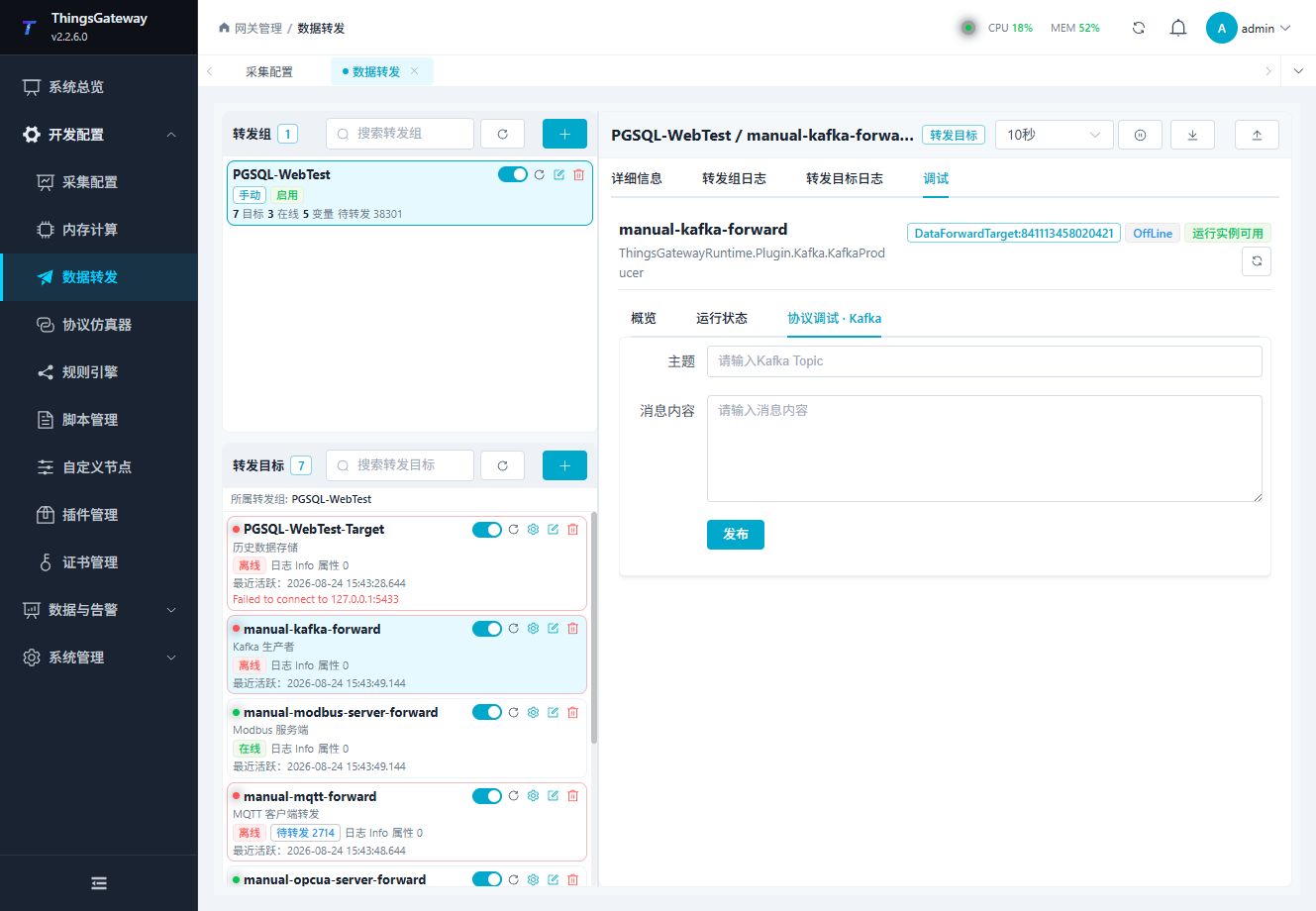
Use the panel to perform the plugin-specific connection or publish operation and inspect the result.
Message verification
At an independent consumer, match Topic, partition, offset, and payload for new source input. A successful debug publish does not establish group-member delivery. Debug text is encoded as a JSON string. Lists, dictionaries, Null handling, and content-template outer strings follow Upload Templates. Kafka's producer lock can serialize sends despite a higher upload-concurrency value.
For a first live test, use fixed Topic tgateway.variable, one online group member, and default JSON. Start the consumer at the current offset, enable the target, then change that source variable. Confirm a later offset with the same device/variable identity and the new value. Multiple bootstrap servers provide discovery; they do not replicate one record to multiple forwarding targets.
Verify the target
- Confirm the bootstrap server and Kafka security settings.
- Use a test Topic and a small JSON payload.
- Enable the target and produce a new value from an included group variable, then consume the Topic with a test consumer.
- Compare message count, payload, partition, and timestamp.
- Check target logs for publish failures, authentication errors, and timeout retries.
Troubleshooting
| Symptom | Check |
|---|---|
| Consumer receives no message | Bootstrap server, Topic template, cluster ACL, target state, and consumer group/offset. |
| Authentication fails | Security protocol, SASL mechanism, username, password, and broker listener configuration. |
| Publish times out | Broker reachability, partition leader, network latency, publish timeout, and broker load. |
| Messages go to an unexpected Topic | Topic templates, ${key} fields, entity script output, and the actual forwarding group target. |
| Payload is invalid | Template preview, JSON syntax, placeholder names, and entity-script output. |
| Variable metadata is missing from the payload | Data1 to Data10 are reserved metadata and are not serialized by Kafka automatically; add them explicitly in a script or upload template. |
| Failed publishes disappear | Check the failed-write retry cache, CacheDB pending rows, memory queue limit, and cache file maximum rows. |
Related links
- Data Forwarding: Forwarding groups, triggers, cache, redundancy, and common target operations.
- Plugin Manual Index: Other collection and data-forwarding plugins.