Real-time Data Storage
This target writes the latest value of each variable in the forwarding group to a database. Use it to provide current data for dashboards, API queries, or reports. The real-time table keeps the latest record rather than a change history.
Configure the forwarding group range, trigger, and runtime state through Data Forwarding. This page covers only the database properties and debug panel specific to real-time storage.
Open the plugin
Open Development Configuration → Data Forwarding and:
- Configure and save the forwarding group range, trigger, interval, online filter, and batching.
- Add a target, choose Real-time Data Storage, and fill in the basic target information.
- Open Target properties and configure the relational database, table, time-zone offset, and offline filter.
- Optionally select a saved real-time-table Dynamic SQL expression; leave it empty for the standard table.
- Save and enable the target, then update a test variable and query the real-time table.
Basic target information
| Setting | Default | Configuration |
|---|---|---|
| Group | - | Select a saved forwarding group. |
| Target name | - | Required and unique within the group. |
| Enable | Enabled | Disable to stop initialization and writes. |
| Log level | Info | Temporarily use Debug for connection or write diagnostics. |
| Start timeout | 60 seconds | Valid range is 1 to 3600 seconds. |
Target properties
| Setting | Default | Configuration |
|---|---|---|
| Database type | SqlServer | Supports SqlServer, MySql, Sqlite, and PostgreSql. Use the matching connection-string syntax. |
| Connection string | Development SQL Server example | Replace with the actual endpoint, database, account, and password; the account must create, query, and write tables. |
| Real-time table name | realValue | Standard table storing one latest row per variable. Use a different table or database for each target. |
| Real-time table script | Empty | Select a saved Dynamic SQL expression to own table creation and writes; empty uses the standard table. |
| Time-zone offset | +08:00 | Enter a fixed offset such as +08:00 or -05:00; empty means UTC. Use the same convention when querying. |
| Filter offline data | Disabled | Excludes offline variables from writes; the forwarding-group online filter also applies. |
Relational connection strings
| Database | Example |
|---|---|
| SQL Server | Server=127.0.0.1,1433;Database=tgateway_realtime;User Id=history_user;Password=<password>;TrustServerCertificate=True; |
| MySQL | Server=127.0.0.1;Port=3306;Database=tgateway_realtime;Uid=history_user;Pwd=<password>; |
| SQLite | Data Source=DB/realtime.db;journal mode=WAL |
| PostgreSQL | Host=127.0.0.1;Port=5432;Database=tgateway_realtime;Username=history_user;Password=<password>; |
Real-time storage supports only these four relational databases. It upserts by variable ID rather than appending history events, and a write failure waits for the next snapshot or value change instead of using the history target's CacheDB outbox.
Target-variable properties
This plugin has no target-variable properties. Variable membership and trigger behavior come from the forwarding group.
Target debug
Open Development Configuration → Data Forwarding, select the forwarding group and target, and open Debug.
| Feature | Purpose |
|---|---|
| Forwarding pipeline | Shows the variable range, trigger, and data entering the real-time table. |
Forwarding pipeline
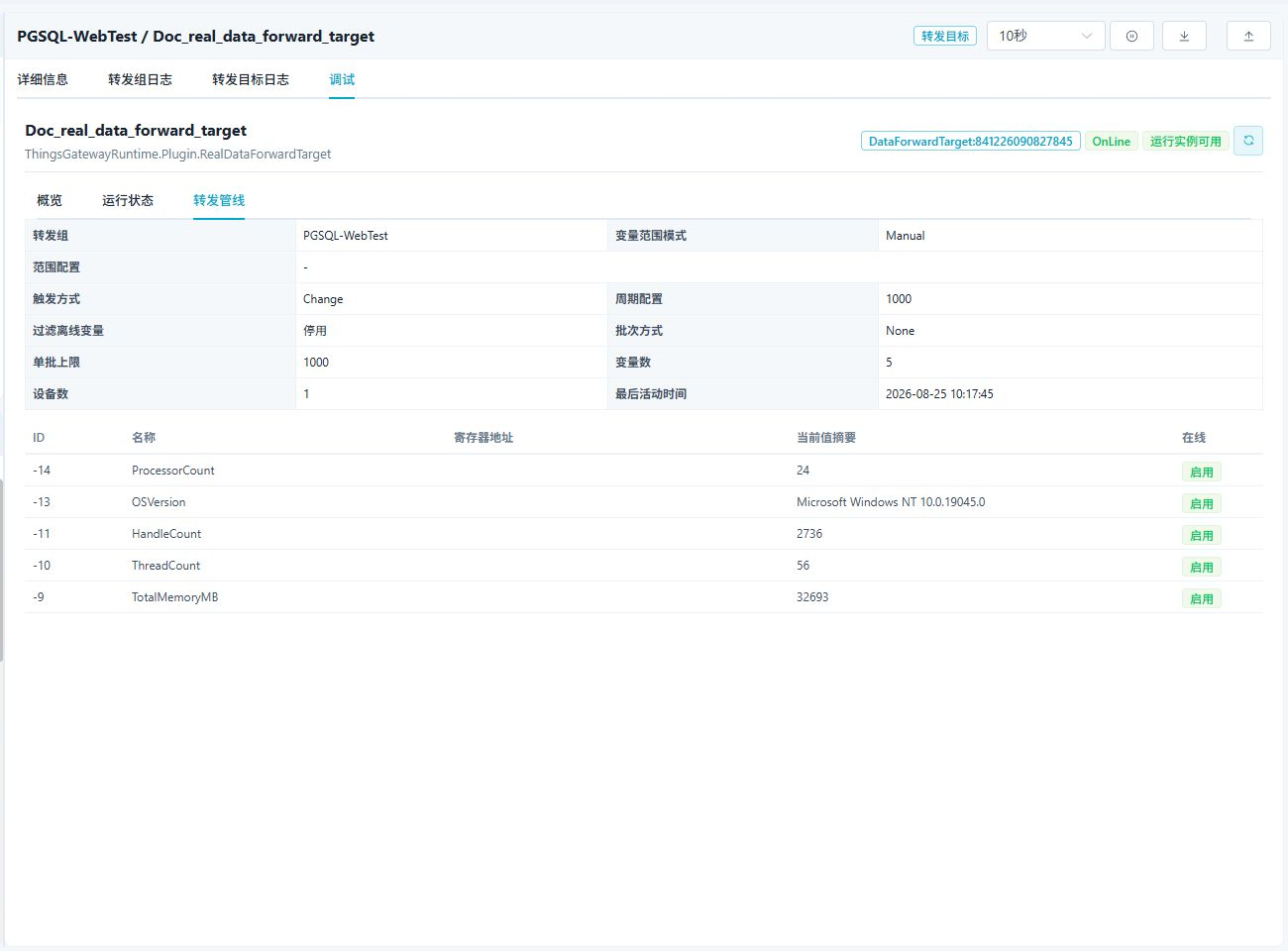
The pipeline shows the variable range, trigger, variable count, and a summary of data entering the target. Real-time storage updates the latest values directly and does not provide a cache-outbox panel.
Verify the target
- Enable the forwarding group and target, then confirm that the target is online.
- Update one variable included in the forwarding group.
- Query the real-time table and confirm variable ID, value, collection time, update time, and online state.
- Update the same variable again and confirm that its row is overwritten rather than appended.
Troubleshooting
| Symptom | Check |
|---|---|
| Target does not start | Database type, connection string, network access, and database permissions. |
| Latest value is not updated | Forwarding group range, target state, and whether Filter offline data excluded the variable. |
| The table still shows an old value | Confirm the configured table name and variable identifier. |
| Data disappears during a database outage | Real-time storage does not use the history target's CacheDB retry queue. Restore the database and trigger a new snapshot or value change. |
Related links
- Data Forwarding: Forwarding groups, ranges, triggers, cache, redundancy, and target runtime operations.
- Plugin Manual Index: Other collection and data-forwarding plugins.