MQTT Client Forwarding
This target connects to an MQTT broker and publishes gateway variables, devices, alarms, and plugin events.
Configure the forwarding group and target through Data Forwarding. This page covers only MQTT target properties, variable-level RPC permission, templates, and MQTT debug actions.
Upload the first value
Use an available test Broker and an independent MQTT subscriber. For a local exercise, install Mosquitto on the same computer as TGateway. In its Windows installation directory, run:
.\mosquitto.exe -p 18885 -v
In another terminal in that directory, subscribe before enabling the target:
.\mosquitto_sub.exe -h 127.0.0.1 -p 18885 -i manual-reader -t tgateway/demo/modbus -v
On Linux, use mosquitto and mosquitto_sub with the same arguments after installing the distribution's Broker and client packages. This local listener uses port 18885 and accepts local connections only; use the actual authenticated Broker connection for a remote gateway.
- Open Development Configuration → Data Forwarding and add group
Demo_MQTT_Group. Select manual variable scope, timed triggering, and interval1000ms; save it. - Reopen the group, select
Demo_Modbus_Device.Demo_Modbus_Valueunder forwarding variables, click the adjacent +, and save. Substitute a safe variable from your project when needed. - Add target
Demo_MQTT_Targetusing MQTT Client Forwarding. Set TCP, host127.0.0.1, port18885, unique client IDgateway-manual-demo, SSL off, and empty credentials for this local exercise. - Set Variable Topic Template to
tgateway/demo/modbus. Leave device, alarm, and plugin-event Topics, entity scripts, and content templates empty. Enable variable-list upload and disable dictionary upload. - Save and enable both group and target. Wait for the target to connect, then inspect new messages in the subscriber.
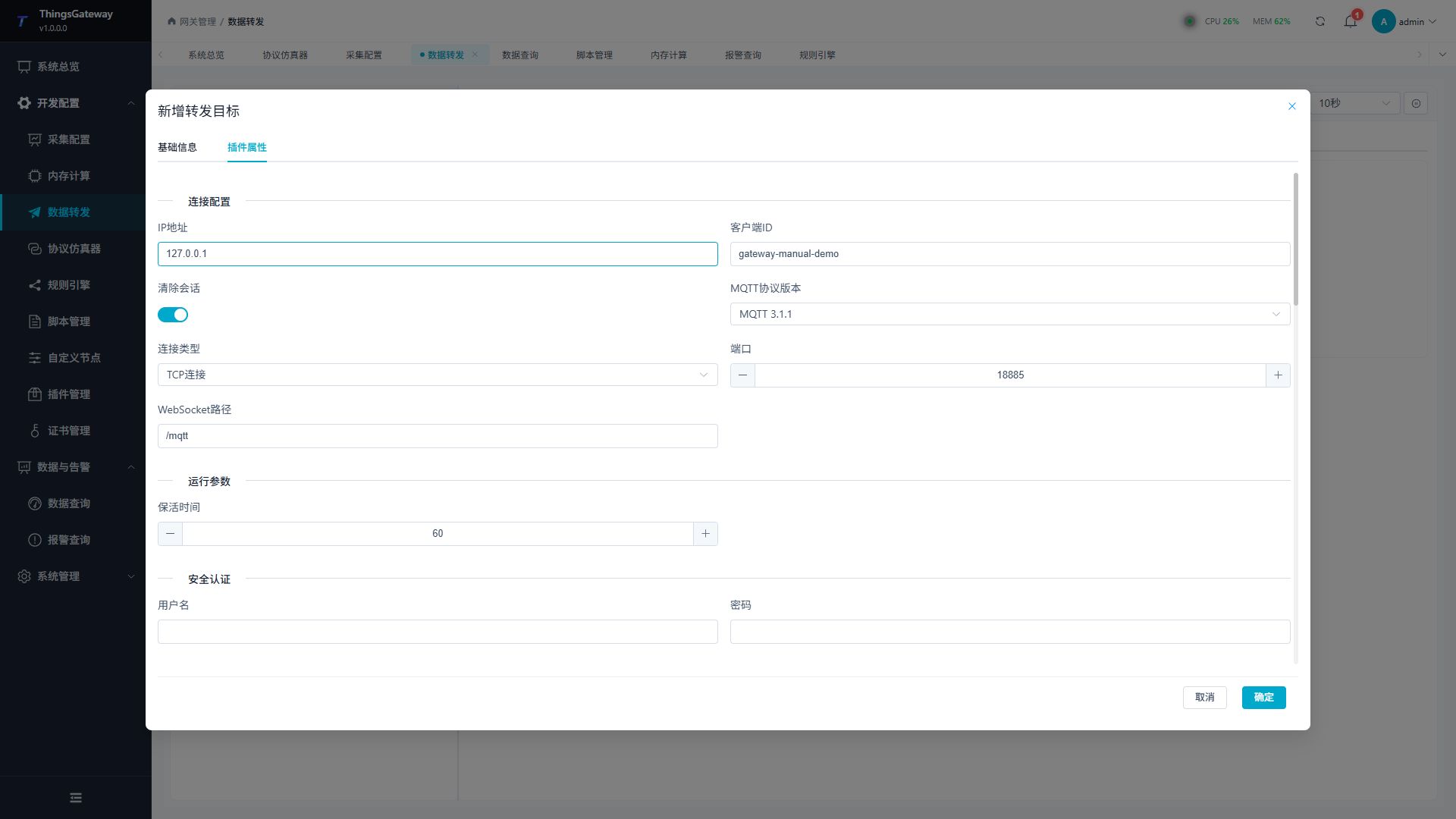
For the example collection point, check an array containing DeviceName="Demo_Modbus_Device", Name="Demo_Modbus_Value", and numeric Value=1234. Relevant fields are shown below; default messages contain additional fields.
[
  {
    "Name": "Demo_Modbus_Value",
    "DeviceName": "Demo_Modbus_Device",
    "Value": 1234,
    "RawValue": 1234,
    "IsOnline": true,
    "RegisterAddress": "40001"
  }
]
The target's Status and Subscriptions panel manages its own subscriptions. Read payloads at the independent subscriber. A successful manual publish does not establish that the forwarding group contains the variable. After the exercise, disable the test target, then press Ctrl+C in the test subscriber and Broker terminals. For production, configure credentials, Topic permissions, TLS, and RPC-write permissions according to the receiving system.
Open the plugin
Open Development Configuration → Data Forwarding and:
- Configure and save the forwarding group range, trigger, interval, online filter, and batching.
- Add a target, choose MQTT Client Forwarding, and fill in the basic target information.
- Open Target properties and configure the MQTT endpoint, security, message topics, scripts, templates, and cache.
- Save and enable the group and target, confirm it is online, then use Target debug for publish and subscription checks.
Basic target information
| Setting | Default | Configuration |
|---|---|---|
| Group | - | Select a saved forwarding group. |
| Target name | - | Required and unique within the group. Include Broker and environment. |
| Enable | Enabled | Disable to stop the MQTT client. |
| Log level | Info | Temporarily use Debug for connection, subscription, or publish diagnostics. |
| Start timeout | 60 seconds | Valid range is 1 to 3600 seconds. Limits target initialization and startup, independently of per-message timeouts and the group interval. |
Target properties
Connection
| Setting | Default | Configuration |
|---|---|---|
| Connection type | Tcp | Use TCP or WebSocket. TLS changes the scheme to ssl or wss. |
| IP address | localhost | Broker host or IP without a scheme or port. |
| Port | 1883 | Common TCP port is 1883; TLS often uses 8883; WebSocket uses the Broker's configured port. |
| WebSocket path | /mqtt | Used only for WebSocket. It must start with /. |
| Client ID | Empty | Empty generates a GUID. Use a fixed, unique ID when the same session must be resumed. |
| MQTT version | V311 (MQTT 3.1.1) | Match the Broker's supported protocol version. |
| Clean session | Enabled | In MQTT 3.1.1, enabled starts a clean session. Resuming a session requires disabling this setting, a fixed Client ID, and Broker retention support. For MQTT 5, also check session-expiry behavior at the Broker. |
| Keep-alive | 60 seconds | Keep Alive interval. Follow the Broker maximum and network policy. |
TLS and authentication
| Setting | Default | Configuration |
|---|---|---|
| Enable SSL | Disabled | Enable for TLS and use the Broker's TLS port. |
| SSL target host | Empty | DNS name in the certificate SAN; empty uses the IP address. |
| Client certificate | Empty | Select a client certificate with private key for mutual TLS. |
| CA certificate | Empty | Select a custom CA when the Broker certificate is not publicly trusted. |
| Allow untrusted certificate | Disabled | Bypasses peer-certificate validation, including hostname mismatch. A successful connection with it enabled does not establish a trusted server identity. Use only for temporary experiments; keep disabled in production. |
| SSL protocol | None (system default) | Keep system default unless the Broker explicitly requires TLS 1.2 or 1.3. |
| Check certificate revocation | Disabled | Enable according to the security policy. |
| Username | Empty | Broker username when authentication is required. |
| Password | Empty | Broker password; never place it in templates, screenshots, or logs. |
Messages and RPC
| Setting | Default | Configuration |
|---|---|---|
| QoS | AtMostOnce (0) | Select 0, 1, or 2 as required by the receiver. |
| Retain | Disabled | Retains the last message per Topic; use only for state topics. |
| RPC write Topic | RpcWrite | Enter a prefix without + or #. The client subscribes to {prefix}/+ and replies on {prefix}/{requestId}/Response. |
| Historical-read RPC Topic | RpcHistory | Enter a prefix without wildcards. Requests use {prefix}/{requestId} and chunked responses use {prefix}/{requestId}/Response. |
| Data request Topic | Empty | Accepts a structured request containing Source and RequestId; publishes the configured snapshots and a matching completion marker. |
| Device Topic template | Empty | Empty disables device records; otherwise use a fixed Topic or ${field} template. |
| Variable Topic template | TGateway/Variable | Use a fixed Topic or ${DeviceName}/${Name} fields. |
| Alarm Topic template | Empty | Empty disables alarm records. |
| Plugin event Topic template | Empty | Empty disables plugin-event records. |
| RPC script | Empty | Select a saved MQTT dynamic RPC script when custom request/response handling is needed. |
${field} must be present on the corresponding entity or script result. Topics control routing only; forwarding-group range controls membership.
Direct plugin method calls
Configure Plugin Method RPC Topic under Messages, default RpcMethod; leave it empty to disable this protocol on the connection. Publish instance type, ID, method name, and positional parameters to the fixed topic; responses use RpcMethod/Response, with no request-ID suffix. Enable Allow method calls on the called instance; the MQTT target's own switch only controls methods on that target.
This protocol does not use the variable/history request ID or RPC script. Retained requests are forbidden. The method entry adds no payload-size cap; MQTT protocol and Broker packet settings still apply. Request/response topics must not overlap other RPC or snapshot routes. See Plugin Method Calls for authentication, examples, and repeated submissions.
Request the current snapshot
Subscribe to the data routes and response prefix before publishing this request to the configured Data Request Topic. Generate a unique 32-character lowercase hexadecimal ID each time:
{"Source":"TGateway","RequestId":"6e8c1a7445064ad6b4bb5d5af9cf28b1"}
Check new values and then {"RequestId":"6e8c1a7445064ad6b4bb5d5af9cf28b1","Success":true} on DataRequestTopic/Response/RequestId. Data and completion are separate. Arbitrary text does not replace the structured request.
Writes use prefix/requestId and reply on prefix/requestId/Response; inspect per-variable results and independent readback. For history discovery use the current camelCase envelope:
{"requestId":"6e8c1a7445064ad6b4bb5d5af9cf28b1","operation":"targets","responseChunkBytes":4096,"input":null}
For chunked history, order chunks, Base64-decode each, concatenate the bytes, then decompress gzip. A completion or transport acknowledgement does not establish a field write or downstream database commit.
Target-variable properties
This plugin inherits the optional text fields Data1 to Data10 and adds RPC permission. The variable must already be in the forwarding-group range.
| Setting | Default | Configuration |
|---|---|---|
| Allow RPC write | Enabled | Allows an external MQTT client to write this variable. Enable only for approved control points. |
| Data1 to Data10 | Empty | Project-specific metadata. MQTT does not publish these values automatically; reference them explicitly from a script or upload template. |
Messages, templates and cache
Data and scripts
| Setting | Default | Configuration |
|---|---|---|
| Detail log | Disabled | Publish summaries contain the Topic and count, without the full payload. Enabled with a Trace target threshold uses Trace summaries; otherwise summaries use Debug and remain subject to the target log threshold. Inspect raw payloads with an independent subscriber. |
| JSON indentation | Enabled | Disable to reduce payload size. |
| Ignore JSON nulls | Enabled | Controls null-property omission in default entity serialization. Explicit nulls generated by content templates remain. |
| Device list upload | Enabled | Publish devices as a list; disable for one message per device. |
| Variable list upload | Enabled | Publish variables as a list; disable for one message per variable. |
| Variable dictionary upload | Disabled | Applies to list mode; DeviceName → Name leaves contain complete entities or script outputs, whose Value field holds the value. |
| Alarm list upload | Enabled | Publish alarms as a list; disable for one message per alarm. |
| Alarm dictionary upload | Disabled | Applies only to alarm-list mode; groups by device and variable. |
| Plugin-event list upload | Enabled | Publish plugin events as a list; disable for one message per event. |
| Entity scripts | Empty | Select saved scripts for device, variable, alarm, or plugin-event entities; script output is used for Topic and payload rendering. |
Upload template configuration
For each entity, choose Text or Json and optionally enter a ${field} content template. Empty content uses default JSON serialization. Preview before saving; JSON mode must be valid JSON and Text mode does not add quoting or escaping.
With a content template and list upload disabled, the rendered single content is encoded as an outer JSON string. With list upload enabled, Text produces string arrays and Json produces arrays of the rendered JSON values. Ignore Null applies to default entity properties; explicit nulls in rendered templates remain. Numeric 0, Boolean false, and empty strings are retained. Data1–Data10 require explicit entity-script output. See Upload Templates for formats and verification.
| Entity | Available fields |
|---|---|
| Variable | Id, Name, DeviceName, Value, RawValue, LastSetValue, CollectGroup, CollectTime, CreateTime, ChangeTime, IsOnline, DataType, Unit, RegisterAddress, OtherMethod, Description, ProtectType, RpcWriteEnable, Remark1 to Remark5, ValueInited, IsMemory |
| Device | Id, Name, ActiveTime, DeviceStatus, PluginName, Description, LastErrorMessage, Remark1 to Remark5 |
| Alarm | AlarmId, VariableId, Name, DeviceName, AlarmCode, AlarmLevel, AlarmLimit, AlarmText, RecoveryCode, AlarmTime, EventTime, FinishTime, ConfirmTime, ConfirmText, AlarmType, EventType, Remark1 to Remark5 |
| Plugin event | DeviceName, ObjectValue |
An entity script changes the object before Topic grouping and template rendering. Keep template fields aligned with the script output. An empty corresponding Topic disables that entity type.
Cache and capacity
| Setting | Default | Configuration |
|---|---|---|
| Enable failed-write retry cache | Enabled | Retains failed publishes in local CacheDB for replay after recovery. Disabling it stops retaining failures for retry. |
| Cache file maximum rows | 262144 | Maximum CacheDB outbox rows; oldest rows are removed after the limit. |
| Upload chunk size | 2000 | Read limit for cached change records. Whole interval snapshots can retain their group boundary, so this does not determine every message's point count. |
| Memory queue limit | 100000 | Counts pending entries separately for each model; a complete snapshot counts as a batch. It is neither the target variable count nor a byte limit. At capacity, persist to CacheDB first. If persistence fails, retain accepted records and reject new records for upstream retry. |
| Filter offline data | Disabled | Filters offline variables at dequeue; the forwarding-group filter also applies. |
| Upload concurrency | 1 | MQTT publishes over one connection; keep 1. |
Target debug
Open Development Configuration → Data Forwarding, select the forwarding group and target, and open Debug.
MQTT client protocol panel
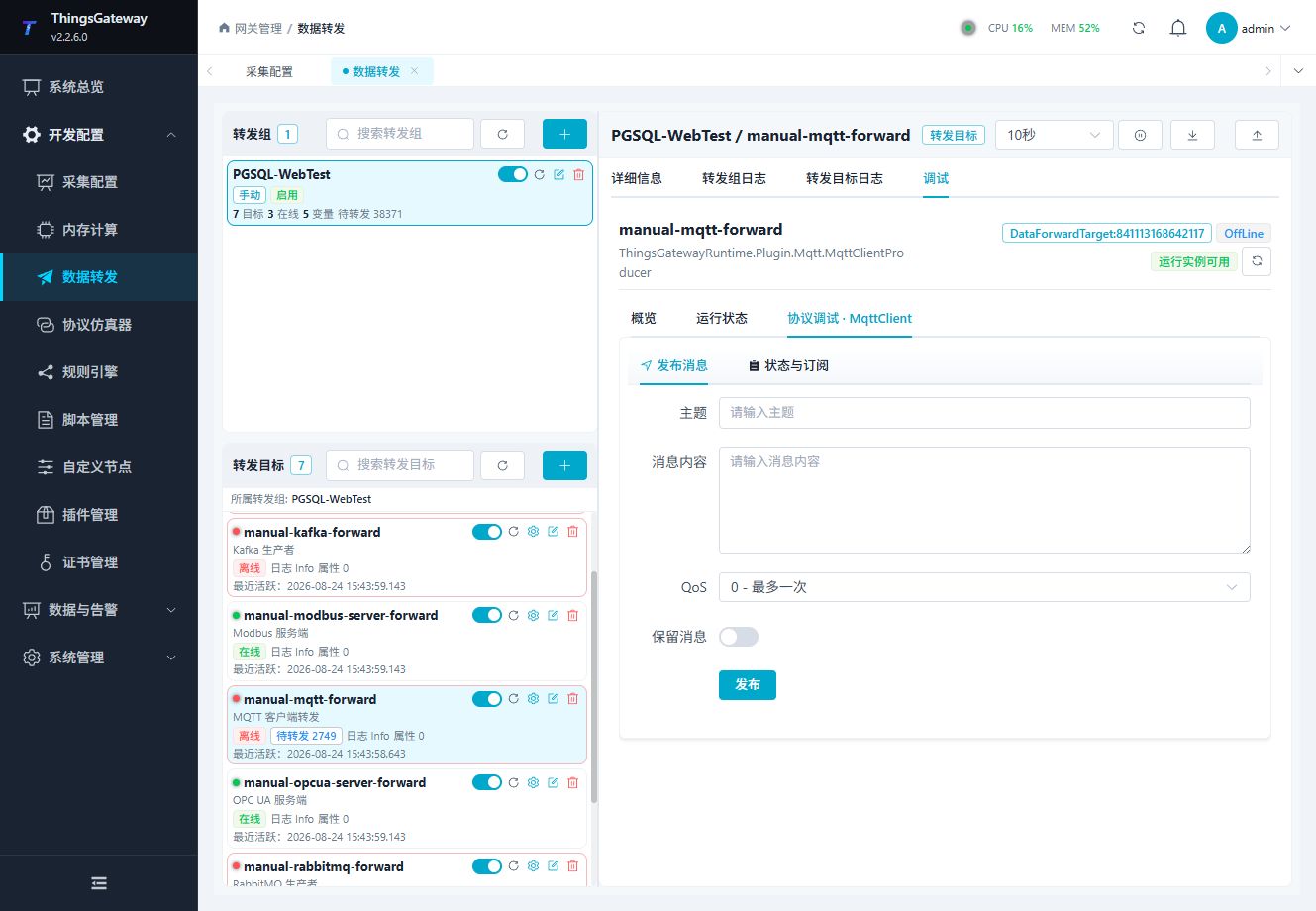
Use the plugin-specific panel to publish a test message, manage the target's own test subscriptions, or remove a subscription. The target must be online before protocol operations can run. Inspect received payloads with an independent MQTT client.
Debug checklist
Use a test Topic and small payload. Check connection state, QoS, retain flag, broker response, and message log. Use a separate test topic for RPC writes.
Read the Runtime Overview
Confirm the target name, owning group, object identity, and active redundancy role before opening Runtime Status. Started, initialized, and online describe lifecycle, initialization, and Broker connection respectively.
| Metric | How to check |
|---|---|
| Variable and device counts | Confirm the input scope. These are neither Broker client counts nor successfully uploaded record counts. |
| Success/failure counts and latest times | Compare snapshots around a new test and inspect target logs. A successful target operation does not prove subscriber receipt. |
| Last activity | Shows target activity rather than the source collection time carried in a payload. |
| Rate, received/sent bytes, and latest duration | — means the current target does not provide that metric. It does not mean zero traffic or duration. |
Choose a public operation in Special Methods. For a publish method, supply its topic and byte payload as indicated and verify the actual bytes at an independent subscriber. Method sends and normal group uploads have separate triggers; a method send does not validate group membership or entity templates.
Verify the target
- Subscribe on the receiver side before sending a test value.
- Change or write one safe variable included in the forwarding group.
- Confirm Topic, payload, QoS, retain flag, and message count.
- Check the target log for reconnect, authentication, or publish errors.
Troubleshooting
| Symptom | Check |
|---|---|
| No message at the receiver | Broker address, port, Client ID, credentials, Topic, ACL, and target online state. |
| Connection repeatedly drops | Keep-alive, TLS settings, broker limits, firewall, and network stability. |
| Topic is unexpected | Topic templates, ${key} fields, entity script output, and group alias. |
| Retained message is unexpected | Disable Retain when the receiver does not need retained state, then clear the old retained message at the broker. |
| RPC write fails | Target and variable RPC permissions, RPC Topic, payload format, and the variable data type. |
| Template output is invalid | Run template preview and check placeholder names, JSON syntax, and entity-script output. |
| TLS handshake fails | IP, SSL target host, client certificate, CA, SSL protocol, certificate validity, and the allow-untrusted setting. |
| Failed publishes disappear | Check the failed-write retry cache, CacheDB pending rows, memory queue limit, and cache file maximum rows. |
Related links
- Data Forwarding: Forwarding groups, triggers, cache, redundancy, and common target operations.
- Plugin Manual Index: Other collection and data-forwarding plugins.