BACnet/IP Server
The BACnet/IP server exposes variables from a forwarding group to building automation clients. It supports Who-Is / I-Am, ReadProperty, ReadPropertyMultiple, Present_Value writes, sixteen command priorities, and confirmed or unconfirmed COV notifications.
See Data Forwarding for group scope, common variables, and target lifecycle. To collect values from another BACnet device, use the BACnet/IP Master.
Create a forwarding target
- Sign in to the WEB configuration page and open Development Configuration → Data Forwarding.
- Create or select a group and configure its variable scope. Ensure source variables are initialized and online.
- Add a BACnet/IP Server target, select the UDP channel, and enter a local binding such as
0.0.0.0:47808. - Set a device instance unique on the BACnet network, a device object name, and the assigned vendor ID. Leave writes disabled during initial verification.
- Under Target Variable Properties, configure the object type, object instance, and engineering unit for variables already in the group.
- Save and enable the target. Under Debug → Operation → Mapped points, check object addresses, values, and access permissions.
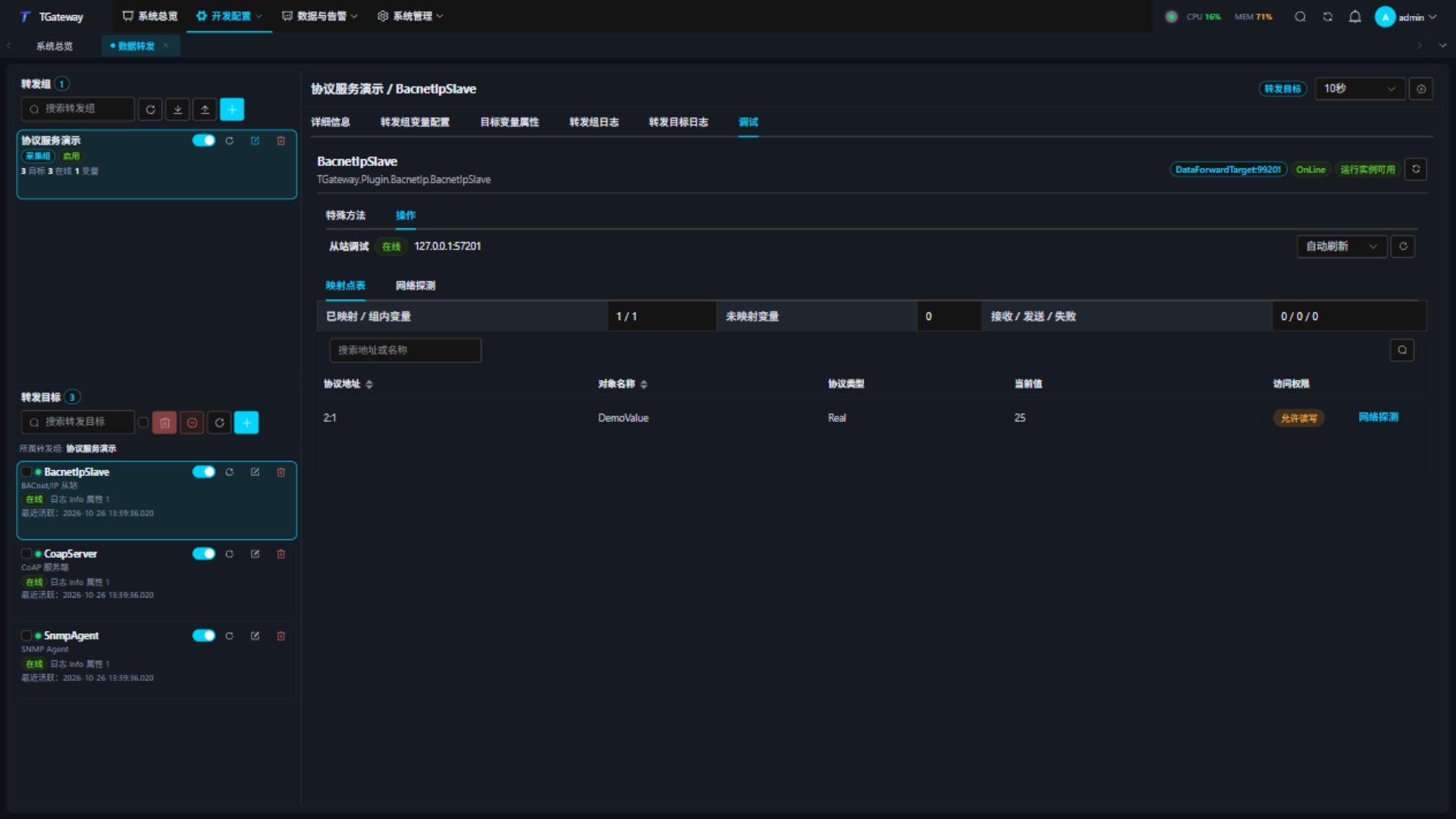
Saving target variable properties does not add a variable to the group. An out-of-scope, uninitialized, or offline source does not produce a fabricated zero value. Duplicate object identifiers or names fail model creation; correct the configuration before restarting the target.
Target settings
| Setting | Description |
|---|---|
| Channel type | Standard UDP session only; BACnet/IP uses IPv4. |
| Local binding | Default 0.0.0.0:47808. Reserve each IP/port for one target. Use 127.0.0.1:47808 for local tests. |
| Device instance | Default 1001, range 0–4194303; must be unique on the BACnet network. |
| Device object name | Default TGateway; required, at most 255 characters, and distinct from variable object names. |
| Vendor ID | Use the assigned BACnet Vendor ID; default 0. |
| Allow writes | Disabled by default. Variable permission and source RPC write capability are also required. |
| Maximum datagram bytes | Default 1476, range 64–1476, including protocol headers. Oversized requests or responses do not cause oversized datagrams. |
| Request timeout, ms | Default 5000, range 100–120000, including source write execution. |
| Maximum COV subscriptions | Default 128, range 1–1024. Each source is limited to 128 relationships, including permanent leases. |
Shared remote-address, serial, and SSL fields are not used by this server. Keep SSL disabled; BACnet/SC is not provided.
Saving validates the transport and protocol settings. Imported settings undergo the same checks before startup. Correct an out-of-range datagram budget before starting; invalid settings do not occupy a listening port.
Variable mapping
| Setting | Description |
|---|---|
| Object type | Analog Input / Output / Value, Binary Input / Output / Value, or Multi-state Input / Output / Value. Input objects are read-only. |
| Object instance | Range 0–4194303; unique within each type. Debug addresses use type:instance, for example 2:1. |
| Object name | Uses the variable name when blank. Must differ from all other objects and the device name; maximum 255 characters. |
| Engineering unit | BACnet unit number for analog values; default 95 means no units. |
| Relinquish default | Default JSON number 0; written when all priority slots are released. Multi-state objects require an integer of at least 1. |
| Allow variable writes | Disabled by default. Both target and variable permissions must allow writes to an output or value object. |
Analog objects use BACnet Real. Binary objects use enumerations 0 / 1, with Boolean sources converted accordingly. Multi-state values use positive unsigned integers. Choose a type matching the source and equipment.
The device Object_List supports index 0 for the element count and individual indexed reads to avoid oversized responses. Objects expose identifiers, names, types, Present_Value, relevant units, and status properties. Writable objects also expose Priority_Array and Relinquish_Default. Unknown properties return protocol errors.
If a source is offline or has an invalid value type during a multiple-property read, that property returns an error while other valid properties remain available. Check each result individually and do not treat an error as a zero value.
Verify reads, writes, and COV
- Click Network probe on a mapped row.
- Click Read over network and compare the result with the source variable. The probe uses the gateway master driver against the server's actual UDP listener.
- Enable target, variable, and source RPC write permissions on a safe test point.
- Enter a JSON number, choose a priority, and click Write and read back. Confirm the control operation, then check the readback and source value.
- Write JSON
nullat the same priority to release a command. Lower numbers have higher priority. Priority6is reserved and rejects manual writes. - Subscribe from a BACnet client and verify the initial and changed values. Confirmed COV requires ACKs. Renew before expiry or send a cancellation request; lifetime
0means a permanent relationship.
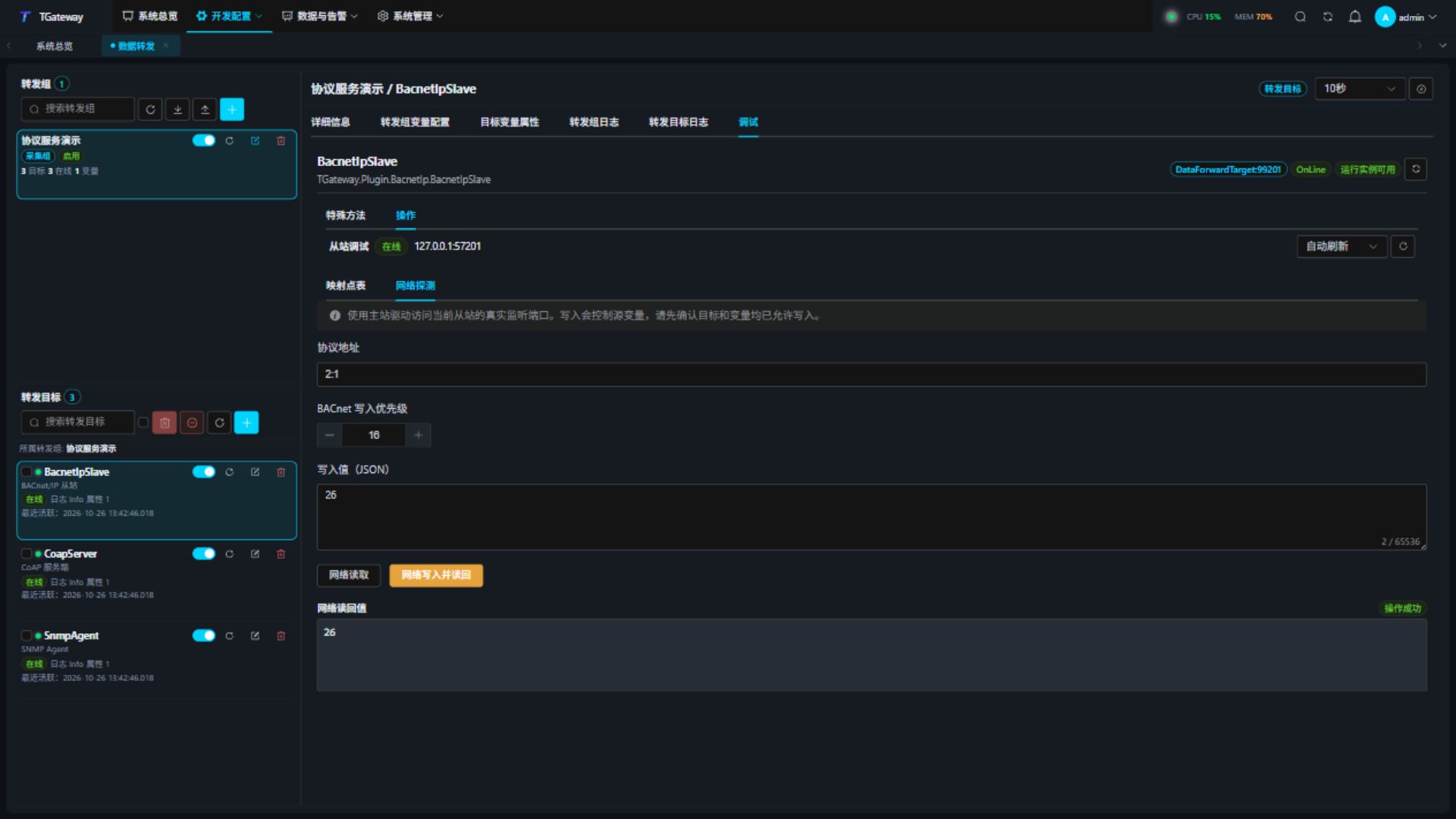
Lower-priority commands cannot override higher-priority slots. Releasing a slot selects the next effective value. Changing mappings or restarting clears runtime priorities and COV relationships; clients should confirm command state and subscribe again.
Only a valid BACnet Null can release a priority slot. A malformed Null carrying a payload or an invalid application tag is rejected without writing to the source; the current value and priority slots remain intact. After a rejection, check the application type and packet encoding, then read back the command state.
Write confirmation uses the target, point, value, and priority captured when the prompt opens. Switching targets or points invalidates that confirmation. Start a new write and confirm again after editing the input.
Scope and troubleshooting
This server provides unsegmented BACnet/IP. BBMD, Foreign Device registration, network routing, segmented APDUs, and BACnet/SC are not provided. Split large object lists and batch reads into smaller requests.
| Symptom | Action |
|---|---|
| Offline target or bind failure | Check local IP, UDP port ownership, group/target enable state, and target logs. |
| Direct reads work but discovery fails | Check client interface, broadcast address, firewall, and device-instance range. Verify direct addressing first. |
| No mapped objects | Check group scope and target variable properties; remove duplicate names or identifiers. |
| Write rejected or readback unchanged | Check both permissions, source RPC, object type, and higher-priority commands. |
| Oversized request returns Abort | Reduce RPM batch size or read Object_List by array index. |
| COV stops | Check lease, ACKs, capacity, mapping changes, or restart; subscribe again. |