ZeroMQ Producer
This target publishes gateway variables, devices, alarms, and plugin events through a ZeroMQ socket.
Configure the forwarding group and target through Data Forwarding. This page covers the ZeroMQ endpoint, socket mode, high-water mark, Topic templates, and debug verification.
Open the plugin
Open Development Configuration → Data Forwarding and:
- Save the forwarding-group range, trigger, interval, online filter, and batching.
- Add a target, choose ZeroMQ Producer, and fill in the basic target information.
- Open Target properties and configure the endpoint, socket type, bind mode, high-water mark, Topics, templates, and cache.
- Save and enable the target, start a matching test receiver, and use target debug.
Basic target information
| Setting | Default | Configuration |
|---|---|---|
| Group | - | Select a saved forwarding group. |
| Target name | - | Required and unique within the group. |
| Enable | Enabled | Disable to avoid creating a ZeroMQ socket. |
| Log level | Info | Temporarily use Debug for endpoint or send diagnostics. |
| Start timeout | 60 seconds | Valid range is 1 to 3600 seconds. |
Target properties
Connection and capacity
| Setting | Default | Configuration |
|---|---|---|
| Connection address | tcp://127.0.0.1:5555 | ZeroMQ endpoint such as tcp://host:port or ipc://file. Both sides must use the same endpoint. |
| Socket type | Pub | Current choices are Pub (publisher/subscriber), Push (push/pull), and Dealer (asynchronous request/reply). The receiver must use the compatible socket type. |
| Bind mode | Enabled | Enabled calls Bind; disabled calls Connect. Only one side may bind an endpoint. |
| High-water mark | 1000 | Outbound socket queue limit. A slow receiver can reach this limit and cause blocking or drops. |
Socket-level send success does not confirm peer receipt. Use Dealer with an application-level ACK when end-to-end confirmation is required.
Topic templates
| Setting | Default | Configuration |
|---|---|---|
| Device Topic template | Empty | Device message prefix/Topic; empty disables device records. |
| Variable Topic template | TGateway/Variable | Variable prefix/Topic; ${DeviceName} and ${Name} may be used. |
| Alarm Topic template | Empty | Alarm prefix/Topic; empty disables alarm records. |
| Plugin-event Topic template | Empty | Plugin-event prefix/Topic; empty disables plugin-event records. |
${field} must exist on the corresponding entity or script result. The forwarding group controls membership; Topic controls category and receiver subscription.
Target-variable properties
ZeroMQ inherits Data1 to Data10, optional text fields that are empty by default and are not added to messages automatically. Configure membership, aliases, trigger, and batching in Data Forwarding.
| Setting | Default | Configuration |
|---|---|---|
| Data1 to Data10 | Empty | Project-specific metadata; reference explicitly from a script or upload template when needed. |
Messages, templates and cache
Data and scripts
| Setting | Default | Configuration |
|---|---|---|
| Detail log | Disabled | Enable briefly to inspect sends. |
| JSON indentation | Enabled | Disable to reduce payload size. |
| Ignore JSON nulls | Enabled | Disable when null fields must remain. |
| Device/variable/alarm/plugin-event list upload | Enabled | Disable the relevant list switch for one message per entity. |
| Variable/alarm dictionary upload | Disabled | Applies only to the corresponding list mode. |
| Entity scripts | Empty | Select saved scripts to transform entities before Topic and payload rendering. |
Upload template fields
In Upload Template Configuration, choose Text or Json for each entity and insert ${field} placeholders. Empty content uses default JSON serialization; preview before saving.
| Entity | Available fields |
|---|---|
| Variable | Id, Name, DeviceName, Value, CollectGroup, CollectTime, ChangeTime, IsOnline, DataType, Unit, RegisterAddress, Remark1 |
| Device | Id, Name, ActiveTime, DeviceStatus, PluginName, Description, LastErrorMessage, Remark1 |
| Alarm | AlarmId, VariableId, Name, DeviceName, AlarmCode, AlarmLevel, AlarmLimit, AlarmText, RecoveryCode, AlarmTime, EventTime, AlarmType, EventType, Remark1 |
| Plugin event | DeviceName, ObjectValue |
Cache and capacity
| Setting | Default | Configuration |
|---|---|---|
| Enable failed-write retry cache | Enabled | Retains failed sends and replays them after recovery. |
| Cache file maximum rows | 262144 | Maximum CacheDB outbox rows. |
| Upload chunk size | 2000 | Maximum records per replay batch. |
| Memory queue limit | 100000 | At capacity, persist pending records to CacheDB first. If persistence fails, retain accepted records and reject new records for upstream retry. |
| Filter offline data | Disabled | Filters offline variables; the forwarding-group filter also applies. |
| Upload concurrency | 1 | ZeroMQ sockets are not thread-safe; the plugin reduces values above 1 to 1. |
Target debug
Open Development Configuration → Data Forwarding, select the forwarding group and target, and open Debug.
ZeroMQ protocol panel
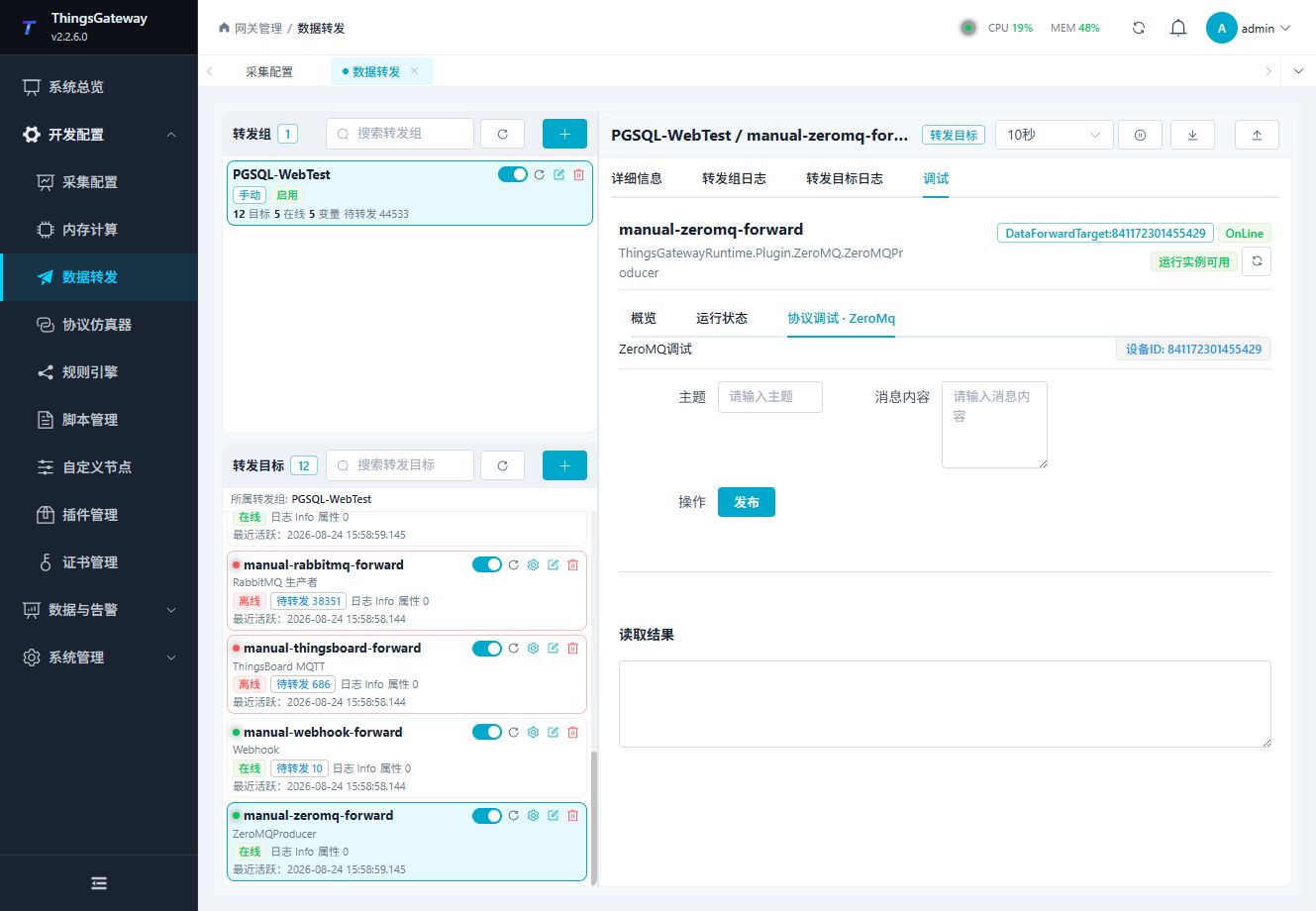
Check endpoint, bind mode, Topic, and publish result. Use a test subscriber while commissioning.
Functions
| Function | Purpose |
|---|---|
| ZeroMQ protocol debug | Use ZeroMQ protocol debug to send or inspect protocol frames and view the device or target response. |
Verify the target
- Start a test ZeroMQ subscriber with the matching socket type and endpoint.
- Confirm that only one side binds the endpoint.
- Change one variable included in the forwarding group.
- Compare Topic, payload, and message count at the subscriber.
- Check target logs and the queue level when the receiver is slower.
Troubleshooting
| Symptom | Check |
|---|---|
| Subscriber receives no message | Endpoint, socket type, bind mode, firewall, subscriber state, group range, and Topic template. |
| Address already in use | Only one process should bind the endpoint. Switch the other side to connect mode or use another endpoint. |
| Messages are delayed or dropped | Receiver speed, high-water mark, network, and target log. |
| Topic is unexpected | Topic templates, ${key} fields, entity values, and the forwarding group target. |
| Payload is invalid | Template preview, JSON syntax, placeholder names, and entity-script output. |
Related links
- Data Forwarding: Forwarding groups, triggers, cache, redundancy, and common target operations.
- Plugin Manual Index: Other collection and data-forwarding plugins.