IEC 61850 Managed Server
This target exposes variables in a forwarding group as IEC 61850 MMS objects. An IEC 61850 client can browse the generated logical-device model, read values, receive the default reports and Journal entries, and write values when both target and variable permissions allow it. Journal records can be kept in memory only or persisted to SQLite through the Journal storage editor.
The target uses the standard TCP service channel. Forwarding-group membership, target enablement, and common channel fields are described in Data Forwarding.
Create the server and variable model
Open the plugin
Open Development Configuration -> Data Forwarding, save the forwarding-group range, add a target using IEC 61850 Managed Server, and then open the target's Target properties and Variable properties editors.
Minimal configuration
- Select TCP service and keep the default bind address
0.0.0.0:102, or choose another free port for commissioning. - Keep the identity defaults unless the client requires a specific vendor, model, or revision.
- Save the target, open Variable properties, and assign a unique object reference to every variable to expose.
- Enable the forwarding group and target. Use the dedicated target debug page to confirm the model and values before connecting the external client.
Target properties
Channel and identity
| Setting | Default | Configuration |
|---|---|---|
| Channel type | TCP service | This plugin accepts only the TCP service channel. |
| Local bind address | 0.0.0.0:102 | Enter the local IP and listening port. Port 102 is the standard MMS port and may require elevated privileges; use a free high port during testing. |
| Vendor name | TGateway | Value returned by the MMS Identify service. |
| Model name | IEC61850_Net | Value returned by the MMS Identify service. |
| Revision | 1.0 | Value returned by the MMS Identify service. |
| ACSE password | Empty | When non-empty, the client must use the same ACSE password. Empty disables password authentication. |
Capacity and file service
| Setting | Default | Range / rule |
|---|---|---|
| Maximum MMS PDU | 65000 bytes | Must be at least the protocol minimum and no greater than 65535. Lower it when a client has a smaller receive buffer. |
| Maximum data-set members | 100 | Maximum members in a static or dynamic data set. |
| Maximum dynamic data sets per association | 10 | Maximum dynamic data sets one client association may create. |
| Maximum open files per connection | 5 | Maximum simultaneous FRSM file sessions for one association. |
| File-session timeout | 30000 ms | Idle FRSM sessions are closed after this interval. |
| Maximum ObtainFile tasks | 5 | Maximum concurrent file retrieval tasks. |
Report and Journal limits
| Setting | Default | Configuration |
|---|---|---|
| Maximum buffered reports per BRCB | 1024 | Number of reports retained for later replay by one buffered report control block. |
| Buffered-report byte budget | 65536 bytes | Byte budget for one BRCB buffer. |
| Allow writes | Enabled | Target-level gate for MMS Write and variable RPC write-back. Disable it to make every mapped object read-only. |
| Journal storage | SQLite enabled | Open the nested editor to choose the database type, connection string, table, retention, time zone, cache, queue, and split-table options. |
Journal storage editor
The default Journal storage is SQLite:
| Field | Default | Configuration |
|---|---|---|
| Journal name | LLN0$EventLog | Name registered under every logical device. Keep it stable so clients can keep their browse configuration. |
| Enable | Enabled | Disable to keep no Journal records. |
| Database type | SQLite | Select a provider supported by the common protocol-event storage editor. |
| Connection string | Data Source=Logs/IEC61850/iec61850_{TargetId}.db;... | Keep {TargetId} when several targets share a runtime. Use a writable path and provider-specific keywords. |
| Table name | iec61850_journal | Table used for persisted entries. |
| Retention days | 30 | Removes entries older than this many days; 0 disables time-based cleanup. |
| Time zone | UTC | Stored occurrence time is UTC when no time zone is selected. Choose a site time zone only when the client requires local wall-clock display. |
| Cache | Enabled | Enables the storage outbox/cache used while the database is unavailable. |
| Queue maximum | 100000 | Maximum queued records before new records are rejected. |
| Cache file maximum length | 262144 bytes | Maximum individual cache file length. |
| Split size | 2000 | Number of rows per split-table segment when split tables are enabled. |
| Split table | None | Keep None unless the selected provider and retention plan require physical table splitting. |
Variable properties
The variable must already be inside the forwarding-group range. A variable property only maps that variable; it does not add it to the group.
| Setting | Default | Configuration |
|---|---|---|
| Object reference | Empty | Required and unique within the target. Use LD/LN.DO.DA;FC=XX, for example LD1/MMXU1.TotW;FC=MX or LD1/LLN0.Mod.stVal;FC=ST. |
| Allow writes | Enabled | Variable-level gate. A write succeeds only when this and target Allow writes are enabled and the source variable accepts RPC writes. |
The part before ;FC= is the MMS domain/item path. The function constraint (ST, MX, SP, CF, CO, and other values supported by the client model) is required for an unambiguous object reference. Duplicate references or invalid paths are skipped and reported in the target log.
Supported source mappings are Boolean, 8/16/32/64-bit signed or unsigned integers, 32/64-bit floating point values, and strings up to 255 characters. Complex structures, arrays, quality objects, and timestamps are not created by this dynamic variable editor.
Generated model and Journal
After the target variables are saved, the server rebuilds the model. Each distinct LD becomes a logical device, and the configured Journal name is registered under that device. Variable changes update the current MMS value and append a Journal entry with the UTC occurrence time, value, and data-change reason. The default dynamic report data set is LLN0$Events with URCB01 and BRCB01 controls for each logical device containing mapped variables.
Debug and verify
Target debug
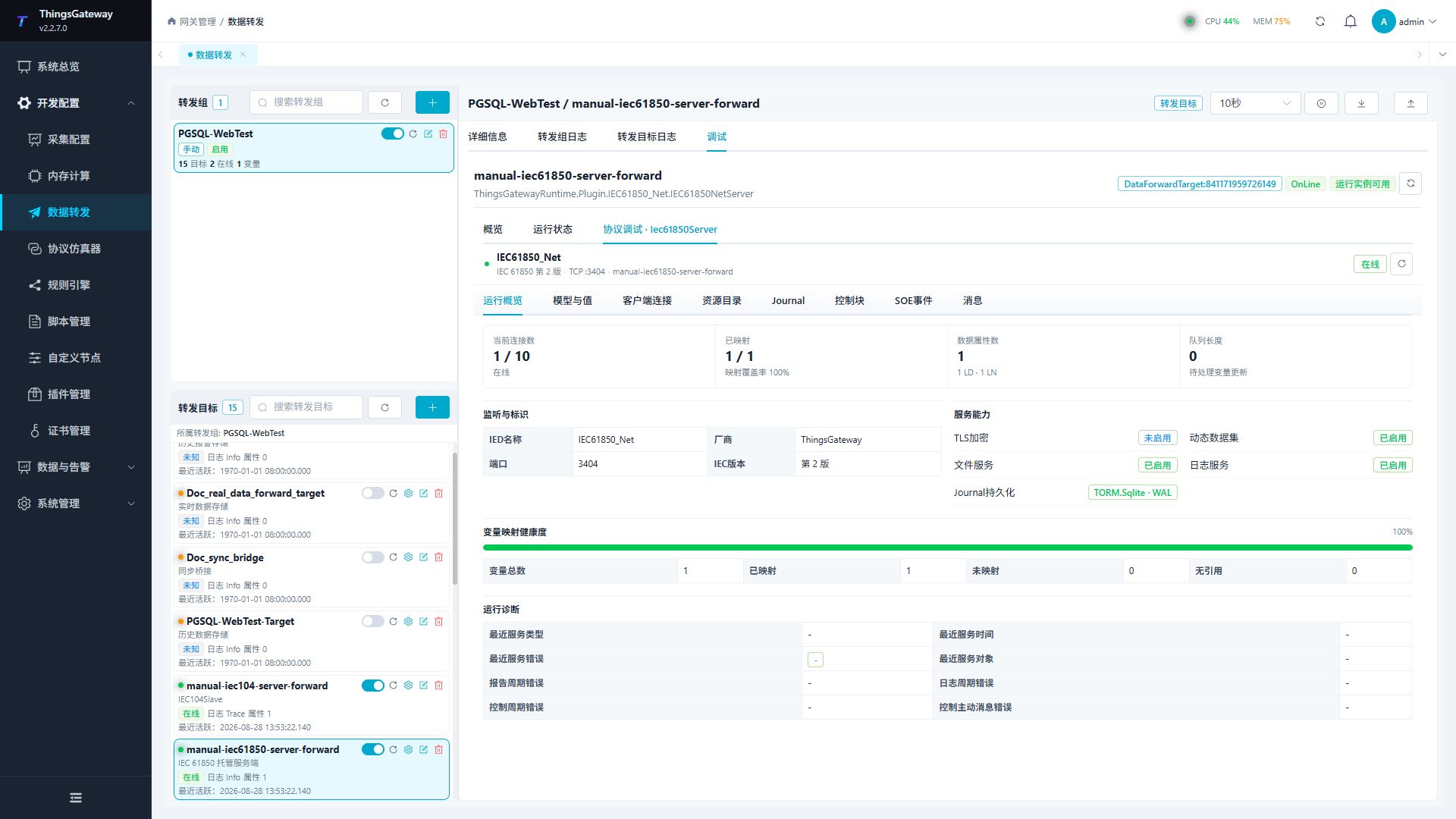
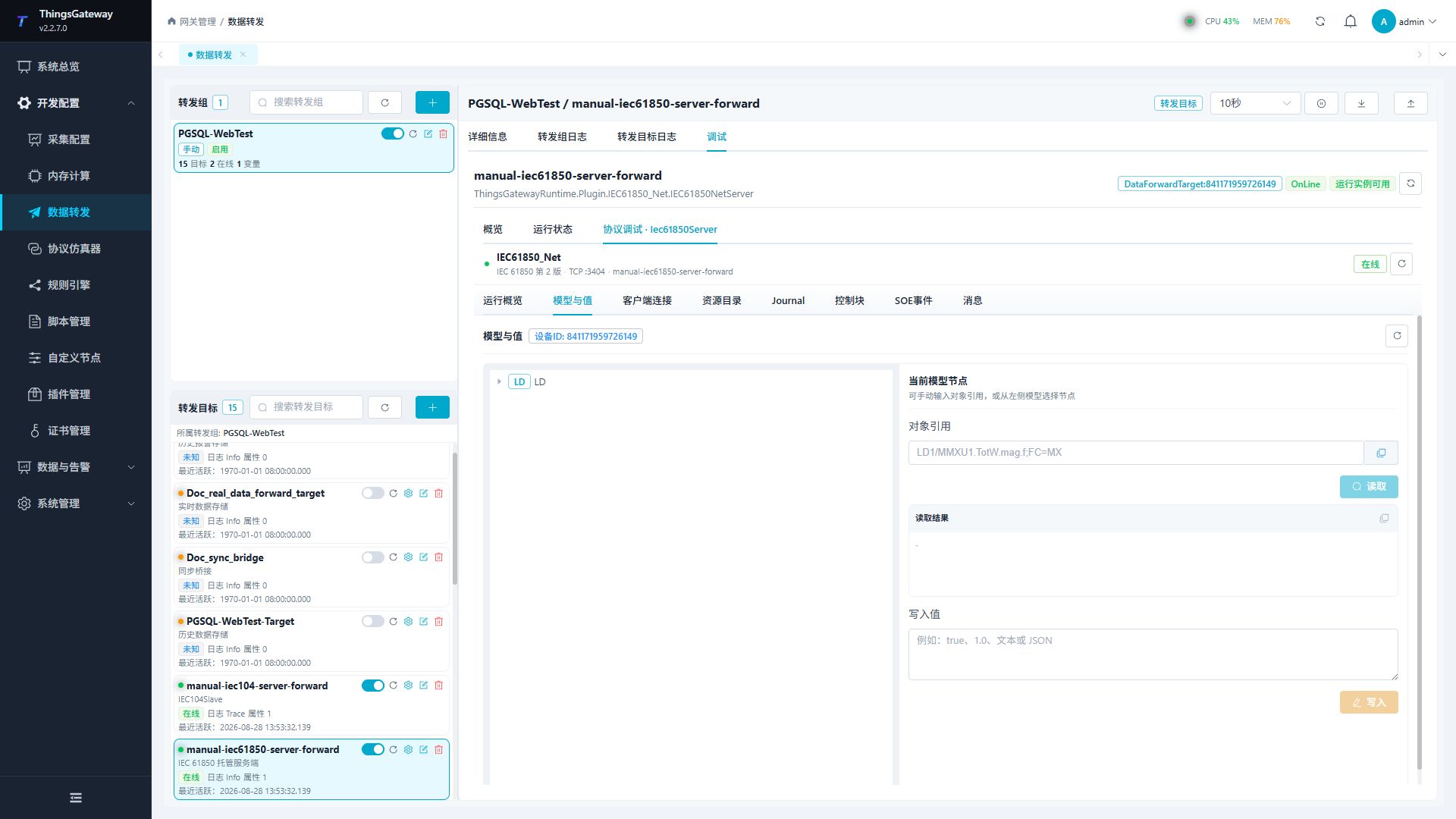
Open the IEC 61850 target, choose Debug, and use the protocol-specific panels:
| Panel | Use |
|---|---|
| Runtime overview | Confirm listener state, client count, mapped/unmapped variables, pending updates, and Journal storage status. |
| Model and values | Browse the generated LD/LN/DO/DA tree, copy an object reference, and read or write a value when permitted. |
| Client connections | Inspect association state, remote address, PDU size, and latest errors. |
| Resource catalog | Search logical devices, variables, data sets, Journal names, and files. |
| Journal | Select a logical device and Journal, set a time range, and page through entries. |
| Reports / controls | Inspect the generated report controls and client reservations. Treat any control or write action as a production-impacting operation. |
| Messages | Review MMS requests, responses, and parser errors. |
Verification
- Confirm the target is online and the TCP service port is listening.
- In Runtime overview, confirm that the mapped count matches the variables with valid object references.
- From an IEC 61850 client, run Identify, GetNameList, and Read; compare one value and its function constraint with the gateway variable.
- Change a source variable and confirm the MMS value and Journal entry update.
- Test a permitted write on a safe point, then confirm the source variable RPC result and the new MMS value. Test a read-only point and confirm that the write is rejected.
- If persistence is enabled, restart the target and confirm that new Journal entries continue in the same database and table.
Troubleshooting
| Symptom | Check |
|---|---|
| Target cannot start | Channel type, bind address, port ownership, firewall, and the Journal connection string. |
| Client cannot associate | Port reachability, ACSE password, maximum connections, PDU size, and client MMS profile. |
| Client cannot see a variable | Forwarding-group range, object-reference syntax, duplicate references, function constraint, and the unmapped list in Runtime overview. |
| Read returns an unexpected value | Source variable type, current online state, object path, and the Model and values panel. |
| Write is rejected | Target and variable Allow writes, source-variable RPC permission, data type conversion, and site safety interlocks. |
| Journal list is empty | Journal storage Enable, mapped variables, Journal name, query time range, and whether the client has generated a data change. |
| Journal persistence fails | Database path permissions, provider-specific connection string, queue limit, and target log messages. |
| Reports are not received | Use the generated data set and URCB/BRCB names shown in Resource catalog, then verify the client reservation and association state. |
| Updates are delayed or dropped | Check pending updates and target logs; reduce source change frequency or increase the configured queue/storage limits within the available memory budget. |
Related links
- Data Forwarding: Forwarding groups, triggers, target enablement, and common cache settings.
- IEC 61850 Master: Connect to an IEC 61850 server as a client.
- Certificate Management: Maintain certificates used by common secure channels.
- Plugin Manual Index: Other collection and data-forwarding plugins.