IEC 60870-5-104 Master
This plugin connects to an IEC 60870-5-104 (IEC104) outstation, runs general interrogation, receives reported data, synchronizes time, and issues approved single or double commands. It is named Iec104Master in the device selector.
See Collection Configuration for common channel, device, variable, and data-format settings. This page covers only IEC104 settings, addresses, special methods, and debug tools.
Establish the master connection
Open the plugin
Open Development Configuration → Collection Configuration, create a TCP client channel, then create a device using Iec104Master.
Supported scope
| Item | Description |
|---|---|
| Channel | TCP client. |
| Data types | Boolean, Byte, common signed/unsigned integers, Float, Double, and String. |
| Writable types | Single commands 45/58 and double commands 46/59. Other types are collected only. |
Plugin properties
| Setting | Default | Range | Description |
|---|---|---|---|
| Common address | 1 | 1 to 65534 | Default for manual commands; collection variable addresses must include ca. |
| Send window K | 12 | 1 to 32767 | Maximum unacknowledged transmitted I-frames. |
| Interrogation retry count | 0 | 0 or greater | Retries after a failed general interrogation. |
| Idle test interval T3 | 20000 ms | 1 to 2147483647 | Link-test interval after the connection becomes idle. |
| Interrogation completion timeout | 180000 ms | 1 to 2147483647 | Maximum wait from activation to termination for general or group interrogation. |
The master acknowledges each valid I-frame immediately with an S-frame (W=1), before processing point data. Acknowledgements bypass the configured send delay. W and T2 are not configurable plugin properties.
Addresses and commands
Address rules
Use ca=common address;type=type identifier;ioa=information object address. All values are decimal.
| Part | Range | Description |
|---|---|---|
ca | 1 to 65534 | Common address. |
type | 1 to 255 | IEC104 type identifier. |
ioa | 0 to 16777215 | Information object address. |
group | 1 to 16 | Optional interrogation group, matching the outstation configuration. Maps to QOI 21 through 36. Omit this segment for an ungrouped point; zero and empty values are invalid. |
Example: ca=1;type=13;ioa=100;group=1. Values are updated by interrogation or spontaneous reports. Variable writes support only type=45/58 single commands and type=46/59 double commands.
Special methods
Choose the method under the variable's Special Method field and enter the listed arguments in the variable address field.
| Selector value | Purpose | Arguments |
|---|---|---|
GeneralInterrogationAsync | Run general interrogation | qualifier,common address |
TestLinkAsync | Run a link test | None |
SynchronizeClockAsync | Synchronize outstation time | timestamp,common address |
SelectSingleCommandAsync | Select a single command | full address,state,time tag |
ExecuteSingleCommandAsync | Execute a single command | full address,state,time tag |
SelectDoubleCommandAsync | Select a double command | full address,state,time tag |
ExecuteDoubleCommandAsync | Execute a double command | full address,state,time tag |
Debug and verify
Device debug
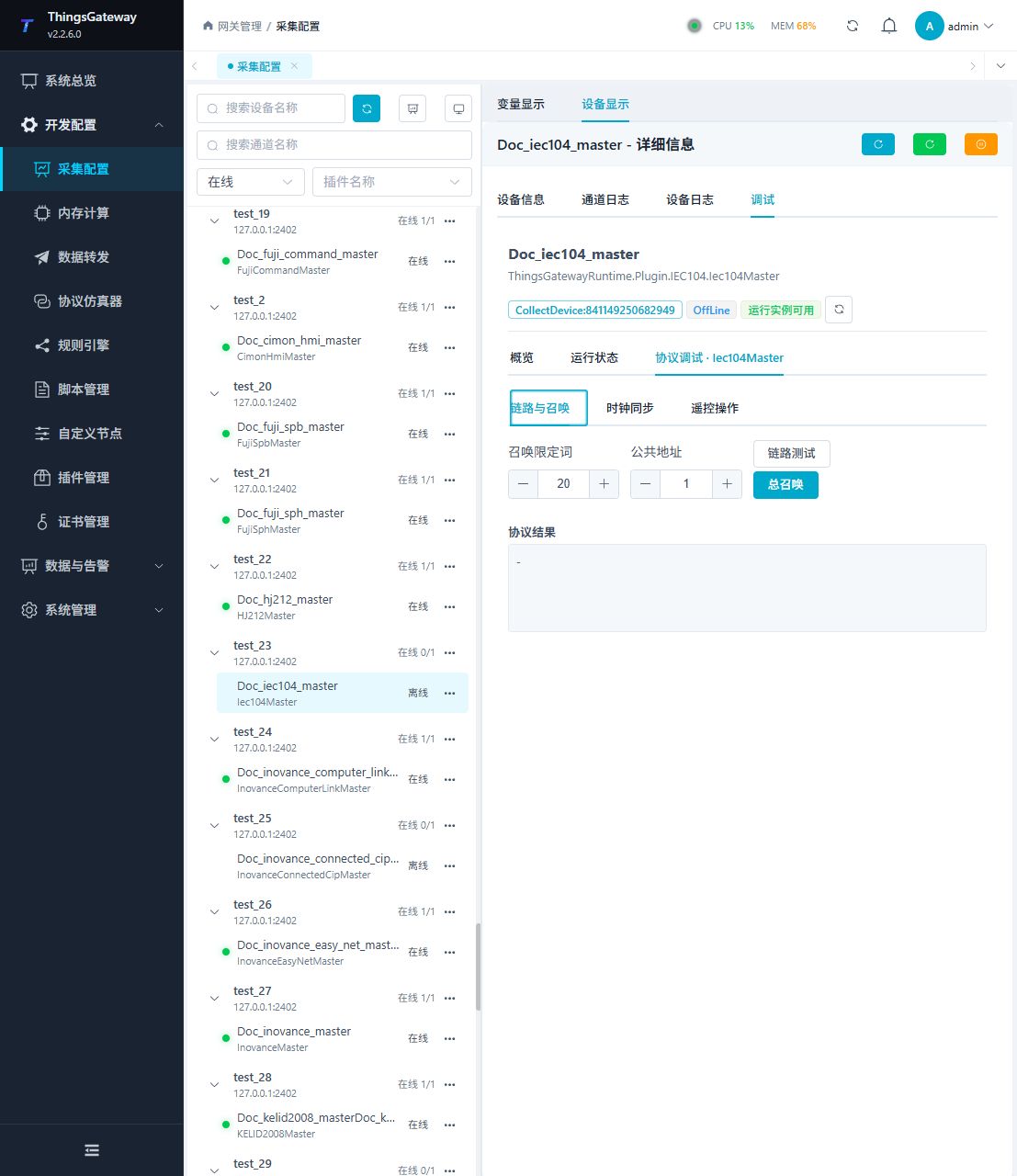
Open Development Configuration → Collection Configuration, select the IEC104 device, then open Debug → Protocol Debug · Iec104Master.
| Feature | Purpose |
|---|---|
| Link and Interrogation | Tests the link and runs general interrogation. |
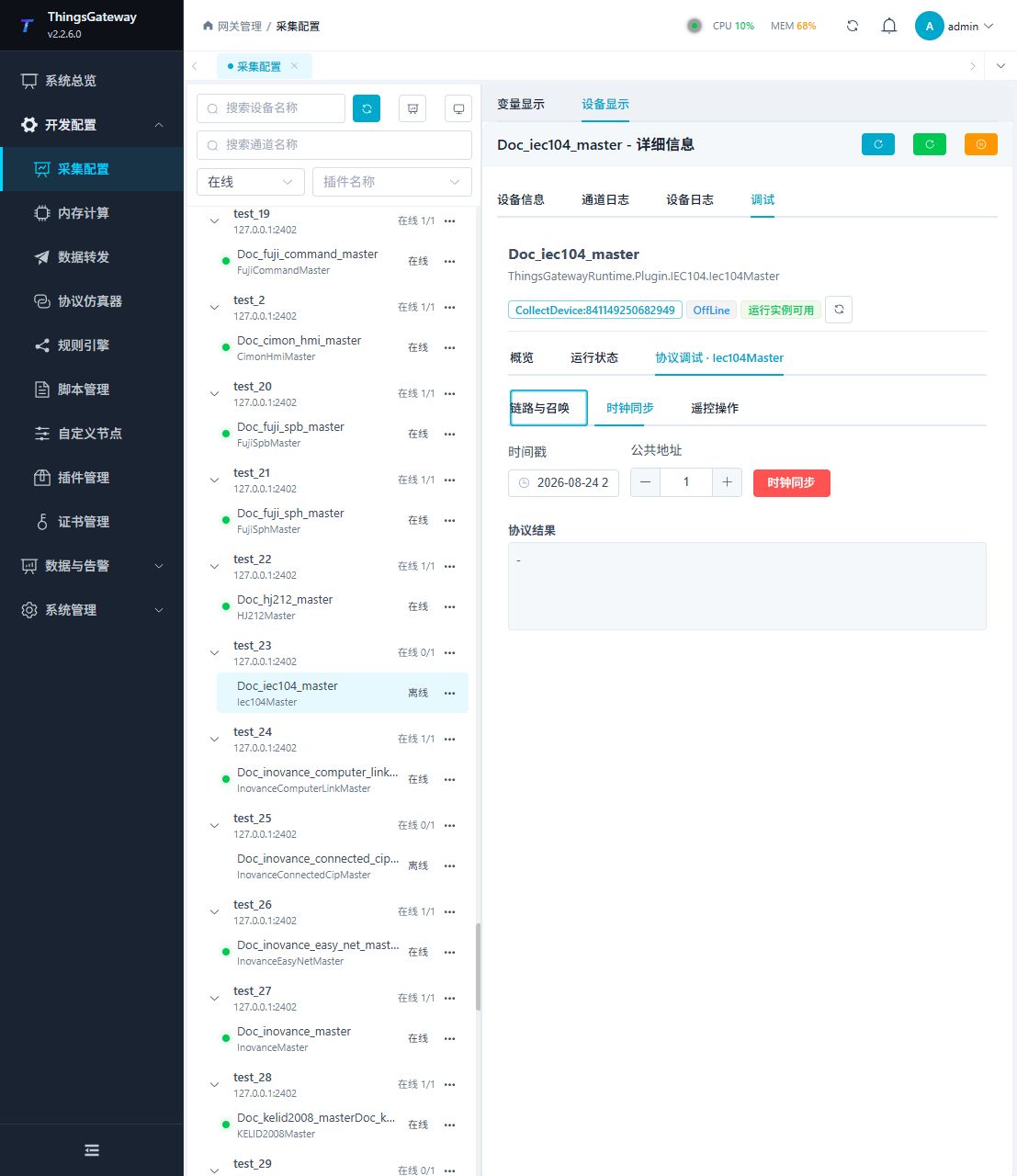
| Clock Synchronization | Synchronizes the selected time to the outstation. |
| Remote Control | Runs single or double select/execute commands. |
Link and interrogation
Run Link Test first, then enter the interrogation qualifier and common address and run General Interrogation. The protocol result should show a valid outstation confirmation.
Clock synchronization
Verify the timestamp and common address before synchronizing. This changes the outstation clock, so first verify the gateway time zone and system time.
Remote control
Select Single or Double and enter the full logical address, target value, and optional time tag. For select-before-operate, run Select and wait for success before Execute.
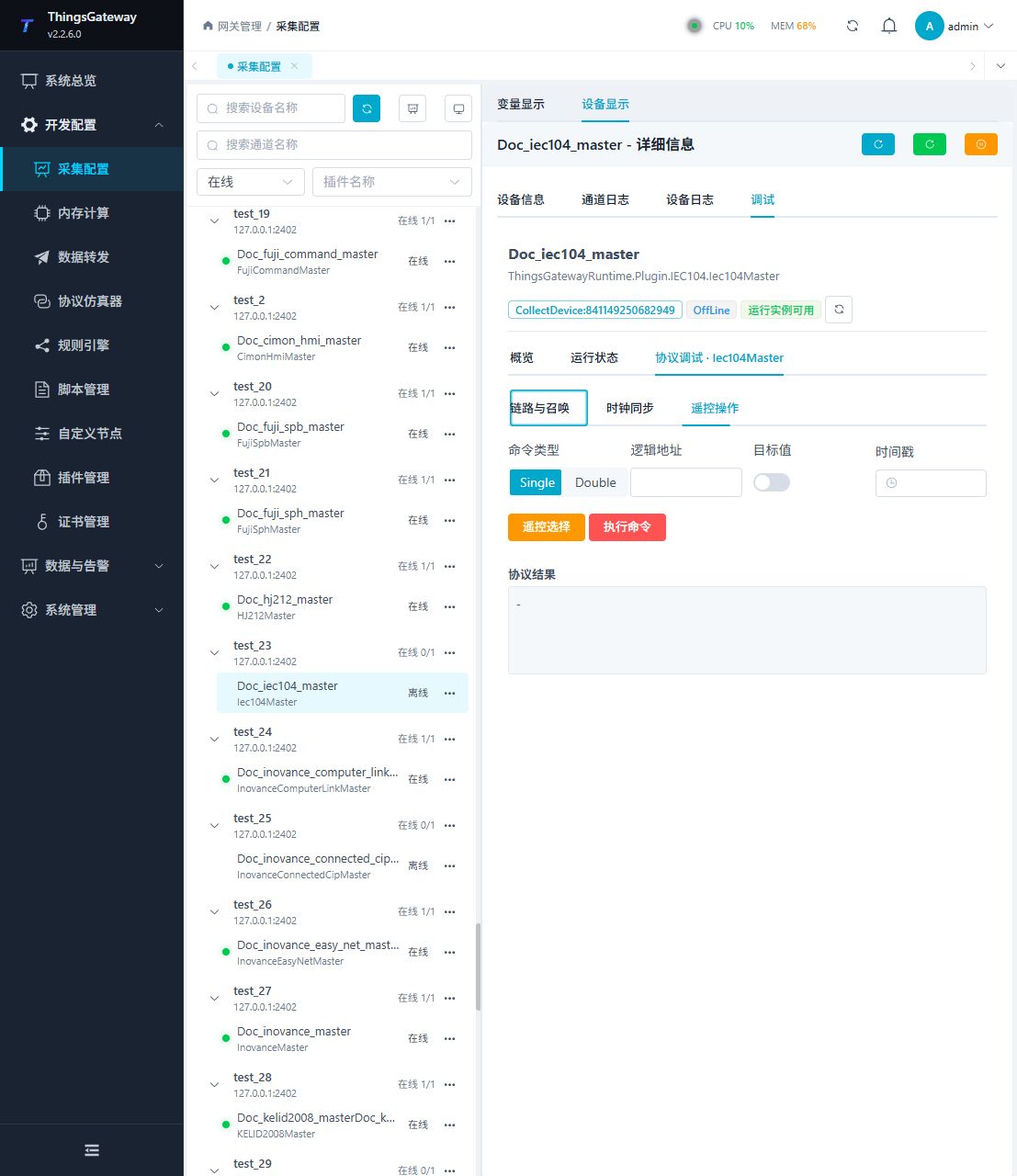
A remote command changes field equipment state. Verify ca, type, ioa, target value, and interlocks before confirming the high-risk operation.
Functions
| Function | Purpose |
|---|---|
| Link status | Use Link status to check the connection state and latest result. |
| Plugin operation | Use the controls on this plugin page and review the returned result. |
| Report monitoring | Use Report monitoring to inspect mapped values, status, counters, recent messages, or the latest result. |
| Plugin operation | Use the controls on this plugin page and review the returned result. |
| Plugin operation | Use the controls on this plugin page and review the returned result. |
| Messages | View sent and received frames, protocol fields, and error details. |
| Protocol debug workspace | Use Protocol debug workspace to send or inspect protocol frames and view the device or target response. |
Interrogation scheduling
On initial connection and reconnection, the master runs one general interrogation (QOI=20) per common address. All read plans for that address share this initialization.
If every collected protocol variable has a group, periodic requests are grouped by common address, interrogation group, and packing interval. Group 1 uses QOI=21; group 16 uses QOI=36. Different intervals within one group create separate read plans.
If even one collected protocol variable omits group, all periodic requests for the device use general interrogation, grouped by common address and packing interval. Disabled, write-only, and special-method variables do not affect this decision. The interval comes from the variable, or the device default when the variable interval is empty. Spontaneous reports continue updating values in both cases.
Verify the configuration
- Run Link Test and confirm a valid outstation response.
- Run one general interrogation and confirm configured variables update under the expected common address.
- Verify that reported variables continue to update.
- Test remote control only with site approval and satisfied interlocks.
Troubleshooting
| Symptom | Check |
|---|---|
| Link test fails | TCP channel, outstation port, network, and existing connection ownership. |
| Interrogation returns no data | Common address, qualifier, group assignment, and outstation point list. |
| Variable does not update | ca, type, ioa, data type, and reported-data configuration. |
| Command is rejected | Command type, select/execute order, target value, time tag, outstation permission, and equipment interlock. |
| Frequent disconnects | Send window K, idle interval T3, prompt S-frame acknowledgements, timeout settings, and network quality. Increase the packing interval if requests are too frequent. |
Related links
- Collection Configuration: Common channels, devices, variables, and data format.
- Plugin Manual Index: Other collection and data-forwarding plugins.