Watchdog Web Operation Manual
Watchdog Web is used to guard the TGateway process and provides package management, runtime logs, backup recovery, tunnel client, and runtime parameter configuration. During on-site maintenance, the dashboard status is usually checked first, followed by project applications, backup recovery, or tunnel configuration.
Sign in and inspect
Login
Open http://<gateway-ip>:6200 and enter your Watchdog username and password. The bundled configuration officially supports standard HTTP access by IP address; it does not require changing the address to localhost or using a browser secure context.
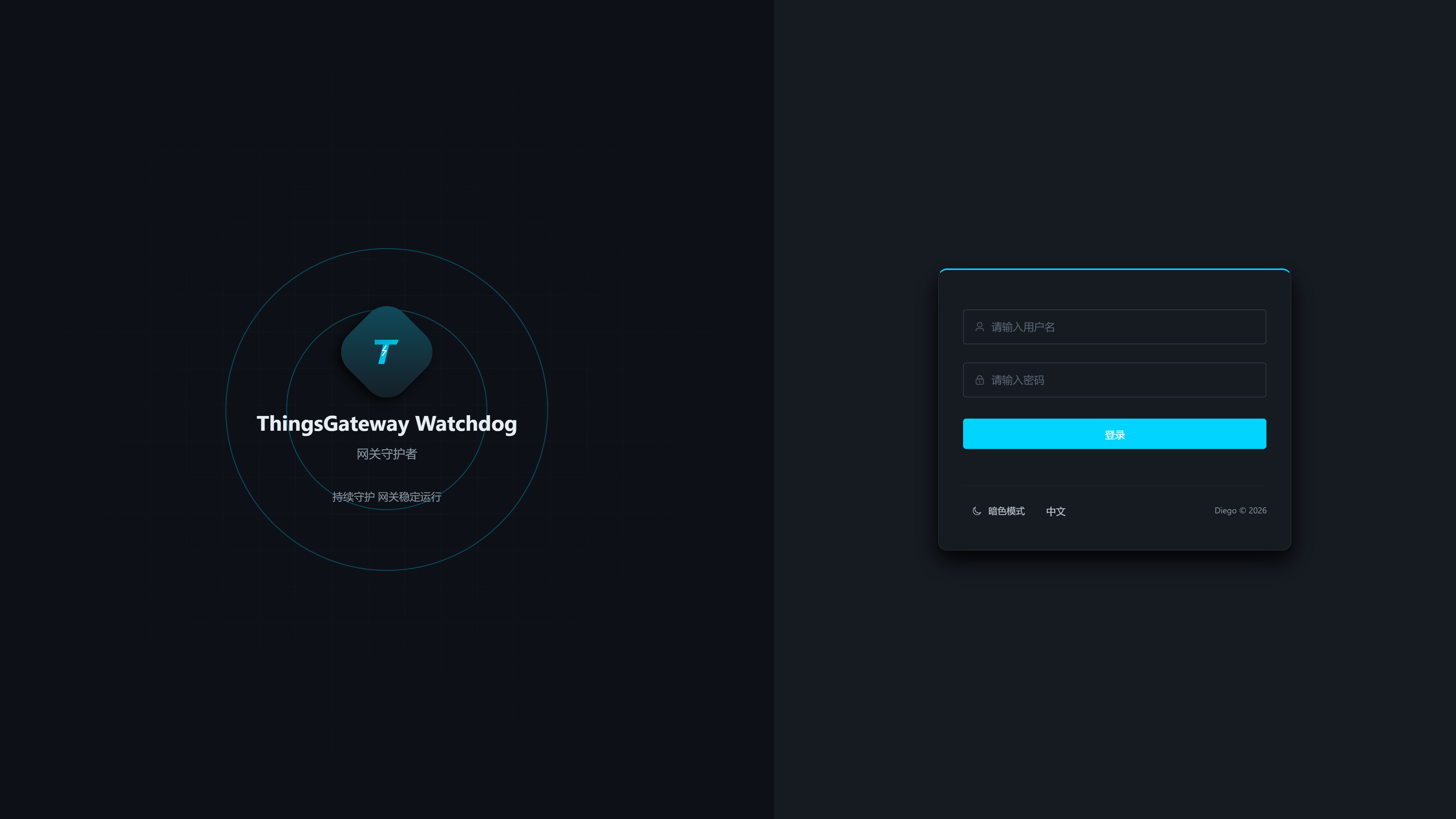
| Configuration Items | Description |
|---|---|
| Username | The default account is admin, which can be modified on the "Settings" page. After modification, you need to log in with a new username. |
| Password | The default password is 111111; it is recommended to change it immediately after initial deployment. |
When submitting login, the page automatically retrieves a two-minute, one-time public key challenge and uses the RSA-OAEP-SHA256 encrypted password. After successful login, Watchdog issues an eight-hour valid opaque Bearer session; Logging out will revoke the current session, and restarting Watchdog will also disable the existing session.
After logging in, first access the "Dashboard". If the browser jumps directly back to the login page, it means the session has expired, Watchdog just restarted, or the account and password are incorrect, requiring re-login.
one-time public key challenge only provides extra protection for login or initialization passwords. Bearer tokens, password change requests, package changes, backups, and other management data under regular HTTP still lack TLS protection; HTTPS is prioritized on public or untrusted networks.
Dashboard Inspection
Menu Path: Dashboard.
dashboard is used to confirm whether Watchdog is online, whether TGateway is running, whether the current project is correct, and whether API ports and health check policies meet expectations.
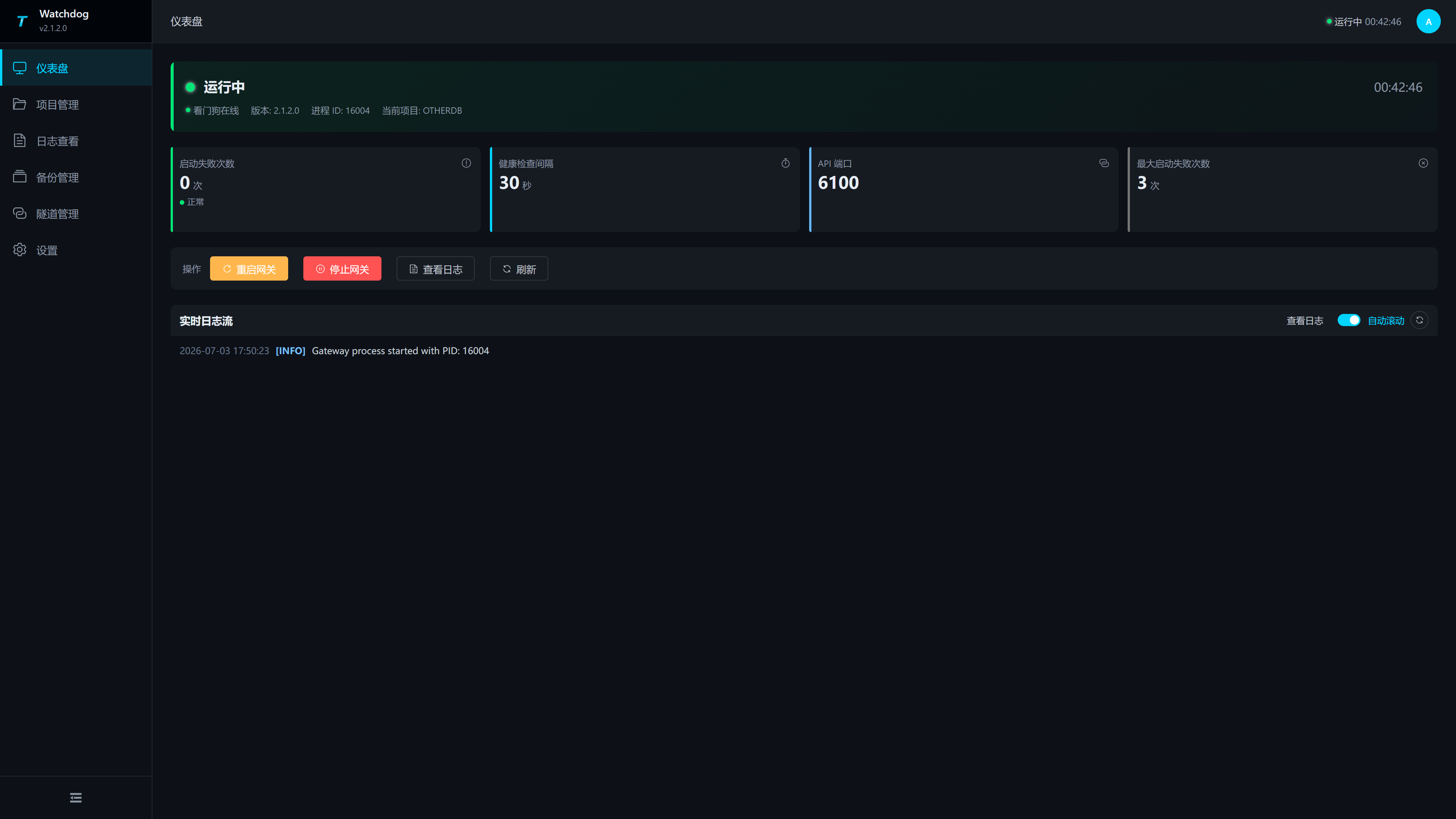
| Area | Description |
|---|---|
| Top Status Banner | Displays Watchdog online status, TGateway running status, runtime, version, process ID, current item, and last error. |
| Number of Startup Failures | Counts the number of consecutive startup failures, which should normally be 0. |
| Health Check Intervals | Watchdog checks the health status of TGateway from the "Settings" page. |
| API Port | Watchdog is used to check the API port for TGateway, and should match the actual listening port of the TGateway Web/API. |
| Maximum number of startup failures | After reaching this threshold, focus on checking package usage, runtime files, and port usage. |
| Action Buttons | Supports restarting gateways, stopping gateways, viewing logs, and refreshing status. |
| Real-time Logs | By default, the most recent logs are read and automatically scrolled to observe start, stop, and exception information. |
Restart or Stop TGateway
- On the dashboard, click "Restart Gateway" or "Stop Gateway."
- Read the confirmation prompt before proceeding.
- After the operation is completed, observe the top status banner, process ID, and real-time log.
- If the status remains unchanged, click "Refresh" and then go to the "View Logs" page to read a more complete log.
Restarting or stopping TGateway interrupts acquisition, rule processing, and data forwarding. Before executing in the production environment, confirm that the upper-level system, field equipment, and data receiving end allow for short-term interrupts.
Projects and backups
Project Management
Menu Path: Project Management.
Project management is used to upload, apply, download, and delete the TGateway package. The current project will have a "Current" label; the current project cannot be deleted or reapplied.
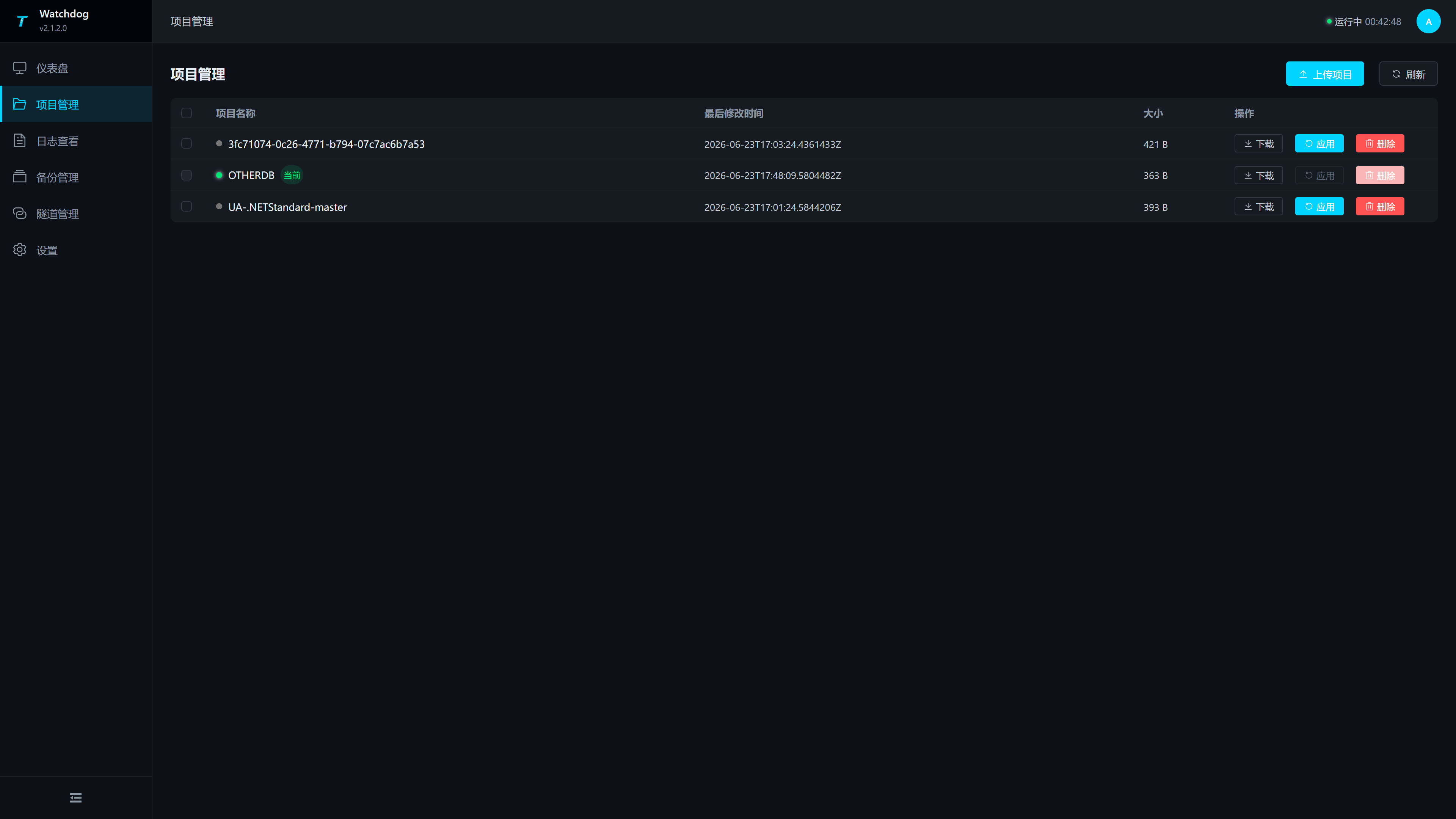
| Column or Operation | Description |
|---|---|
| Check the box | After selecting a non-current project, you can perform batch deletion. |
| Project Name | Display the package name; The currently running project displays the status point and the "Current" identifier. |
| Last Modification Time | The last modification time of the project package, used to identify the order of uploads or updates. |
| Size | Package file size. |
| Download | Download the package locally; if the file name does not have an extension, the browser will replace it with .zip. |
| Application | applies this project as the current TGateway project. |
| Delete | Delete non-current items. The delete button for the current project is disabled. |
| Upload | Open the project upload popup. |
| Refresh | Reload the item list and current project status. |
Upload Project Package
Click "Upload Project" to open the upload popup. The pop-up window supports dragging files and also clicking to select files.
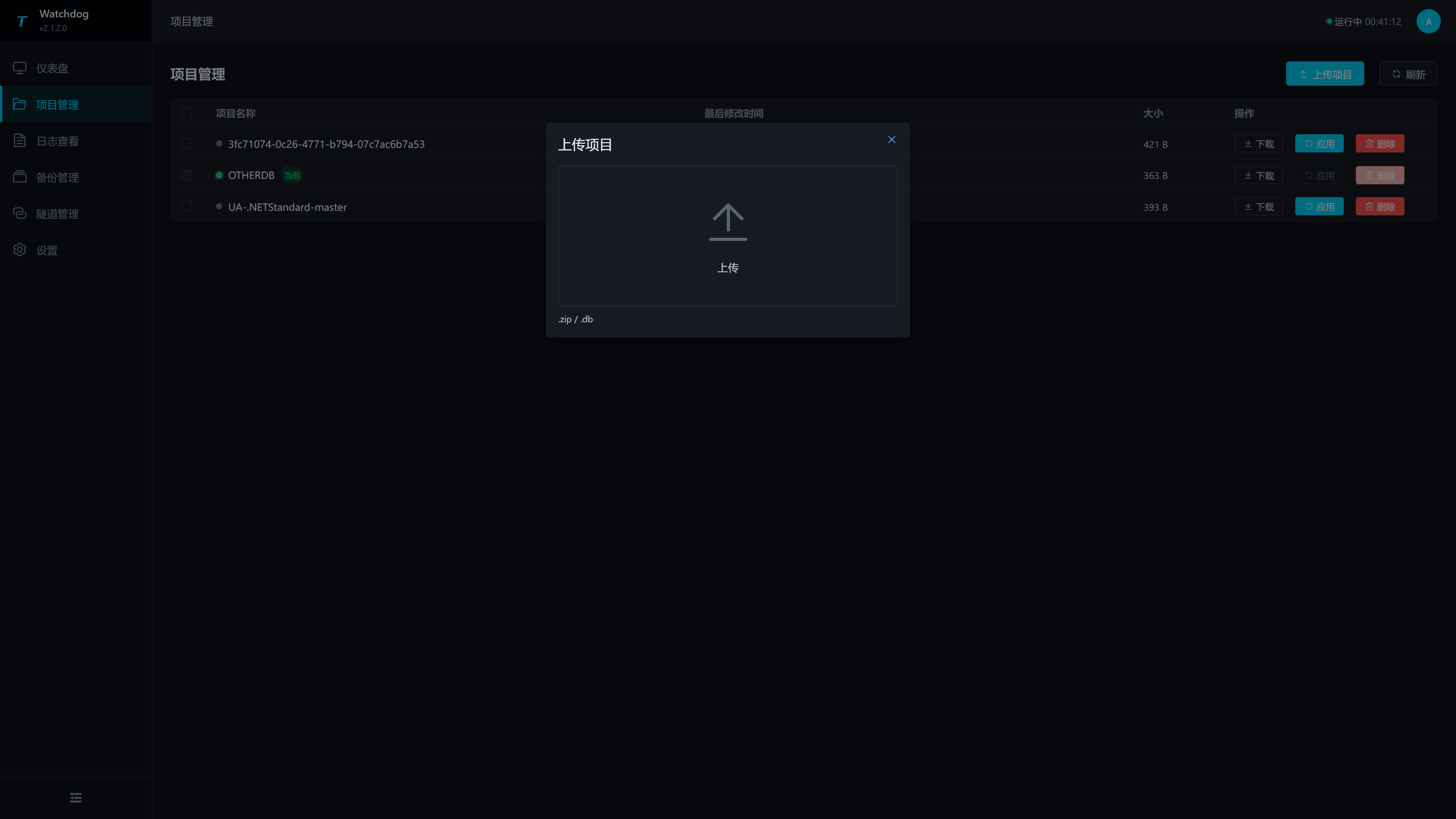
| Configuration items | Description |
|---|---|
| Project file | supports .zip and .db. ZIP usually comes from Studio exports or release packages, while DB is used to directly upload project databases. |
| Upload Region | Drag files into the area and upload immediately; After successful upload, the list will automatically refresh. |
After uploading, it is recommended to check three things: whether the project name meets expectations, whether the file size is obviously abnormal, and whether the last modification date is the same as the current upload.
Application Project
- Find the target project in the project list.
- Click "Apps".
- Confirm the operation in the confirmation box.
- After waiting for the operation to complete, refresh the list and dashboard.
- On the "Log View" page, confirm whether TGateway is starting as a new project.
The application project will change the current running project of TGateway. Before running, it is recommended to create a backup in "Backup Management" or confirm that Studio/Field already has rollable project packages.
Download and Delete Projects
| Operations | Usage Scenarios | Notes |
|---|---|---|
| Download | Send the current project back to Studio, retain the field version, and back up before troubleshooting. | Downloading is a package and is not equivalent to running logs or Watchdog configurations. |
| Delete | Clean up historical project packages and free up disk space. | The current project cannot be deleted; Batch deletion will only select non-current items. |
Backup Management
Menu Path: Backup Management.
Backup management is used to create, restore, and delete current project backups. The bottom of the page will display the current number of backups and the maximum number of backups configured in "Settings."
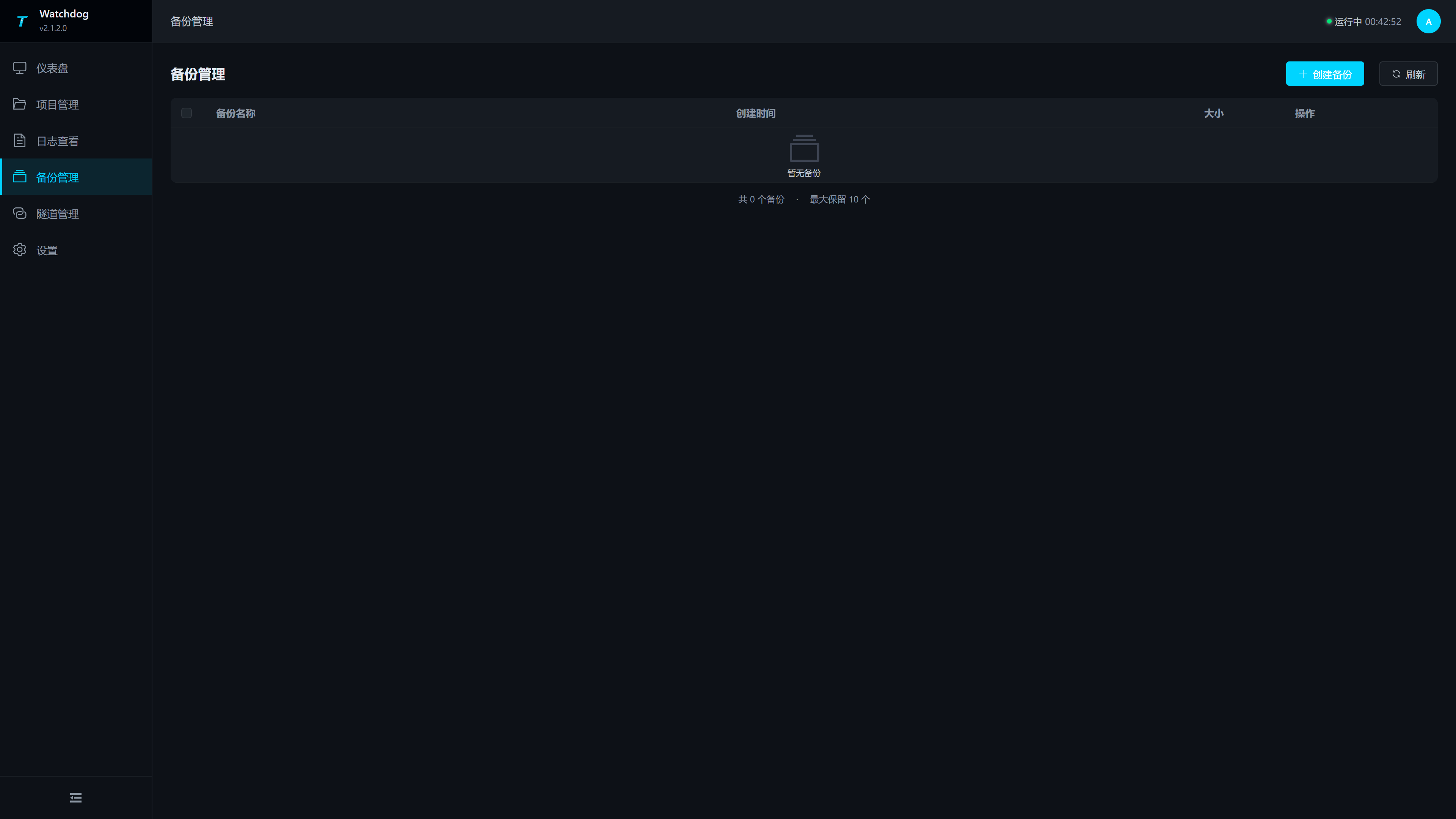
| Column or Operation | Instructions |
|---|---|
| Create a backup | Create a backup for the current project, which must be confirmed before execution. |
| Check the box | Select Backup to perform batch deletion. |
| Backup Name | Backup file name, usually used to identify dates and items. |
| Creation time | Back up creation time. |
| Size | Backup file size. |
| Restore | Restore the backup to the current item and requires warning confirmation. |
| Delete | Delete a single backup, which requires warning confirmation. |
| Batch delete | Delete multiple selected backups. |
| Maximum Number of Backups | Maximum number of backups from "Set > Backup Policy". When set to 0, the automatically cleaned backup is not kept. |
Recommended Backup Strategy
| Scenarios | Recommended |
|---|---|
| Before uploading a new project, | create a backup and keep the current runnable version. |
| Before restoring the backup, | confirm whether the current project still needs to be retained; if necessary, create a new backup first. |
| Backup count reaches the limit | After creating a new backup, the earlier backup will be cleaned up according to the limit; It is recommended to download or migrate important versions first. |
| Running abnormally after restoration | Immediately review the logs and restore to the previous confirmed run-ready backup. |
Restoring backup will change the current TGateway project content. Before resuming, please ensure that the on-site version, plugin, and runtime environment corresponding to the backup are all available.
Logs, tunnels and settings
Log View
Menu Path: Log View.
Log view is used to read Watchdog runtime logs. Compared to real-time dashboard logs, this page is suitable for viewing more rows, exporting logs, and continuously monitoring the startup process.
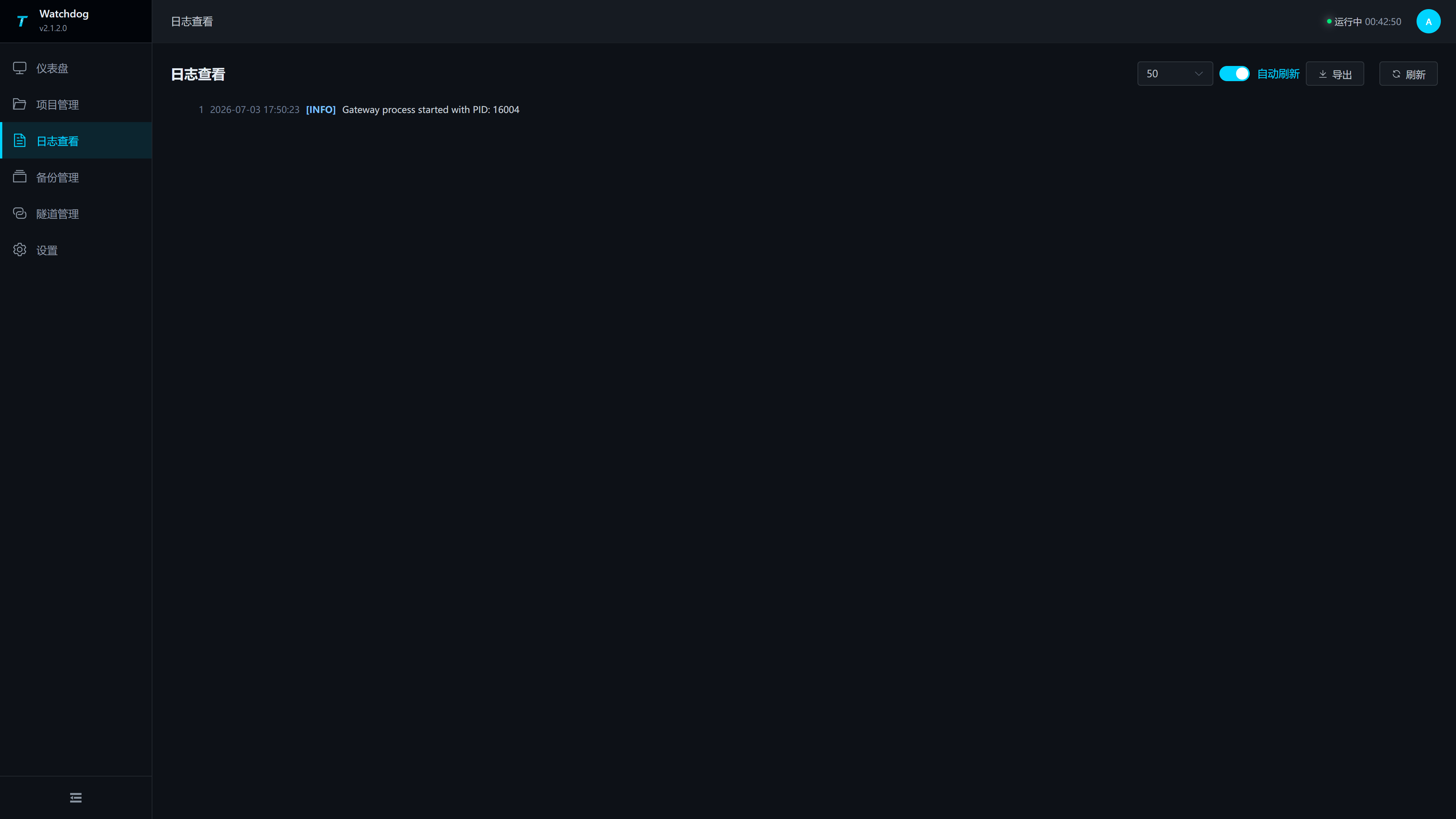
| Configuration Items | Description |
|---|---|
| Number of entries | Control the number of log rows to be read this time, with options of 50, 100, 200, or 500. When troubleshooting startup failure, it is recommended to choose 200 or 500. |
| Automatic refresh | Automatically refresh page logs after activation; It can remain on during extended inspections. |
| Export | Refresh the current logs and export to watchdog-logs-time.txt. |
| Refresh | manually reread the log. |
| Line Number | Log Stream displays line numbers, making it easier to locate the same anomaly with colleagues. |
Common inspection sequence:
- First, check the dashboard for the last error and the number of startup failures.
- Open "View Logs" and choose between 200 or 500 lines.
- Click "Refresh" to start viewing from the most recent restart or application of the project.
- After detecting port usage, package corruption, runtime missing, plugin missing, etc., return to the corresponding page to handle it.
Tunnel Management
Menu Path: Tunnel Management.
Watchdog tunnel client actively connects to the Studio Broker, exposing the internal TGateway service to a specified external address. This page offers both card and table views, with status automatically refreshing every 10 seconds, and you can also manually click "Refresh".
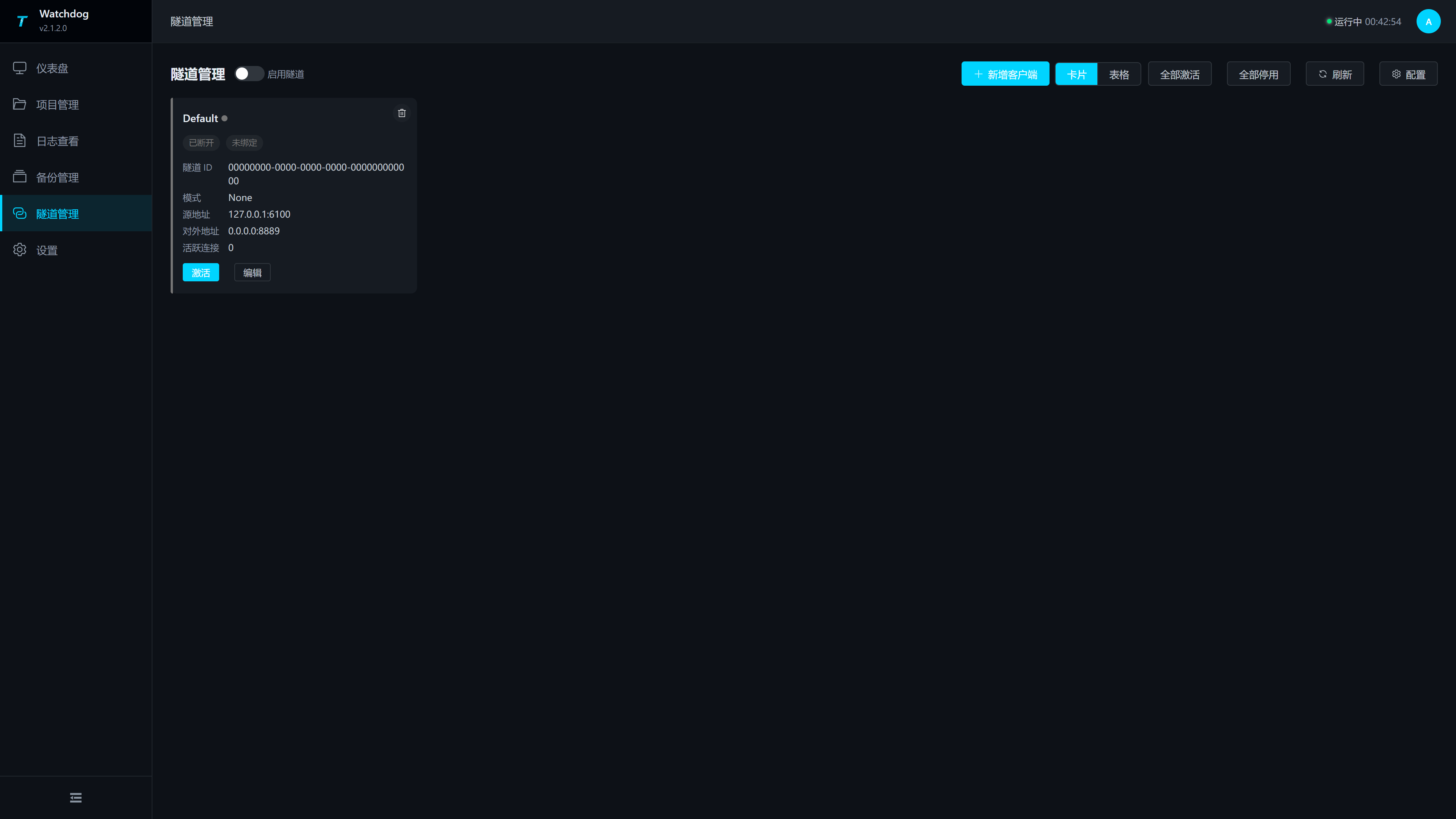
| Area or Operation | Instructions |
|---|---|
| Enable the Tunnel | global switch to control the Watchdog tunnel client functionality. |
| Add a client | Open the configuration drawer and add a client configuration. |
| Card/Table | Switch client-side display mode. Table views support batch deletion. |
| Activate all | Activate all configured clients. |
| Disable all | Disable all clients. |
| Refresh | Instantly refresh client status and configuration. |
| Configuration | Open the tunnel configuration drawer. |
| Client Status | Displays client name, connection status, tunnel ID, source address, external address, and number of active connections. |
Tunnel Configuration Drawer
Click "Configuration" to open the tunnel configuration drawer.
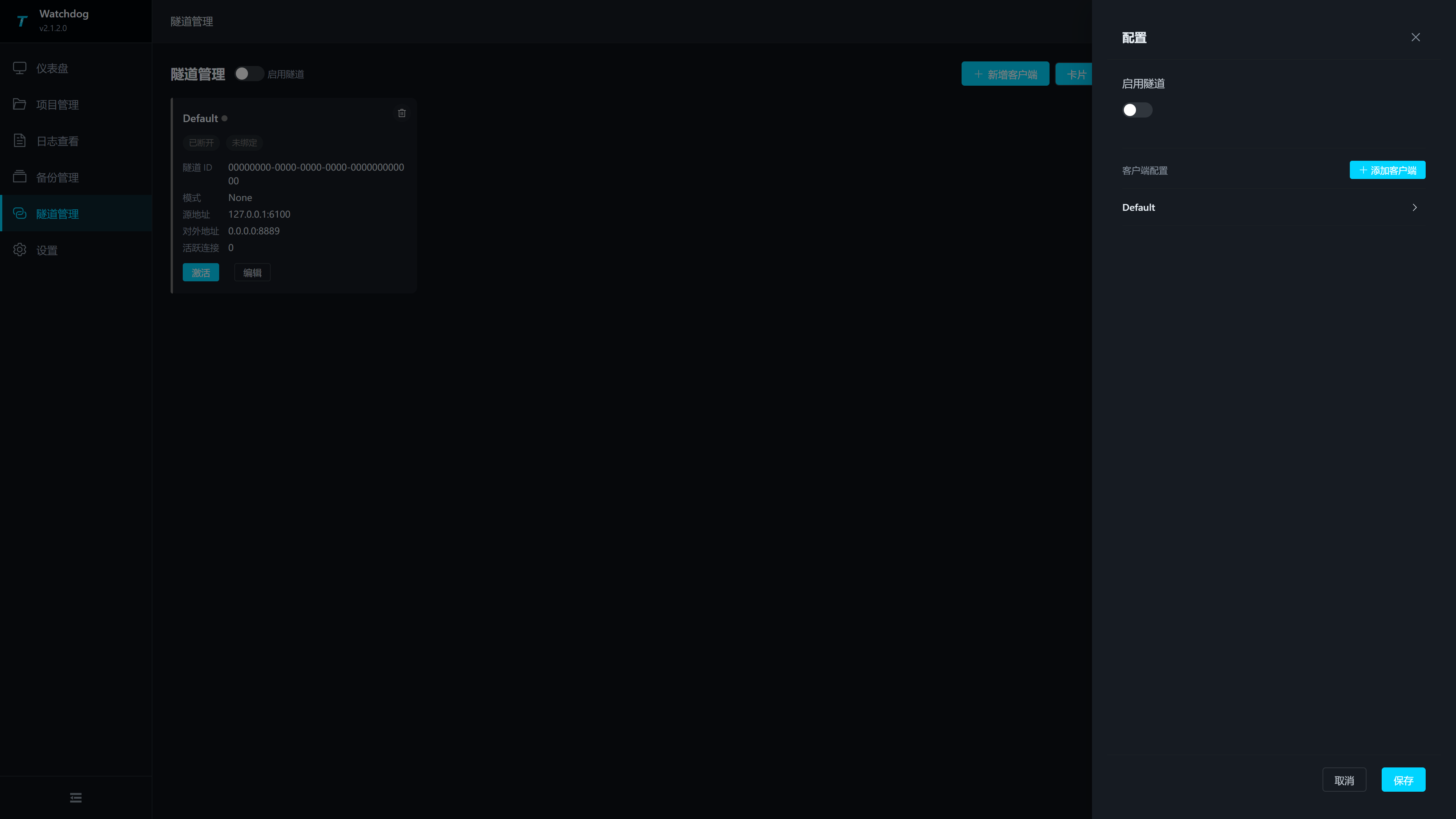
| Configuration Items | Description |
|---|---|
| Enable Tunnel | Control the global tunnel switch after saving. The top of the page switch also syncs this value. |
| Client Configuration | Displays the currently saved client. Each client can be expanded and edited. |
| Add a client | Add a client form to the drawer. |
| Save | Verify the client name, server address, port, source address, and external address before saving. |
Add Client Configuration
Click "Add Client" or "Add Client" in the drawer, and fill out the client form.
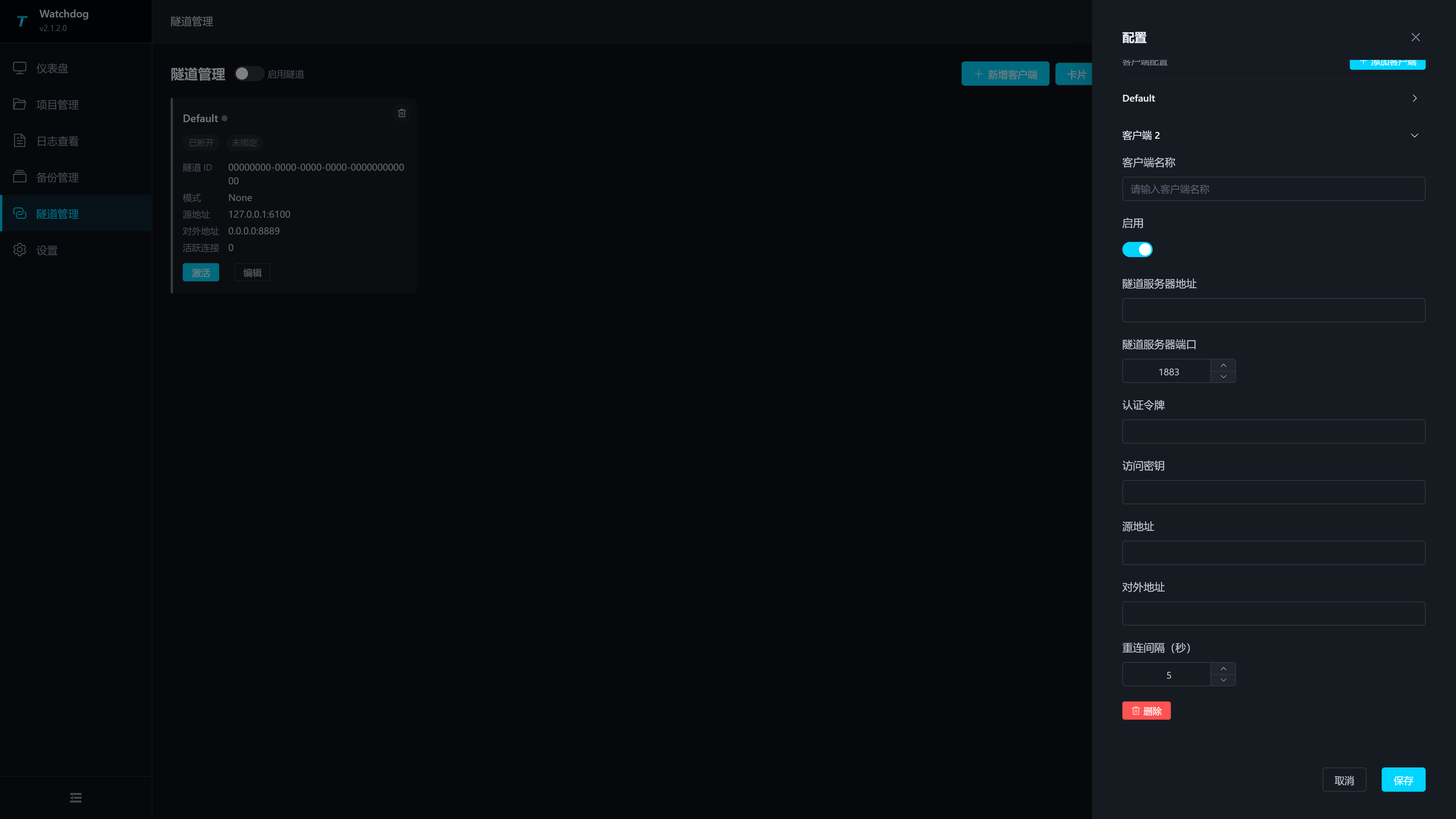
| Configuration Items | Description |
|---|---|
| Client Name | Must be unique within the same Watchdog; verification will be repeated before saving. |
| Enable | to control whether the client is included in the activation scope. |
| Tunnel server address | the IP or domain name of the server where Studio Broker is located. Watchdog must be accessible from the field network. |
| Tunnel server port | Studio Broker listening port, range 1-65535, should match the tunnel port saved in Studio Web's "Intranet Tunneling", commonly 7789; Other values are only filled in if Studio Broker is indeed changed to another port. |
| Authentication Token | is consistent with Studio Broker's authentication token. This value is used for client-side connections to the broker; both case and space must be consistent. |
| access key | matches the access key for Studio Broker. When the Studio side enters the access key, Watchdog must enter the same value to bind the endpoint; When secondary verification is not used, both ends remain empty for easy troubleshooting. |
| Source address | service address to be exposed on the network where Watchdog operates, for example, 127.0.0.1:6100. If TGateway and Watchdog are not on the same machine, you should enter the gateway address accessible by Watchdog. |
| External address | Studio Broker side external listening address, for example, 0.0.0.0:8889. External visitors will access this port on the Studio server. |
| Reconnection interval (seconds) | Wait time for automatic reconnection after disconnection, minimum 1 second. If network jitter is frequent, increase the volume appropriately to avoid rapid reconnections. |
| Delete | Delete the current client configuration; Connected clients will be disabled before being deleted. |
Steps for Tunnel Joint Debugging
- Save the broker configuration and start the service on the "Intranet Tunneling" page in Studio Web.
- Enable tunnels in "Tunnel Management" on Watchdog Web.
- Add a client, fill in the Studio Broker address, port, and authentication token; When using the access key on the Studio side, enter the same access key here.
- Enter the source address, for example, the TGateway Web/API address
127.0.0.1:6100. - Enter the external address, for example
0.0.0.0:8889. - After saving the configuration, click "Activate."
- Go back to Studio Web's "Intranet Tunneling > Endpoint Information" to see if bound endpoints appear.
- Use an external network to access the external address and confirm access to TGateway Web or call the API.
Settings
Menu path: Settings.
The settings page is divided into four groups according to the left navigation: Account Security, Gateway Operation, Backup Policy, and Security. After modifying the parameters, you need to click "Save" at the bottom of the page for persistence; Clicking "Reset" will restore the value read when the page was opened this time.
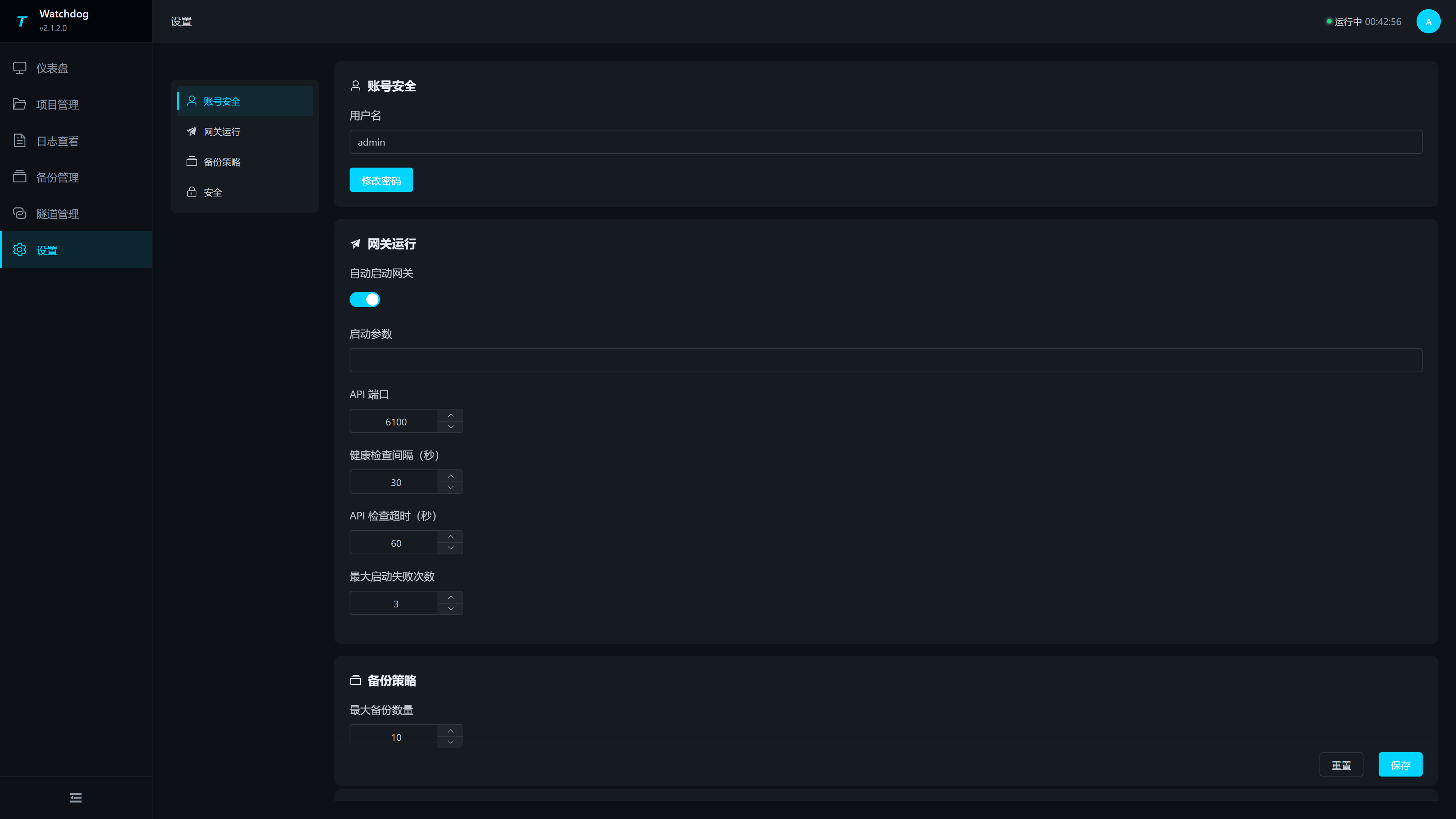
| Grouping | Configuration Items | Description |
|---|---|---|
| Account Security | Username | Watchdog Login Username. |
| Account Security | Change Password | Open the password change popup. |
| Gateway runtime | Start gateway automatically | Whether Watchdog starts TGateway automatically after Watchdog starts. The bundled configuration enables this option so collection resumes automatically after a power outage or service restart. |
| Gateway runtime | Startup arguments | Command-line arguments appended when Watchdog starts TGateway. Enter them only when a listening address, environment option, or runtime option is required; otherwise leave this field blank. |
| Gateway runtime | API port | TGateway API port in the range 1-65535. The bundled configuration commonly uses 6100. Watchdog requests http://localhost:<api-port>/api/health/health locally. This is not the Watchdog login port; an incorrect value may cause the dashboard to report that the gateway has stopped and trigger a restart. |
| Gateway runtime | Health check interval | Interval in seconds between TGateway status checks; minimum 1. The bundled value is 30 seconds. A shorter interval detects failures sooner but calls the API more frequently. |
| Gateway runtime | API check timeout | Time in seconds to wait for a TGateway API response; minimum 1. The bundled value is 60 seconds. Increase it when the network is slow or the gateway takes longer to start. |
| Gateway runtime | Maximum startup failures | Number of consecutive startup failures before manual intervention is required; minimum 0. The bundled value is 3. A smaller value surfaces startup problems sooner, while a larger value may delay alarms. |
| Backup policy | Maximum backups | Maximum number of backups retained on the backup management page; minimum 0. The bundled value is 10. With 0, a newly created backup is immediately cleaned up, so this is not suitable as a retention policy. |
| Security | Allowed origins | Web origins allowed to access the Watchdog API across origins. Separate multiple origins with commas, for example http://a.com,http://b.com. Leave blank to allow all origins; for public-network deployments, enter only trusted Web origins. |
Click "Change Password" to open the password change pop-up window.
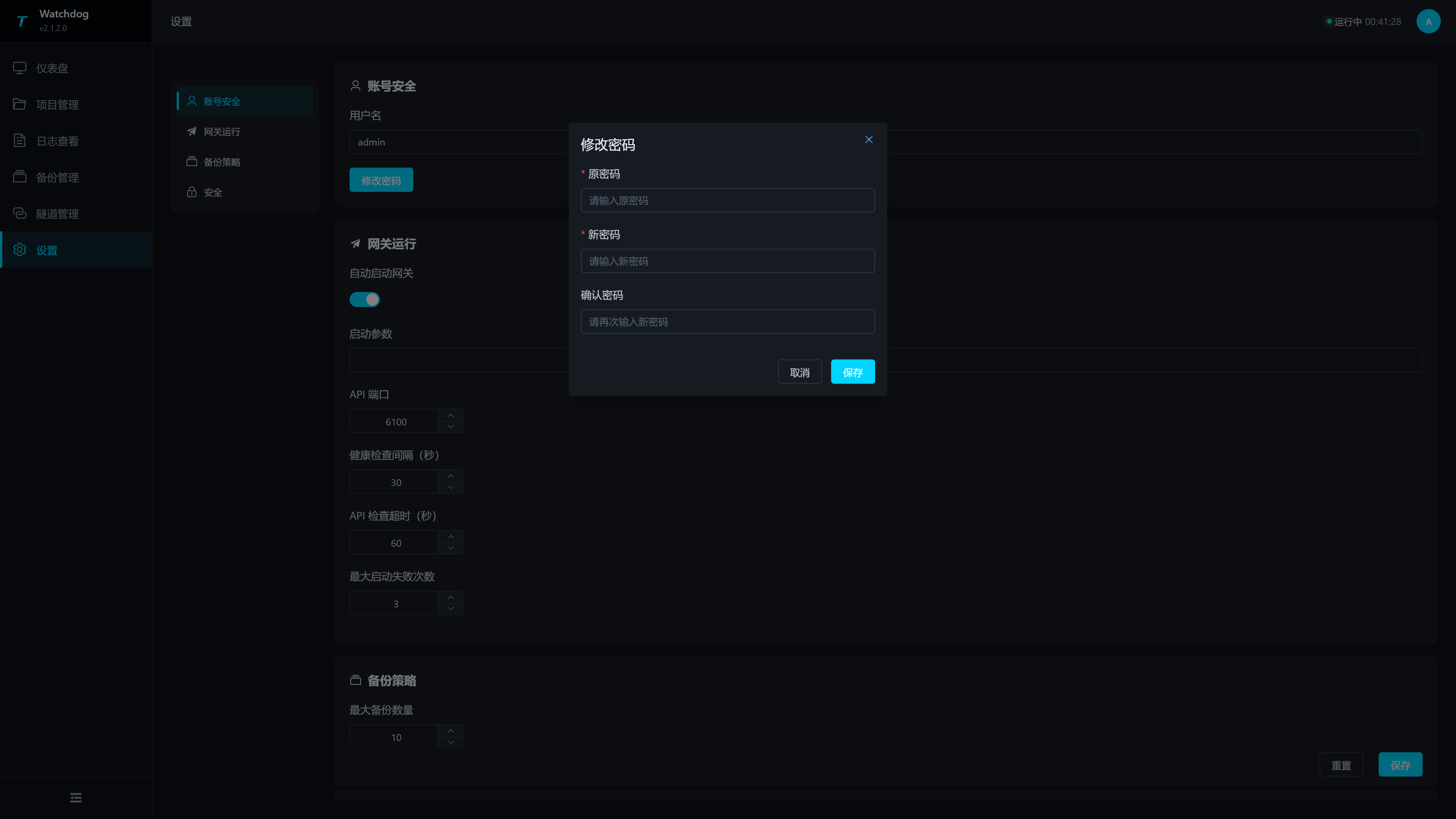
| Configuration Items | Description |
|---|---|
| Old Password | Current Login Password. |
| New password | The new password to set. |
| Confirm the password | Enter the new password again, but it must match the new password. |
After modifying API ports, health check intervals, maximum boot failure counts, and other operating parameters, it is recommended to return to the dashboard to observe at least one health check cycle and confirm that the status reads normally.
Certificate maintenance and center enrollment
Open Tunnel management → Certificate maintenance → Import → Trusted peer CA to import the public PEM exported by Studio. Compare its fingerprint with Studio's issuing CA. The panel also supports server PFX import/export and local identity creation or rebuild. See Management certificates for activation and renewal steps.
Use Connect to center with the center HTTP/HTTPS URL and a ten-minute single-use enrollment code from Studio Site management. Watchdog automatically configures both management tunnels. TLS is optional and follows the center tunnel setting; private-CA HTTPS/TLS requires the trusted CA to be imported first.
Studio Integration Process
| Objective | Operation Order |
|---|---|
| Publish a new project from Studio | Create or import a project in Studio Local Simulation Configuration → Configure Watchdog services and test connections → Upload project → Confirm the project in Watchdog Project Management → Check the Watchdog dashboard and logs. |
| Return a site project to Studio | Confirm the target project in Watchdog Project Management → Open Studio Local Simulation Configuration → Download from Gateway → Select Watchdog and project → Check the downloaded project name and plugins. |
| Remote Access to the Internal Network Gateway | Studio Launch Broker → Watchdog Configuration and activate the tunnel client → Studio View Endpoint → External Access Address. |
| Back up before release | Create a backup in Watchdog Backup Management → Upload from Studio Local Simulation Configuration → Apply the project in Watchdog → Check Watchdog logs. |
Common Issues
| Phenomena | Handling Suggestions |
|---|---|
| Login Failure | Check Username, Password, and Watchdog Service Port; If you forget your password, you need to reset the configuration according to the on-site maintenance process. |
localhost is normal but IP cannot access | Check if Watchdog is listening at 0.0.0.0:6200, whether remote management and normal HTTP switches are enabled, and allow the firewall port. |
Page prompt importKey Error | Clear browser and proxy cache and republish the complete frontend static resource; The current page does not rely on subtle.importKey; the dynamic resources required for login must be able to load properly. |
| Prompt login challenge invalid | Resubmit login to obtain a new challenge; The challenge expires in two minutes and can only be used once. |
| Watchdog restarts and returns to the login page | Memory Bearer session is invalid; log in again. |
| The dashboard shows that the gateway has stopped | checks whether the current project exists, whether the API port is correct, whether runtime files are intact, and reviews the logs. |
| The number of startup failures continues to increase | Prioritize viewing port occupancy, missing plugins, project database exceptions, and runtime missing information in the logs. |
| Project upload failure | Check whether the file format is .zip or .db, whether the file is corrupted, and whether disk space and service permissions are normal. |
| No status changes after applying the project | Refreshing project management and dashboard; If still unchanged, check the logs to confirm whether the application action failed. |
| Abnormal project after backup restoration | Restore to the previous confirmed runtime backup and check the runtime and plugin versions of the recovery target. |
| Tunnel shows as inactivated | Confirm that global "Enable Tunnel" is enabled and check if the client has been saved. |
| The tunnel is connected but not accessible | Check whether the source address is accessible on the Watchdog machine, whether the external address port is occupied, and whether the firewall is allowing access. |
| Studio side cannot see endpoints | Check whether Studio Broker is running and whether authentication tokens are consistent; When entering the access key on the Studio side, make sure the Watchdog access keys are exactly the same; When not using secondary verification, both ends should be left empty. |