Protocol Simulator
The protocol emulator is used to directly establish Modbus or Siemens S7 slaves within TGateway, providing readable and writable simulation data to PLCs, host computers, configuration software, acquisition programs, and protocol testing tools. It is suitable for protocol joint debugging, point table verification, abnormal scene reproduction, training demonstrations, and automated testing, without the need to install additional standalone simulation software.
Pages use a unified three-level configuration model:
| Hierarchical | Function |
|---|---|
| Simulation Channel | Manage listening endpoints, serial ports, startup status, safety limits, diagnostic capacity, and fault injection. |
| Built-in protocol plugin | Select Modbus Slave or S7Slave from the dropdown to determine the protocol packet and address space. |
| Simulation variables | Define protocol address, data type, initial value, access permissions, and automatic change patterns. |
Protocol emulators use TGateway as a protocol server or slave. Collection Configuration usually uses TGateway as a client or master station to read field devices. Protocol simulation channels, protocol plugins, and simulation variables are managed only on this page.
Prepare the simulation
Function Entry
Log in to TGateway Web and open Development Configuration → Protocol Simulator. For a first local point, follow Collect the First Point: create a stopped channel, add the variable, start the channel, then read it with the collection client.
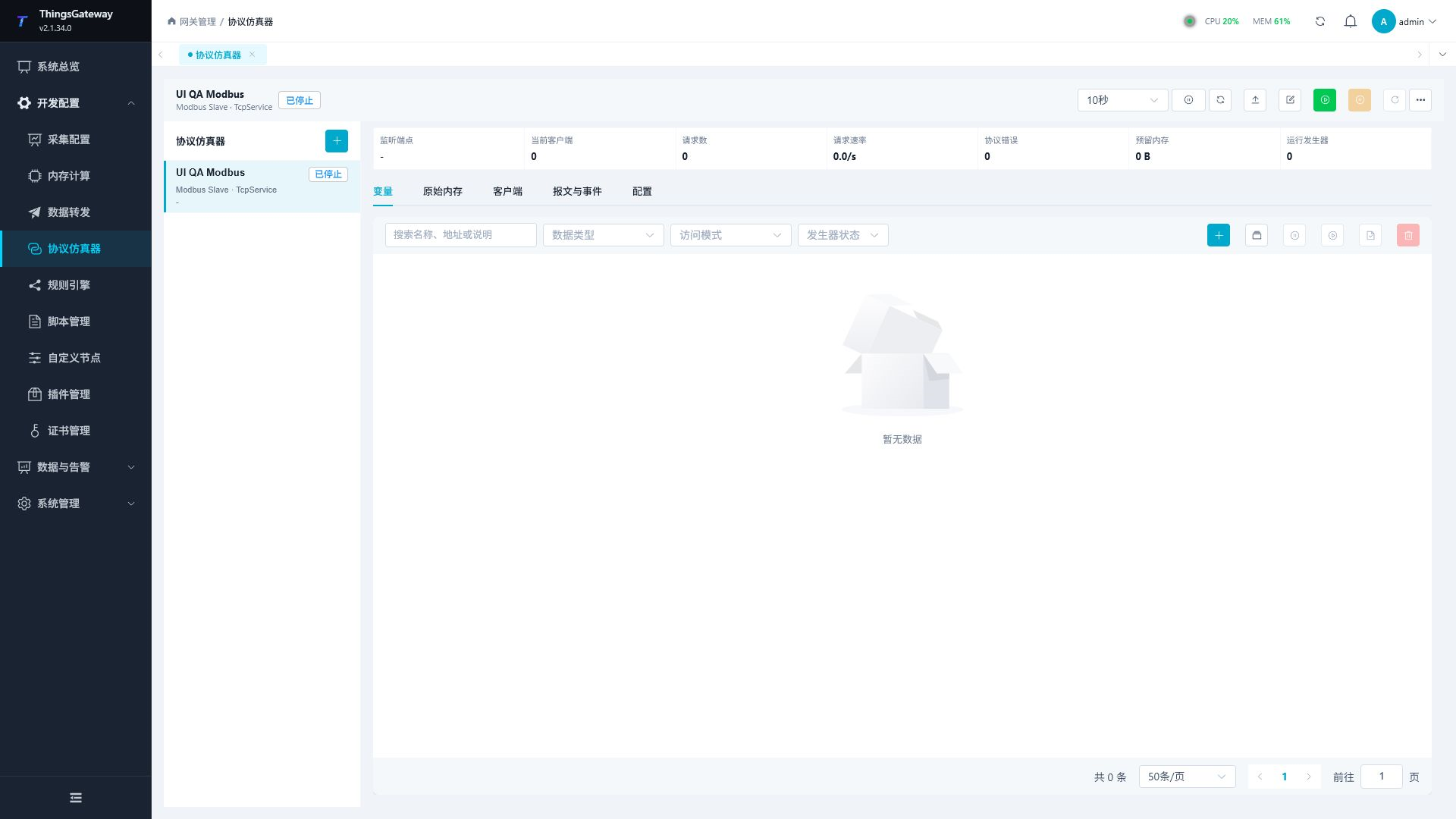
On the left side of the page is a list of simulation channels, at the top are the commands for refresh, import, edit, and run, and the workspace on the right contains the following content.
| Region | Description |
|---|---|
| Run Summary | Displays listening endpoints, current client, number of requests, request rate, protocol errors, Reserved memory and the number of running generators. |
| Variables | Paginate variables, current values, change modes, and access modes, and perform add, batch add, write, pause, continue, save current value, and delete. |
| Raw memory | Read hexadecimal and ASCII data by protocol memory area; When permission is granted, it can preview and write to the original bytes. |
| Client | View connection endpoints, session phases, S7 negotiation PDUs, number of requests, error counts, and incoming traffic. |
| Messages and Events | Query lifecycle, connections, requests, protocol errors, variable changes, and security denial events by page. |
| Configuration | View protocols, security, diagnostics, and a complete configuration summary for the current channel. |
When the browser width does not exceed 1024px, the channel list will automatically be included in the channel button to the left of the current channel name. Clicking this button allows you to switch or create a new channel in the drawer; The workspace occupies the remaining width, and filters, pagination, and forms are rearranged into two or single columns.
Preparations Before Configuration
Before configuration, determine the test client's protocol, network location, and target point table.
| Information | Content to be confirmed |
|---|---|
| Protocol Role | The test client connects to TGateway as a Modbus master or S7 client. |
| Protocol plugin | Modbus client: Select Modbus Slave; For the S7 client, select S7Slave. |
| Channel Type | Network Listening uses TcpService; Modbus RTU serial port testing uses SerialPort. |
| Listen to endpoints | Confirm available network card addresses, ports, firewalls, and port occupancy. |
| Address Space | Confirm the Modbus station and data area, or the S7 I/Q/M/DB area and DB number. |
| Write Scope | Clarify which variables are allowed to be written by the client and which can only be modified by the page or generator. |
| Data patterns | Determine fixed values, waveforms, random quantities, sequences, pulse or string templates, and update cycles. |
| Event Scale | Before long-term stress testing, determine event capacity, record successful requests, and capture the original packet. |
Configure channels and protocols
Creating a New Simulation Channel
- Click Add to the right of the Protocol Simulator heading in the left channel list.
- Enter the channel name in "Channel Configuration."
- In the "Protocol Plugin" dropdown, select
Modbus SlaveorS7Slave. - Go to "Transmission Configuration," select the channel type, and fill in the monitoring or serial port parameters.
- Complete the Modbus or S7 Slave parameters according to the selected protocol.
- Check "Permissions & Security," "Diagnostics," and "Fault Injection."
- Click "Save". After saving, configure the variables first, then start the channel.
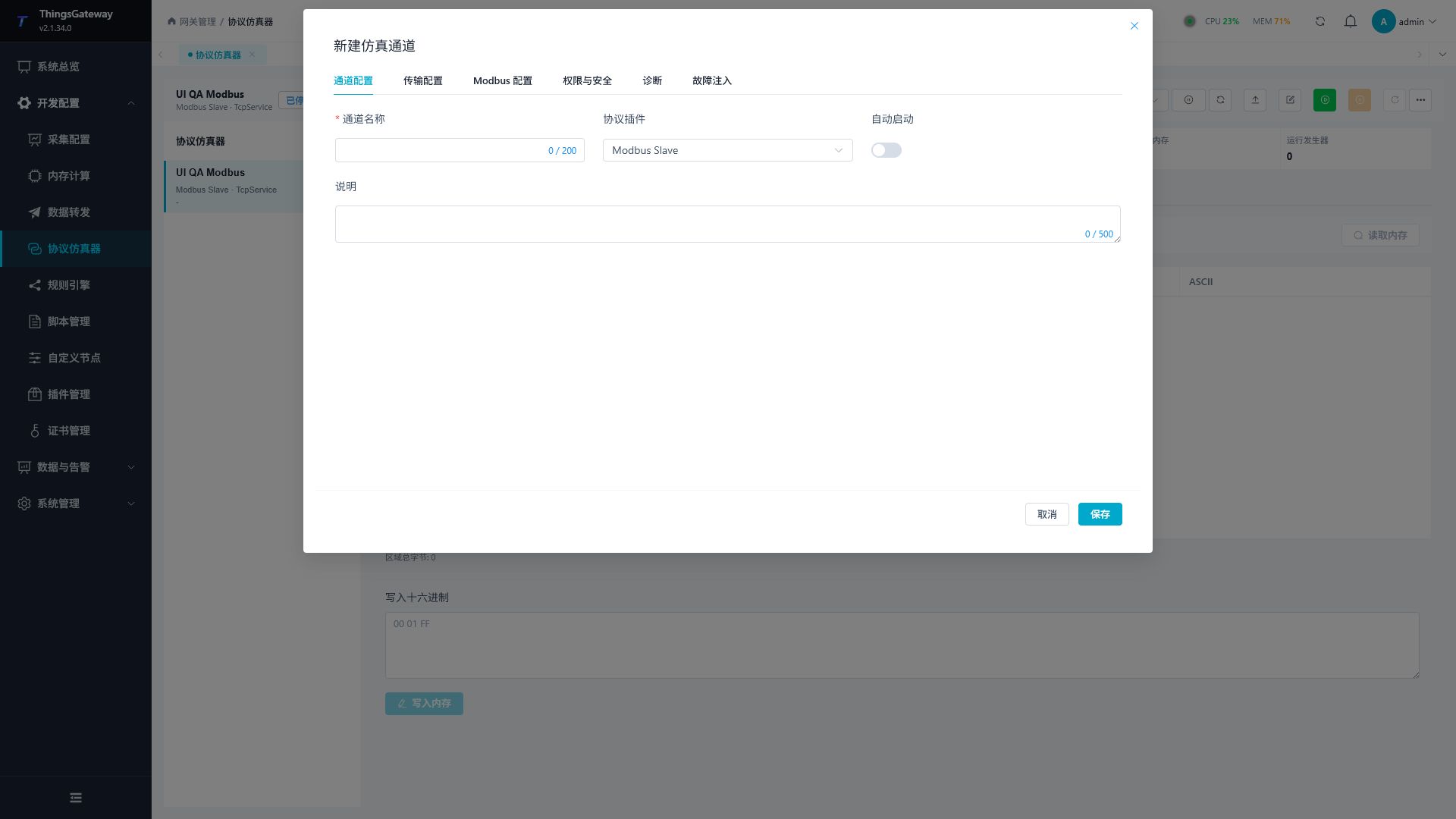
Channel configuration
| Configuration items | Description |
|---|---|
| Channel Name | The unique name of the current simulation channel, recommended to include the protocol and purpose, such as modbus-line-demo. |
| Protocol Plugin | dropdown to select Modbus Slave or S7Slave. If you need to switch to another protocol after creation, you should create a new channel and re-verify the variable address. |
| Auto-start | After starting, the simulation channel will automatically start when TGateway starts. Before officially activating, confirm that the listening port and variable configurations are correct. |
| Description | Record the test subject, person in charge, port purpose, or joint debugging scope. |
Transmission Configuration
The channel type belongs to "Transmission Configuration". Network services and serial ports are channel capabilities, not protocol plugins.
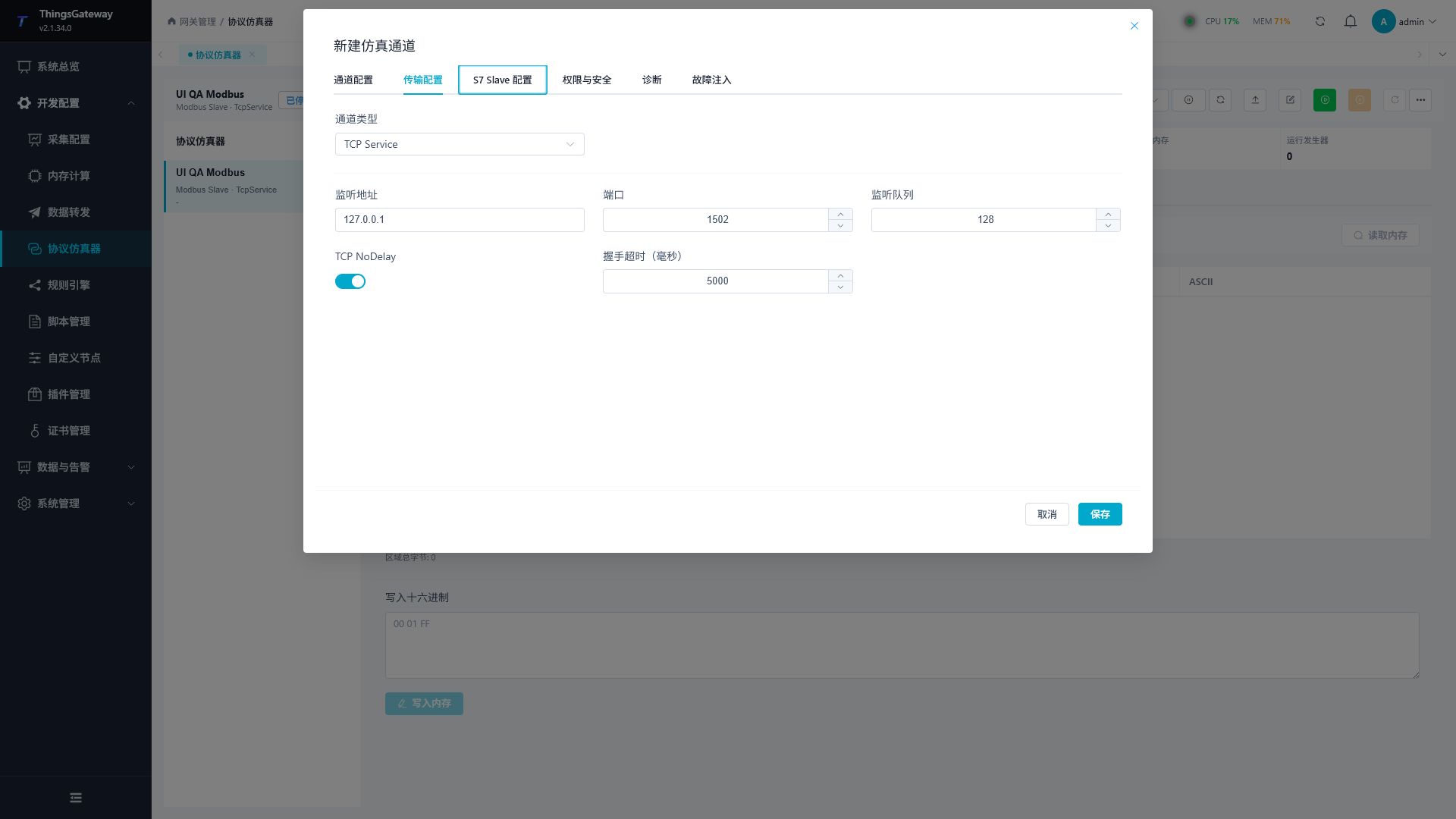
| Channel Type | Supported Protocol | Key Parameters | Description |
|---|---|---|---|
TcpService | Modbus, S7Slave | listen addresses, ports, listening queues, TCP NoDelay Handshake timeout | TGateway listens to the port and waits for the client to connect actively. |
SerialPort | Modbus | serial port, baud rate, data bits, parity bits, stop bits, flow control, receive timeout, frame intervals, | used for Modbus RTU serial slave station simulation. The S7Slave does not use serial ports. |
TcpService Common Settings:
| Configuration Items | Description |
|---|---|
| Listening address | 127.0.0.1 Only local connections are allowed; LAN joint debugging and filling in the designated network card address; To monitor all network cards, you can enter 0.0.0.0. |
| Ports | Modbus TCP commonly uses 502, S7 commonly uses 102; Non-administrator test environments can use unoccupied high-level ports. |
| Listen queue | Control the number of connections waiting to be received. Generally, the default value is maintained, and during concentrated stress testing, adjustments are made according to the planned number of clients. |
| TCP NoDelay | reduces the wait time for small packets, and protocol debugging usually remains enabled. |
| Handshake timeout | Milliseconds allowed for connection setup and for a complete frame to arrive from fragmented input. Modbus TCP has no S7 session negotiation but still uses this frame window. Configure the client response timeout separately. |
Listening 0.0.0.0 will open the port to all accessible network cards. The production network should be configured simultaneously with "allowed subnets," operating system firewalls, and border access policies; do not rely solely on ports without making them public.
Serial RTU settings
With SerialPort, the client and simulator must use matching serial settings. Connect the physical ports correctly or install a virtual port pair first; port names alone do not establish a connection.
| Setting | Description |
|---|---|
| Serial port | Defaults to COM1. The simulator opens this system port; the client opens its connected peer. Two programs cannot occupy the same port. |
| Baud rate | Defaults to 9600. Match both ends and check driver and device support. |
| Data bits | Defaults to 8. Although the form allows 5–8, Modbus RTU requires full 8-bit binary bytes. Matching 7-bit settings do not make RTU frames valid. |
| Parity | None, odd, even, mark, or space. Match both ends; character parity and the RTU frame CRC are separate checks. |
| Stop bits | Select 1, 1.5, or 2 as supported by the device and driver. A driver may reject combinations such as 8 data bits with 1.5 stop bits. |
| Flow control | None, software, RTS/CTS, or combined flow control. Hardware flow control requires the appropriate wiring; a virtual-port read does not verify physical control lines. |
| Receive timeout | Defaults to 1000 ms; range 100–60000. Limits how long fragmented RTU input can wait for a complete frame. Configure the client response timeout separately. |
| Inter-frame delay | Defaults to 4 ms and must be greater than 0. The current setting can be saved but does not change actual frame waiting; receive timeout controls fragmented-frame expiry. |
Save and start, then read a fixed point with an independent master. Stop the channel before changing serial settings, reopen both ports, and verify again.
Configure Modbus Slave
After selecting Modbus Slave, the channel supports the following combinations.
| Simulation Method | Channel Type | Message Format |
|---|---|---|
| Modbus TCP | TcpService | Modbus TCP |
| RTU over TCP | TcpService | Modbus RTU |
| Modbus RTU Serial | SerialPort | Modbus RTU |
Modbus Parameter
| Configuration Items | Description |
|---|---|
| Station Number | One or more slave station numbers can be configured, ranging from 1 to 247 and cannot be duplicated within the same channel. |
| Number of coils | Allocate the Coil address space for read/write booleans. |
| Discrete Input Quantity | Allocate Discrete Input address space for read-only Booleans. |
| Number of input registers | Allocate Input Register address space for read-only register data. |
| Holding register count | Allocate Holding Register address space for read/write data. |
| Default byte order | Set the default byte/word order for multi-register values; Individual variables can still be configured individually. |
| Strict address mode | This switch does not currently isolate unmodeled addresses. Allocated capacity is enforced, but locations within that capacity can remain readable without a named variable. |
Variable addresses can be structured in format, for example:
| address example | meaning |
|---|---|
S=1;F=1;0 | Station number 1, functional area 1, coil offset 0. |
S=1;F=2;0 | Station number 1, ribbon 2, discrete input offset 0. |
S=1;F=3;0 | Station number 1, Function Area 3, Offset 0 holding register. |
S=1;F=4;0 | Station number 1, ribbon 4, input register offset 0. |
S=1;F=3;10.3 | Keep the register offset to bit 3 in 10. |
Configure S7Slave
After selecting S7Slave, TGateway runs as the real S7 slave/server, establishes connections via ISO-on-TCP, and handles COTP and Setup Communication, Read Var, and Write Var. It does not convert the S7 address into a Modbus address.
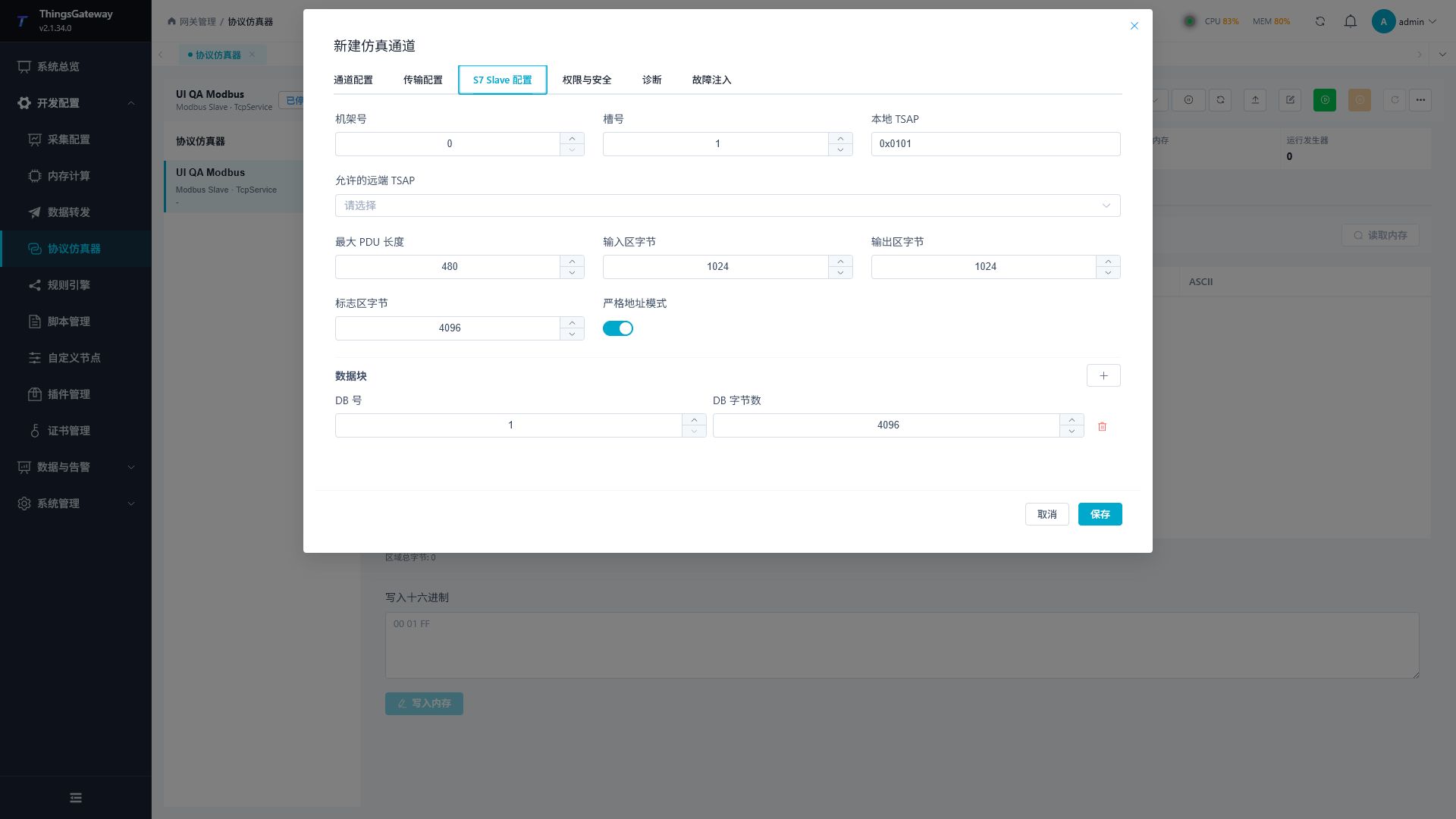
| Configuration Items | Description |
|---|---|
| Rack / Slot | Determines the local S7 connection identifier; match the client connection settings. |
| Local TSAP | local TSAP used by TGateway, such as 0x0101. |
| Allowed remote TSAPs | Client TSAPs that can be restricted to which sessions can be established; If left vacant, assess according to the on-site safety strategy. |
| Maximum PDU Length | the maximum PDU length negotiated by the S7 session; client settings cannot exceed server capacity. |
| Input area bytes | Allocate volume to Area I. |
| Output bytes in the output area | Allocate Q area capacity. |
| Flag area bytes | Allocate volume to the M section. |
| Data Block | Configure one or more DB numbers and the number of bytes per DB. |
| Strict address mode | This switch does not currently reject unmodeled locations. Access depends on the allocated I/Q/M/DB capacity and whether the requested DB exists. |
The S7Slave variable can be mapped to the following address areas:
| Address Example | Meaning |
|---|---|
IX0.0 | Input byte 0, bit 0. |
QW10 | Word at byte offset 10 in the output area. |
MD20 | Double word at byte offset 20 in the marker area. |
DB1.DBX0.0 | DB1 byte 0, bit 0. |
DB1.DBW2 | Word at byte offset 2 in DB1. |
DB1.DBD4 | Double word at byte offset 4 in DB1. |
Permissions and Security
"Permissions and Security" control protocol: whether clients can access and write to the protocol; System role permission control allows logged-in users to execute management commands on the web. Both should be configured together.
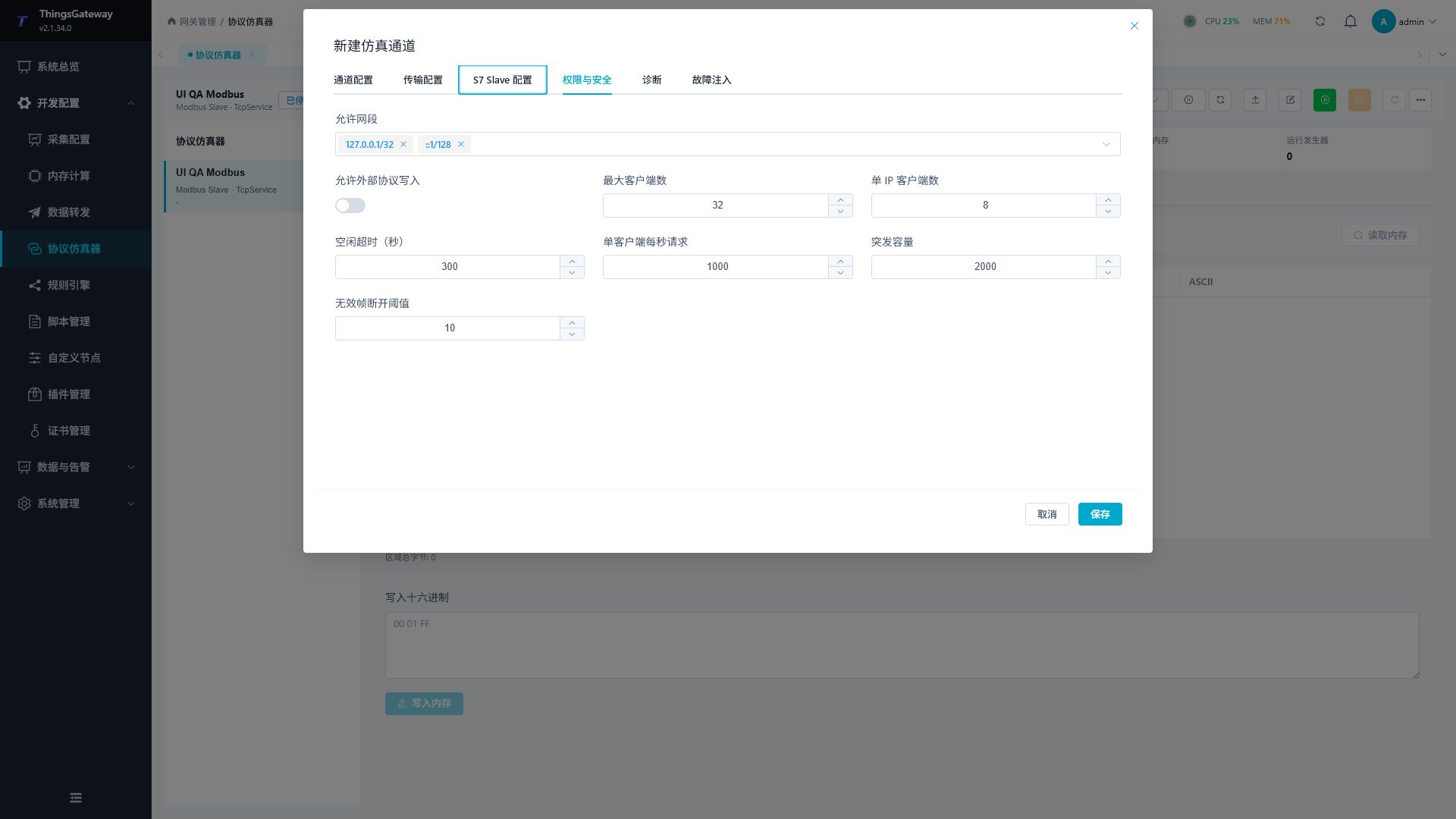
Channel Security Parameters
| Configuration Items | Description |
|---|---|
| Allowed Segments | Allowed IPv4/IPv6 CIDR Connections. The default loop segment is suitable for local testing; When debugging a local area network, only the segments actually needed are added. |
| Allow external protocol writes | Master switch. When off, protocol writes do not change variables. When on, variable access mode and external-write policy must also allow the write. |
| Maximum number of clients | The total number of clients allowed to connect simultaneously in the current channel. |
| Number of clients per IP | The maximum number of connections allowed by the same source IP. |
| Idle Timeout | The number of seconds a client disconnects after a long period of inactivity. |
| Requests per client per second | Sustained request-rate limit for one client connection. |
| Burst Capacity | The number of requests allowed for short-term bursts. |
| Invalid Frame Disconnection Threshold | Proactively disconnects when the same connection generates too many invalid messages consecutively. |
Web Role Permissions
Go to "System Management → Role Management" to assign page and button permissions to roles that need to use the protocol emulator. It is recommended to delegate according to the minimum responsibilities.
| Permission groups | Executable operations |
|---|---|
| View and refresh | View channels, variables, runtime, memory, client, and pagination events. |
| Channel Management | Add, edit, and delete simulation channels. |
| Variable Management | Add, edit, batch add, and delete variables. |
| Operation control | start, stop, and restart channels. |
| Data Writing | Page Writes and Original Memory Writes. |
| Generator Control | Pause or continue the generator of the selected variable. |
| Save the current value | Save the current runtime value as the initial value for the next startup. |
| Client Management | Disconnect a specific client or disconnect all clients. |
| Event Management | Clear diagnostic events for the current channel. |
| Import and Export | Import/export JSON channel configuration and Excel variable point table. |
Users who only need to observe the running results can be granted viewing and refresh permissions only. Pages hide or disable unauthorized commands to add, write, run, disconnect, and empty.
Configure variables and data changes
Configure simulation variables
After saving the channel, click "Add variable" or "Batch create variables" on the "Variables" page. The structural configuration can only be modified when the channel stops, preventing changes in the address space during client-side communication.
- Enter the unique variable name.
- Use the Address Assistant to select the protocol area, station number or DB number, offset, and bit number, or directly fill in the standard address.
- Select the data type and array length.
- Select byte order for multi-byte data in Modbus; Fill in the memory format for the string.
- Set access mode, external write policy, and initial value.
- When automatic changes are needed, enter the "Data Change Designer" to activate the generator.
- Check for usage range, out-of-bounds, and address conflict prompts, then save them.
Data Type
| Data Type | Description |
|---|---|
Boolean | Boolean values, which can be mapped to bit addresses, coils, or discrete inputs. |
Byte | 8-bit unsigned integer. |
Int16 / UInt16 | 16-bit signed/unsigned integers. |
Int32 / UInt32 | 32-bit signed/unsigned integers. |
Int64 / UInt64 | 64-bit signed/unsigned integers, pages processed as exact decimal values. |
Float / Double | Single-precision / double-precision floating-point count. |
Decimal | Uses the .NET 16-byte layout and occupies eight Modbus registers. It is not a standard PLC floating-point format. Configure it with exact decimal text. |
String | Stored according to per-element byte capacity and encoding. Check the length-header and WSTRING limitations below. |
When the "array length" exceeds 1, the variable occupies a contiguous address as a fixed-length array. Before increasing the array length, check whether subsequent addresses have been occupied by other variables.
Byte Order and Strings
| Configuration Items | Description |
|---|---|
| Byte order | Modbus multibyte variables can be selected ABCD,BADC,CDAB, DCBA. S7 Processing byte order according to protocol. |
| Number of bytes per element | Reserve fixed space for each element of the string's array. |
| Encoding | You can choose or fill in UTF-8,ASCII, UTF-16BE, and other codes. |
| Length header | Ordinary Modbus strings do not currently use this flag; initialization produces the same bytes with either setting. It affects S7 read interpretation. |
| S7 WSTRING | Affects S7 string read interpretation. Initialization still writes ordinary encoded bytes and does not construct a standard WSTRING length header. |
First verify fixed-byte strings with both options disabled. If headers are needed, compare actual memory with the client's parsing. A fallback display of the initial value after a read failure is not proof of the current memory value. Capacity is measured in bytes; UTF-8 Chinese characters usually need multiple bytes. Check each element of a string array separately.
Access Modes and External Write Policies
| Configuration Items | Behaviors |
|---|---|
| Read-only | Neither client nor page can use this variable as a regular writable point. |
| Read and write | Pages are writable; When the channel allows external protocols to write, the client can also write according to the external write policy. |
| Pages are writable and external rejection | Web pages can write values, but Modbus/S7 client writes will be rejected. |
| Accept and continue changing | Accept client-side writes, while the generator continues updating according to the original timeline. |
| Accepts and pauses the generator | Accepts client writes and pauses the variable generator to facilitate client-sent values. |
| Rejects external writes | Even if the channel allows external writes, the variable still rejects client-side write requests. |
Protocol writes require the channel's external-write permission, the variable access mode, and its external-write policy. Web operations separately require the logged-in role's permissions. Use read-only or externally denied points until control testing is permitted.
Configure Data Changes and Seeds
Each variable can independently enable the generator. Common parameters include update cycle, startup latency, recovery strategy, algorithm version, and seed.
| Change Mode | Applicable Scenarios |
|---|---|
| Fixed | When enabled, each update reapplies the saved initial value. Disable the generator to retain a runtime write. |
| Ramp | Increases or decreases step size, with selectable clamping, looping, round-trip, or out-of-bounds error modes. |
| Sine | generates sine waves based on center value, amplitude, period, and phase. |
| Triangle | generates a triangle wave. |
| Sawtooth | generates sawtooth waves. |
| Square | Generate square waves based on high/low values, period, and duty cycle. |
| Random | Generate random values within a range according to a uniform or Gaussian distribution. |
| RandomWalk | Randomly walks from the initial value according to the maximum step size. |
| Toggle | Flips Boolean state once per update. A complete true/false cycle takes two updates. |
| Pulse | Pulses are generated by period, high level duration, and initial level. |
| Sequence | Playback by step value and holding chronological order, can loop, repeat, or keep the last value. |
| Template | Generate strings such as batch numbers or time labels using counters and simulated time. |
Ramp, Sine, Triangle, Sawtooth, Square, and RandomWalk require a numeric scalar. Random accepts numeric or Boolean scalars; Toggle and Pulse require a Boolean scalar; Template requires a String scalar. Arrays support only Fixed and Sequence. Array length counts elements: three Double elements occupy twelve Modbus registers. Each sequence step must supply the complete array.
Timing, boundaries, and numeric modifiers
| Parameter | Configuration |
|---|---|
| Update interval | Milliseconds between generator updates; independent of client reads and page refreshes. |
| Startup delay | Retains the point's initial value until the delay has elapsed, then starts the generator timeline. |
| Ramp start, step, and range | Start within the valid range. The nonzero signed step determines direction. |
| Ramp/RandomWalk boundary | Clamp holds the boundary, loop carries the overshoot, and bounce reflects it. An out-of-range error can stop updates while retaining the last successful value. |
| Wave period and phase | Period is the time for one complete cycle in milliseconds. Phase is in degrees. |
| Square duty / Pulse duration | Square uses the high-value proportion of a cycle; Pulse uses an active-window duration and period in milliseconds. |
| Pulse initial level | Used outside the active window and inverted inside it. An initial false level gives a true active window; an initial true level reverses that polarity. |
| Boolean random probability | 0 always produces false and 1 always produces true. Numeric random values use their own range and distribution. |
| Sequence hold time | Each step has its own duration. End behavior can loop, bounce, or retain the final value and finish. |
| Template counter and simulated time | Insert supported tokens from the menu. They do not evaluate arbitrary expressions; simulated UTC time is independent of the system clock. |
Numeric modifiers run in this order: scale and offset → noise → clamp → quantization → decimal rounding. Test one modifier at a time. For an unmodified input of 1.3456, scale 2 gives 2.6912; a quantization step of 0.5 gives 1.5; rounding alone to three decimal places gives 1.346.
Set or clear both clamp bounds together and use a positive quantization step. Uniform noise stays within its signed amplitude; Gaussian amplitude is a scale, not a hard bound. Add a clamp where limits are required, then check the final value because quantization runs after clamping.
Deterministic Seeds
Random, RandomWalk, noise modifiers, and fault injection can all use configured seeds. The same algorithm version, seed, and configuration produce repeatable sequences suitable for automated regression testing and issue reproduction.
| Operation | Recommends |
|---|---|
| Fixing the seed | Record in the test case, Ensure that each run has the same trajectory. |
| Generate seeds | Temporarily explore different random sequences; After confirming the issue, the generated value should be recorded. |
| Separating seeds | Main generator, noise, and fault injection use different seeds for easy individual reproduction. |
| Record the algorithm version | The page displays the current version as read-only. Record it together with the seed and all parameters when reproducing results. |
Numeric modifiers apply only to numeric Ramp, Sine, Triangle, Sawtooth, Random, and RandomWalk modes. Square, Fixed, Sequence, and Boolean random points do not use this chain. Decimal rounding accepts 0–28 places only for Float, Double, and Decimal. Start with the basic waveform, then add one modifier at a time.
Verify through the protocol
The designer previews a draft. Save the point and restart the channel before checking runtime memory and an independent client.
- Read a fixed point, such as holding-register value
1234, and confirm collection quality. - Enable a ramp with an explicit range, step, and interval. Save and restart, then check direction and boundary behavior over multiple reads.
- Keep the update interval unchanged when comparing waveform periods. Compare peaks or transitions over the same observation window.
- Rebuild random timelines with seeds
7,99, and7. The same settings should reproduce a sequence segment, although client reads may skip generator updates. - Test noise separately and record its own seed.
External writes require the channel permission, variable access mode, and external write policy together. Web writes also require the logged-in role's permission. With Accept and continue changing, the generator can overwrite a client value on the next update. With Accept and pause, check that it remains unchanged for several update intervals. Rejection leaves the source unchanged while generation can continue.
Pausing the generator leaves the current value readable. Resume can continue the saved timeline or restart it, according to the selected action. Runtime writes, editing the initial value, and saving the current value as the initial value affect different states; only saved initialization controls the next start.
Run, debug and inject faults
Startup and Operation Control
- Confirm that the channel is "Stopped" and complete the configuration of the channel and variable structure.
- Click "Start" at the top. After successful startup, the summary area displays the listening endpoint and reserved memory.
- Connect to this endpoint using the actual Modbus master or S7 client and read and write variables.
- Observe the current value and generator status in the variable list; After selecting a variable, you can pause, continue, or save the current value as the initial value.
- Stop the channel before modifying the structural configuration; You can use "Restart" only when re-establishing listens and sessions.
| Command | Instructions |
|---|---|
| Start | allocate protocol memory and start listening or open the serial port. |
| Stop | Disable listening and client connections, allowing modification of channel and variable structures. |
| Restart | After stopping, restart as configured as currently is. |
| Write Value | Set the current value for a single writable variable and choose whether to apply an external write strategy. |
| Pause/Continue | Batch control of the generator of the selected variable. |
| Save the current value as the initial value | Persist the current value for the next startup recovery. For bulk storage, it is recommended to select by business grouping. |
Original Memory and Client
Original Memory
"Original Memory" is used to check whether variable values match protocol bytes.
| Protocols | Optional memory |
|---|---|
| Modbus | Coils, Discrete Inputs, Holding Registers, Input Registers, and select the station number. |
| S7Slave | Inputs, Outputs, Markers, Data Block; The Data Block also requires selecting the DB number. |
After entering the byte offset and the number of bytes to be read, click "Read Memory". Before writing to hexadecimal, the page checks the coverage area; When intersecting with variable mapping, it will require reconfirmation. Original memory writes directly affect the corresponding variable and should only be used when the address layout is clearly understood.
These offsets are bytes: Modbus holding-register offset 4 corresponds to raw byte offset 8. The raw coil and discrete-input views use one byte per Boolean, so do not apply register widths there. Confirm the complete affected range before writing. Changing an unmodeled location does not create a named variable; verify bytes and typed protocol reads separately.
Raw memory writes require the separate Web data-write permission. They write directly to the selected area without the ordinary point write's read-only check or the channel and point restrictions on external protocol writes. Those settings therefore do not restrict an administrator who has raw memory write permission. After confirmation, an affected point using Accept and pause generator is paused; other running generators can overwrite the bytes on a later update. Check memory, point values, and generator state, then read back through an independent client.
Client
The "Client" page displays the remote endpoint of each connection, connection time, recent activity, number of requests/errors, and bytes sent and received. S7Slave also displays the session phase and negotiation PDU. If you need to terminate an abnormal connection, you can disconnect a single client or all clients.
Messages and Events
Determine the scope of records in the channel "diagnostics."
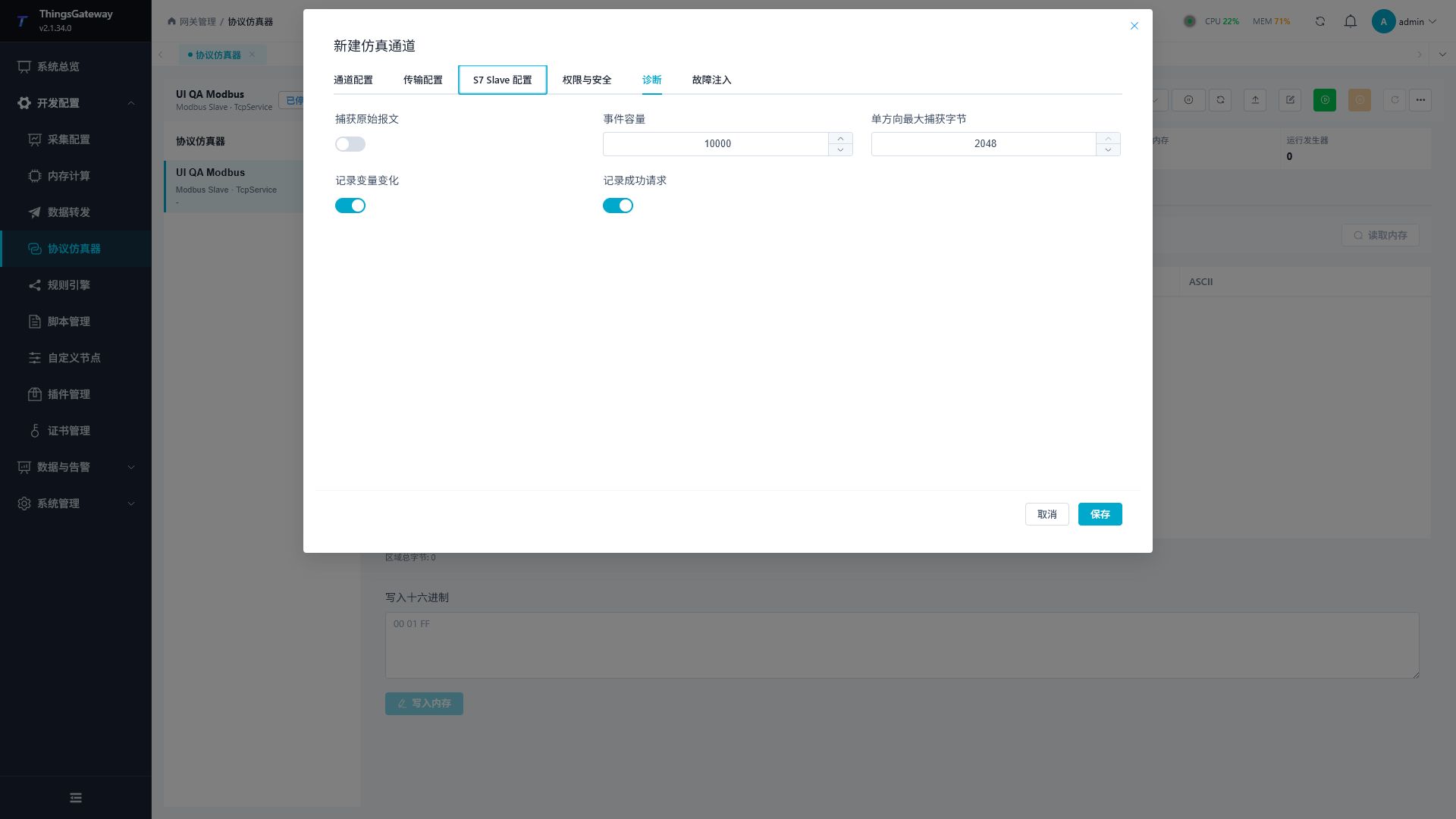
| Configuration items | Description |
|---|---|
| Capture raw messages | Save hexadecimal content of requests and responses. It only activates during joint debugging and error troubleshooting to avoid recording unnecessary data. |
| Event Capacity | The maximum number of events held in the current channel. After reaching capacity, the oldest event is covered and will not grow indefinitely. |
| Maximum one-way capture byte | Limits the number of raw bytes stored in a single request or response. |
| Record variable changes | Record changes caused by generator writes, page writes, and protocol writes. It can be turned off when there are many high-frequency points. |
| Record successful requests | Record normal protocol requests. It can be turned off during prolonged high-frequency stress testing, retaining only errors and key events. |
The "Messages and Events" page supports keyword and event type filtering, as well as server-side pagination.
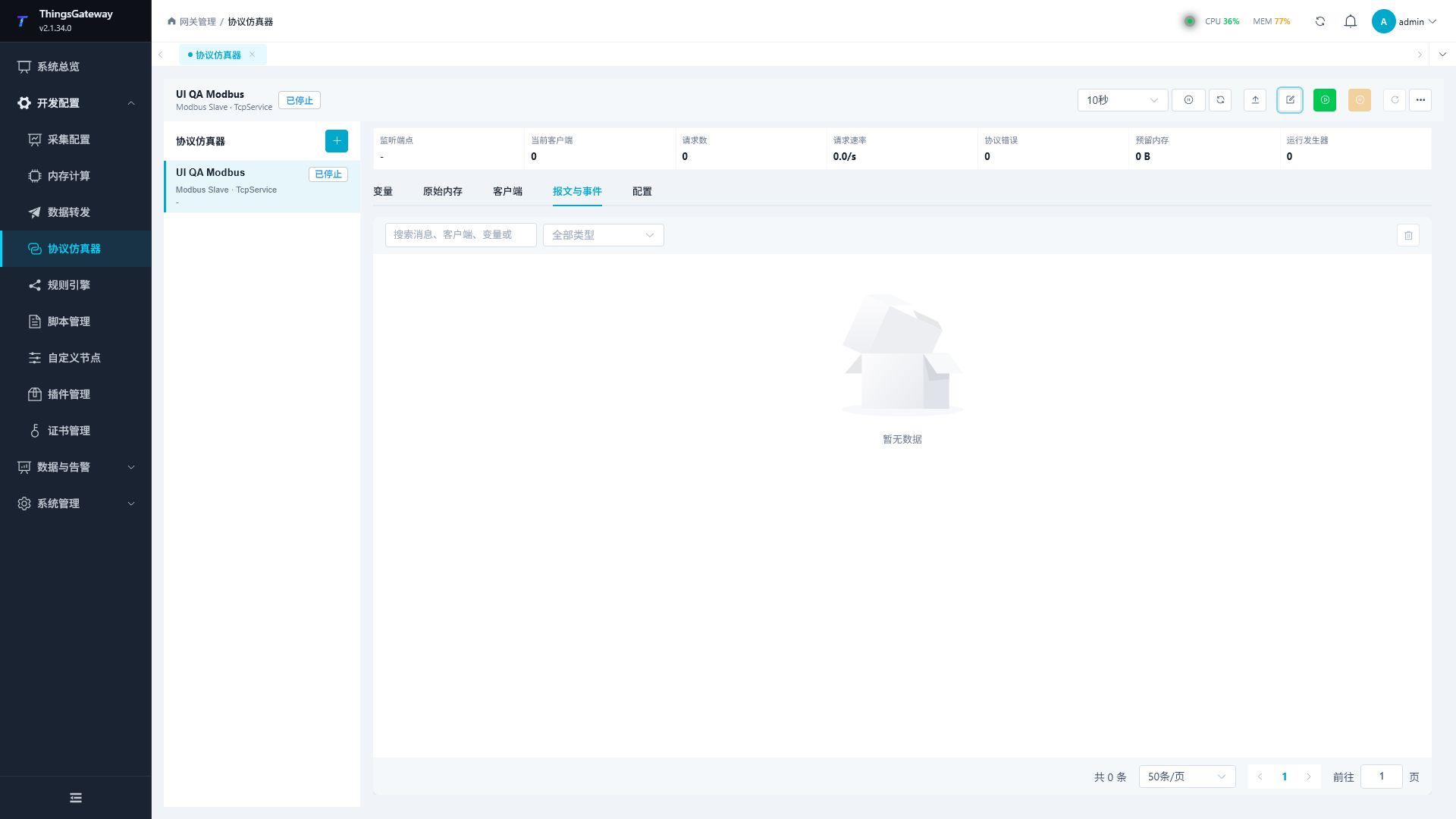
| Event Content | Description |
|---|---|
| Time and Type | Distinguishes lifecycle, client connection/disconnection, protocol requests, protocol errors, variable changes, generator status, security denial, and buffer coverage. |
| Messages and Clients | Displays event summaries and associated clients. |
| Variables and Error Codes | Displays associated variables and protocol error codes. |
| Processing Time | Displays request processing time to help locate abnormal and slow requests. |
| Request/Response Message | View the captured hexadecimal request and response after clicking the event. |
The event list loads only the current page at a time. Switching page numbers, page sizes, or filter criteria will re-query the server; Automatic refresh cancels expired requests and does not cause concurrent stacking and repeated refreshes. The page will also show the number of old events that have been overwritten by the circular buffer.
Fault Injection
Fault injection is used for repeatable verification of client timeouts, reconnections, and exception handling, and should not be enabled long-term in production debugging channels.
| Configuration Item | Description |
|---|---|
| Enable fault injection | master switch. After turning off, do not apply delay, jitter, lost response, or active disconnect. |
| Fault seed | Fixed random fault sequence to facilitate reproduction of the same test process. |
| Fixed Latency | Adds fixed processing delay per request. |
| Random jitter | adds random wait on top of fixed latency. |
| Lost response probability | No response is sent by probability, used to verify client timeout and retry. |
| Disconnect after processing the number of requests | After reaching the specified number of requests, actively disconnect the client to verify automatic reconnection. |
Verify faults and recovery
- Keep the endpoint, fixed point, and client timeout unchanged; record several fault-free round trips.
- Set a fixed delay such as
300ms, save and restart, then compare repeated requests with fault injection disabled and enabled. - Test lost responses separately and count successes/timeouts. A short window need not match the probability exactly. Reproduction also requires the same connection and request order.
- Test forced disconnect and verify client reconnection and collection-quality recovery.
- Disable fault injection and unused generators, save and restart, then verify the fixed point and new collection again with an independent client.
Reuse and scale the configuration
Import and Export
At the top, "Import JSON" allows you to import the full channel configuration; The "More" menu provides channels for exporting JSON, importing Excel, exporting Excel, and deleting channels.
Batch creation
- Stop the channel and open batch creation. Use a name pattern such as
Tag{n}orTag{n:000}, starting at1. - Enter count, starting address, type, array length, and initial value. Count creates independent variables; it is not array length.
- Address step
0advances by the complete type width. Two-element Int32 points occupy four registers each, so three points starting at200use200,204, and208. - Explicit steps leave gaps. Boolean steps count bits and carry across register or S7 byte boundaries.
- Check every candidate's name, capacity, and overlap before submitting. A partial preview still validates the entire group; a conflict rejects the group.
Next free address advances after the largest occupied end in the area; it does not promise the smallest internal gap. Copied generator settings create independent point timelines.
| Format | Purpose | Notes |
|---|---|---|
| JSON | Backup or copy of channels, protocols, security, diagnostics, faults, and variable configurations. | Before importing, you can choose to create a new channel or override a stopped channel from the same protocol, and preview first. |
| Excel | batch maintenance variable point tables. | Only handle variables; The channel must be stopped before the structural configuration is imported. Exporting the template first and then filling in can reduce formatting errors. |
If other users have already modified the same channel during import, the page will prompt a configuration version conflict. Refresh and verify the latest configuration before re-importing; do not overwrite unknown changes directly.
JSON stores channel and point configuration, excluding live memory, clients, and event history. Creating a channel assigns independent identities; IDs in the file do not select an overwrite target. Overwrite requires an explicitly selected, stopped channel of the same protocol and replaces its complete configuration using the current revision. Preview first, then confirm; canceling confirmation saves nothing.
Use the exported Excel Points sheet rather than a collection template. Its columns include Id, Name, Address, DataType, ArrayLength, DataFormat, AccessMode, ExternalWritePolicy, InitialValueJson, StringOptionsJson, GeneratorOptionsJson, Sort, and Description. Preserve identities and typed JSON. After preview and confirmation, restart and check changed and unchanged points. An out-of-range file must be rejected without changing the saved configuration.
Large-scale Simulation and Performance Recommendations
| Scenarios | Recommendations |
|---|---|
| Many variables | Use batch creation of variables or import them in Excel; Filter by name, address, type, and access mode, manage by page, without relying on displaying all variables at once. |
| High-frequency automatic change | Enable generators only for variables that require dynamic behavior, set update cycles reasonably, and avoid millisecond-level changes at all points. |
| Long-term protocol stress testing | Set fixed event capacity; During the non-troubleshooting phase, the original packet, successful request, or high-frequency variable change record is closed. |
| Event queries | Use event types and keywords to narrow the scope and maintain pagination; The page only keeps the current page and does not accumulate all historical events in the browser. |
| Auto Refresh | Select a refresh cycle that matches the test rate. If the previous round is not yet completed, it will not be triggered concurrently to refresh again. |
| Multi-client | Set the total number, single IP limit, and request rate according to the planned number of connections, gradually increasing the load and observing request rates, errors, and memory summaries. |
Troubleshooting and related pages
Frequently Asked Questions
| Phenomena | Handling Suggestions |
|---|---|
| Client Cannot Connect | Check if the channel is started, listen for addresses and ports, operating system firewall, allowed subnets, maximum number of clients, and port usage. |
| Modbus returns an address error | Check station, framing, data area, and whether offset plus the complete type width exceeds allocated capacity. The strict-address switch does not control current access bounds. |
| S7 client handshake failure | check ports, rack/slot numbers, local and remote TSAP, maximum PDU, allowed segments, and handshake timeouts. |
| S7 address read fails | Check I/Q/M/DB syntax, DB existence, and the complete type range against area capacity. The strict-address switch does not isolate unmodeled locations. |
| Client write value is rejected | Check the channel in sequence for "Allow external protocol writes," variable access mode, external write policy, and request address/data type. |
| The value changes again after writing | The external writing strategy is "accept and continue changing." When you need to keep the write value, switch to "Accept and pause the generator." |
| Random results cannot be reproduced | Fixed algorithm version, generator seed, noise seed, fault seed, and initial value at startup. |
| Too many page events | Reduce event capacity, close successful requests or variable change records, and use type/keyword filtering and pagination. |
| Unable to edit channels or variables | Stop the channel first, then check whether the current role has the corresponding management permissions. |