User Management
User management is used to maintain TGateway web login accounts, role assignments, login methods, account status, and online sessions. After adding a new user, at least one role should be assigned; otherwise, users may not see the business menu or be unable to perform operations after logging in.
Create and maintain accounts
First, look at the terminology
| terminology | understand the site |
|---|---|
| user | login An account for TGateway Web usually corresponds to an operations staff member, a team account, or an external system account. |
| Roles | A set of permissions. Users must bind characters to see menus and perform corresponding actions. |
| Local Account | TGateway saves the password and verifies the logged-in account itself. |
| OAuth2 Account | Account logged in via third-party platforms, such as the Enterprise Unified Identity Platform. Passwords are managed by third-party platforms. |
| Sessions | The user's online status after a single login. After canceling a session, the user needs to log in again. |
| Forced password change | Administrators require users to change their password first after logging in, suitable for handover after password reset. |
| Lock accounts | Temporarily prohibit the account from continuing to use and revoke its sessions, which is suitable for account anomalies or personnel leaving the venue. |
Function Entry
After logging into TGateway Web, enter "System Management → User Management".
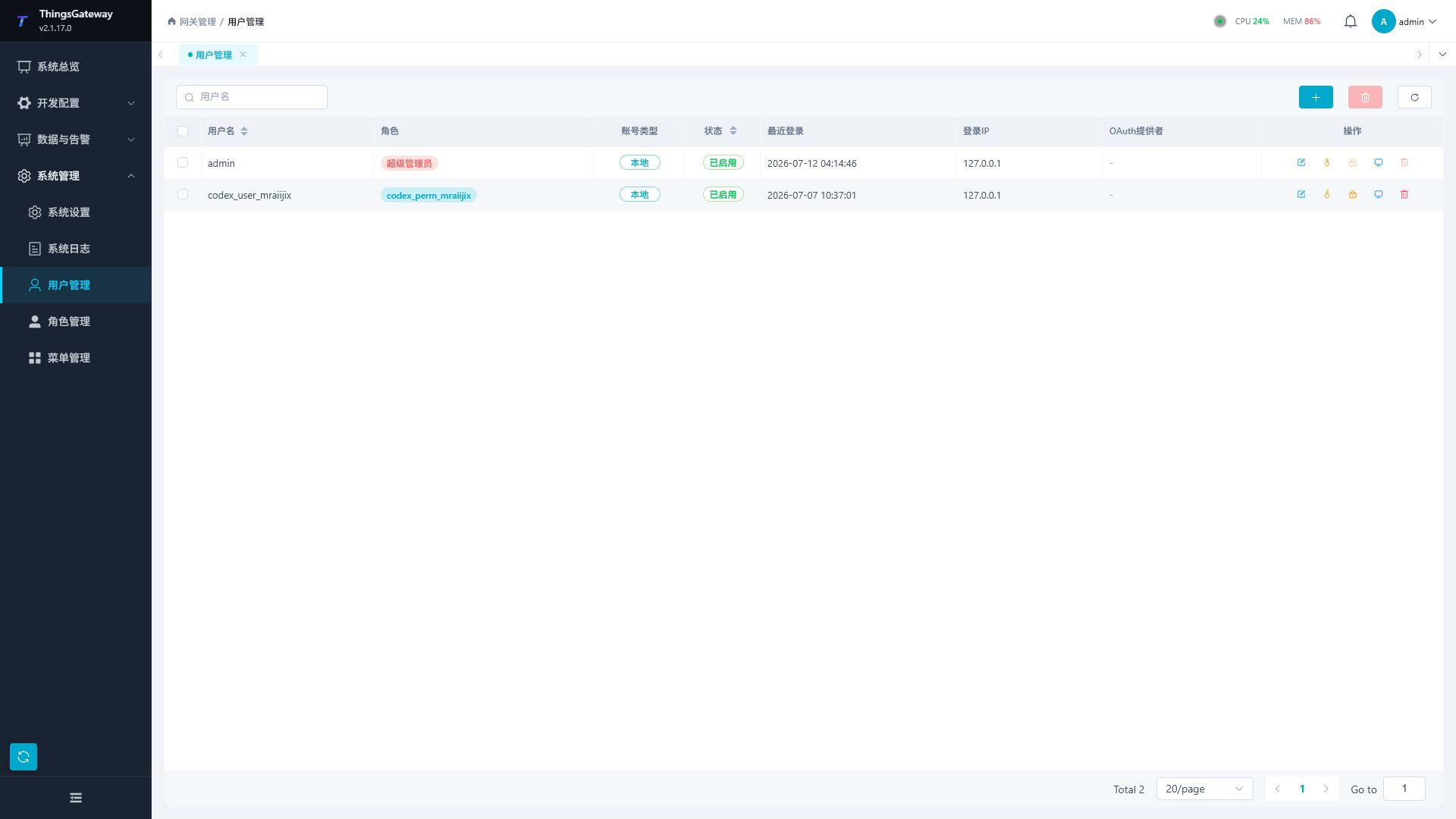
User List
| Column | Description |
|---|---|
| Username | User Login Account. |
| Role | User-bound character. A single user can bind multiple characters. |
| Account Type | Displays local accounts, OAuth2 accounts, or hybrid accounts. |
| Status | shows enabled, disabled, or locked status. |
| Recent Login | The most recent login time of the user. |
| Login IP | The user's most recent login source address. |
| OAuth Provider: | third-party login provider corresponding to OAuth2 users. |
| Operations | Entry points for editing, resetting passwords, locking/unlocking, session management, deletion, and more. |
The top of the list supports searching by username, with operations such as adding, batch deleting, and refreshing in the upper right corner. Before batch deleting, users need to be checked.
Add User
Click "Add" to open the user configuration drawer.
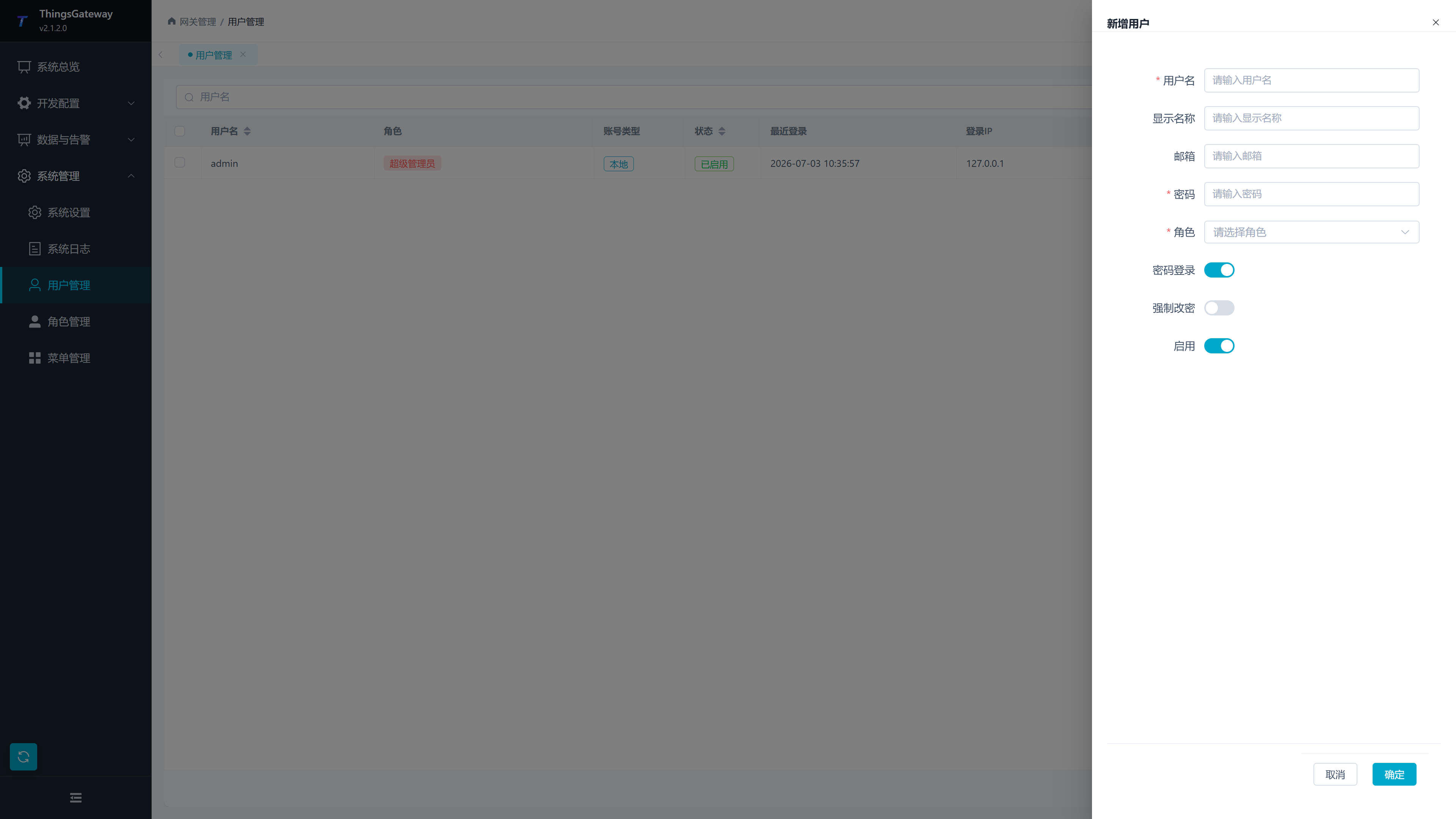
| Configuration Items | Description |
|---|---|
| Username | Login Account. Once created, it cannot be modified in the editing drawer. |
| Display Name | The page displays the name, which can be filled in as the real name, position, or team name. |
| User email, used for account identification or subsequent notification scenarios. | |
| Password | Local account login password. |
| Role | A set of user-available permissions, with multiple selections. |
| Password Login | enabled allows login using username and password. |
| Forced password change | After activation, users need to change their password the next time they log in. |
| Enable | to control whether accounts are allowed to log in. |
After filling in the form, click "OK" to save. After a successful save, new users will appear in the list and immediately gain permissions according to the selected role.
Edit User
Click "Edit" in the user list to maintain display name, email, password, role, login method, and enabled status.
| Scenario | Operation Suggestions |
|---|---|
| Adjust User Permissions | Modify "Role" and save, It takes effect after users refresh the page or log in again. |
| Temporarily deactivate the account | disable "Enable"; the user will no longer be able to log in. |
| Request user to change password | Enable "Forced password change," save it, and notify users to log in again and change password. |
| OAuth2 user | Password-related fields are managed by the OAuth2 provider, and manual password setting will be restricted on the page. |
Passwords, locks and sessions
Reset Password
Click "Reset Password" in the user list to open the reset password drawer.
| Configuration Item | Description |
|---|---|
| Password | New password set for the user. |
| Forced password change | After activation, users need to change their password again to their own password after logging in with a new password. |
After the reset is complete, users should be informed of the new password through a secure channel. It is recommended to simultaneously implement "mandatory encryption changes" in the production environment.
Lock, Unlock, and Delete
| Operations | Instructions |
|---|---|
| Lock | Lock users and revoke their sessions, suitable for account anomalies or temporary access blocks. |
| Unlock | Restore login ability of locked users. |
| Delete | Delete user accounts. Before deletion, confirm that the account will no longer bear operational or audit responsibilities. |
| Batch Delete | Check multiple users and delete them all together. |
Session Management
Click "Session Management" to view users' current and historical sessions.
| column | Descriptions |
|---|---|
| Session ID | Session ID. |
| Status | Valid, expired, or revoked. The current session will be marked with an identifier. |
| IP address | session source address. |
| Device | Name of the login device. |
| Recently Active | Session: The most recent activity time. |
| Expiration time | Session expiration time. |
| User-Agent | Browser or client information. |
| Operation | Description |
|---|---|
| Refresh | Reload the session list. |
| Revoke session | Disable the specified session. The current session cannot be directly undone. |
| Revoke other sessions | Keep the current session and revoke the user's other valid sessions. |
| Revoke all sessions | Revoke all valid sessions for this user; the user needs to log in again. |
Super Administrator Account
Built-in admin account is the highest privilege and restricts page changes to username, role, activation status, and deletion operations. This account can change its password.
Please keep your admin password. After the initial deployment in the production environment, the default password should be changed immediately, and the super administrator account should only be used in necessary maintenance scenarios.
Frequently Asked Questions
| Issues | Handling Methods |
|---|---|
| No menu after the user logs in | Check whether the user is bound to a character and whether the character has menu permissions. |
| Users can see the menu but buttons are unavailable | Check if the character has the corresponding button permission. |
| User operation prompt indicates no permissions | Check if the role has the corresponding API permissions, save the data, and have the user refresh the page or log in again. |
| User forgets password | administrator performs "Reset Password" in the user list. |
| User account login abnormal | Lock the user and revoke the session, then review the audit logs in the system logs. |
Related Links
- Role Management - Role Configuration and Permission Assignment
- Menu Management - Menu and Button Permission Configuration
- System Log - View login audits and user security audits