Menu Management
Menu management maintains navigation menus, button permissions, and menu display rules for TGateway Web. Ordinary operations and maintenance personnel usually only need to review; System administrators use this page when adding custom menus, adjusting menu order, or supplementing button permissions.
Open menu management
First, look at the terminology
| Terminology | On-site understanding |
|---|---|
| Table of Contents | Grouping in the left navigation, Usually, the business page itself is not opened directly. |
| Page | Specific function pages accessible in the left navigation, such as data collection configuration and alarm queries. |
| External link/embedded | Open the external system address. External links appear in the current system, and embedding shows external pages within the current page. |
| Button | specific operation permissions within the page, such as adding, editing, deleting, and exporting. |
| Permission Encoding | The internal identifier of the system's determination of menu or button permissions. Once authorized, do not modify it arbitrarily. |
| Parent Menu | The parent directory or page to which the current menu belongs, used to determine the navigation level. |
| Built-in Pages | Pages already provided by the system. After selection, the access path will be automatically displayed. |
| Page Caching | Whether table filters, tabs, and other states are retained after switching pages. |
Function Entry
After logging into TGateway Web, enter "System Management → Menu Management".
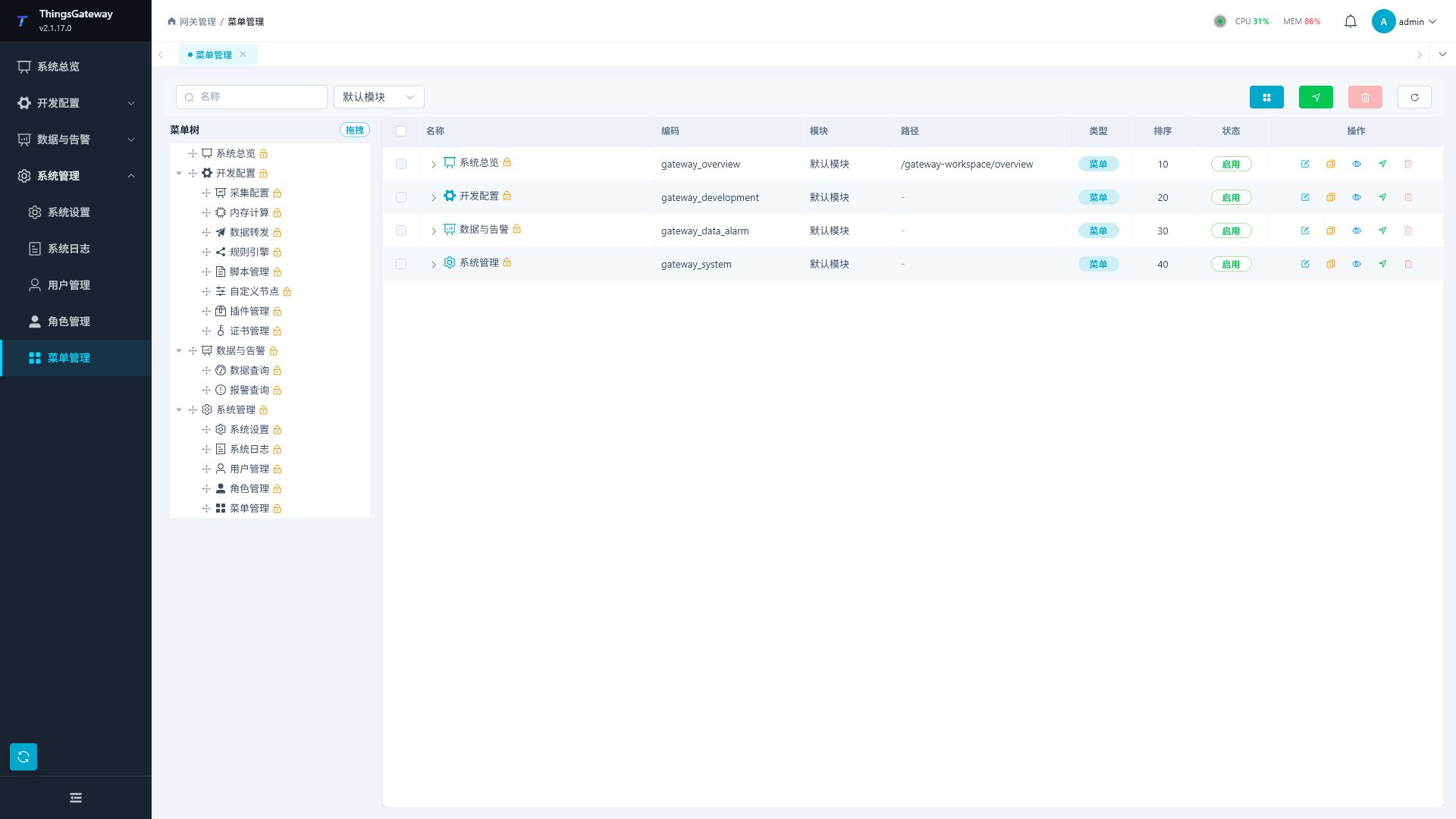
Configure menus and buttons
Menu Tree Table
| Columns | Description |
|---|---|
| Name | Menu or button display name. |
| Encoding | Permission Coding, used for role authorization and permission determination. |
| Path | The page access path corresponding to the menu. |
| Type | displayed as a directory, page, backlink, embedding, or button. |
| Sort | The display order of menus or buttons at the same level. |
| Status | Enabled or disabled. After disabling, users cannot use the menu or button normally. |
| Operations | Add submenus, add buttons, copy, view bind buttons, edit, delete, etc. |
The top of the list supports searching by name and can refresh the menu tree. When adjusting menu levels, first confirm the target parent menu and sorting to avoid affecting user navigation.
Add or Edit Menu
Click "Add Menu" or "Edit" in the list to open the Configuration Drawer.
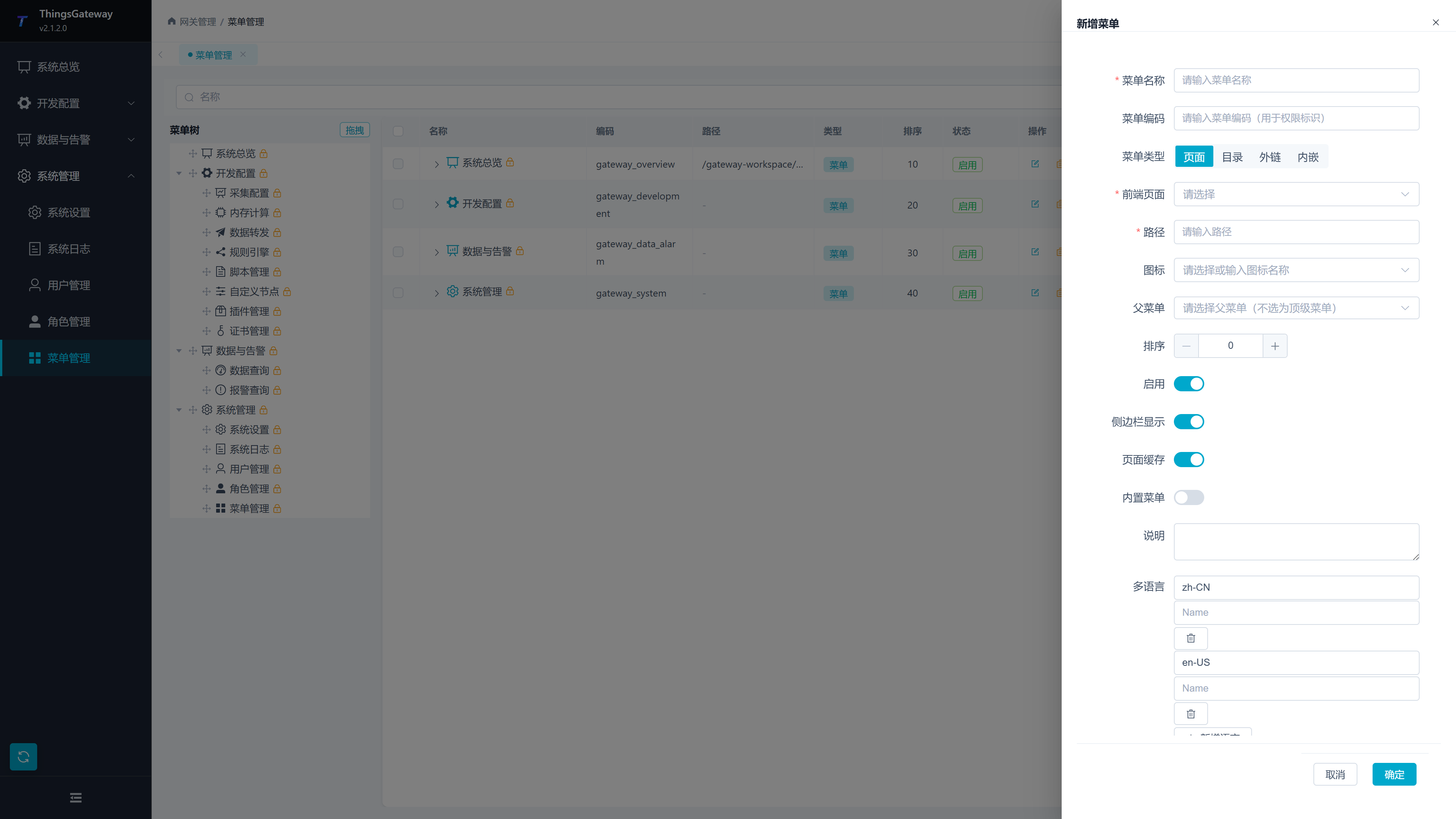
| Configuration Items | Description |
|---|---|
| Menu Name | Name as the user sees in the left navigation. |
| Menu encoding | Menu permission identification. It is recommended to keep the menu unique and stable, and do not arbitrarily modify the encoding of the authorized menu. |
| Menu Type | Select Directory, Page, Backlink, or Embedding. Different types will display different configuration items. |
| Built-in Pages | Select the system page you want to open. After selection, the access path will be displayed. |
| Path | Menu Access Path. When customizing, make sure it does not conflict with existing menus. |
| External link address | Target address opened by external link or embedded menu. |
| Default Jump to | Subpages entered by clicking the menu menu. |
| Icons | Icons displayed in the menu on the left, which can be selected from the dropdown list or entered the icon name. |
| Parent menu | The parent to which the menu belongs. When not selected, it serves as a top-tier menu. |
| Sort | Sort values by the same level of menu; the smaller the value, the higher it ranks. |
| Enable the | control menu to check availability. |
| The sidebar shows whether the | control menu is displayed in the left navigation section. |
| Page Caching | Control whether page state is retained after page switching. |
| Built-in menu | Built-in menu in the markup system. Built-in menus are generally not recommended to modify or delete encoding. |
| Description | Menu Purpose and Maintenance Notes. |
| Multilingual | Fill menus for different languages to display names. After |
saves, logged-in users usually need to refresh the page or log in again to see changes in the menu display.
Add or Edit Button
The button controls specific operation permissions on the page, such as adding, editing, deleting, exporting, and start/stopping.
Click the "Add Button" in the menu row, or click "Edit" in the button row to open the button and configure the drawer.
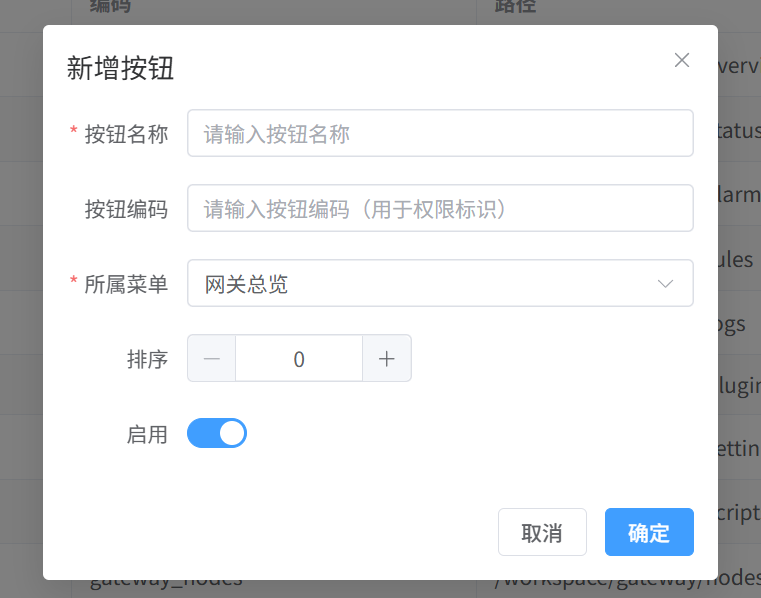
| Configuration Items | Description |
|---|---|
| Button Name | Display name of the page operation button. |
| Button encoding | Button permission identification. When authorizing a role, determine whether the character is visible or available according to this code. |
| Parent Menu | The menu to which the button belongs. |
| Sort | The display order of buttons under the same menu. |
| Enable | control button permissions to be available. |
View bound buttons
Click "Bound buttons" in the menu row to view the maintained button permissions under that menu.
| Column | Description |
|---|---|
| Button Name | Button Display Name. |
| Button Encoding | Button Permission Encoding. |
| Sort | Sort buttons. |
| Status | Enabled or Disabled. |
Maintain menu access
Common Operations
| Operations | Steps |
|---|---|
| Add a New Directory | Click "Add Menu", select "Directory" as the menu type, and fill in the name, code, icon, and sort. |
| Add a page menu | Click "Add Menu", select "Page" as the menu type, choose the built-in page, and save. |
| Add a new backlink | Click "Add Menu", select "Backlink" as the menu type, and enter the backlink address. |
| Add button permission | Click "Add Button" in the target menu row and enter the button name and code of the button. |
| Copy menu | Click "Copy" in the menu bar, generate copy as prompted on the page, then adjust the name, code, and parent menu. |
| Delete Menu | Click "Delete" and confirm. Before deletion, confirm that no user roles depend on the menu or button. |
Usage Notes
| Scenarios | Recommended |
|---|---|
| Adjust System Menu | Back up and configure the database first, then modify the built-in menu. |
| Modify menu encoding | Authorized roles may become invalid; after modification, the role permissions need to be checked again. |
| Menu not displayed | Check whether the menu is enabled, whether sidebar display is checked, and whether the user role has menu permissions. |
| Button invisible | Check whether the button is enabled and whether the character has button permissions. |
| External links cannot be opened | Check if the address is complete and whether the target site is allowed to be opened in the browser. |
Related Links
- User Management - User Creation and Management
- Role Management - Role Configuration and Permission Allocation
- System Logs - View Permission Audits