Device Debugging
Device debugging directly verifies the communication capabilities of collection devices and data-forwarding targets in GatewayRuntime Web. The current version uses a unified debug workspace: the page combines overview, runtime status, general read/write, receive monitoring, clients, cache, variable mapping, and protocol-specific panels according to the selected plugin. Select a real device or forwarding target first, then open the "Debug" tab on its details page. "Test Data" is used to generate demo channels, devices, and variables in batches.
CustomPacketMaster Can send a complete custom packet by Hex or text, and choose to send only or send and wait. For configuration and operation instructions, refer to Fully Customizable Packet Collection.
Check the Terminology Before Debugging
| Terminology | On-site Understanding |
|---|---|
| Broker | servers of message systems such as MQTT, Kafka, RabbitMQ, etc., which can be understood on-site as "message relay servers." |
| Topic | The topic/path for sending or subscribing to messages, similar to the data channel name agreed upon by an external system. |
| Payload | message body, which is the actual data content sent. |
| RPC writes | external system backwrite points. Only when it is confirmed that on-site equipment allows remote control should control points be activated. |
| Target variable property | The external mapping of a forwarding target to a single variable, such as an external field name, slave address, or write permission. |
| DTU / DTU ID | Transparent terminal and its number, used to distinguish which remote device is accessing. |
| QoS/Retain | MQTT delivery level and retention message toggle. For regular tests, first fill out the information as agreed by the on-site broker. If unclear, do not open Retain casually. |
debug pages like MQTT, Kafka, RabbitMQ, etc., require corresponding servers or brokers on-site. The page provides forms such as publishing, subscription, and client lists, but the execution results depend on the connection status of the target service.
On-site Debugging Principles
The debugging page is directly oriented toward real equipment or real external systems. During on-site inspections, first prove that "readable, read correctly, and logs are normal," then consider writing or publishing test messages.
| Principles | Explanation |
|---|---|
| Read before write | Read the read-only or secure point first, confirm that the channel, station number, address, and data type are correct, Then test the write. |
| Single point first, then batch | Verify with one address first, then expand to continuous addresses, point table import, or batch forwarding. |
| Test the environment before production | If possible, verify first in the PLC simulator, test broker, or test topic. |
| Writing requires on-site confirmation | Points for start/stop, reset, set values, valves, motors, and interlocks must be confirmed before writing that the equipment is in a permitted remote control state. |
| After debugging, log level recovery | After temporarily opening Debug or Trace, the joint debugging should resume to Info to avoid long-term log-generating volume. |
Debug Permissions
Collection Configuration and Data Forwarding each provide five independent debug permissions. Administrators should grant both menu-button and API permissions according to job responsibilities. Do not include high-risk operations in a general debug role.
| Button Permission | Permission Code | Allowed Operations | Suggested Role |
|---|---|---|---|
| Debug View | debug:view | Enter the Debug tab and view the object overview, runtime state, and redacted summaries. | Read-only monitoring and debug staff |
| Read-only Debug | debug:query | Read values, browse nodes, query state, and run read-only diagnostics. | Read-only debug staff |
| General Debug Write | debug:write | Write ordinary points, publish messages, maintain subscriptions, and run low-risk protocol commands. | Operations and maintenance staff |
| Dangerous Debug Control | debug:dangerous | Run or stop PLCs, move robots, reset equipment, perform batch I/O, delete datasets, send arbitrary commands, or disconnect clients. | Approved control engineers |
| Sensitive Debug Data | debug:sensitive | View certificate trust information, identity-card data, and other separately controlled content. | Security administrators or designated staff |
The default user role contains only Debug View and Read-only Debug. General writes, dangerous controls, and sensitive data must be granted explicitly through independent roles. When only communication diagnosis is required, do not grant the latter three permissions.
Dangerous Debug Control is not equivalent to an ordinary variable write. Before resetting, starting or stopping, moving equipment, switching programs, sending raw commands, or deleting datasets, confirm that the equipment is in maintenance mode, field interlocks are active, and someone able to stop the equipment immediately is present.
Function Entry
Device Acquisition Debugging
Go to "Development Configuration → Collection Configuration", first switch to "Device Display", then select a device from the device status list on the left. When the device details appear on the right, click the "Debug" tab.
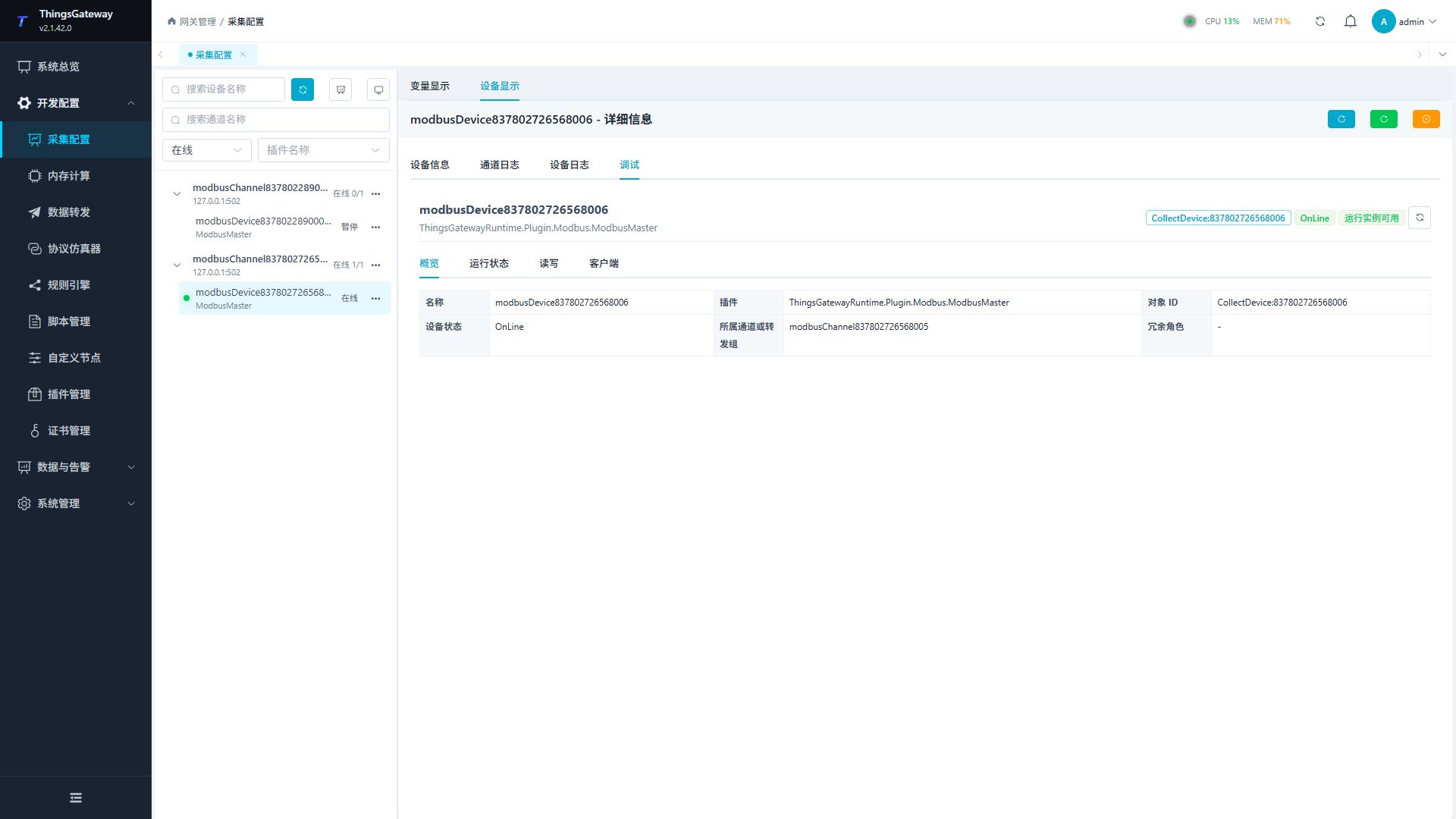
| Steps | Instructions |
|---|---|
| Switch device display | "Variable Display" for viewing the point list, "Device Display" for opening device details. The equipment debugging entry is only displayed in the device details. |
| Select the device | Click the device row on the left, not the variable row. The right header will display "Device Name - Details." |
| Open Debugging | Select "Debugging" under the "Device Information, Channel Logs, Device Logs, Debugging" tab in the device details. |
| Perform the test | Display the corresponding debug interface according to the plugin type. The general driver displays Foundation read/write, while MQTT/Kafka/RabbitMQ displays message debugging. |
Data Forwarding Target Debugging
Enter "Development Configuration → Data Forwarding", select a forwarding group, then choose a forwarding target. Click the "Debug" tab in the details area on the right to verify the send, publish, or server status of forwarding plugins such as MQTT, Kafka, RabbitMQ, ModbusSlave, OpcUaServer, etc.
| Object | Debugging entry | Applicable scenarios |
|---|---|---|
| Collection equipment | Collection Configuration → Device Display → Device Details → Debugging | Verify read/write, subscription, or protocol status of PLC, instrument, OPC, MQTT collection devices. |
| Data forwarding target | Data forwarding → Select target → Details Area → Debug | Verify message publishing, subscription management, client connections, or server-side statistics for forwarded targets. |
Unified Debug Workspace
After entering the "Debug" tab, the workspace header shows the object name, plugin, object ID, online state, and runtime-instance state. The tabs below are assembled from the current plugin's capabilities, so different plugins may expose different numbers of tabs.
| Workspace Module | Main Content | Available While Offline |
|---|---|---|
| Overview | Object name, plugin, channel or forwarding group, variable count, and latest error. | Yes |
| Runtime Status | Success and failure counts, latest activity, rate, and initialization state. | Yes |
| Read/Write | Foundation single-point and batch read/write with result history. | View only; commands disabled |
| Receive Monitor | Active reports, parsing, mapping, and drop statistics. | View only; live commands disabled |
| Clients | Connected TCP server clients. Displayed only for server channels. | View only; disconnect disabled |
| Forwarding Pipeline | Forwarding-group input, batches, and processing state. | Yes |
| Cache Queue | In-memory queue and offline-cache backlog. | Yes |
| Storage Diagnostics | Database connection, target table, and latest write state. | Yes |
| Protocol Service | Server listener, sessions, and request state. | View only; control commands disabled |
| Variable Mapping | Mapping state between gateway variables and external addresses or nodes. | Yes |
| Certificate Store | Protocol certificates and trust information. Sensitive fields still require Sensitive Debug Data. | Yes |
| Protocol | The current plugin's dedicated debug page. | View only; operations requiring a runtime instance are disabled |
When an object is disabled, paused, on standby, missing a runtime instance, failed during initialization, or stopped, the page displays a "Runtime instance unavailable" notice. Saved configuration, overview data, and historical snapshots remain available, but commands requiring a live connection cannot run.
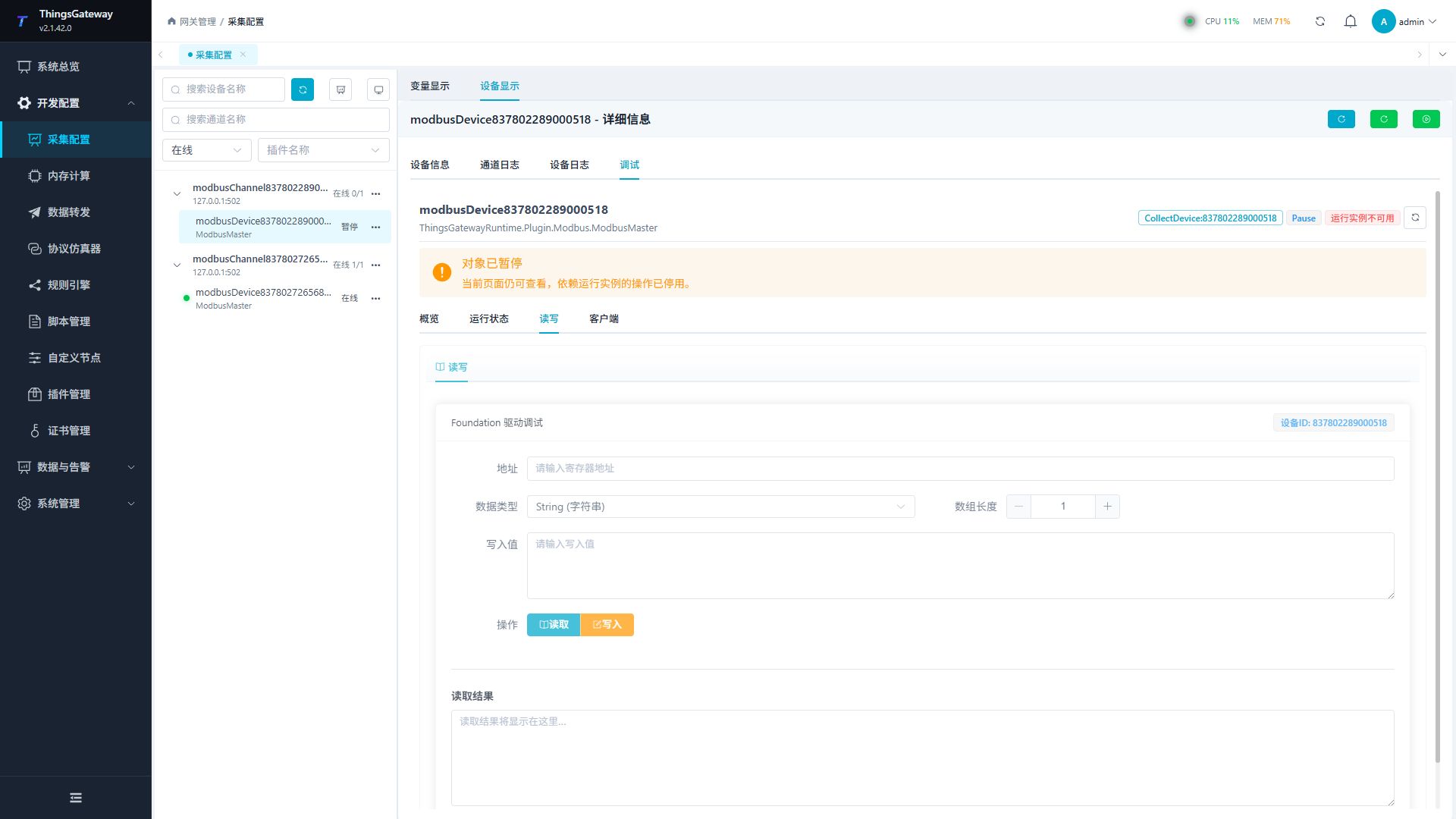
Troubleshoot in this order:
- Read the reason in the notice, such as "Object paused" or "Initialization failed."
- Return to the device or forwarding-target details and confirm that the object is enabled and is not a standby instance.
- Check the channel, device, or target logs and correct connection or initialization errors.
- After runtime operation is restored, refresh the debug workspace and begin with a read-only query.
Supported Debug Types
After selecting a device or forwarding target, the Debug tab displays the panels supported by its plugin. The current version provides 12 composable general modules and 56 protocol-specific panels. Foundation plugins without a dedicated page still receive general read/write, client, and message-monitoring modules.
| Category | Protocol-specific Panels | Main Purpose |
|---|---|---|
| Instrumentation and control modules | DAM3601, DL/T 698, DTSU6606, EC Fan | Read temperature or electrical snapshots, run APDU diagnostics, inspect speed, and apply controlled settings. |
| PLC and industrial control | Fatek Program Port, Fuji SPH, GE SRTP, Inovance Computer Link, Keyence Nano, Mitsubishi A3C/FX Links/FX Serial, Modbus C20, Omron Host Link C-Mode, Panasonic Mewtocol, Toyo PUC, Yaskawa Memobus, Yokogawa Link | Read PLC state, clock, model, and special modules; perform write, run, stop, or reset operations according to permissions. |
| Robots and CNC | ABB Web API, Estun, Efort, FANUC CNC 0i, FANUC Robot Interface, Hyundai Tracking, KUKA Controller TCP, KUKA Variable Proxy, Yamaha RCX, Yaskawa YRC1000, Yaskawa YRC High Ethernet | Inspect robot state, coordinates, programs, and I/O; control programs, servos, motion, macro variables, or I/O only with dangerous permission. |
| Industrial protocols | CAN, IEC 104 Master, IEC 61850 Client/Server, Open Protocol, SECS-I, HSMS/SECS-II | Diagnose frames, general interrogation, models, datasets, control blocks, tightening results, and SECS transactions. |
| Barcode, identification, and RFID | Keyence DL-EN1, Keyence SR-2000, SAM identity-card module, Turck RFID, barcode/event monitor | Run explicit sensor or scanner commands, read tags or cards, and restrict sensitive-information display. |
| Messaging and platforms | MQTT Client/Server, Kafka, RabbitMQ, ThingsBoard, HTTP Webhook, ZeroMQ, OPC UA Client/Server, OPC DA, Gateway MQTT Client/Server, SyncBridge, Custom Packet, event monitor | Publish and subscribe, inspect server sessions, browse nodes, manage certificates and cache, synchronize data, and diagnose complete packets. |
Dedicated Gateway MQTT collection and SyncBridge use specialized debug pages instead of mounting the general MQTT debug form. See Dedicated Gateway MQTT Collection and SyncBridge Gateway Synchronization.
OPC UA Server Certificate Stores
The OPC UA Server "Certificate Stores" tab maintains trust sources for client application and user certificates. Go to "Development Configuration → Data Forwarding", select an OpcUaServer target, and open its "Debug" tab. Only users with debug:sensitive can view certificate subjects, issuers, thumbprints, and validity periods.
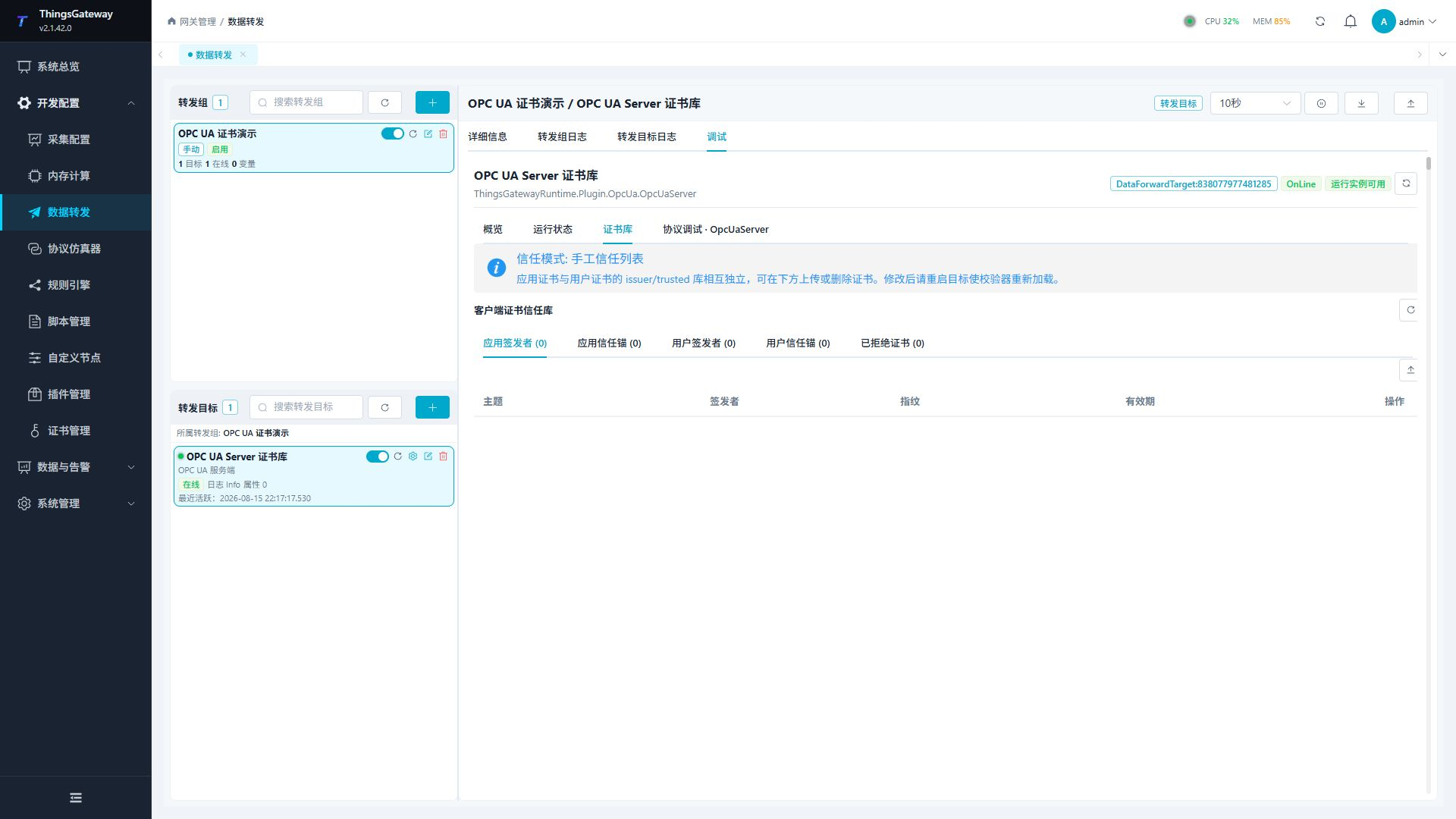
Configuration Steps
- Edit the OPC UA Server target and confirm the service address (default
opc.tcp://127.0.0.1:48410), server certificate name, and security policy. Enable "Allow certificate login" when clients use user certificates. - Select a client certificate trust mode.
ManualTrustListis maintained through the four application/user issuer/trusted stores. InSpecifiedCA, select "Trusted client CA" to accept only client application and user certificates issued by that CA; when it is blank, valid client certificates are trusted automatically. - Save the target, open "Debug → Certificate Stores", and use the refresh button to load the five fixed stores. Use the returned store name and thumbprint as the operation identifiers; do not infer physical paths.
- In
ManualTrustList, select a store and click the upload icon. Choose a.cer,.crt,.der, or.pemfile larger than zero and no larger than 1 MiB. - To delete a certificate, click the row delete icon, check the subject in the confirmation dialog, and confirm. Deletion is identified by thumbprint and does not remove other certificates in the store.
| Store | Contents | Manual trust-list mode | Specified-CA mode | Permission |
|---|---|---|---|---|
| ApplicationIssuer | Issuer certificates for client applications. | Upload and delete. | Read-only; the selected CA manages the chain. | Upload debug:write; delete debug:dangerous. |
| ApplicationTrusted | Trusted client application certificates. | Upload and delete. | Read-only; certificates are not maintained individually. | Upload debug:write; delete debug:dangerous. |
| UserIssuer | Issuer certificates for user certificates. | Upload and delete. | Read-only; the selected CA manages the chain. | Upload debug:write; delete debug:dangerous. |
| UserTrusted | Trusted user certificates. | Upload and delete. | Read-only; certificates are not maintained individually. | Upload debug:write; delete debug:dangerous. |
| Rejected | Certificates rejected by the SDK or server. | No upload; delete only. | No upload; delete only. | Delete debug:dangerous. |
In SpecifiedCA, the four issuer/trusted stores show read-only hints; Rejected can always be deleted with dangerous permission. Certificate-store query and refresh are sensitive-data operations, so do not combine debug:sensitive with a general write role. When the server certificate is CA-issued, fill in "Server issuing CA" so clients can build the complete certificate chain.
New Industrial Protocol Debug Pages
The following 37 pages are the new root-level protocol-specific pages in the current version. The common path is "Development Configuration → Collection Configuration → Device Display → Device Details → Debug → Protocol". Run the read-only operation in each row first, then perform a write or control. Buttons are hidden by permission, and dangerous buttons also require a confirmation dialog before sending. Address, station, program-number, and array formats must follow the device manual or field point table.
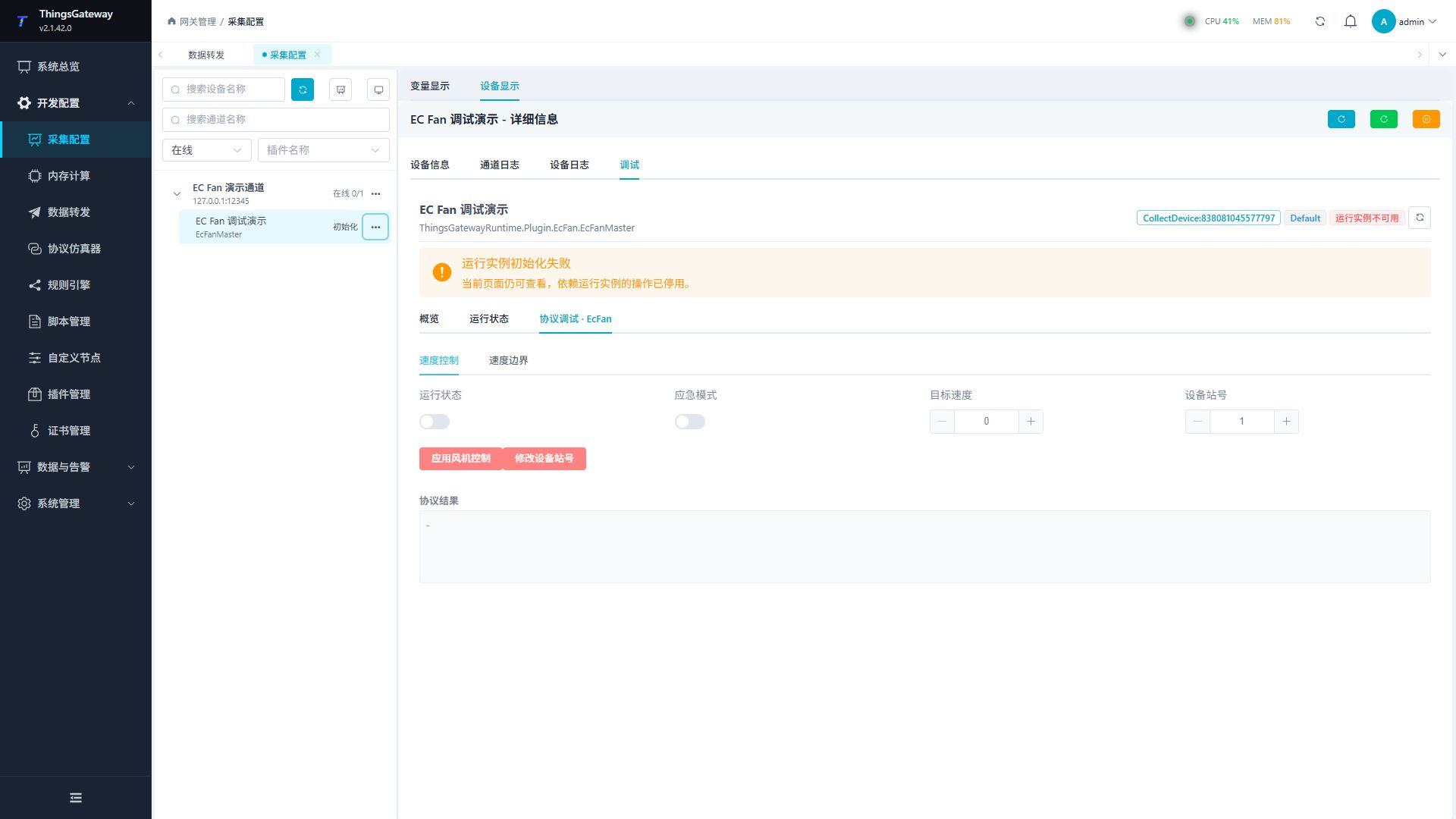
| Page | Read-only operations and main inputs | Writes, controls, and confirmation |
|---|---|---|
| ABB Web API | Overview, I/O, joint target, event log, and user-symbol queries; network, mechanical unit, I/O unit/signal, log count, and user-symbol inputs. | Raw requests use path, Content-Type, and body. GET is query; POST requires debug:dangerous and confirmation. |
| DAM3601 | Read the full temperature snapshot; no extra input. | No write operation. |
| DL/T 698 | Read an OAD list; enter OADs such as 20-00-02-00. | Enter OAD and APDU hex to exchange a clear APDU; arbitrary APDU requires debug:dangerous and confirmation. |
| DTSU6606 | Read the complete electrical snapshot; no extra input. | No write operation. |
| EC Fan | Read emergency, minimum, and maximum speeds. Enter run/emergency state, target speed (0-4095), and station (1-30). | Apply speed control and set station require debug:dangerous and confirmation. |
| Efort Robot | Refresh the robot status snapshot; no extra input. | No write operation. |
| Estun Robot | Refresh status; enter project name and global speed. | Start/stop, reset error, load/unload project, set speed, and reset command status require dangerous permission and confirmation. |
| FANUC CNC 0i | Read machine status, macros, tool offsets/groups, PMC/raw memory, and program directory; enter numbers, lengths, addresses, function codes, paths, block size, and program text. | Macro/tool/PMC/raw-memory writes and program write/select/start/delete require dangerous permission and confirmation. |
| FANUC Robot Interface | Read snapshots and bit/word I/O; enter region, address, length, and JSON arrays. Pose input includes Cartesian/Joint, address, user frame/tool, and pose arrays. | Bit/word I/O and pose writes are robot control and require dangerous permission and confirmation; UI/SI bit regions are read-only. |
| Fatek Program | Read PLC status; no extra input. | PLC run and stop require dangerous permission and confirmation. |
| Fuji SPH | Select a CPU control mode and view the result. | CPU control requires dangerous permission and confirmation. |
| GE SRTP | Read PLC clock and current program name; no extra input. | No write operation. |
| Hyundai Tracking | Refresh the tracking frame; enter X/Y/Z and Rx/Ry/Rz increments. | Writing tracking increments affects robot pose and requires dangerous permission and confirmation. |
| IEC 104 Master | Test link and run general interrogation; enter qualifier and common address. | Clock synchronization is a normal write. Remote control uses type, address, single/double state, and timestamp; select and execute require dangerous permission and confirmation. |
| Inovance Computer Link | Read PLC type; no extra input. | PLC run and stop require dangerous permission and confirmation. |
| Keyence DL-EN1 | Enter sensor command text/array and inspect the response. | An arbitrary sensor command requires debug:dangerous and confirmation. |
| Keyence KV Upper Link | Read PLC type/mode, annotation, and expansion unit; enter device address, unit, start address, word count, and hex words. | Clear CPU error, set controller time, and write expansion unit require dangerous permission and confirmation. |
| Keyence SR-2000 | Read barcode, version, command/error state, and record; enter terminal number (0-255) and value for I/O. | Set output and indicator toggles are writes with confirmation. Reset, lock/unlock, and arbitrary command require dangerous permission and confirmation. |
| KUKA Controller TCP | Enter one variable name/value per line and read or write; enter a program name. | Batch variable write and start/reset/stop program require dangerous permission and confirmation. |
| KUKA Variable Proxy | Enter one variable name and value and read it. | Variable write requires dangerous permission and confirmation. |
| Melsec A3C | Read PLC type; no extra input. | Remote run and stop require dangerous permission and confirmation. |
| Melsec FX Links | Read PLC type; no extra input. | Remote run and stop require dangerous permission and confirmation. |
| Melsec FX Serial | View the PLC type result. | PLC activation requires dangerous permission and confirmation. |
| Modbus C20 | Enter station, file address, start address, and length to read waveform files; enter device address for spectrum, frequency, and setting reads. | Query-only page. |
| Omron Host Link C-Mode | Read PLC type and mode; no extra input. | Query-only page. |
| Open Protocol | Read parameter sets, jobs, tools, and controller time; enter parameter-set ID, job ID, revision, tool state, and time. | Selecting parameter/job, setting tool, subscriptions, controller time, and alarm acknowledgement require their displayed write/dangerous permission and confirmation. |
| Panasonic Mewtocol | Read PLC model; no extra input. | No write operation. |
| SAM Card | Read module number and status. | Search/select/read card summary reveals identity data, uses debug:sensitive, and requires confirmation; do not grant it to a general debug role. |
| SECS-I | Enter a SECS-I message or hex payload and inspect the exchange. | Message exchange is a write and requires debug:write plus confirmation. |
| HSMS/SECS-II | Test the link; enter a SECS-II message and comma-separated SVIDs. | Message exchange requires debug:write plus confirmation; SVID-name lookup is read-only. |
| Toyo PUC | Enter a random WORD address list and read values. | No write operation. |
| Turck RFID | Read tag inventory information; no extra input. | No write operation. |
| Yamaha RCX | Read motor, mode, joint, and emergency status; enter I/O group. Enter program/task on the program tab and axis/robot/send-only/raw command on the control tab. | Reset, run/stop/load program, jog, and raw command require dangerous permission and confirmation. |
| Yaskawa Memobus | Enter extended-register addresses and hex words; symbolic-register addresses are read-only. | Extended-register write requires dangerous permission and confirmation. |
| Yaskawa YRC1000 | Read alarms, joints/pose, status, jobs, user frames, and variables; enter coordinate, external-axis flag, frame, variable type/address. | I/O, hold/servo/interlock/mode, program, motion, and raw command controls require dangerous permission and confirmation. |
| Yaskawa YRC High Ethernet | Read alarms, status, jobs, pose, torque, management data, variables, and position variables; enter alarm type/task, addresses, variable type, and lengths. | Hold, reset/cancel error, servo, interlock, program, variable/I/O writes, and raw commands require dangerous permission and confirmation. |
| Yokogawa Link | Enter random bit/word addresses and values; read PLC status, system information, and clock. Special-module input includes unit, slot, word position/count, and hex words. | PLC run/stop, module reset, and random/special-module writes require dangerous permission and confirmation. |
When a dedicated page shows "Runtime instance unavailable", its form and previous results remain visible but commands requiring a live connection are disabled. Operation logs record dangerous and sensitive debug endpoints; leave the page and restore the field log level after commissioning.
Foundation Read/Write Debugging
Foundation is a general-purpose read/write debugging interface, which is displayed by common acquisition drivers like ModbusMaster. It is suitable for verifying whether the address, data type, length, and write values match those of the field device.
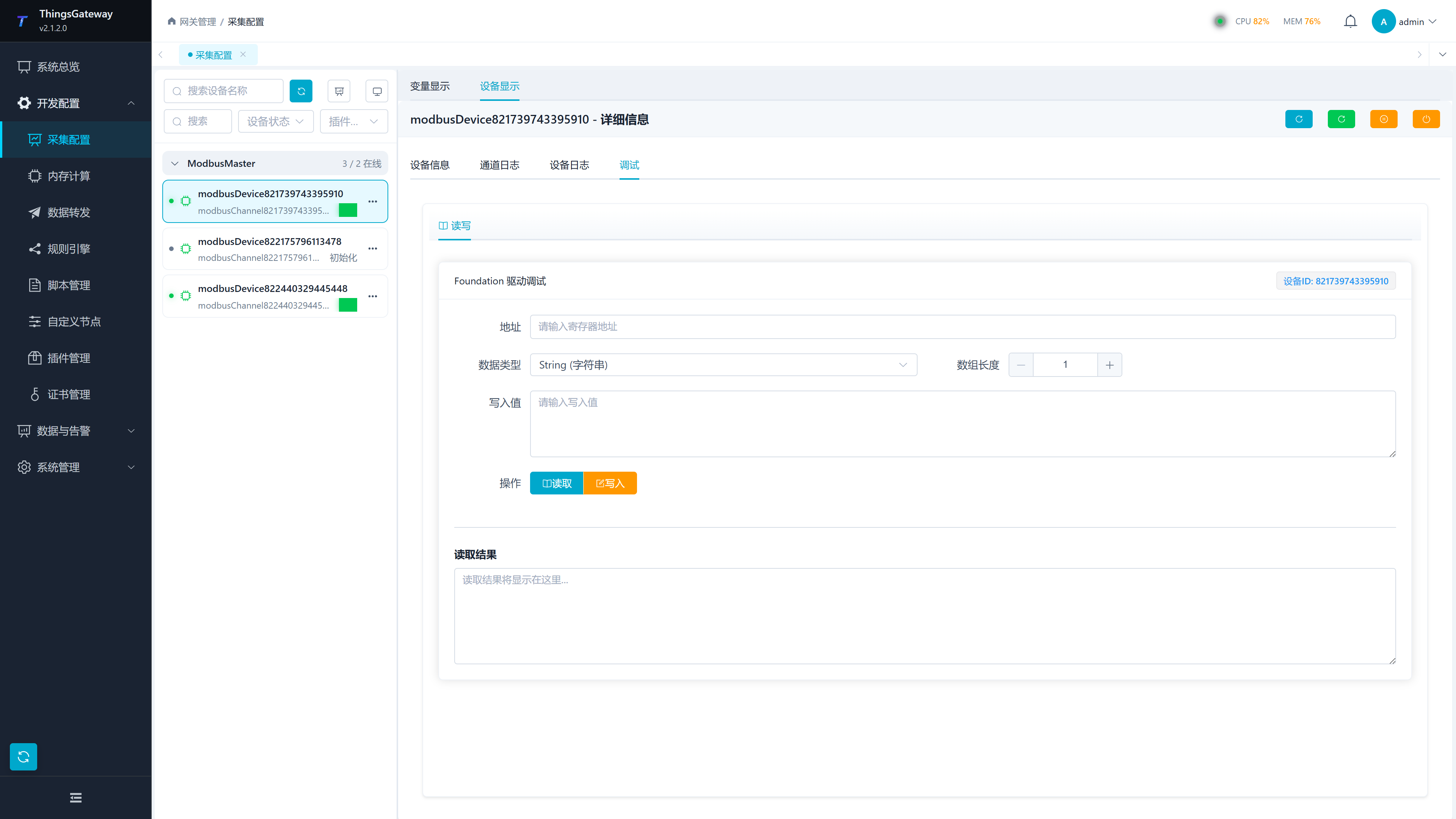
| Configuration Item | Description |
|---|---|
| Address | The register, node, or protocol address to be read or written. The address format is determined by device plugins, such as Modbus register addresses, PLC addresses, or custom protocol addresses. |
| Data Type | The type of data used when reading or writing. The page provides String,Boolean,Byte,Int16,UInt16,Int32,UInt32,Int64,UInt64,Float,Double, Decimal. |
| Array Length | Used for batch reading of consecutive addresses. Normal single-point read stays at 1. |
| Write Value | The value sent when the write is executed. The filling format must match the data type; Array or complex types should be filled in according to plugin requirements. |
| Read | Read device data according to the address, data type, and length entered in the form. |
| Write | Send the "write value" to the address filled in the form. Before execution, verify variable permissions and allow on-site devices to write. |
| Read Results | Displays the most recent read result, error messages, or return values. |
Operational Advice:
- First, select the online device, then proceed to debugging.
- First, use read-only addresses for read verification, confirming that the channel, station number, timeout, and address format are correct.
- Before writing, confirm that the on-site equipment is in a state where remote control is allowed.
- If the read fails, first check the "Device Log" and "Channel Log," then check the channel IP, port, serial port parameters, station number, timeout, and address.
Before writing, it is recommended to confirm item by item:
| Check items | Pass the standard |
|---|---|
| Address | has been verified to read normally using the same address or adjacent read-only addresses. |
| Data type | Write type consistent with PLC or meter point tables, with no disputes over byte order, scale conversion, or decimal places. |
| Write values | within the allowable range on site and will not trigger protection, interlocks, or malfunctions. |
| Permissions | Variable read and write permissions, RPC write switches, and external system permissions all meet field requirements. |
| Callback | When confirming the write is effective, the same address or feedback point can be read to verify the results. |
MQTT Client Debugging
MQTT Client debugging includes the "Publish Message" and "Status & Subscription" tabs. It can appear either in the MQTT acquisition client or in the MQTT Client data forwarding target.
Post Message
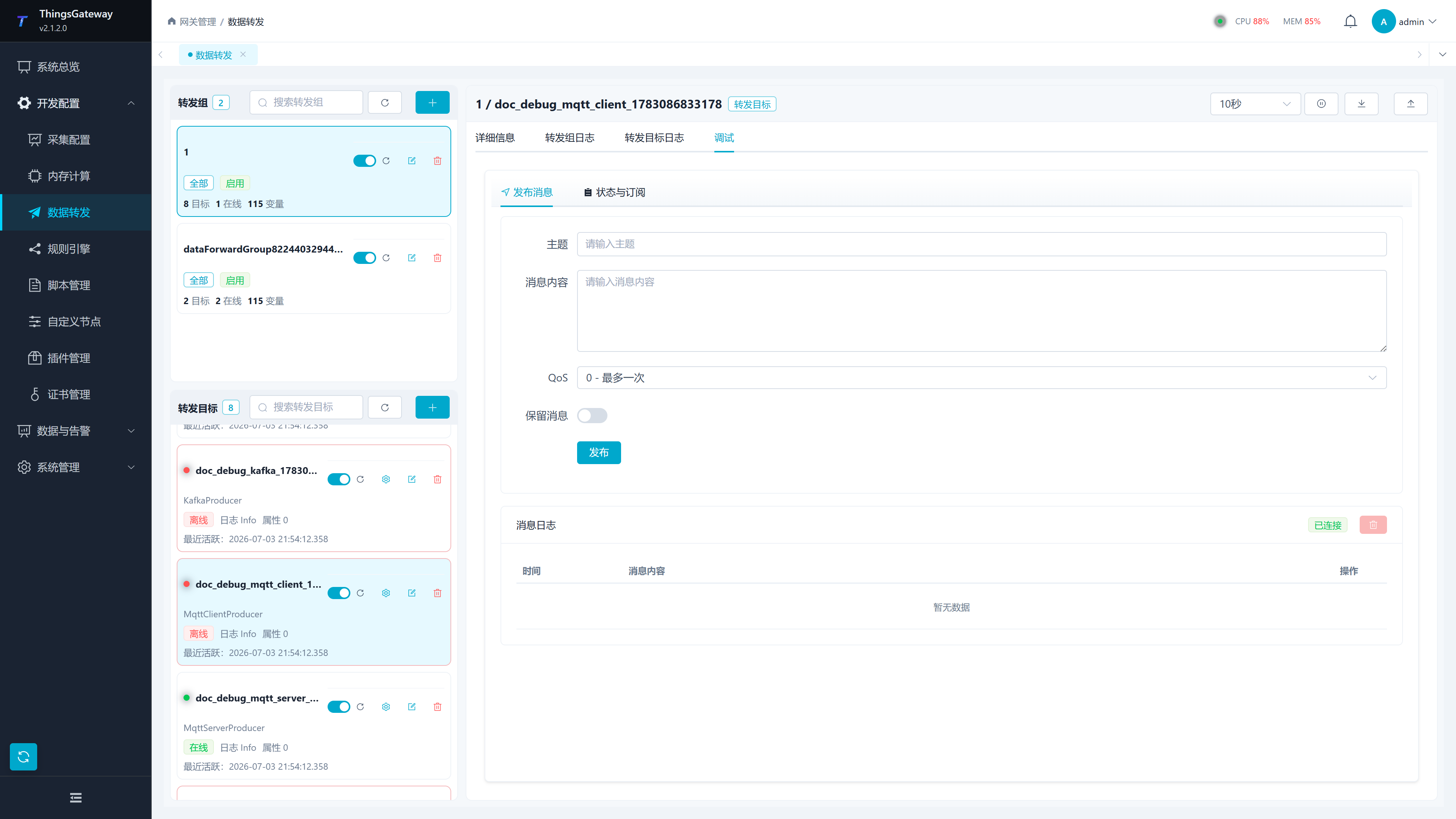
| Configuration Item | Description |
|---|---|
| Topic | The Topic to be published to the broker. It is recommended to use on-site agreed test topics to avoid affecting production subscribers. |
| Message Content | Published Payload. Can be filled with plain text or JSON strings. |
| QoS | release quality levels: 0 - at most one, 1 - at least one, 2 - exactly one. |
| Retain messages | Whether to set the MQTT Retain flag. After activation, the broker may save the last retention message, so be cautious in your production environment. |
| Publish | Call the MQTT publishing interface for the current device or target. Success depends on the broker's connection status, authentication, Topic permissions, and network. |
| Message Log | Displays the status of the debugging WebSocket connection, the time of sending and receiving messages, and the message content. |
Status and Subscription
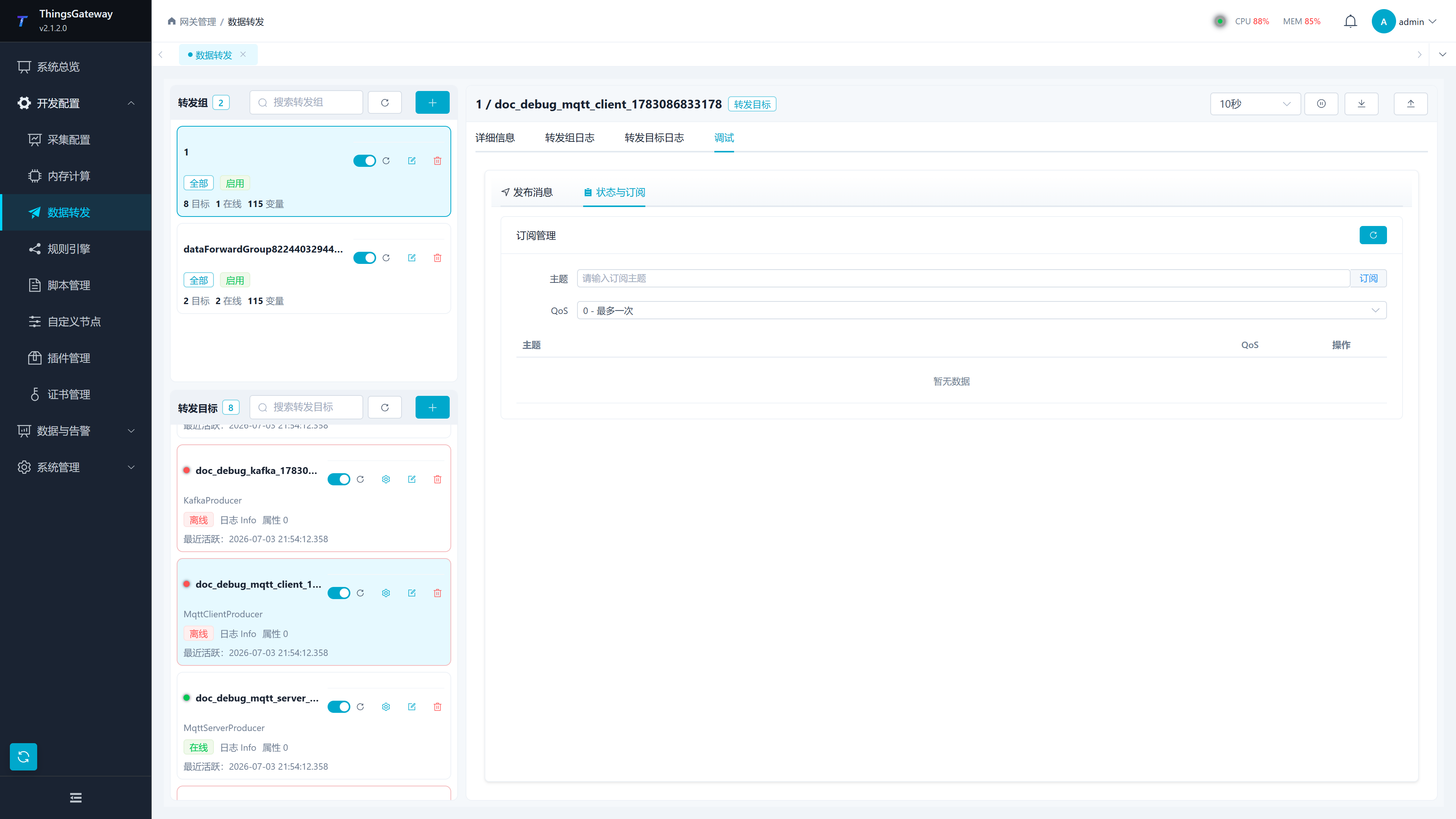
| Configuration Items | Description |
|---|---|
| Connection Status | Displays whether the client has connected to the Broker, used to determine whether publishing and subscribing are ready for communication. |
| Topic | The topic you want to subscribe to, you can enter either a regular theme or a wildcard theme. |
| QoS | QoS level used for subscriptions. |
| Subscribe | Add the current topic to the subscription list. |
| Subscription List | displays subscribed topics, QoS, and unsubscribe actions. |
| Refresh | Regain the current subscription list. |
| Cancel | Unsubscribe to a specified topic. |
Inspection Order:
- Confirm that the IP address, port, connection type, client ID, username, and password in the target configuration match the broker.
- When using TLS, check the certificate name, CA, target host, and certificate revocation check settings.
- If there is no message on subscription, confirm whether the topic matches, whether the broker allows the account to subscribe, and whether the production side actually publishes.
- If publishing fails, first check the debug page message log, then look at the "forwarding target log" or "device log."
MQTT Server Debugging
MQTT Server debugging includes the "Publish Message" and "Status Monitoring" tags. It is suitable for verifying whether MQTT server plugins are listening, whether clients are accessed, and whether theme subscriptions exist.
Publish Message
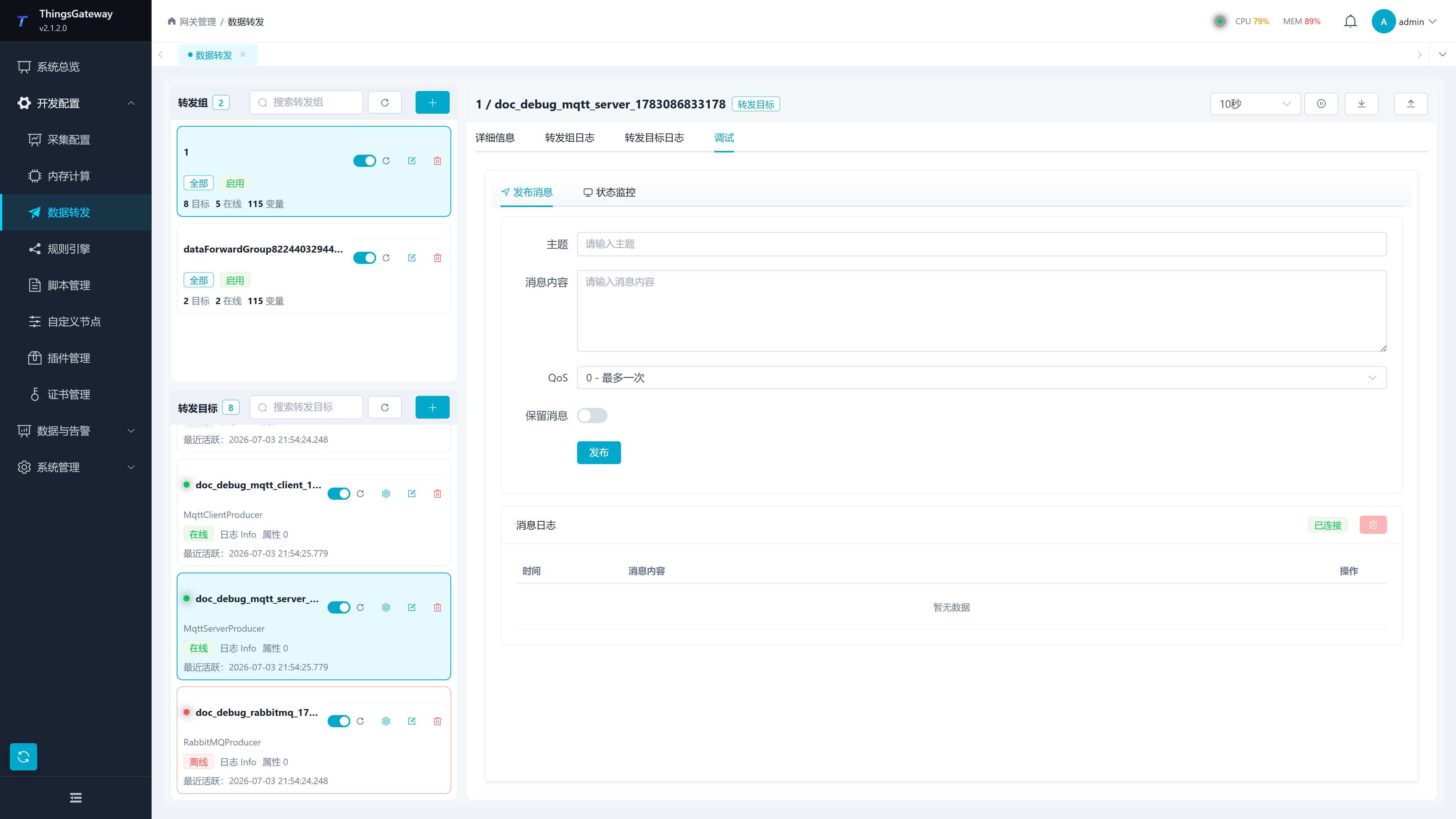
| Configuration Item | Description |
|---|---|
| Topic | The server publishes a topic to an already connected client. |
| Message Content | Payload to be sent to the client. |
| QoS | Quality Rating. Client-side subscription QoS and server-side release QoS jointly affect the final delivery level. |
| Reserved message | Whether to publish as a reserved message. |
| Publish | Send messages from the current MQTT Server plugin to the client. |
State Monitoring
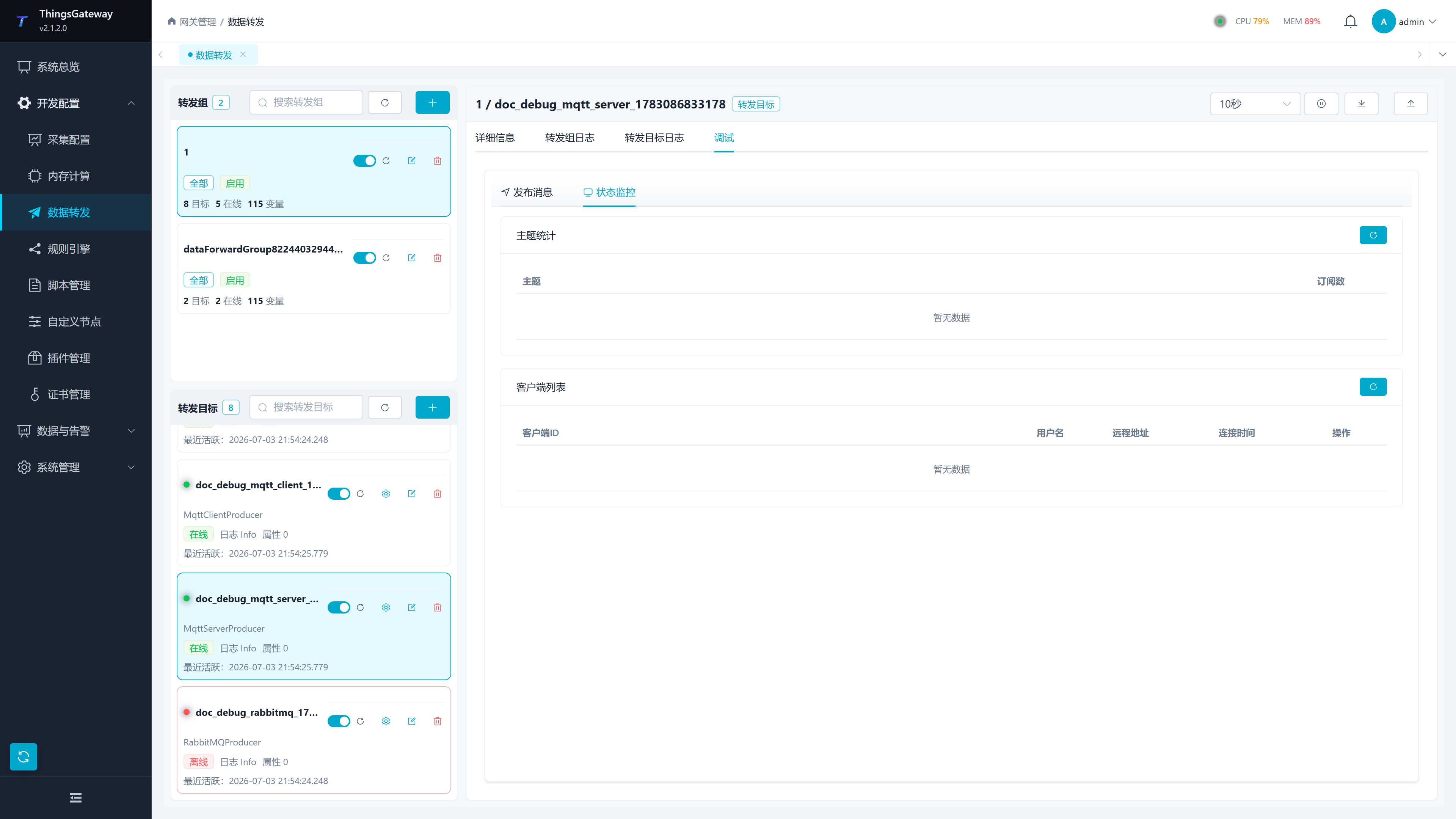
| Zone | Description |
|---|---|
| Topic Statistics | Displays the topic name and subscription count, used to determine whether the client subscribed to the intended topic. |
| Client List | displays ClientId, username, remote address, and connection time. |
| Kick out the client | Disconnect the connection to the specified client. Before implementation, it should be confirmed that it will not affect production communications. |
| Refresh | Reload topic statistics or client lists. |
Kafka Debugging
The Kafka debug page is used to publish messages to a specified Topic, suitable for verifying Kafka addresses, authentications, topic permissions, and serialized content.
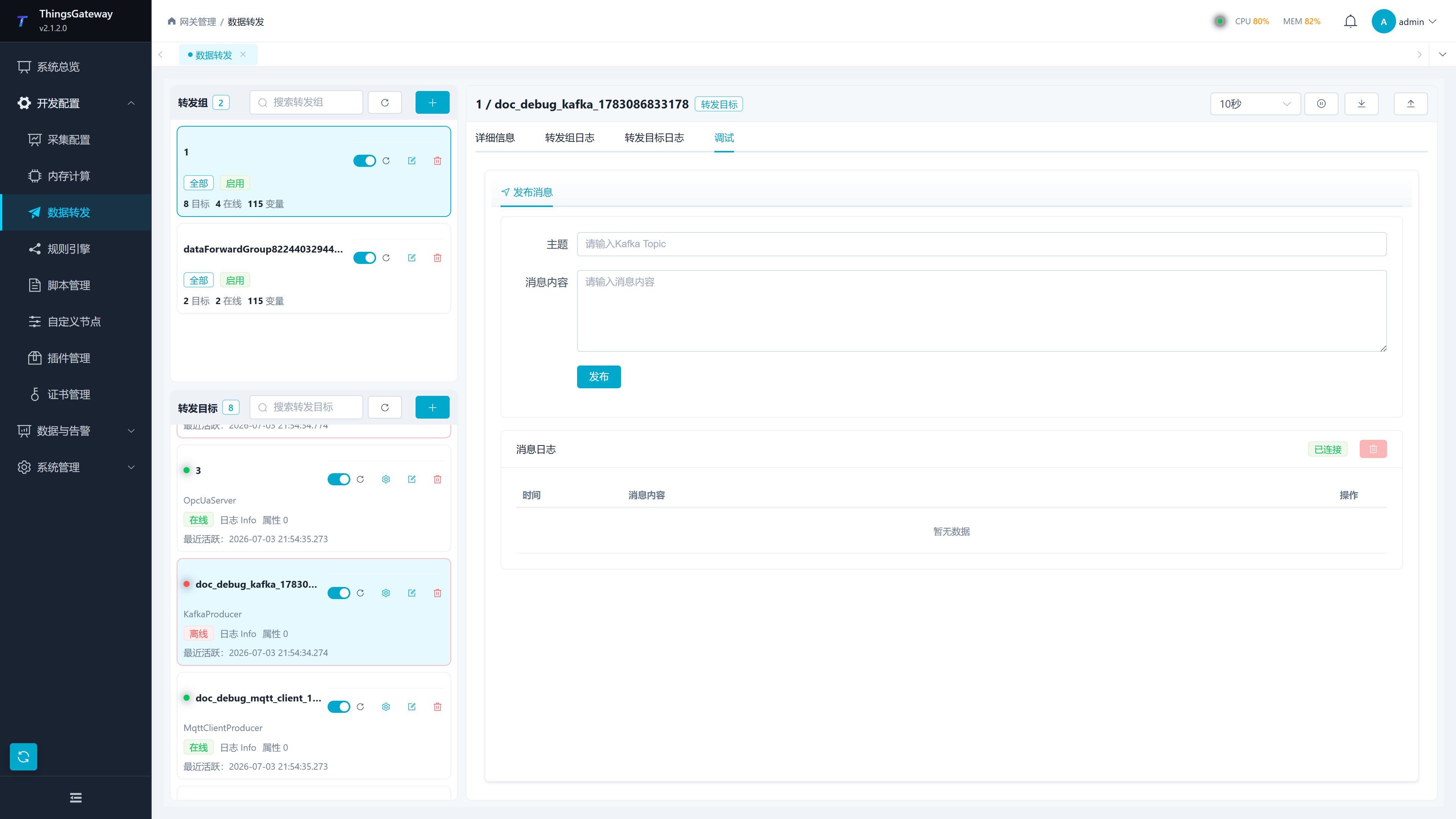
| configuration items | description |
|---|---|
| Topic | Kafka Topic name. By default, variable topic templates can be used in data forwarding targets, and test topics can be manually filled in during debugging. |
| Message Content | The message body to be sent. It is recommended to first send a small JSON or plaintext to verify connectivity. |
| Publish | Call Kafka to publish interface. On failure, check service addresses, security protocols, SASL mechanisms, usernames, passwords, and posting timeouts. |
| Message Log | displays the status of the WebSocket debugging and debug messages. |
Common Kafka target attributes:
| Configuration Item | Description |
|---|---|
| Service Address | Kafka Bootstrap Address. Multiple brokers are filled in according to the Kafka connection string agreement. |
| Release Timeout | Single Release Wait Time, in milliseconds. Increase the size appropriately during slow network or busy Kafka. |
| Security protocols | Kafka connection security protocols. Common uncertified intranets Plaintext; Choose between enabling authentication or encryption according to cluster requirements. |
| SASL Mechanism | The authentication mechanism Kafka uses SASL must be consistent with the cluster configuration. |
| Username/Password | SASL verified account. Leave SASL blank when not enabled. |
| Variable, device, alarm topic template | Topic for writing different data types. After the template is expanded, the topic must allow the current account to be written. |
| Enable offline caching / memory queue limits / concurrent upload count | Control reposts, backlog caps, and upload concurrency after failed sends. When the order is strict, the number of concurrent uploads should be kept at 1. |
RabbitMQ Debugging
The RabbitMQ debug page is used to publish messages by Routing Key. Target connection parameters are configured in the data forwarding target drawer.
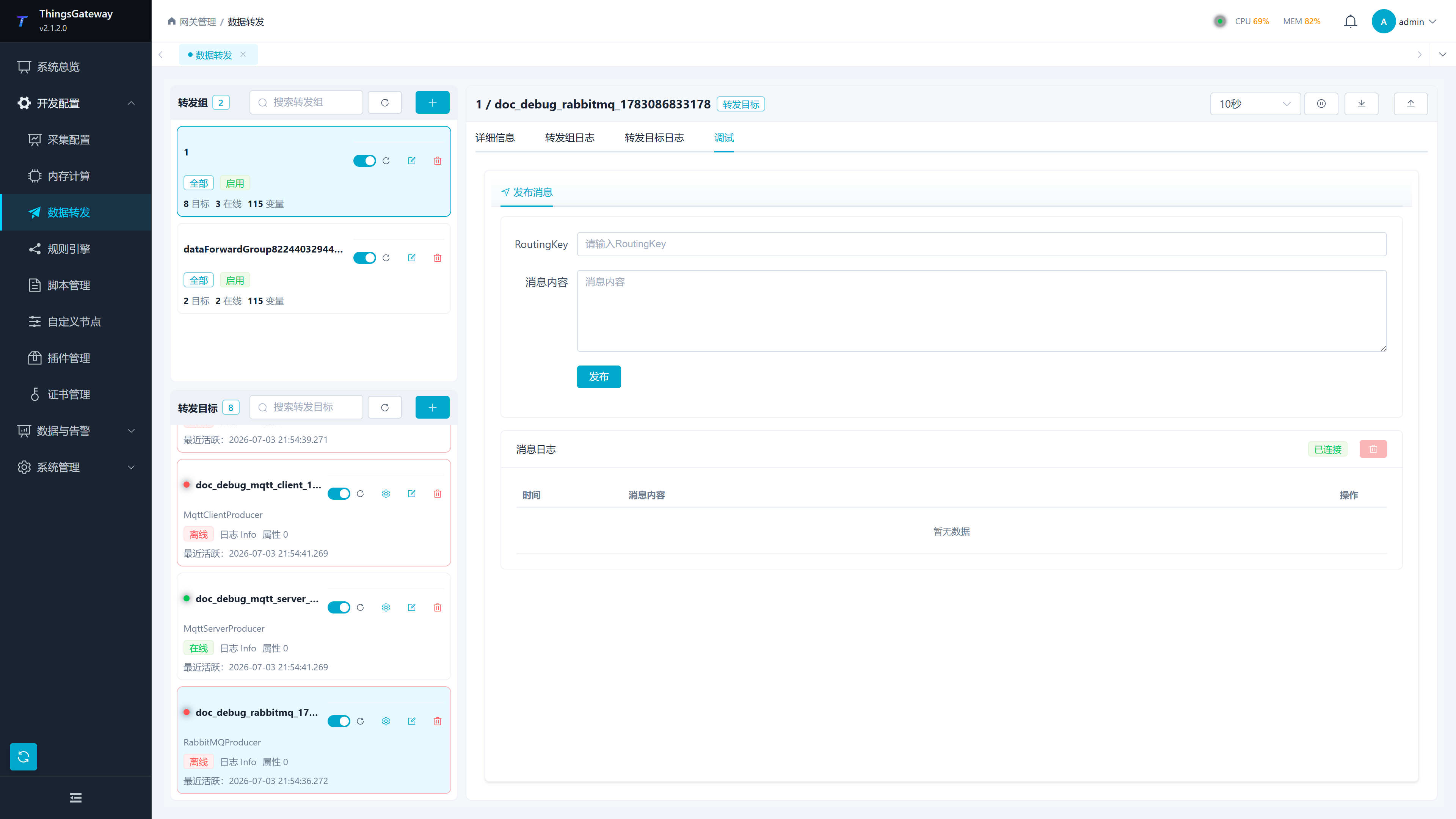
| Configuration Items | Description |
|---|---|
| Routing Key | The routing key used to publish messages. It should match the switch type and queue binding rules. |
| Message Content | Payload to be sent. |
| Publish | Call the RabbitMQ publishing interface. Check switches, queues, authentication, and networks when failures occur. |
| Message Log | displays debug connections and message records. |
Common RabbitMQ Target Attributes:
| Configuration Items | Description |
|---|---|
| IP Address / Port | RabbitMQ Service Address and Port, Default Port is usually 5672. |
| Username/Password | RabbitMQ account and password. |
| Virtual Host | RabbitMQ Virtual Host. The account must have write permissions for this virtual host. |
| Switch Name | The name of the switch used for publishing. |
| Switch Type | Switch type, such as direct,topic,fanout, headers, must match the actual switch. |
| Declaring queue / declaring switch | Whether the plugin automatically creates queues or switches. When a unified queue specification exists in the production environment, it is usually closed. |
| Release Timeout | Single Release Wait Time, in milliseconds. |
MQTT Forwarding Target Configuration Drawer
The plugin attributes of data forwarding targets are maintained in the target configuration drawer. After selecting the MQTT Client Producer, the drawer will display MQTT connections, TLS, authentication, QoS, topic templates, offline caching, and queue parameters.
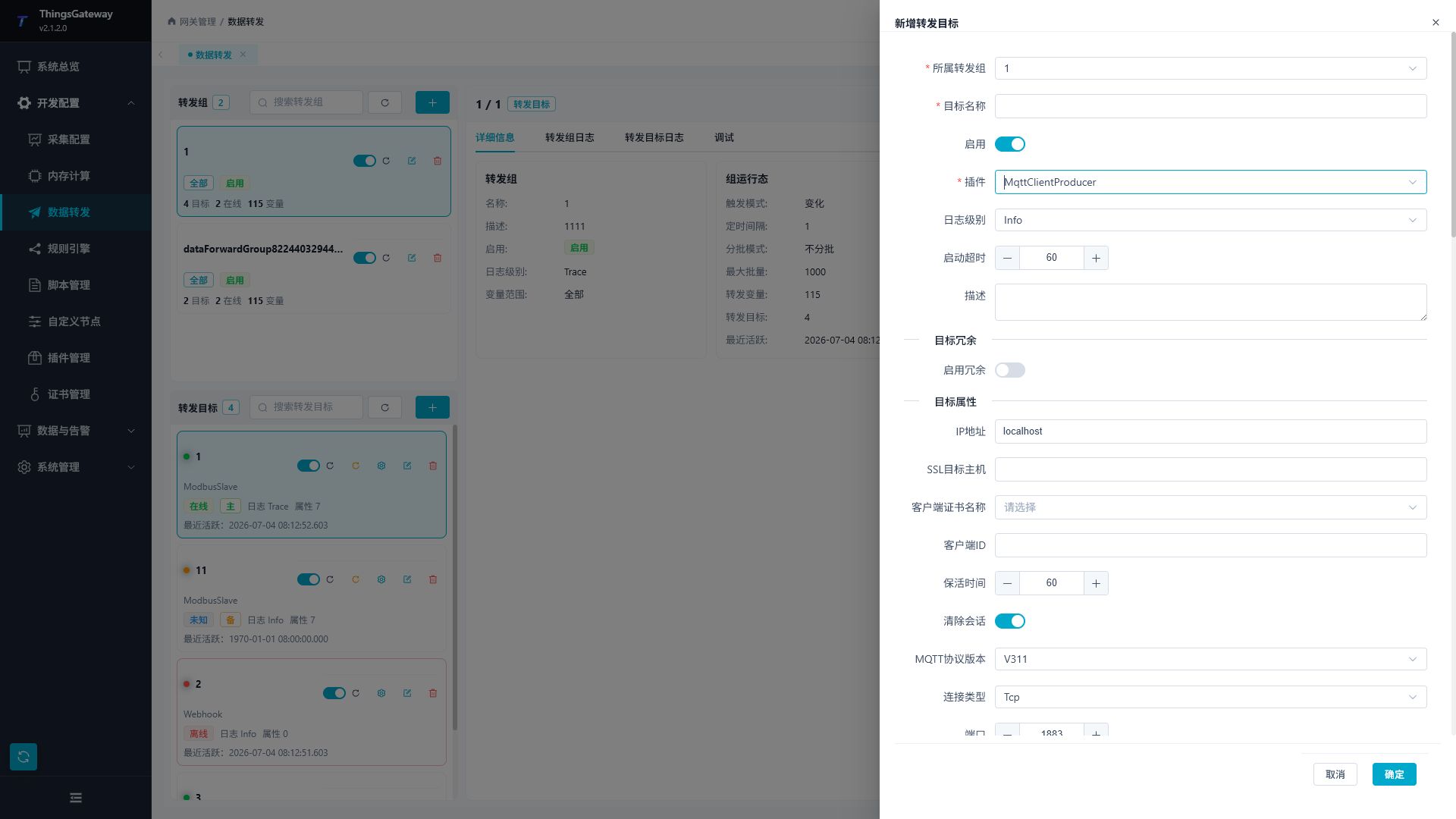
| Configuration Items | Description |
|---|---|
| Target Name | Current Forwarding Target Name, which should be unique within the same forwarding group. |
| Enable | to control whether the target is running. Only after enabling will the runtime target be created and the corresponding debugging entry point displayed. |
| Plugins | Select data forwarding plugins, such as MqttClientProducer,MqttServerProducer,KafkaProducer, RabbitMQProducer. |
| Log level | Control the detail of target operation logs. During the debugging phase, you can temporarily use Debug or Trace, and restore to Info after stabilization. |
| Startup timeout | Target start wait time, measured in seconds. If external service connections are slow, the size can be increased appropriately. |
| IP address / port / connection type | MQTT Broker address, port, and connection method. WebSocket connections also require the WebSocket path. |
| Client ID / Survival Time / Session Clearing | MQTT client identity, heartbeat keep-alive, and session retention policies. |
| Enable SSL/TLS certificate configuration | TLS connection parameters, including target hostname, client certificate, CA, protocol, and certificate revocation check. |
| Username/password | Broker authentication information. |
| QoS Level / Retain Message | Default release QoS and Retain policies. |
| RPC writes Topic / Data Request Topic / RPC scripts | External system reverse writes, active request snapshots, and custom RPC processing usage. |
| Upload topics for devices, variables, alarms, plugin events | Topic templates for different data types. If the topic is empty, the corresponding data type will not be uploaded. |
| Device, variable, alarm, plugin event entity script | reassembles corresponding data before uploading. The new fields output by the script can continue to be used for Topic templates and upload templates. |
| Upload template configuration | Open template pop-up to separately maintain message content for variables, devices, alarms, and plugin events. Use the default JSON when left blank. |
| JSON indentation formatting / JSON ignores Null | default JSON output format control. |
| Enable offline caching / maximum number of rows in cached files | Local caching policy when external services are unavailable. |
| Upload shard size / memory queue limit / number of concurrent uploads | Control reissue batches, memory backlog, and concurrent uploads. |
When coordinating MQTT forwarding targets, it is recommended to first use the minimum template to verify the link. For example, fill in the variable Topic ThingsGateway/Variable/${DeviceName}, and only keep the variable name and value when uploading the template; After confirming the Broker can receive the message, add time, quality code, extension field, or business field. The placeholders in both the topic template and upload template must come from the upload data or entity script output. Writing the wrong name will cause the topic or message body to fail to generate.
Webhook targets the same template entry point as MQTT, but the Topic template represents the final requested URL. When configuring a webhook, the variable, device, alarm, or plugin event Topic should be filled in as the actual interface address; The data type that does not need to be sent keeps the topic empty.
OPC UA and OPC DA Debugging
OPC debugging is divided into "node browsing" and "subscription management." OPC UA has a similar page structure to OPC DA, but node attributes and browsing results are returned by the corresponding server.
| Function | Description |
|---|---|
| Node Tree | Browse the server address space. Expandable nodes, select nodes, and view details. |
| Node Details | Displays information such as NodeId, browsing name, display name, current value, status code, and timestamp. |
| Read Node | Perform a read on the selected node. |
| Write nodes | Assign values to writable nodes. Confirm permissions and on-site status before writing. |
| Exporting Excel | Exports selected nodes as Excel for offline variable organization. |
| Import the database | Import the selected node as a variable configuration. After importing, you still need to check variable names, addresses, data types, and collection cycles. |
| Create a Subscription | Enter one or more NodeIds to create a subscription group. |
| Message Log | Displays subscription push messages to help confirm whether change notifications have arrived. |
IEC61850 Debugging
IEC61850 The Master and Server debug pages cover model browsing, read/write, subscription status, client status, and SOE queries. Before on-site use, confirm the device model, logical devices, logic nodes, functional constraints, and certificate/TLS configuration.
| Debug Page | Key Features |
|---|---|
| IEC61850 Master | Connection Status, Model browsing, node read/write, RCB subscription status, GOOSE subscription status, dataset operations, control operations, SOE events. |
| IEC61850 Server | Server status, data model, client connections, attribute read/write, variable mapping statistics, SOE events. |
Common precautions:
- Object references and functional constraints must align with the server-side model.
- Before controlling operations, the control model, permissions, and on-site interlock conditions should be confirmed.
- SOE tabs require the device or server to generate event records; If there are no events, the list will remain empty.
- TLS scenarios require maintaining certificates first in "Certificate Management," then selecting them in the plugin properties.
- Deleting a dataset is a dangerous operation and requires a second confirmation. Continue only after verifying the reference and confirming that no production report depends on it.
CAN and ZeroMQ Debugging
| Type | Configuration Items | Description |
|---|---|---|
| CAN | CAN ID | Supports hexadecimal or decimal identifiers. |
| CAN | data | hexadecimal byte strings, such as 01 02 03 04. |
| CAN | Extended Frame | Control whether to use the extended frame format. |
| ZeroMQ | Topic | Release Topic. |
| ZeroMQ | Payload | Publishing. |
Test Data Generation
"Test Data" is located in the "Show More" menu at the top right of the collection configuration page, used to generate test channels, devices, and variables.
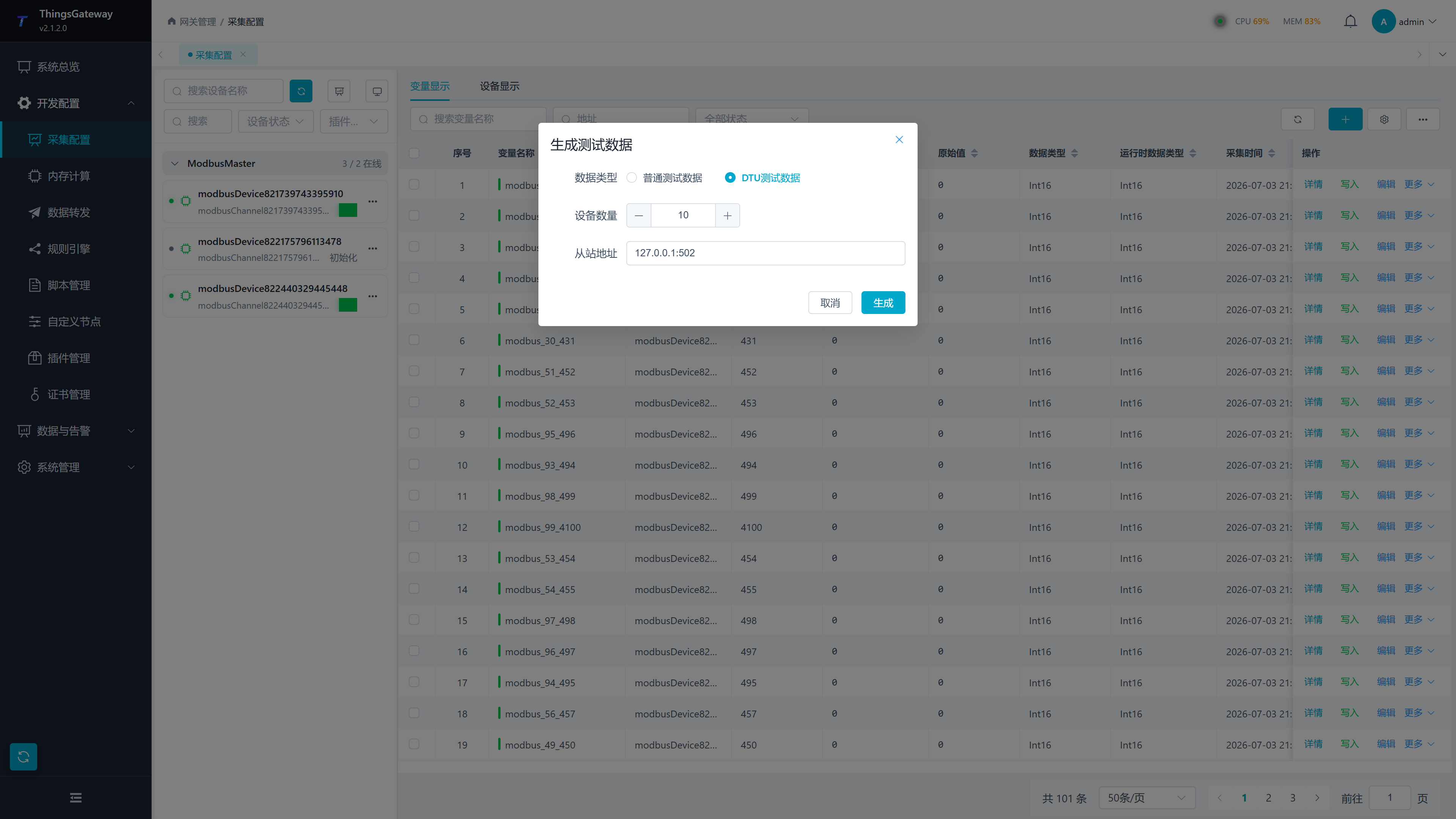
| Configuration Items | Description |
|---|---|
| Data Type | You can choose between standard test data or DTU test data. |
| Number of variables | Number of variables generated under regular test data. |
| Number of devices | Number of devices to be generated. |
| Slave Address | Slave address or connection information used to generate the test device. |
| Enable data forwarding | Whether data forwarding is generated simultaneously under normal test data. |
| Generate | Generate test configurations according to the parameters entered in the form. Before implementation, it should be confirmed that production configurations will not be overlaid or confused. |
Logs and Troubleshooting
| Phenomena | Handling Suggestions |
|---|---|
| Debug tab not displayed | Confirm that the role has Debug View under the current menu, then confirm that "Device Display" is active and a device is selected, or select a target on the Data Forwarding page. |
| No protocol-specific tab | The selected plugin may provide only general modules. Foundation plugins use "Read/Write," and active-reporting plugins use "Receive Monitor"; this does not mean that the plugin failed to load. |
| Runtime instance unavailable | Follow the notice and check whether the object is disabled, paused, on standby, failed during initialization, or stopped. Refresh the page after restoring runtime operation. |
| A button is not displayed | Verify that the role has the corresponding read-only, general write, dangerous control, or sensitive-data permission, and check API authorization as well. |
| Foundation Read Failure | Check channel connections, device status, address format, data type, array length, station number, timeout, and device logs. |
| Write failure | Check whether variables/devices allow writes, write value format, field device permissions, and RPC write switches. When enabling write check, you must also confirm that the device's readback value immediately matches the write value. |
| MQTT Release Failure | Check Broker address, port, TLS, account and password, Topic permissions, QoS, and target logs. |
| MQTT subscription without message | Check the Topic wildcard rule, whether the production side publishes, whether the broker allows subscription, and whether the client is online. |
| Kafka Release Failure | Checks Service Address, Authentication, Security Protocol, Topic Permissions, and Release Timeout. |
| RabbitMQ Release Failure | Check switches, routing keys, virtual hosts, account passwords, queue binding, and network connectivity. |
| Data forwarding target debugging is set to empty | target needs to be enabled and enter runtime; Disabling targets will not display the corresponding debugging entry. |