Gateway MQTT Collection Client
This plugin is used on a central Gateway to collect variables from multiple edge Gateways through one shared MQTT broker connection.
It is not a general MQTT JSON collector. It accepts the current TGateway Gateway MQTT protocol and uses RemoteKey to separate each edge Gateway's variables, devices, online state, snapshots, and remote writes.
Choose the mode and data path
Choose a Mode
| Mode | Use When | Central Gateway | Edge Gateways |
|---|---|---|---|
GatewayMqttCollectClient | A shared Broker already exists, or every Gateway can only make outbound connections | Uses one persistent ClientId and subscribes to all configured sources | Multiple MqttClientProducer targets connect to the same Broker and publish under their own RemoteKey |
GatewayMqttCollectServer | The central Gateway can expose an inbound MQTT port | Listens on one port and binds each edge session to a ClientId, credentials, and optional certificate fingerprint | Multiple MqttClientProducer targets connect directly to the central Gateway |
Prepare the Deployment
- Assign every edge Gateway a stable
RemoteKeycontaining only ASCII letters, digits, hyphens, or underscores. - Use the same Topic root on the collector and all edge producers. The default is
TGateway/Gateway. - Create an
MqttClientProduceron the Data Forwarding page of every edge Gateway, keep Retain disabled, and configure the variable, data-request, and RPC Topics as described below. - For remote writes, enable permissions on the edge producer, the central collector, and the target variable.
- Enable TLS according to the network policy. In Server mode, configure unique credentials for every source. If certificate fingerprints are enabled, bind a different certificate to each source.
Complete Data Path
GatewayMqttCollectClient and GatewayMqttCollectServer run only on the central Gateway and perform inbound collection. MQTT upload from each edge Gateway continues to use the existing MqttClientProducer data-forwarding plugin. No second Gateway-specific producer plugin is required.
Collected variables on an edge Gateway
  → Data-forwarding group (selects scope and trigger mode)
  → MqttClientProducer (uploads values and handles snapshot/write requests)
  → Shared Broker or the central Gateway MQTT listener
  → GatewayMqttCollectClient / GatewayMqttCollectServer
  → Mirror variables on the central Gateway
Client and Server in the plugin names describe the MQTT role of the central collector, not the data direction. In Client mode, the central collector connects to a shared Broker. In Server mode, the central collector listens and each edge MqttClientProducer connects to it.
Configure MQTT Upload on Each Edge
Perform these steps on every edge Gateway:
- Sign in to TGateway Web and open Development Configuration → Data Forwarding.
- Create and enable a data-forwarding group, then add every variable to aggregate to the group scope. Variables outside that scope are not uploaded.
- Create a target in that group, select
MqttClientProducer, and enable the target. - Configure the endpoint for the selected mode, then configure the fixed Topics with this edge Gateway's
RemoteKey. - After saving, verify that the target is online and has no CacheDB backlog. Then request a snapshot and synchronize variables from the central collector debug page.
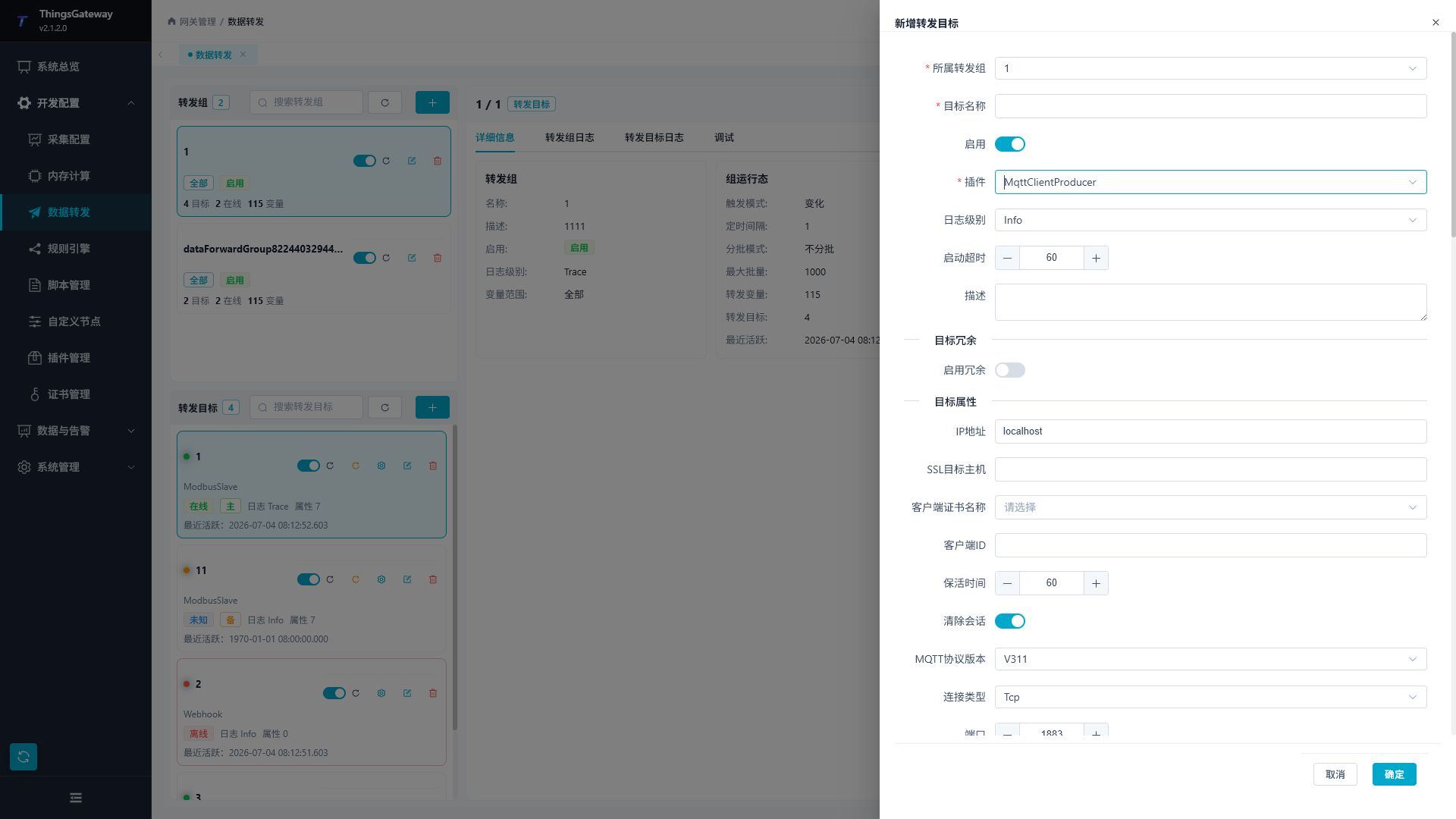
Endpoint Mapping
| Central Collection Mode | Edge MqttClientProducer Endpoint | Identity Configuration |
|---|---|---|
GatewayMqttCollectClient | Enter the shared Broker address and port. The central collector connects to the same Broker | Use a unique edge ClientId and the Broker account assigned to this edge. Broker ACLs should restrict the edge to its own {TopicRoot}/{RemoteKey}/# namespace |
GatewayMqttCollectServer | Enter the central Gateway address and the listener port configured by GatewayMqttCollectServer | ClientId must equal the source's AllowedClientId; username and password must also exactly match that source configuration |
Do not use MqttServerProducer on the edge. Client collection requires both sides to connect to one shared Broker, while Server collection requires an edge client to connect to the central listener. MqttClientProducer is the connection initiator in both topologies.
Fixed Topics and Payload Shape
If the collector Topic root is TGateway/Gateway and this edge uses RemoteKey=edge-01, configure its MqttClientProducer as follows:
| Edge Property | Value or Requirement |
|---|---|
| Variable Topic Template | TGateway/Gateway/edge-01/Variable |
| Data Request Topic | TGateway/Gateway/edge-01/RpcQuest |
| RPC Write Topic | TGateway/Gateway/edge-01/RpcWrite |
| Variable List Upload | Enabled |
| Variable Dictionary Upload | Disabled |
| Variable Entity Script / Upload Template | Empty; do not change the current fixed payload |
| JSON Ignore Null | Disabled |
| Retain Message | Disabled; dedicated collection rejects retained messages |
| Filter Offline Data | Disabled so a full snapshot includes offline variables and their metadata |
| QoS Level | Match the edge and the central source; AtLeastOnce is recommended. Repeated older values cannot overwrite current state, but historical backfill can contain duplicates |
| Upload Shard Size | Greater than 0, with each JSON batch kept below the collector's Inbound Payload Byte Limit |
RemoteKey is not a separate MqttClientProducer property. It is embedded in the three fixed Topics above. Every edge Gateway must use a different RemoteKey. Do not use ${...} placeholders in these Topics, and do not change the payload through an entity script or upload template. The dedicated Gateway MQTT collector does not consume the historical-read RPC Topic.
Backfill the central history database
Enable the Edge's failed-send retry cache, include mapped central variables in an enabled forwarding group, and configure a Historical Data Storage target. Every received sample retains its source value, CollectTime and CreateTime. A list may contain multiple samples for the same variable. Late values do not roll back current state, and unchanged values can still enter history. ChangeTime remains available for custom processing but is not a separate standard history column.
The fixed payload requires CreateTime, CollectTime and ChangeTime as Unix millisecond timestamps; the default Edge variable list supplies them. Backfill stores the processed Edge value without reapplying the center's read expression. Central scope, enable state and online filtering apply. Scheduled central collection adds local snapshots; use change triggering when only source records are needed.
The Edge cache covers Edge publishing failures. If the shared Broker has acknowledged publication while the central subscriber is offline, delivery also requires a stable central ClientId, a persistent session and suitable Broker offline queues. MQTT publication acknowledgement is not database commit confirmation. QoS redelivery and reconnect snapshots may duplicate history. The general MQTT Collection Client updates variables at receipt time and does not provide this source-time backfill. See Offline cache and historical backfill for capacity and database time columns.
Check the center's Messages per second limit and concurrent processing capacity for replay peaks. Messages beyond these limits are rejected, and Broker-acknowledged messages do not automatically return to the Edge cache. Configure suitable batch sizes and publishing rates, then inspect rate-limit and rejection counters.
Configure the connection and remote variables
Open the plugin
Open Development Configuration → Collection Configuration, create one collection device, and select Gateway MQTT Collection Client.
This is a shared-connection plugin: configure multiple remote sources inside this one device. Do not create one ordinary MQTT channel or one Gateway MQTT device for every edge Gateway.
On each edge Gateway, configure the MQTT client forwarding target in the Configure MQTT Upload on Each Edge section below.
Connection and security
| Setting | Description |
|---|---|
| Connection type | Default Tcp. Select TCP or WebSocket according to the shared broker. |
| IP address | Default localhost. Host name or IP address of the shared broker. |
| Port | Default 1883. Broker port. |
| WebSocket path | Default /mqtt. Used only for WebSocket connections. |
| Client ID | Persistent client ID for the central collector. It must be unique on the broker. |
| Clean session | Default enabled. Controls the shared MQTT session state. |
| MQTT version | Default 4 (MQTT 3.1.1). Must match the broker. |
| Enable SSL | Enables TLS for the shared connection. |
| SSL target host | Host name used for certificate validation. |
| Client certificate / CA certificate | Select the trusted Broker CA for TLS. Select a client identity only if the Broker requires mutual TLS. |
| Allow untrusted certificate | Temporary commissioning option. Disable it in production. |
| SSL protocol / revocation check | TLS and certificate-revocation controls required by the broker. |
| Username / password | Credentials for the central collector on the broker. |
| Keep-alive | Default 60 seconds. |
| Connection timeout | Default 3000 ms. |
Remote sources and protocol
| Setting | Description |
|---|---|
| Topic root | Default TGateway/Gateway. It must be identical on the central collector and all edge forwarding targets. |
| Remote source | Opens the source list. Add one source for each edge Gateway. |
| RemoteKey | Stable identifier used in topics, variable addresses, snapshot requests, and RPC. It must be unique and contain only ASCII letters, digits, hyphens, or underscores. |
| Display name | Human-readable source name shown in the debug page. |
| Enable | Enables subscription, snapshots, catalog updates, and RPC for this source. |
| QoS | QoS used by this source's fixed protocol messages. |
| Allow remote write | Enables write requests from the central collector to edge variables. Keep it disabled unless required. |
| Snapshot interval | Default 60 seconds; range 10–3600. Periodic full catalog snapshot interval. |
| Request timeout | Default 30 seconds; range 1–600. Timeout for snapshot and RPC requests. |
| Offline timeout | Default 180 seconds. Must be greater than the snapshot interval. |
Each remote source must have a different RemoteKey. The collector uses one shared MQTT session, while source identity is carried by the protocol namespace.
Capacity limits
| Setting | Default | Description |
|---|---|---|
| Remote source limit | 32 | Maximum configured edge sources for this device. |
| Snapshot concurrency | 4 | Maximum simultaneous snapshot or synchronization tasks. |
| Inbound payload limit | 1048576 bytes | Maximum size of one incoming MQTT payload. |
| Messages per second | 200 | Total message rate entering the parser. |
| Inbound handler concurrency | 4 | Maximum concurrent JSON handlers. |
| JSON depth limit | 64 | Maximum accepted protocol JSON nesting depth. |
| Per-source catalog limit | 100000 | Maximum variables in one edge source catalog. |
| Total catalog limit | 300000 | Maximum variables across all sources. It must cover one source limit. |
| Pending RPC limit | 256 | Maximum simultaneous remote RPC batches. |
| Detailed log | Disabled | Enables protocol summaries without full sensitive payloads. Disable after commissioning. |
Increase limits only after checking memory, broker traffic, and the number of edge sources.
Address rule
Use the remote source key and remote variable ID:
{RemoteKey}/{RemoteVariableId}
Example: factory-a/828746157506629.
The variable ID is the ID reported by the edge Gateway. Do not replace it with the local mirror variable ID.
Debug and verify
Device debug
Open Development Configuration → Collection Configuration, select the Gateway MQTT device, and click More Functions, then open Debug.
Gateway MQTT protocol panel
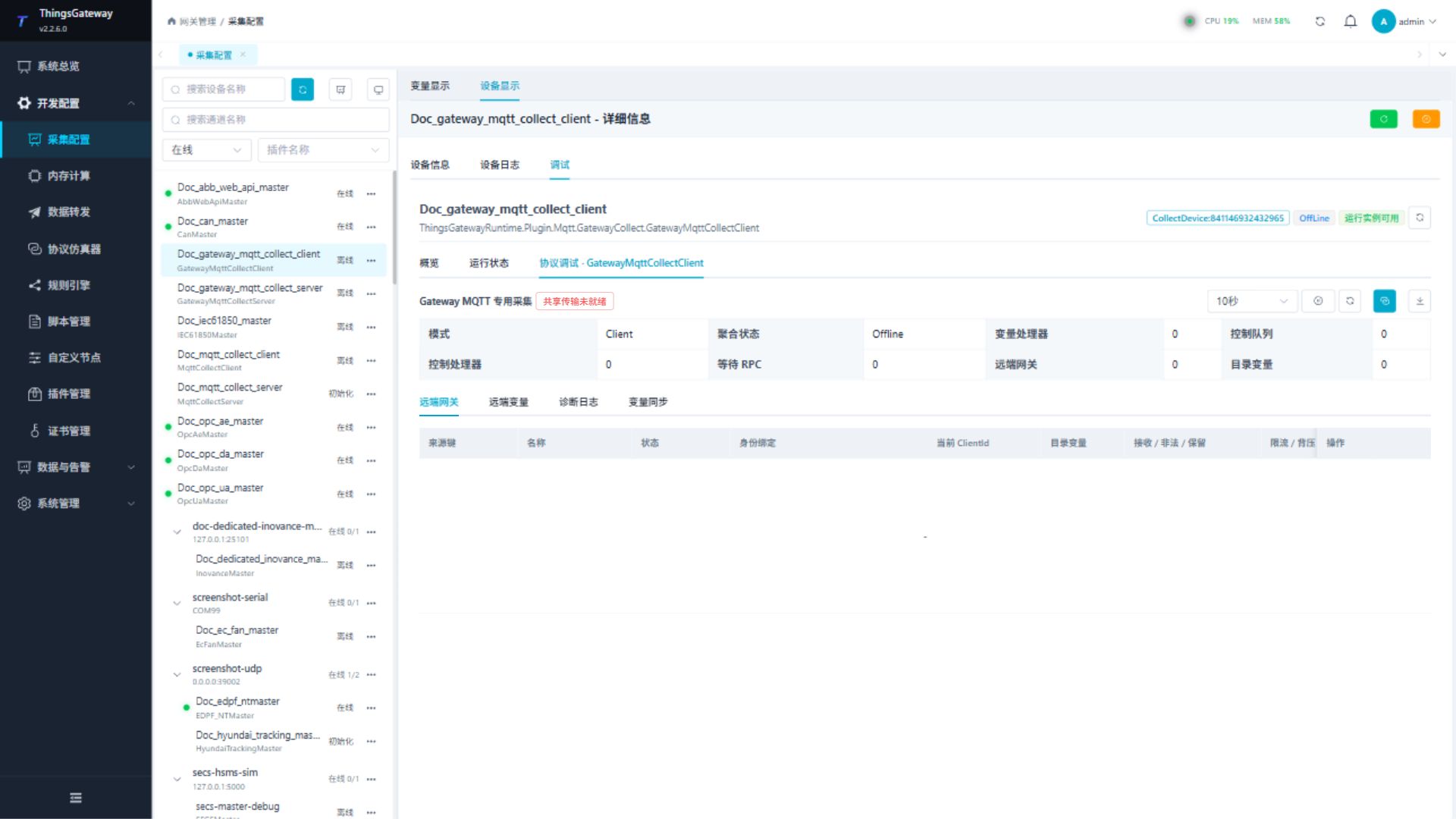
Use the plugin-specific panel to inspect remote sources, request a full snapshot, synchronize the variable catalog, and review diagnostics. Overview and runtime-status tabs are common workspace tabs and are not repeated here.
Functions
| Function | Purpose |
|---|---|
| Remote gateway | Use Remote gateway with an approved test point and confirm site safety before execution. |
| Remote variables | Use Remote variables with an approved test point and confirm site safety before execution. |
| Diagnostic log | Use Diagnostic log to inspect mapped values, status, counters, recent messages, or the latest result. |
| Variable synchronization | Use Variable synchronization to inspect mapped values, status, counters, recent messages, or the latest result. |
Verify the configuration
- Add one remote source with a unique
RemoteKey. - Confirm the edge MQTT target uses the same Topic root and RemoteKey.
- Confirm the central target connects to the broker and the source becomes online.
- Request a snapshot and wait for the edge catalog to complete.
- Read one mirror variable and compare it with the edge value.
- Test remote writing only when central, edge, target, and variable permissions all allow it.
Troubleshooting
| Symptom | Check |
|---|---|
| Shared connection cannot start | Broker address, port, Client ID, credentials, TLS, CA certificate, and broker ACL. |
| Source remains offline | RemoteKey spelling, Topic root, edge target state, snapshot interval, and edge protocol messages. |
| Catalog is empty | Edge forwarding range, variable-list upload, snapshot response, payload limit, and catalog limits. |
| Values from sources are mixed | Every source must use a unique RemoteKey; every mirror address must use the matching RemoteKey. |
| Snapshot times out | Edge target connectivity, request timeout, message rate, inbound payload size, and broker traffic. |
| Remote write fails | Central and edge remote-write switches, source metadata permission, local variable permission, and RPC response logs. |
| Source becomes degraded | Offline timeout, snapshot completion, edge reconnect state, and diagnostics. |
Related links
- Gateway MQTT Collection Server: Server-mode listener properties.
- Collection Configuration: Common device, variable, import, and debug operations.
- Plugin Manual Index: Other collection and data-forwarding plugins.