MQTT Collection Server
The MQTT Collection Server listens for MQTT clients and maps fields from valid JSON messages to gateway variables. RawString controls write publishing; it does not enable telemetry mapping from arbitrary non-JSON text.
Open the plugin
Open Development Configuration → Collection Configuration, create a device, and select MQTT Collection Server.
The server manages its MQTT listener in device properties and does not use an ordinary TCP, UDP, or serial channel. Configure common variable fields through Collection Configuration.
Plugin properties
Listener
| Setting | Description |
|---|---|
| Connection type | Default Tcp. Select TCP or WebSocket according to the client connections. |
| Port | Default 1883. The listening port for MQTT clients. |
| WebSocket path | Default /mqtt. Used only for WebSocket connections. |
Connection type options are Tcp and WebSocket. WebSocket clients use the configured port and path; SSL changes the scheme to wss://.
TLS and authentication
| Setting | Description |
|---|---|
| Enable SSL | Enables TLS for the MQTT listener. |
| Server certificate | Server certificate configured in Certificate Management. |
| CA certificate | CA used to validate client certificates. |
| Allow untrusted certificate | Temporary commissioning option for self-signed clients. Disable it in production. |
| SSL protocol | Select a TLS protocol only when required by the client or security policy. |
| Check certificate revocation | Enables certificate revocation checks. |
| Allowed Client ID prefix | Limits client connections to IDs beginning with this prefix. Leave empty only when the listener is intentionally open to all authenticated clients. |
| Username / password | Listener credentials when shared authentication is used. |
When SSL is enabled, select a server certificate with its private key. Allow untrusted certificate defaults to enabled. Disabling it also requires terminals to present a valid client certificate; configure the CA that trusts those terminals and provide their client identities. Terminals must independently trust the gateway server certificate.
If Username is non-empty, client username and password must match exactly; a non-empty Client ID prefix must also match the beginning of the Client ID. Certificate authentication and account authentication are separate checks.
Messages and diagnostics
| Setting | Description |
|---|---|
| QoS | Default 0. QoS used for subscriptions and publishes. |
| Detailed log | Enables detailed message logs during commissioning; restore the normal setting afterward. |
| Check and cleanup interval | Default 60000 seconds. A readable variable becomes offline after this time without a sample; this is unrelated to disk-cache cleanup. |
QoS options are 0 (at most once), 1 (at least once), and 2 (exactly once), used for server publishes and RPC responses.
Address rule
Use PropertyName=Value; with properties in any order. Names are case-insensitive and unused properties can be omitted:
SubscribeTopic=vendor/device;Path=$.data.temperature;Condition=TelemetryCondition;ConditionParameters={"Minimum":"12.5"};
The properties SubscribeTopic, Path, Condition, ConditionParameters, PublishTopic, PayloadMode, Retain, ResponseTopic, and Timeout follow the client address rules. The server listens on the gateway and can also provide the publishing client's ID to the condition script.
Click Edit fields beside Variable Address, select a condition script, and fill in its named inputs. Click Confirm and fill, then save the variable. See condition parameter configuration for input types and escaping. Unspecified inputs use script defaults; Topic, MqttTopic, ClientId, and MqttClientId receive actual message context when not explicitly configured.
Existing eight-segment addresses remain supported. Applying changed fields in the editor generates the named format; existing addresses require no manual conversion.
Examples:
| Use | Address |
|---|---|
| Read a JSON value | SubscribeTopic=vendor/device;Path=$.data.temperature; |
| Condition with parameters | SubscribeTopic=vendor/device;Path=$.data.temperature;Condition=TelemetryCondition;ConditionParameters={"Minimum":"12.5"}; |
| Publish a raw write | PublishTopic=factory/a/reboot;PayloadMode=RawString;Retain=false; |
| RPC request and response | PublishTopic=factory/a/command/{RequestId};PayloadMode=Json;Retain=false;ResponseTopic=factory/a/response/{RequestId};Timeout=5000; |
Payload paths support $, dot paths such as items.0.value, filters [?()], wildcards [*] and .*, and recursive search $..name. With ||, the first existing candidate path is used. Exact case-sensitive property names are preferred; a unique case-insensitive match is used only when no exact name exists.
A present field with null does not guarantee fallback to the next path. Multiple matches select the first result rather than creating multiple variables. Create a read-only variable at SubscribeTopic=vendor/device;Path=$.data.temperature;, connect an independent client, and publish the following payload; the variable should receive 31 with a new collection time:
{"data":{"temperature":31}}
The condition is a DataTrans script name. Its raw input contains the complete JSON payload; it may also declare Topic, MqttTopic, ClientId, or MqttClientId. A wildcard topic updates the same variable for every matching message, so filter by Topic or ClientId when values must be separated by source.
Publish topics cannot contain + or #; {RequestId} must be the final topic level.
A subscribe topic and JSONPath must be provided together; publish options require a publish topic. RPC response topic and timeout are a pair, and the timeout must be 100–60000 ms. A read-only variable cannot contain publish fields, a write-only variable cannot contain telemetry fields, and every variable must configure at least one route.
Device debug
Open Development Configuration → Collection Configuration, select the MQTT server device, and click More Functions, then open Debug.
MQTT server protocol panel
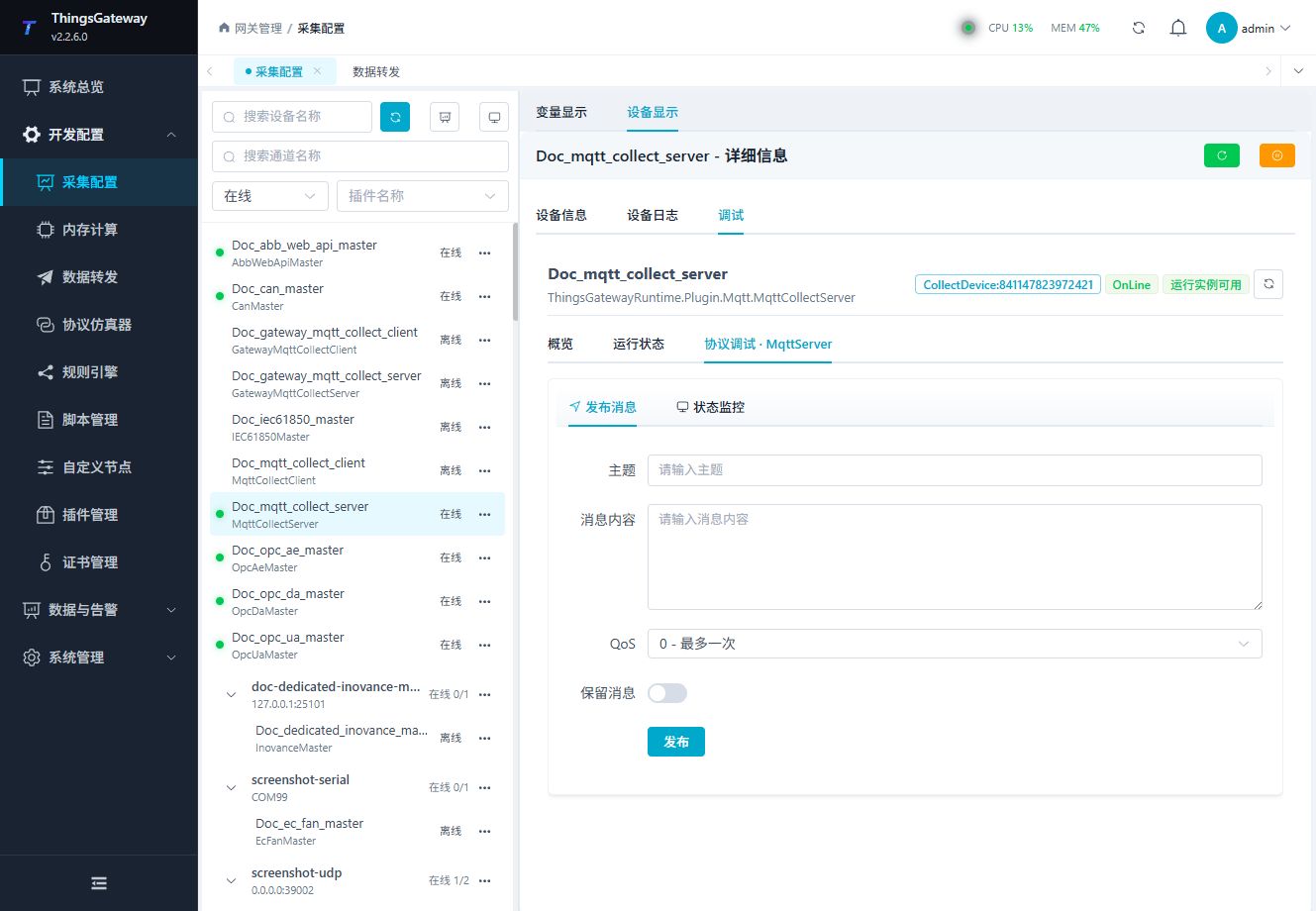
Use the panel to inspect clients, subscriptions, and server operations.
Publish message
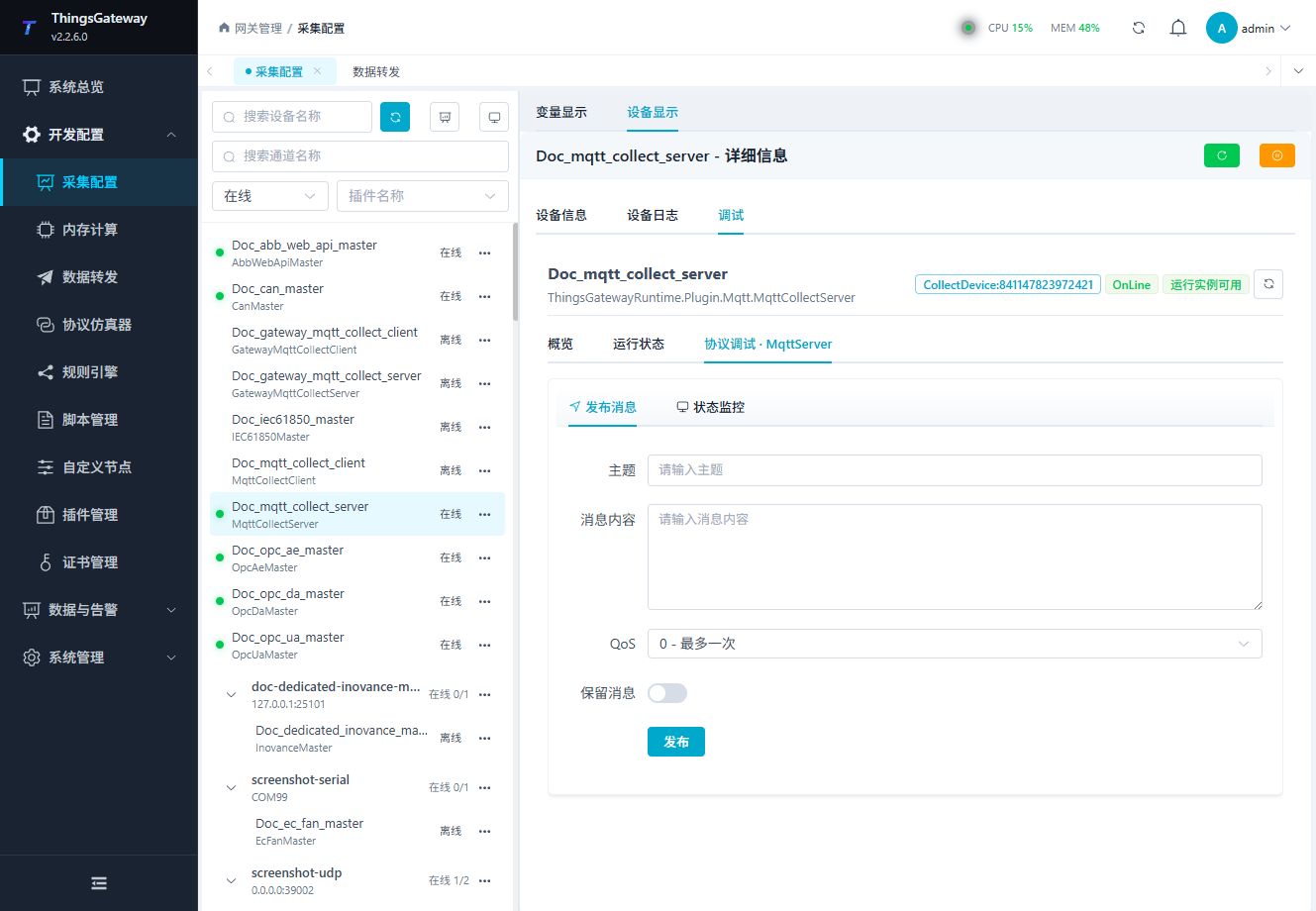
Enter a test topic and payload to verify server publishing without changing field-device values.
Status monitor
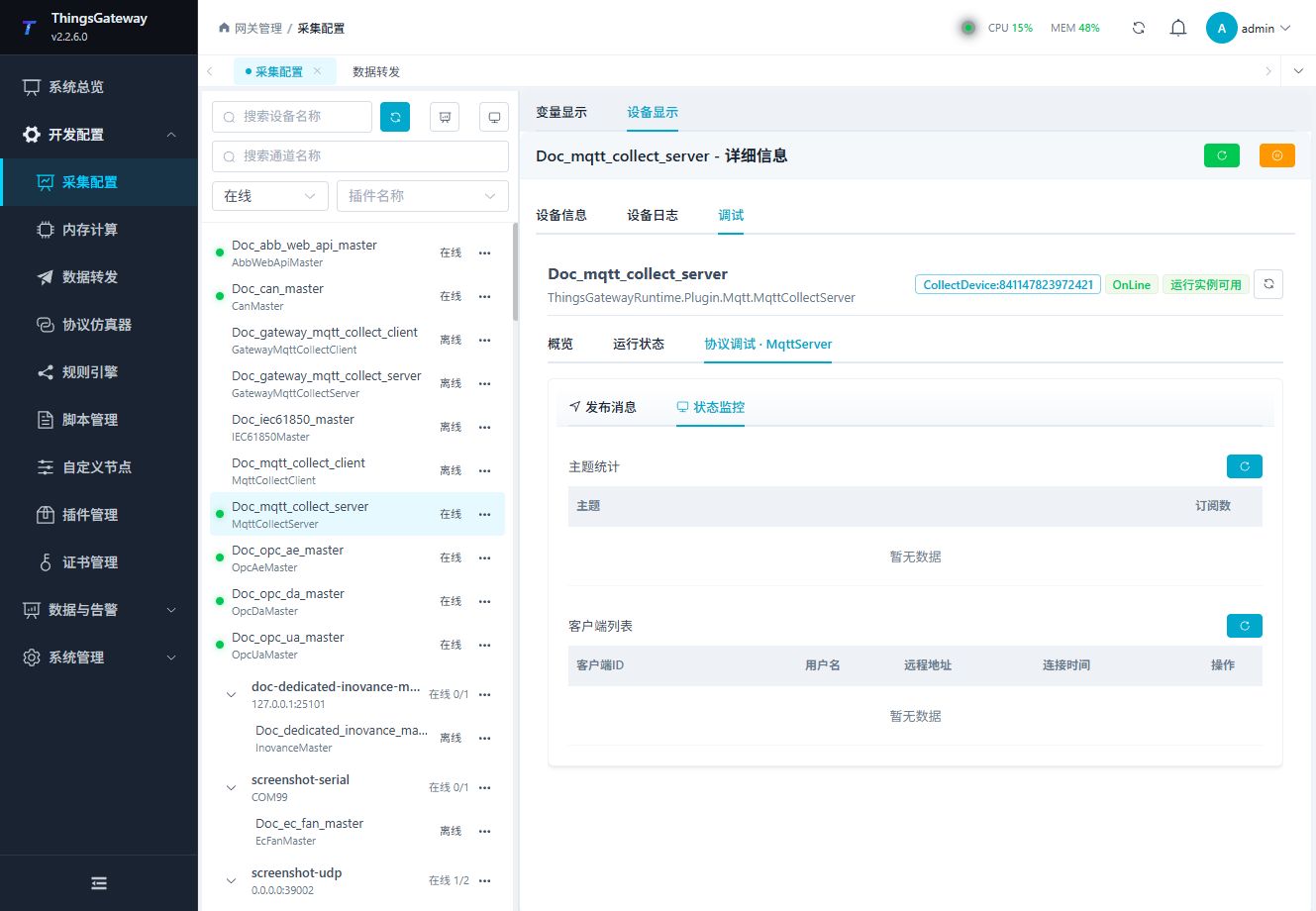
Check connected clients, subscriptions, received messages, and connection state.
Functions
| Function | Purpose |
|---|---|
| Publish message | Use Publish message with an approved test point and confirm site safety before execution. |
| Topic statistics | Inspect each topic and its current subscription count. |
| Client list | Inspect client ID, username, remote endpoint, and connection time. |
| Kick client | Disconnect a selected client; confirm that it is safe before using this action. |
Verify the configuration
- Start the MQTT server and confirm its listening port.
- Connect a test MQTT client with an approved Client ID and credentials.
- Publish one JSON payload to an exact test topic.
- Confirm the condition, JSONPath, variable value, and collection time.
- Test a write only when the variable and server permissions allow it.
Keep the client connected but stop new telemetry to check the configured missing-sample interval. The variable should become offline and then recover after a new valid message; a connected client alone does not establish data freshness. Verify two clients separately when testing ClientId filtering, and confirm that rejected messages do not replace the accepted value or sample time.
For writes, Json preserves the input JSON type and RawString accepts only a string, publishing its unwrapped text. Enable the variable's RPC write permission, inspect the message with a subscriber, and verify field feedback. RPC requires the matching RequestId and response within its timeout.
Troubleshooting
| Symptom | Check |
|---|---|
| Client cannot connect | Listener port, connection type, firewall, TLS certificate, credentials, allowed Client ID prefix, and client limit. |
| Message arrives but variable is unchanged | Exact topic, JSONPath, condition script, payload shape, and variable data type. |
| Values from different clients are mixed | Use exact topics or filter by ClientId in the condition script. |
| Publish operation fails | Client connection, topic permissions, QoS, retain setting, and server log. |
| Certificate is rejected | Server certificate, CA, client certificate trust, and TLS protocol. |
Related links
- Collection Configuration: Devices, variables, common permissions, and import.
- Certificate Management: Manage MQTT server, client, and CA certificates.
- Plugin Manual Index: Other collection and data-forwarding plugins.