Gateway MQTT Collection Server
For installation, automatic deployment and verification, see Center and edge deployment.
This plugin starts one MQTT listener on a central Gateway and receives variable catalogs, current values, device state, and snapshots from multiple edge Gateways using the TGateway Gateway MQTT protocol. Each edge node connects through its own authorized remote-source identity.
It is not a general MQTT JSON collector. Use MQTT Collection Server for custom Topics and payloads.
Configure the listener and security
Open the plugin
Open Development Configuration → Collection Configuration, create one collection device, and select Gateway MQTT Collection Server.
This is a shared-listener plugin: configure multiple remote sources inside this one device. Do not create multiple Gateway MQTT server devices on the same listener port.
Configure the corresponding MQTT forwarding target on each edge Gateway. See Gateway MQTT Collection Client, Configure MQTT Upload on Each Edge, for the complete topology and fixed Topics.
Channel and data type
| Item | Description |
|---|---|
| Channel | Embedded MQTT listener. Common TCP, UDP, and serial channel fields are not used. |
| Data type | Object. Variable types and catalogs are supplied by the remote Gateway protocol. |
Listener and TLS
| Setting | Default | Description |
|---|---|---|
| Connection type | Tcp | Select TCP or WebSocket listening. |
| Port | 1883 | MQTT listener port, from 1 to 65535. |
| WebSocket path | /mqtt | Used only in WebSocket mode. |
| Enable SSL | Disabled | Enables the MQTT TLS listener. |
| Server certificate | - | Required for TLS. Select a server certificate from Certificate Management. |
| CA certificate | - | Required for TLS. It validates client chains when source fingerprint binding requires client certificates. |
| Allow untrusted certificate | Disabled | Temporary commissioning option. Keep it disabled in production. |
| SSL protocol / revocation check | - | Configure according to the project TLS and revocation policy. |
Remote variables and reliability
Remote sources
Open Remote Sources and add one entry for each edge Gateway allowed to connect.
| Setting | Description |
|---|---|
| RemoteKey | Stable protocol key using 1 to 64 ASCII letters, digits, hyphens, or underscores. It is used in Topics, variable addresses, snapshots, and RPC. Do not change it casually after commissioning. |
| Display name | Human-readable edge name shown in debug. |
| Enable | Enables connection handling, snapshots, catalog synchronization, and RPC for this source. |
| QoS | QoS used by this source's fixed protocol messages. |
| Allowed Client ID | Edge MQTT Client ID. It must match exactly and be unique on the listener. |
| Username / password | Independent credentials used by this source. Keep them out of screenshots and logs. |
| Client certificate SHA-256 | Optional 64-character lowercase hexadecimal fingerprint used to bind the source to one client certificate. |
Each source must have a unique RemoteKey, Client ID, and configured certificate fingerprint. Certificate binding requires TLS. If one enabled source uses fingerprint binding, every enabled source must use it.
Without fingerprint binding, TLS does not require a client certificate; ClientId and source credentials are still checked. With binding enabled, each edge must present the matching trusted client identity.
Protocol and reliability
| Setting | Default | Range | Description |
|---|---|---|---|
| Topic root | TGateway/Gateway | - | Must be identical on the central listener and every edge forwarding target. |
| Allow remote write | Disabled | - | Allows the central Gateway to issue edge-variable RPC writes. Enable only with site authorization. |
| Snapshot interval | 60 seconds | 10 to 3600 | Periodic full-catalog and current-value snapshot interval. |
| Request timeout | 30 seconds | 1 to 600 | Timeout for snapshot and RPC requests. |
| Offline timeout | 180 seconds | Greater than snapshot interval, maximum 86400 | Marks a source offline after no valid protocol message. |
| Detailed log | Disabled | - | Records protocol summaries without complete sensitive payloads. Disable after commissioning. |
Capacity limits
| Setting | Default | Range | Description |
|---|---|---|---|
| Remote source limit | 32 | 1 to 128 | Maximum configured edge sources. |
| Snapshot concurrency | 4 | 1 to 32 | Maximum simultaneous snapshot or sync tasks. |
| Inbound payload limit | 1048576 bytes | 4096 to 16777216 | Maximum size of one incoming MQTT payload. |
| Messages per second | 200 | 1 to 100000 | Total message rate entering the parser. |
| Inbound handler concurrency | 4 | 1 to 64 | Concurrent JSON handlers. |
| JSON depth limit | 64 | 8 to 256 | Maximum protocol JSON nesting depth. |
| Per-source catalog limit | 100000 | 1 to 1000000 | Maximum variables in one edge catalog. |
| Total catalog limit | 300000 | At least the per-source limit, maximum 3000000 | Maximum variables across all sources. |
| Pending RPC limit | 256 | 1 to 4096 | Maximum simultaneous remote RPC batches. |
Increase limits only after checking memory, message traffic, and the number of edge sources.
Address rule
Use the source key and remote variable ID:
{RemoteKey}/{RemoteVariableId}
Example: factory-a/828746157506629.
The remote variable ID is reported by the edge Gateway. Do not replace it with the central Gateway's local mirror-variable ID. See Collection Configuration for common variable fields, imports, and intervals.
Debug and verify
Device debug
Open Development Configuration → Collection Configuration, select the Gateway MQTT server device, and click More Functions, then open Debug → Protocol Debug · GatewayMqttCollectServer.
| Feature | Purpose |
|---|---|
| Remote Gateways | Shows identity, connection, Client ID, catalog size, message counters, snapshot time, and errors; requests snapshots or tests RPC. |
| Remote Variables | Queries the remote variable catalog by source, keyword, and online state. |
| Diagnostics | Shows bounded protocol diagnostic events filtered by source. |
| Variable Sync | Previews local additions, updates, missing variables, and conflicts, then applies a confirmed synchronization plan. |
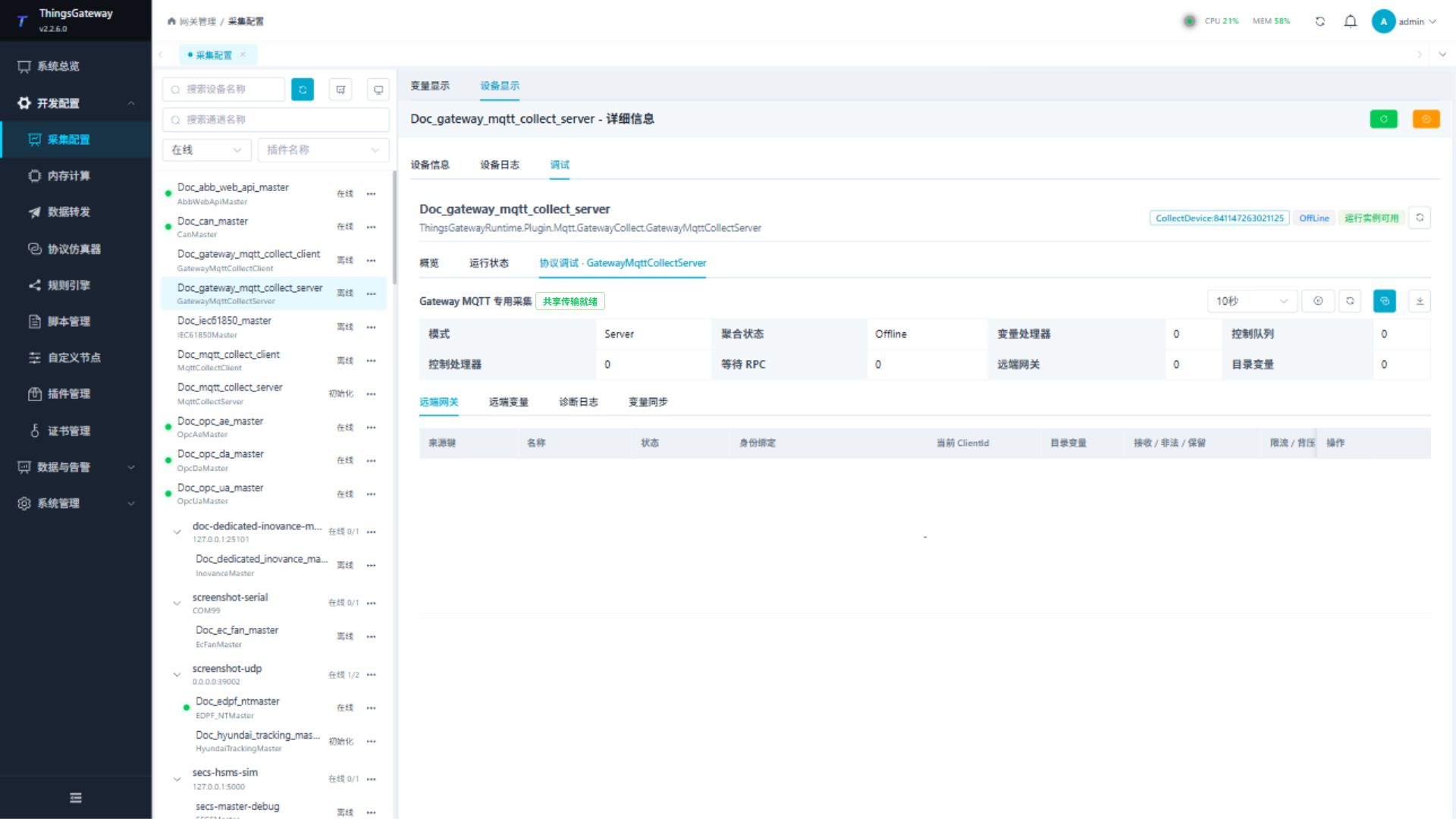
Request snapshot and Test RPC affect only the selected source. Synchronize all and Apply plan change local variable configuration; review the differences and impact first.
Functions
| Function | Purpose |
|---|---|
| Remote gateway | Use Remote gateway with an approved test point and confirm site safety before execution. |
| Remote variables | Use Remote variables with an approved test point and confirm site safety before execution. |
| Diagnostic log | Use Diagnostic log to inspect mapped values, status, counters, recent messages, or the latest result. |
| Variable synchronization | Use Variable synchronization to inspect mapped values, status, counters, recent messages, or the latest result. |
Verify the configuration
- Add one source with a unique RemoteKey, Client ID, and credentials.
- Confirm that the edge MQTT target uses the same Topic root and RemoteKey and connects to the central listener.
- Confirm that the source becomes online and request one full snapshot.
- Find one variable under Remote Variables and create or synchronize its local address.
- Read the local mirror value and compare it with the edge Gateway.
- Test remote writing only when central, edge, target, and variable permissions all allow it.
Troubleshooting
| Symptom | Check |
|---|---|
| Listener cannot start | Port conflict, connection type, TLS server certificate, CA, and firewall. |
| Source cannot connect | Client ID, username, password, certificate fingerprint, TLS, and listener state. |
| Source remains offline | RemoteKey, Topic root, edge target state, snapshot interval, and last valid protocol message. |
| Catalog is empty | Edge forwarding range, snapshot response, payload limit, and catalog limits. |
| Values from sources are mixed | Every source needs a unique RemoteKey and Client ID, and each local address must use the matching key. |
| Snapshot times out | Edge connectivity, request timeout, message rate, payload size, and MQTT traffic. |
| Remote write fails | Both remote-write switches, variable permissions, pending RPC count, and response diagnostics. |
Related links
- Gateway MQTT Collection Client: Shared topology, edge
MqttClientProducer, and fixed Topics. - Collection Configuration: Common device, variable, import, and debug operations.
- Certificate Management: Maintain the MQTT server certificate and CA.
- Plugin Manual Index: Other collection and data-forwarding plugins.