On this page
ZeroMQ subscription collection
ZeroMQ subscription reception, topic filtering and variable mapping collection driver
Open the plugin
Enter “Development Configuration → Collection Configuration”, create a device and select “ZeroMQCollectClient” in “Collection Plugin”.
Supported channels and data types
| Channel type | Pre-configuration check |
|---|---|
| Plugin built-in connection | Connection parameters are configured in the device dynamic properties and do not use public TCP, UDP or serial channel parameters. |
Available data types: All variable data types are supported. Choose according to the extracted JSON value; select Object for a complete object or array.
Plugin properties
ZeroMQ Collection Client connects or binds a NetMQ socket directly and does not use ordinary TCP, UDP, or serial channel fields. Configure common timeout, retry, and data-format fields through Collection Configuration.
Connection configuration
| Setting | Description |
|---|---|
| Connection address | Default tcp://127.0.0.1:5555. Use the endpoint paired with the sender, not the TGateway Web address. |
| Socket type | Default Sub. Choose Sub, Pull, or Router to match the sender as described below. |
| Binding mode | Disabled by default: this side connects. Enable it to bind, with the peer taking the matching role. |
Socket type options are Sub (subscribe to a publisher), Pull (receive from a Push peer), and Router (pair with Dealer and reply by identity). The default is Sub. When Binding mode is enabled this side binds; otherwise it connects. Only one side may bind the same endpoint.
Message configuration
| Setting | Description |
|---|---|
| Subscription topic prefix | Empty by default. Used for the initial Sub subscription; an empty prefix subscribes to all topics. Loaded variables determine the active topic prefixes. |
The prefix is used for the initial subscription in Sub mode. Saving variables replaces the active subscriptions with their configured topic prefixes; removing all variables clears the subscriptions. Pull and Router ignore this field.
Capacity limit
| Setting | Description |
|---|---|
| High water mark | Default 1000. Sets the collection socket receive-buffer high-water mark, not the number of saved history records. |
The high-water mark limits the socket receive buffer, not durable storage. Reaching it may block or drop messages depending on the paired socket types. It does not replace history storage or offline replay.
Log diagnostics
| Setting | Description |
|---|---|
| Detailed log | Disabled by default. When enabled and the device log level permits Trace, receive logs include Topic and Payload. When disabled, they include only Topic and remain subject to the log threshold. |
Caching and reliability
| Setting | Description |
|---|---|
| Check clearing time | Default 60000 ms. A read-only variable is marked offline after this period without a successful update. This is not a reconnect or retry interval. |
Messages for other topics, missing fields, and messages rejected by a condition do not advance that variable’s collection time. Keep the sender interval below this timeout, with allowance for network and processing delays.
Address rules
Use read-only variables and named PropertyName=Value address fields. JSONPath and condition parameter rules are shared with MQTT collection. For Topic device/data, use this JSON as the payload frame:
{
  "Temperature": 25.6,
  "Humidity": 60.5,
  "Status": "Running"
}| Address field | Description |
|---|---|
| SubscribeTopic | Required. Matches the actual topic by a case-sensitive prefix. device/ matches device/data; MQTT + and # wildcard rules do not apply. |
| Path | Required. Supports root $, property paths, array indices, wildcards, filters, and candidate paths separated by ||. Reads the first existing result. Exact property names take precedence; case-insensitive matching requires a unique candidate. |
| Condition | Optional. Select a data transformation condition script. It receives the complete JSON body and must return true to update the variable. False results and execution errors reject the update. |
| ConditionParameters | Optional. A JSON object of input parameter texts, such as {"Minimum":"20"}. Select the script and edit its inputs in the address editor; each variable stores its own parameters. |
SubscribeTopic=device/data;Path=$.Temperatureextracts numeric25.6.SubscribeTopic=device/data;Path=$.missing||$.Statusextracts"Running".SubscribeTopic=device/data;Path=$.Status;Condition=TemperatureFilter;ConditionParameters={"Minimum":"20"}requires an existing condition script with a numericMinimuminput.- Filter arrays with a path such as
Path=$.items[?(@.code == 'A')].value; usePath=$for the complete payload. - Scripts can declare string inputs named
TopicorZeroMqTopicto read the actual message topic. Explicit parameters take precedence over automatic topic values. - URI-escape semicolons, percent signs, and whitespace inside field values. The address editor handles this automatically. Field names are case-insensitive; duplicate or unknown fields, invalid paths, and invalid parameters are rejected.
- Messages use two frames: Topic followed by a UTF-8 JSON Payload.
Routermessages also contain identity and empty delimiter frames; the plugin sends an empty reply automatically.
Special methods
| Method | Purpose | Parameters |
|---|---|---|
| SendDebugMessage | Send ZeroMQ debug message | topic=message topic, payload=message text |
Device debug
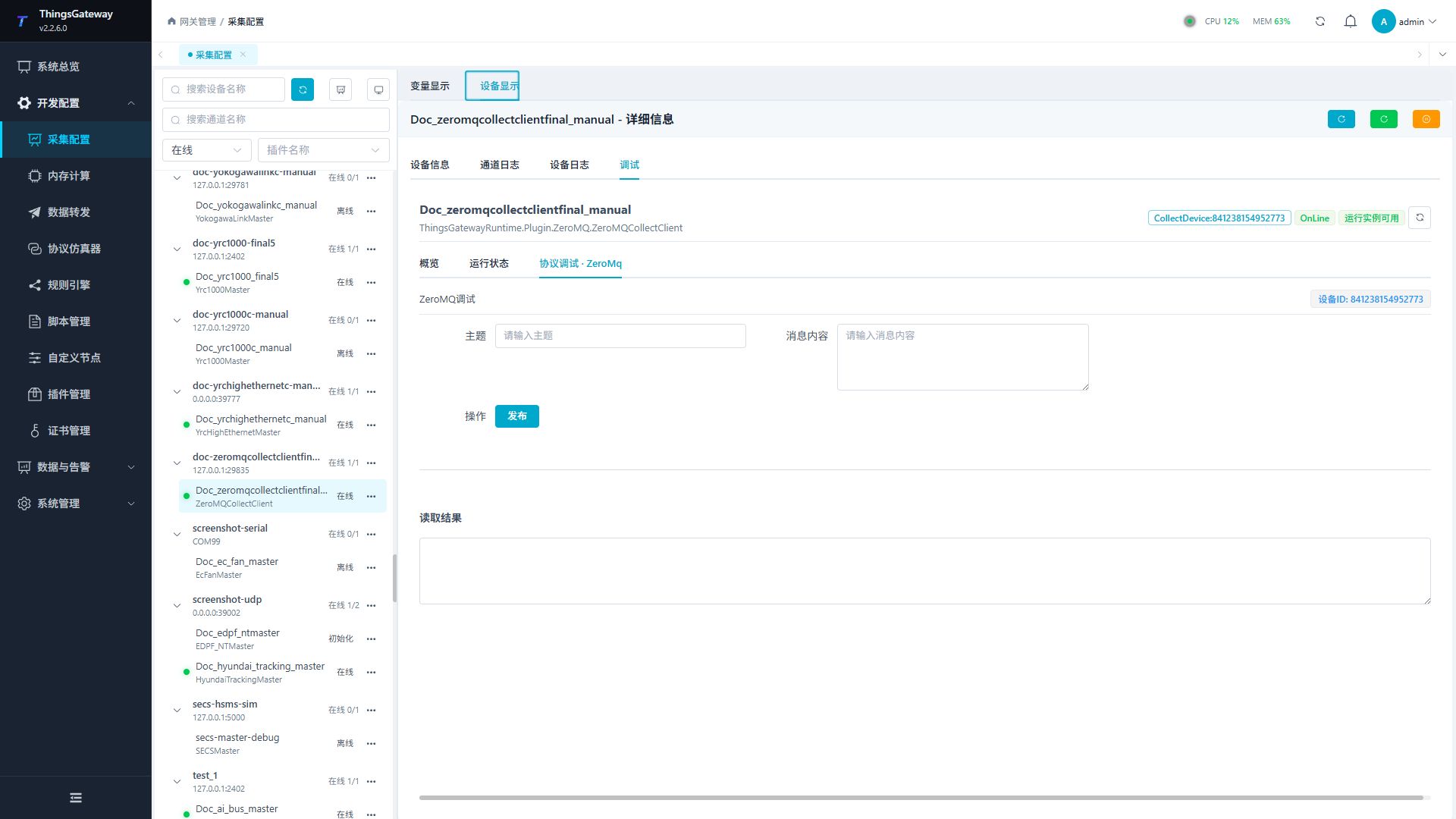
Enter “Development Configuration → Collection Configuration”, select the current device then open “Protocol Debug” at the top of the workspace.
Dedicated debugging page
The protocol debug page provides Topic, message content, a Publish button, and a result area. Diagnose connections and subscriptions using device settings, variable values, and device logs.
| Function | Purpose |
|---|---|
| Topic / message content | Enter the topic and payload. Topic is required; the payload is limited to 64 KiB of UTF-8 bytes. |
| Publish | Submit a send through the current runtime socket. This does not create an independent publisher or inject data into variables. |
| Debug result | View the send request’s return or error, then check the actual message at the peer. |
Debugging notes
Sub and Pull are receive-only types; use an independent Publisher or Push peer to test collection. Pair Router with Dealer and use the frame format on this page. A Publish result does not verify receiving or variable mapping.
Verify the configuration
- Match endpoint, socket types, and Bind/Connect roles on both sides; only one side binds the endpoint.
- Configure a read-only variable with
SubscribeTopic=device/data;Path=$.Temperature. - Send two frames from the paired sender: Topic
device/dataand UTF-8 body{"Temperature":25.6}. Confirm numeric value25.6and a new collection time. - For a variable with a condition script, send a rejected message and confirm it does not update the value.
- Observe the high-water mark and logs under the intended message rate, checking for delays or loss.
Troubleshooting
- Publishing or receiving fails: check the endpoint, socket type, Bind/Connect role, and firewall. Only one side may bind.
- The device is online but variables do not update: check the actual Topic, variable topic prefixes, payload fields, and condition script.
- Missing values: check JSONPath and property names. Missing paths and ambiguous case-insensitive matches leave the value unchanged. Topic plus JSON in one text frame is not two frames; Router also includes identity and empty delimiter frames.
- Condition variables do not update: check the script, parameter types, and script errors in the log. Script errors reject the update.
- A Connect socket appears online but the peer receives nothing: this state only confirms socket setup, not peer reachability. Confirm message logs on both ends.
- Messages are delayed or lost: compare sender and receiver rates with the high-water mark, and reduce the test rate if needed.
- The debug send does not reach the peer: confirm that the current socket supports the send pattern and inspect peer logs.
Sub/Pullreception must be tested from their paired sender.
Related links
- Collection configuration: View channel, device and common variable configuration.
- Plugin Index: Find other collection or data-forward plugins.