On this page
Architecture
TGateway separates centralized management from site operation. Studio manages multiple sites and their projects, coordinates remote updates, and provides script analysis and code completion services. Watchdog applies projects and supervises the gateway at each site. TGateway performs collection, processing, alarms, rules, and forwarding.
Watchdog and TGateway run on the same site machine in the same runtime environment, as separate supervision and business-execution services. Studio can be deployed separately to manage multiple sites.
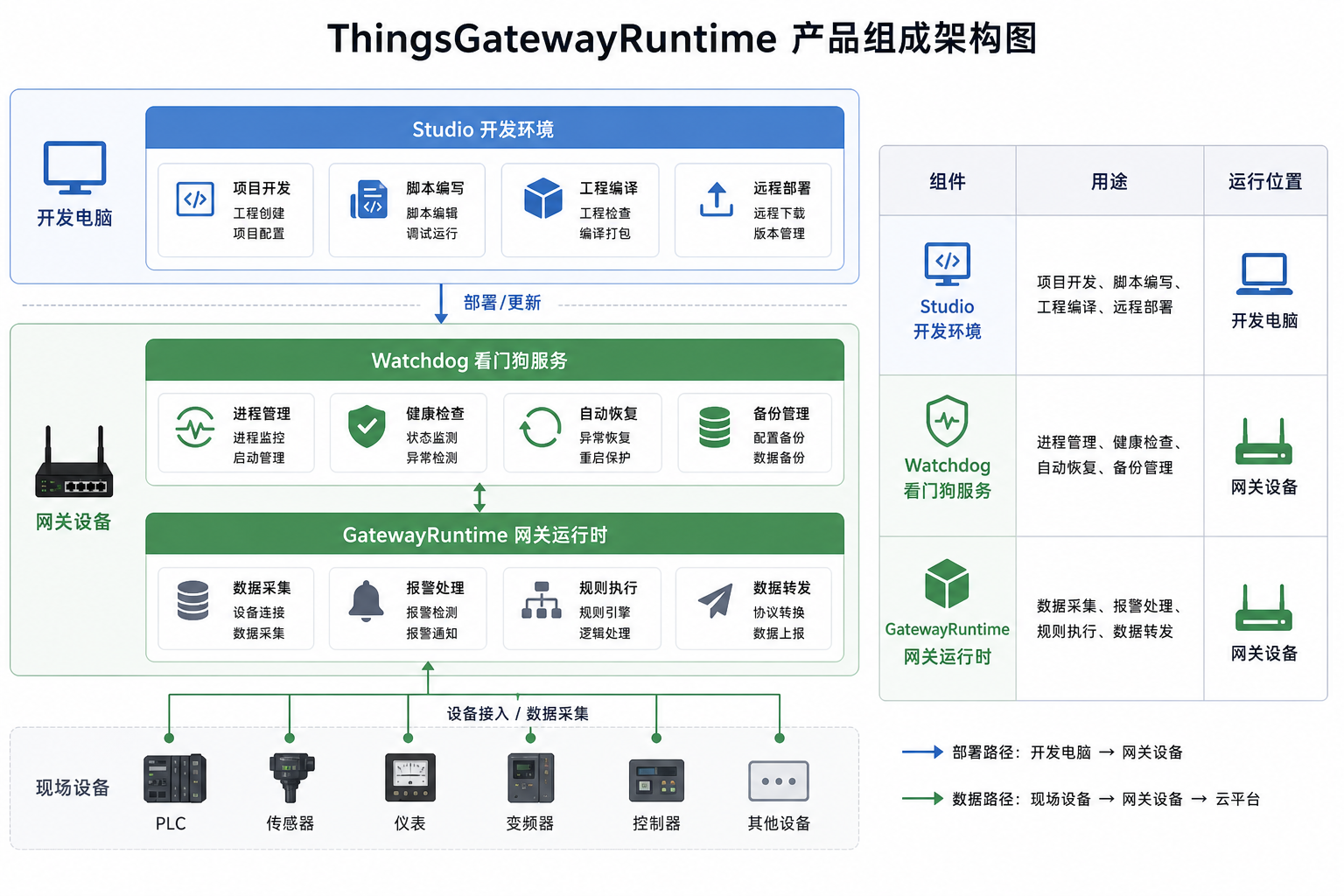
Product responsibilities
| Product | Responsibilities |
|---|---|
| Studio | Manage multiple sites and projects; maintain local projects, upload and retrieve them; remotely update gateway programs; provide script analysis, completion, signature help, and diagnostics. |
| Watchdog | Manage site project packages, apply the current project, start and supervise TGateway, retain logs and backups, restore projects, and execute remotely requested gateway program updates. |
| TGateway | Manage channels, devices, and variables; execute collection, transformations, rules, alarms, and forwarding; provide the Web interface for runtime configuration, script editing, and online debugging. |
Multiple sites and projects
Register factories, production lines, or equipment sites in Studio Site management, connecting to each site’s Watchdog. Check the current project, runtime state, backups, and update result separately for every site.
Projects maintains local projects for creation, import, export, validation, and deployment. Retrieve a site project to continue working locally. Each local project uses its own gateway process and data directory, with local and site ports managed separately.
A Watchdog stores multiple project packages and applies one as the current project. Before switching or restoring, verify the site and project names and distinguish the local copy, active site project, and backup.
- Site enrollment and multi-site management
- Project isolation, upload, and retrieval
- Site projects, application, and recovery
Script analysis and code completion
Maintain scripts in the TGateway Web editor. The editor connects to Studio language services for member completion, signature help, hover documentation, and diagnostics. Studio analyzes code and assists editing; the target TGateway performs formal compilation, loading, and execution.
The editor uses the official language service by default and can connect to a self-hosted Studio. Configure the language-service address separately from the runtime address. Changing the analysis service does not move script execution.
See Code completion, documentation, and diagnostics.
Remote deployment and updates
Check which maintenance task you intend to perform before submission:
| Task | Entry point and scope |
|---|---|
| Deploy project configuration | Upload from Studio Projects to the selected Watchdog. Leave the program-update option off for configuration-only deployment. |
| Remotely update gateway programs | Select one or more sites in Site management, verify the version, OS, and CPU architecture, then run a batch update. Running gateways restart; inspect each site’s result. |
Create a usable backup and arrange a maintenance window before deployment or updates. Afterwards, verify the current project and process in Watchdog, then check collection and forwarding in TGateway.
See Batch gateway program updates and Center and edge deployment.
Site data flow
Field device → channel and collection plugin → variable → transformations, rules, and alarms → forwarding target.
This path runs in TGateway. Studio and Watchdog manage projects and runtime processes. A working management connection still requires separate verification of the business data path.